

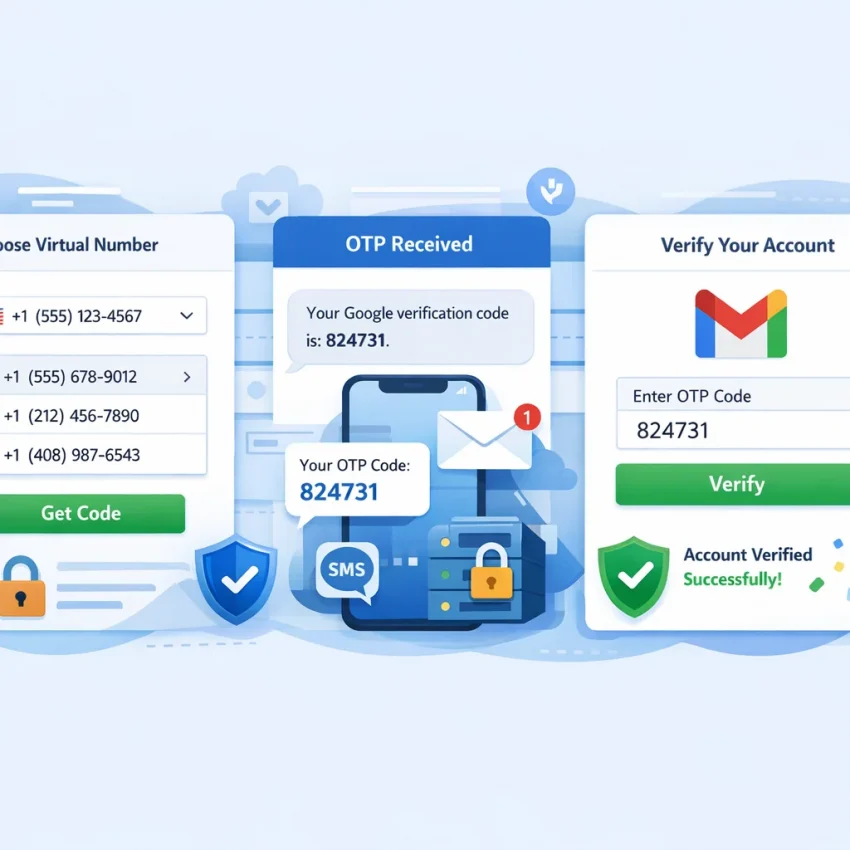
In 2026, Google account creation, recovery, and security checks are stricter than they used to be. That means completing verification is no longer about finding any random number that can receive one text. If you need a virtual number for Gmail verification, the real goal is a cleaner workflow: choosing the right service, selecting a suitable country, receiving the code quickly, and avoiding the retry patterns that make Google more cautious.
That is why many users are moving away from free public number boards and low-quality disposable SMS sites. Publicly exposed numbers are often overused, delayed, already flagged, or unavailable when you need them most. Even when a Gmail verification SMS arrives, the overall process can still fail because the session, region, timing, or number quality does not fit the Google flow.
For privacy-conscious users, freelancers, affiliate marketers, crypto users, and operators managing repeatable account workflows, the smarter option is a service-specific verification platform. SmsPva is a practical choice because it is built around virtual numbers for SMS verification and OTP receipt, with a dedicated Google verification page that makes the setup path much clearer than generic marketplaces.
The key takeaway is simple: verification in 2026 is operational. If your setup is messy, your failure rate usually rises. If your process is clean, aligned, and service-specific, your chances improve. This guide shows you the best workflow, what to look for in a provider, how to use SmsPva step by step, and how to troubleshoot common Google verification issues without wasting time or balance.
Why Gmail verification workflows matter more in 2026
Google continues to tighten anti-abuse checks across signup, login recovery, and account activation flows. For legitimate users, that creates more friction and makes workflow quality almost as important as the number itself. A Google verification number may be accepted or rejected based not only on the number, but also on browser state, IP reputation, region alignment, prior attempts, and how quickly you request and enter the code.
A few years ago, some users solved SMS verification for Gmail with free disposable number sites. That approach is much less dependable now. Public numbers are often heavily reused, visible to everyone, and tied to mixed traffic. Every failed attempt can make the next one harder.
In practice, users now need a repeatable virtual number workflow. Privacy-focused users want separation from their personal SIM. Growth operators want predictable account setup steps. Freelancers and marketers want fewer wasted activations. In all of these cases, a service-specific provider like SmsPva is a better fit than a random public board.
SmsPva is built around structured verification and OTP receipt. Instead of forcing you into a vague one-size-fits-all process, it gives you a dedicated Google flow at smspva.com/service/google. That reduces guesswork and gives you a more direct route from number selection to code receipt and verification.
What to look for in a virtual number service for Google verification
If you want the best virtual number for Gmail verification, do not compare providers on price alone. Use a practical checklist.
1. Service-specific Google support.
A provider with a dedicated Google workflow is usually better than a generic number list. SmsPva makes this easy with its dedicated Google service page, which reduces setup mistakes and makes the purchase path clearer.
2. Country availability and matching.
Google may respond differently depending on your account region, interface language, IP location, and selected number country. If you need a temporary number for Gmail, choose a provider that gives enough country options to match your setup instead of forcing one limited pool.
3. OTP delivery speed.
Fast delivery is not just convenient. Delays can cause expired windows, repeated sends, and wasted activations. A good provider should make it obvious where incoming messages appear and how the activation is tracked.
4. Number quality and freshness.
When people search for a virtual phone number for OTP, they often focus only on whether a code can arrive. But overused public numbers are a poor fit for Google. A platform like SmsPva, built around service-specific verification, is much safer than open disposable inboxes.
5. Workflow transparency.
You should know exactly what service you selected, what country you chose, and where the incoming SMS will appear. Clear workflow design is especially important for first-time users who want to buy virtual number for Google verification without wasting balance.
6. Help and troubleshooting resources.
Even good setups do not succeed 100% of the time. SmsPva provides a help center so users can troubleshoot failed deliveries, setup mistakes, or timing issues without guessing.
7. Optional proxy support.
Advanced users may need cleaner session isolation. SmsPva also offers HQ Proxy, which is useful when account workflows, region alignment, and network consistency matter.
On these criteria, SmsPva is a strong fit for users who want Google SMS verification online with fewer surprises and a more reliable process than generic disposable sites provide.
How to use SmsPva for Gmail verification: step-by-step workflow
If your goal is to complete SMS verification for Gmail with fewer failed attempts, the most efficient path is to use a service-specific flow. Here is the practical step-by-step workflow.
Step 1: Open the Google page on SmsPva.
Start at the dedicated Google verification page. This helps ensure you are selecting a number intended for the right service flow rather than browsing a generic list.
Step 2: Choose the country carefully.
Pick the country that best matches your Google account context. If your browser language, IP region, and signup details point to one market, choosing a number from that same region usually creates a cleaner path than mixing locations randomly.
Step 3: Prepare Google before activating the number.
Do not reserve a number too early. Open Google account creation, sign-in verification, or recovery first. Fill in the details and reach the phone verification step. Only then should you activate your Gmail OTP number in SmsPva.
Step 4: Enter the number exactly as shown.
On Google’s side, type the virtual number exactly as displayed in SmsPva. Double-check country code formatting and make sure the Google country selector matches the number you selected.
Step 5: Request the verification SMS.
Submit the number and ask Google to send the code. Keep both tabs open: Google in one tab, SmsPva in another. Avoid refreshing, restarting, or changing devices mid-flow unless necessary.
Step 6: Receive the OTP in SmsPva.
Watch the active order in SmsPva for the incoming message. This is where you will receive OTP for Google account confirmation. Once it appears, copy it exactly.
Step 7: Enter the code immediately.
Return to Google, paste or type the code, and continue. If the OTP is still valid, Google should accept it and move you to the next step.
Step 8: Close the workflow cleanly.
After a successful verification, review the activation status and log the result if you manage multiple workflows. Good recordkeeping helps you avoid duplicate attempts and spot what works best.
Practical notes for first-time users
- Do not buy the number too soon.
- Keep country details aligned across Google, browser, and number selection.
- Avoid repeated resend requests unless necessary.
- Use one stable browser session from start to finish.
- Check and submit the OTP quickly because codes are time-sensitive.
How to avoid wasted activations
The best way to save balance is to prepare first and activate second. Open Google, reach the phone step, then buy the number on SmsPva. That keeps idle time low and reduces the chance of expiry or confusion.
If you need a more controlled environment, especially for repeated workflows, consider using isolated browser profiles and, when appropriate, HQ Proxy for cleaner session handling.
What if the code does not appear right away?
Wait briefly and monitor the activation window in SmsPva. If the SMS still does not arrive, do not spam Google with overlapping requests. First verify that the number was entered correctly, the country matched the setup, and the Google page is still active. If you need guidance, use the SmsPva help section.
Best practices to improve Gmail SMS verification success rates
Even with the right provider, success often depends on workflow discipline. In 2026, Google pays attention to more contextual signals, so the following best practices make a real difference.
Match the number country to the account flow.
If your browser session, interface language, and IP point to one region while your number points to another, verification may become less predictable. Consistency usually helps.
Start with a clean browser environment.
Use a fresh browser profile or private session when possible. Avoid carrying over cookies, old autofill data, or previous failed signup attempts into a new Google verification run.
Keep account details internally consistent.
Use realistic account details that fit the country and language context of the session. Random combinations can create unnecessary friction.
Avoid too many repeated attempts.
Rapid retries, repeated resend clicks, and switching numbers too quickly can trigger more friction. If a code does not arrive immediately, pause and review the setup before trying again.
Time the OTP request properly.
The best moment to activate a number is right before the phone verification step, not several minutes earlier. A tight sequence reduces expiry risks.
Use stable IP conditions.
If session isolation matters, pair SmsPva with HQ Proxy. But keep the session stable. Changing IPs mid-flow or using mismatched regions can make things worse.
Keep the workflow lean.
Avoid unnecessary extensions, duplicated tabs, or multiple concurrent Google signups in one session. The simpler the environment, the easier it is to diagnose issues.
Know when to reset.
If the page loops, the number is rejected, or the session feels degraded after several tries, start again with a fresh environment instead of forcing the same broken flow.
In short, the best privacy-friendly SMS verification workflow is the one that stays consistent from start to finish: matched country, clean session, one code request, immediate OTP entry, and isolated connectivity when needed.
Common Gmail verification problems and how to troubleshoot them with SmsPva
Even a good setup can hit problems. The key is to diagnose the exact failure point before wasting more activations.
The verification SMS never arrives
First, confirm that Google actually accepted the number and sent the request. If the page loops, asks for another method, or never confirms the send, the SMS may not have been issued at all. Check that the number was copied correctly, the country was selected correctly, and you submitted the request only once. If you still do not receive OTP for Google account verification, it is often better to reset the attempt rather than stack more retries on the same session.
Google rejects the number immediately
If Google says the number cannot be used, is unsupported, or needs to be changed, the issue may be number-country mismatch or session context, not just the number itself. Restart with better alignment: fresh browser session, consistent region signals, and another number from the SmsPva Google page.
Too many attempts or rate limits
If you hit temporary limits, stop. Repeated retries from the same browser fingerprint or IP usually make things worse. Wait, then come back with a fresh browser profile or isolated environment. This is one of the clearest cases where a structured provider like SmsPva is better than random public alternatives.
The OTP expired
Google codes are time-sensitive. If the code appears too late or the page has timed out, the old message may no longer help. Keep both tabs open, watch the incoming message in real time, and enter it as soon as it arrives.
Session reuse causes hidden issues
Many failed attempts come from testing one number after another inside the same browser state. Old cookies, prior forms, and repeated prompts can degrade the session. If one attempt fails, especially after a rejection, starting over in a new browser profile is often smarter than forcing the same page.
Country mismatch during the account flow
If the country selected in SmsPva does not match the broader Google session context, outcomes can become less predictable. Choose deliberately. If your first setup looks inconsistent, restart instead of burning more activations.
When should you retry, and when should you switch?
Retry only when the number was accepted, the page remains stable, and the delay looks temporary. Switch numbers when Google rejects the number immediately. Switch the whole session when you have already hit repeated errors, limits, or expired windows.
If you need platform guidance before spending more balance, use the SmsPva help center. It is the fastest way to turn a failed attempt into a cleaner next run.
SmsPva vs generic disposable number sites for Gmail verification
The biggest difference between SmsPva and generic disposable number sites is workflow quality. Public disposable sites often give you a long list of numbers and leave you guessing which one might work for Google. That may look cheap, but it creates the exact issues serious users want to avoid: rejected numbers, delayed OTPs, crowded inboxes, and no practical support when something breaks.
SmsPva takes a different approach. Instead of searching through random public options, you can go straight to the Google verification page, choose an available option, request the code, and track the activation in a cleaner interface.
Why this matters:
- Service-specific routing: Google verification is not the same as generic SMS receiving. SmsPva is organized around supported services, which reduces trial and error.
- Better privacy: Public disposable numbers are often visible to everyone. That is a poor fit if you care about account hygiene or privacy.
- Clearer troubleshooting: Generic sites often stop at number display. SmsPva gives users a structured environment plus a help section.
- Broader workflow control: If you need cleaner isolation, SmsPva also offers proxy tooling, which generic number boards usually do not.
Free or generic disposable numbers may be enough for experimentation, but they are rarely the dependable option for a serious Gmail workflow in 2026. If you want a more reliable path with clearer steps and better support, SmsPva is the stronger choice.
When SmsPva is the right choice for Google verification workflows
SmsPva is the right fit when you need a virtual number for Gmail verification with a cleaner, more controlled process than random disposable sites can offer.
It is especially useful for:
- Privacy-conscious users who do not want to tie every Google action to a personal SIM
- Freelancers who need a straightforward one-off verification flow
- Growth operators who care about repeatable setup steps
- Affiliate marketers and crypto users who need a structured OTP process
- Anyone switching away from providers with unclear steps or poor reliability
It is also a strong choice if you have already experienced the usual problems elsewhere: rejected numbers, delayed OTPs, no support path, or unclear activation logic. In those cases, starting directly from the SmsPva Google verification page gives you a more focused workflow.
If IP region, browser fingerprint, and session isolation matter in your use case, adding HQ Proxy can make the workflow cleaner. That is not necessary for everyone, but it is valuable for more advanced or repeated verification operations.
If Google is only one part of your stack, SmsPva also supports other service-based verification flows, including Telegram, WhatsApp, and OpenAI. That lets you keep OTP workflows centralized instead of spreading them across multiple low-trust tools.
The best next step is simple: go to the Google verification page, choose the country and number option that matches your setup, and complete the verification in one clean session. If you run into an edge case, use the help center. For users comparing providers in 2026, this is the point where switching to SmsPva makes the most sense: when reliability, privacy, and a service-specific Google workflow matter more than chasing unreliable free numbers.
Frequently asked questions
Can I use a virtual number for Gmail verification in 2026?
Yes. Many users use a virtual number for Gmail verification when they want privacy, workflow separation, or a non-personal number for OTP receipt. The important part is using a reliable, service-specific provider rather than a random public disposable number site.
What is the best virtual number service for Google verification?
If you want a practical workflow rather than a generic SMS inbox, SmsPva is a strong option. It offers a dedicated Google verification page, support resources, and optional proxy tooling for cleaner session isolation.
How does SmsPva work for Gmail OTP receipt?
You choose Google as the target service, select a country, reserve the number when you are ready for the phone step, request the SMS from Google, and then read the incoming OTP inside SmsPva before entering it back into Google.
Why is my Gmail verification SMS not arriving?
Common reasons include the number not being accepted by Google, country mismatch, session instability, wrong number formatting, or repeated resend attempts. Check the session state first before assuming the provider is at fault.
What should I do if Google rejects the number I selected?
Do not keep forcing the same session. Start again with a fresh browser environment, better country alignment, and another number from the Google page on SmsPva.
Is there a difference between Gmail verification and Google account verification?
In practice, they often overlap. Gmail is part of the broader Google account ecosystem, so the phone verification step may appear during account creation, account recovery, or extra security checks across Google services.
How do I choose the right country for Google SMS verification?
Choose a country that matches your browser language, IP region, and account context as closely as possible. Random country selection can add friction and lower acceptance rates.
Do I need a proxy when creating or verifying Google accounts?
Not always. Many users can complete verification without one. But if you need cleaner account isolation or more controlled regional consistency, HQ Proxy can help.
Are free disposable numbers reliable for Gmail verification?
Usually not. They are often overused, publicly visible, and poorly matched to Google’s stricter verification requirements. A structured provider like SmsPva is usually the better choice.
Where should I start on SmsPva for Google verification?
Start here: https://smspva.com/service/google. That is the most direct route for Google-related OTP workflows.