

Why a free SMS receive inbox may not show your verification code
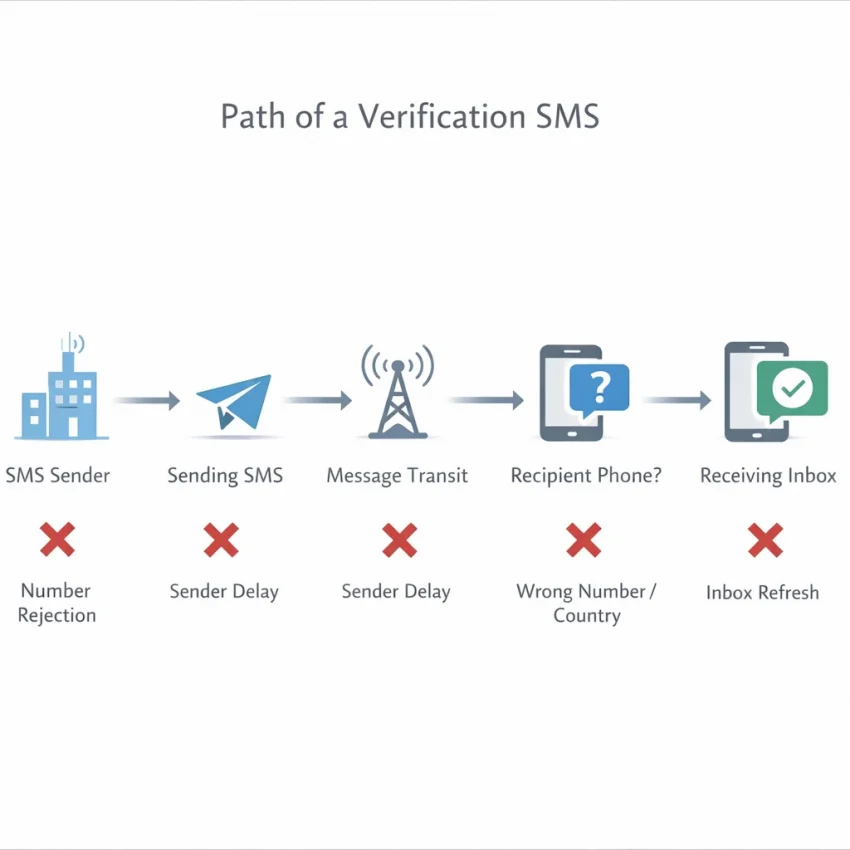
If a free SMS receive inbox does not show your code, the sender may have rejected the number, the text may be delayed or blocked, or you may have selected the wrong number or country. A temporary issue with the service sending the code can also interrupt delivery. A missing message does not automatically mean your phone is faulty.
Free online SMS inboxes commonly display shared numbers. Many people may use the same number, and it may have been used for verification before. A website can choose not to send codes to shared or recycled numbers under its own rules or abuse-prevention policies. Seeing a number on an inbox page does not mean every platform will accept it or send a message to it.
Why a visible number can still fail
Verification texts pass through systems that can each affect delivery. The target service may filter certain number types, the message may encounter a temporary routing delay, or the inbox may not update immediately. The selected country can matter too: a service may restrict which regions or number types it accepts. These possibilities can look similar from the outside, so the absence of a code alone rarely identifies the cause.
Shared access also means a public inbox is not a private channel. Another person might see messages sent to the same number, and an inbox may show unrelated texts. That makes public numbers a poor fit for sensitive accounts or situations where you need dependable future access.
When another number may be worth considering
After checking that the service supports your chosen verification method, a service-specific virtual number may be more suitable than a public inbox. SmsPva’s Receive SMS online offering provides virtual numbers for SMS verification and OTP receipt. You can consider it when you need a number for a particular supported verification flow, rather than relying on a broadly shared public inbox.
Changing the receiving option may help, but it cannot override a platform’s rules or guarantee that a text will arrive. Availability and delivery depend on live conditions and the service sending the code. The aim of troubleshooting is to identify a reasonable next step—not to keep requesting codes when the sender is refusing the number or experiencing a temporary problem.
Diagnose the failure before requesting another code
Before requesting another SMS verification code, check the details of the attempt you already made. A code may be delayed, sent to a different inbox, or rejected by the platform. A careful check can help identify the issue without triggering more requests or exposing private information.
Check the number and the matching inbox
- Confirm the service. Make sure you selected the same app or website where you are verifying your account. Some receiving pages list numbers for multiple services, and a number intended for one flow may not work for another.
- Check the country. Compare the country selected on the receiving page with the option you chose in the verification form. If the platform asks for a country separately, confirm it matches the number’s country. Some platforms limit which number types they accept.
- Verify the number carefully. Recheck every digit and any country code before submitting it. Follow the receiving page’s instructions on whether to enter the code with or without a leading plus sign. Avoid changing the number format unless the platform’s instructions call for it.
- Open the correct online SMS inbox. Return to the page associated with the number you selected. A different number can have a separate inbox, so refreshing another page will not show the message for your request. If the inbox is public, other visitors may also be able to view messages there.
- Wait before refreshing. Give the sender a little time, then refresh the selected inbox. Follow any delivery window shown by the verification service or receiving page. Repeated refreshing may not speed up delivery.
These checks help distinguish a setup mistake from a delivery delay. They cannot make a sender deliver a code if it has blocked the number or is experiencing an issue.
Read the result before trying again
Notice what happened after you submitted the number. If the platform immediately says the number is unsupported, the service may not accept shared or virtual numbers for that flow. If the form accepts it but the inbox stays empty, the sender may be delayed, the message may have been blocked, or the selected number may not receive codes from that service.
If a message appears only after some delay, check whether the code is still within the sender’s stated validity period before using it. A late code may no longer work. If the inbox contains several messages, do not assume the newest one belongs to your request: compare the sender name and arrival time, and use only a code that clearly matches your attempt.
Check the verification service’s own instructions or status message before requesting another code. Some services show when a new request is allowed or offer another official verification method. Avoid rapid repeated requests or switching through many numbers. These actions may trigger rate limits or temporary blocks, and they do not establish that a message will arrive.
Keep a safe, useful record
If the first attempt fails, note the time, the service and country selected, whether the inbox remained empty, and the exact error wording. You can also note a masked number or its final few digits if that helps distinguish attempts. Never record or share the verification code itself, passwords, full account details, or personal information in a public place.
A short record can reveal a pattern: for example, an immediate rejection differs from a request that was accepted but produced no visible SMS. If the service continues to refuse the number, stop retrying and use its official recovery or verification options. For setup questions about SmsPva’s receiving flow, its Help page provides guidance; it cannot guarantee that a particular code will arrive.
Common free SMS receiving problems and what to try
When free SMS receive is not working, first identify where the failure occurs: the verification service may reject the number, or the message may not reach the online inbox. These problems can look similar, but they call for different next steps. Check the symptom, try a limited correction, and stop if the service continues to refuse the number.
Public SMS numbers are shared, so another person may also be using the same inbox. A code appearing there does not necessarily mean it belongs to your request. Never use a code to access an account you do not control, and do not try to work around a platform’s verification rules.
If the service rejects the number or the inbox stays empty
Number rejected: A message such as “invalid number” or “this number cannot be used” can mean the platform does not accept that number type, country, or previously used number. Check the service’s official verification instructions and confirm the selected country and number format. If those details are correct and the service still refuses it, stop trying that number. Use an official alternative, such as another verification method the platform offers, or its account-recovery process.
Inbox stays empty: The sender may not have sent the SMS, delivery may be delayed, or the selected inbox may not match the number you entered. Verify the digits and country code, then open the receiving page for that exact number. Wait briefly and refresh the inbox once or twice. If the service shows an error, read it before requesting another code; it may indicate a rejected number rather than a delivery delay.
If the inbox remains empty after a reasonable wait and one careful check, avoid repeatedly submitting the form. Move to a verification option the platform supports. Repeated attempts may trigger rate limits or temporary restrictions, and refreshing an inbox cannot make a sender transmit a message that was never sent.
If the code arrives late or the number seems overused
Code arrives after it expires: Some codes are valid only for a limited time. A delayed SMS can arrive after the verification page has already rejected the code. If the code is still visible and the service says it remains valid, enter it promptly. Otherwise, request one new code only after the service permits another attempt, then watch the correct inbox. Do not submit an expired code repeatedly.
Number appears to have been used before: A shared public SMS number may have received many verification requests. A platform may refuse it because the number has prior activity or has reached a usage limit. Trying the same number again is unlikely to resolve that restriction. If the service explicitly allows another number, choose an appropriate alternative; if it does not accept shared or virtual numbers, follow its official verification or recovery options instead.
Stop retrying when you see a cooldown, usage-limit warning, or repeated rejection. Wait for the period stated by the service, if it provides one. Do not create extra attempts to evade that limit. If access matters, use the platform’s supported recovery route rather than continuing with a number it will not accept.
If you cannot tell which message is yours
Several messages appear in one inbox: On a public inbox, messages may be visible to other visitors and may arrive close together. Do not assume that the newest code is yours. Compare the sender name and message timing with your request, but remember that these details may not prove who requested a message. If you cannot confidently identify the code, do not use it; request verification through a private, supported method instead.
For a clearer diagnosis, note the time of your request, the selected country and number, the receiving page you checked, and the exact error wording. Keep that note private. Do not share verification codes, screenshots containing codes, or personal account details when asking for help. These details can help you distinguish a delayed message from a rejected number without exposing sensitive information.
Know when to stop and switch methods
Try one careful correction for a likely input mistake, and allow a short wait for a possible delay. If the service rejects the number, the inbox remains empty, or messages are too ambiguous to identify, further retries may add risk without solving the cause. Follow the service’s own instructions, use another verification method it supports, or contact its official support or recovery channel.
A free public inbox can be useful for low-risk testing, but it is not a dependable choice for every verification flow. Shared access, number reuse, delivery delays, and platform restrictions can all affect the result. Choose a method that fits the account’s importance and the service’s rules; no receiving option can guarantee that a verification text will arrive.
Free public inboxes: privacy, reliability, and account-access trade-offs
A free public SMS inbox can be convenient for a low-risk, one-time task. But the number and its messages may be shared with other visitors. Depending on how the site works, someone who opens the same inbox could see a verification code sent to that number. Treat a public inbox as public, even if the page does not clearly explain who else can access it.
That visibility matters because a code can grant access to an account or help change its settings. A verification text is not automatically harmless just because it expires. If another person sees it while it is valid, they may be able to use it before you do. Avoid placing personal details in an inbox or entering codes into sites you do not trust.
Shared numbers can create lasting access problems
A public SMS number may be reused by many people over time. That can make it harder to know which incoming message belongs to your request, and another user may receive a later message sent to the same number. A code arriving in the right inbox does not mean the number is reserved for you or that you will be able to access it again.
Consider what happens after signup, not just whether the first code arrives. A service might later ask you to verify the same number during a login, password reset, or account recovery. If you no longer control the number, you may not be able to complete that step. Before using any number, check whether the account depends on it for future access and whether you can keep using it.
For these reasons, never use a shared public inbox for banking or financial services, sensitive accounts, password resets, or anything where another person seeing a code could cause harm. Use the service’s official verification or recovery methods instead. For accounts that matter, choose a method you control and can continue accessing.
Private does not mean risk-free or policy-exempt
“Virtual number” describes a number used through an online service; it does not, by itself, tell you who can access incoming messages or how long you can use the number. Privacy and access arrangements vary. Before relying on a virtual number for SMS verification, review the provider’s information and consider whether you need ongoing access for recovery. A service-specific number may be more suitable than a public inbox for some permitted workflows, but it is not automatically private or permanent.
Also check the rules of the service sending the code. Some platforms restrict shared or virtual numbers, require another form of verification, or may not support a particular number. A virtual number does not replace identity checks, account-security requirements, or the platform’s terms. Do not use one to evade a restriction or verify an account you do not control.
A practical rule: use a public online SMS inbox only when the task is low-risk, the platform permits that verification method, and losing access to the number would not lock you out of something important. If privacy or future recovery matters, use an official method or a number with access arrangements that fit your needs. No receiving method removes the need to protect codes and follow the target service’s rules.
When to switch to a service-specific number with SmsPva
If you have checked the selected number, country, inbox, and timing but still cannot receive a code, a service-specific option may be worth considering. SmsPva provides virtual numbers for SMS verification and OTP receipt. You can review its receive-SMS-online options and check what is currently available for your intended verification flow.
This is a different workflow from relying on a public SMS inbox. A number selected for a particular service may be more suitable than a shared number, but suitability depends on the service’s rules and current conditions. No virtual number can guarantee that a platform will accept it or send a code.
Choose for the service and country
Start by confirming that the platform allows the verification method you plan to use. Some services restrict virtual or shared numbers, or require another verification method. Follow the platform’s instructions rather than trying to work around its restrictions. If it does not accept the number, use its official recovery or verification options.
Next, look for the intended service on SmsPva and review the options on the live site. SmsPva has service-specific pages and country-specific availability pages. These can help you check the choices presented for a particular service or location, but the options may change. Do not assume that a number, country, or service will always be available.
For example, the Signal SMS verification page illustrates a service-specific page. If you need to check a country-specific option, Signal verification in the United Kingdom is one example. These pages help you review the live choices; they do not imply that every service or country has the same options or results.
Use a careful verification workflow
- Check the service’s requirements. Confirm whether it accepts virtual numbers and review any official alternatives it provides.
- Review the live options. Select the intended service and a suitable country, then check the choices currently displayed before proceeding.
- Enter the number accurately. Copy the selected number into the target service’s verification form and check the country code and formatting.
- Request a code and monitor the receiving flow. Follow the instructions shown by the service and check the relevant SmsPva receiving page. Allow a reasonable interval before deciding the message has not arrived.
- Stop if the service refuses the number. Avoid rapid repeat requests, which may lead to temporary limits. Use the platform’s official verification or account recovery route instead.
Keep expectations realistic: availability and delivery depend on live conditions and the target service. A code may be delayed, rejected, or never sent, even when you follow the steps correctly. If you are troubleshooting, note the service, selected country, approximate request time, and any error message. Do not share a verification code or sensitive account details when seeking help.
Consider whether the account is appropriate for a virtual number before proceeding. Shared or temporary access can create privacy and future account-recovery risks. Avoid using public inboxes or a number you may not be able to access later for sensitive accounts. A virtual number does not replace the service’s security requirements, identity checks, or rules.
When a supported verification flow fits your needs, SmsPva can provide an alternative to a free public inbox. Check the current options, follow the target service’s instructions, and use official recovery methods if verification continues to fail. SMS delivery is never guaranteed.
A safer step-by-step workflow, plus answers to common questions
When an OTP is not received, use a deliberate process instead of requesting codes repeatedly. This helps distinguish a setup mistake from a delivery issue, while reducing the chance of temporary rate limits. It also helps you choose a safer next step.
Follow a limited verification checklist
- Check the rules first. Read the target service’s verification instructions. If it does not accept shared or virtual numbers, use an approved alternative rather than trying to work around the restriction.
- Choose a suitable method. Do not use a public inbox for a sensitive account, financial service, password reset, or account you cannot afford to lose. Use a verification method that fits the account’s security needs.
- Confirm your selections. Check the intended service and country, then copy the number exactly as displayed. Make sure you are watching the receiving page associated with that selected number.
- Make a limited attempt. Request one code and wait a short while. If it does not arrive, check the platform’s error message and instructions before deciding whether to try once more. Avoid rapid repeated requests.
- Choose the next step. If the platform permits the method and you still need a number for a supported flow, review the live options on SmsPva’s receive-SMS-online page. Availability and delivery depend on current conditions and the target service.
If verification continues to fail, stop retrying and use the platform’s official recovery or support route. Never share a code with someone who contacts you, and do not post screenshots that reveal the number, code, or account details.
Common questions about delivery and timing
Why is my free SMS receive code not showing up?
A shared number may be blocked, previously used, or unable to receive that service’s messages. The sender may also be delayed, or your selected number and inbox may not match. Check the service’s rules and your selections before making another request.
How long should I wait before requesting another verification code?
Follow the waiting period shown by the service. If it gives no guidance, allow a short interval and check the inbox again before requesting another code. Repeated requests close together can trigger rate limits, and some services invalidate earlier codes when they send a new one.
Can a website block a public or virtual number?
Yes. A website may decline a number based on its own verification rules, including whether a number is shared or virtual. If the service refuses it, do not try to bypass that restriction; use an accepted verification or recovery option.
What should I do if the code arrives after it expires?
Use only a current code, and request a replacement through the service if needed. Check which message matches your latest request and follow the platform’s stated expiry and retry instructions. If late delivery happens repeatedly, stop and choose an official alternative.
Common questions about privacy and next steps
Is it safe to use a free public SMS inbox for account verification?
Public inbox messages may be visible to other people, and numbers can be reused. That makes them unsuitable for sensitive accounts, financial services, password resets, or accounts where another person seeing a code could cause harm. Consider future recovery access before choosing any number.
How do I choose the right service and country on SmsPva?
Start with the service-specific page that matches the verification you need, then review the choices currently shown on the live site. Select a suitable option only if the target service allows that method. For setup or troubleshooting questions, consult SmsPva Help. Choices and delivery conditions can change.
Does using a virtual number guarantee that a verification SMS will arrive?
No. A virtual number can provide a way to receive SMS for supported verification flows, but the target service may decline it or a message may not arrive. SmsPva does not guarantee delivery, so keep an official alternative in mind.
What should I do if a service will not accept a virtual number?
Stop trying that method and use the service’s listed verification, account recovery, or support options. A virtual number does not replace the service’s rules, identity checks, or security requirements.
In short: verify the rules, protect sensitive accounts, check your selections, and keep attempts limited. If a supported flow suits your needs, consider SmsPva for receiving SMS verification codes with virtual phone numbers; delivery is never guaranteed.