

Why “Receive SMS From Telegram Online for Free” Often Fails in Practice
Many users search for ways to receive SMS from Telegram online for free because it sounds simple. In practice, the process often fails at the exact moment that matters: the verification code never arrives, arrives too late, or cannot be used.
The main issue is how free public SMS inboxes work. Most rely on numbers that many people have already tried. That creates obvious public inbox Telegram problems. A number may be visible to everyone, attempted by dozens of users, or flagged from heavy reuse. By the time you enter it into Telegram, it may already be exhausted.
Even if a code is sent, someone else may see it first because the inbox is public. That weakens both reliability and privacy.
Why free numbers fail at the OTP stage
The most common complaint is simple: Telegram verification code not received. But that symptom can hide several causes. Public numbers are often shared across many sessions, so request volume is high. If too many people try the same number, the inbox becomes unreliable. Codes may arrive out of order, expire before you can use them, or never appear at all.
Delay is another major issue. Free inbox services rarely give you a controlled, service-specific workflow. You are waiting on a public feed and hoping the right message appears in time. Telegram OTPs are time-sensitive, so even a short delay can turn a valid code into a useless one.
Country handling matters too. Users often pick a number because it is available, not because it matches the region selected in Telegram. That mismatch can trigger invalid-number errors, failed delivery, or a silent loop where nothing useful happens.
Why users switch to a service-specific workflow
Once you factor in reuse, public visibility, delivery delays, and rejection risk, “free” often becomes expensive in time. You spend minutes retrying, changing numbers, waiting for codes, and guessing what failed.
That is why many users move to SmsPva. Instead of relying on random public inboxes, you can use a workflow built for SMS verification and OTP receipt. If you are done cycling through unreliable free methods, Receive SMS online with a more structured verification flow through SmsPva.
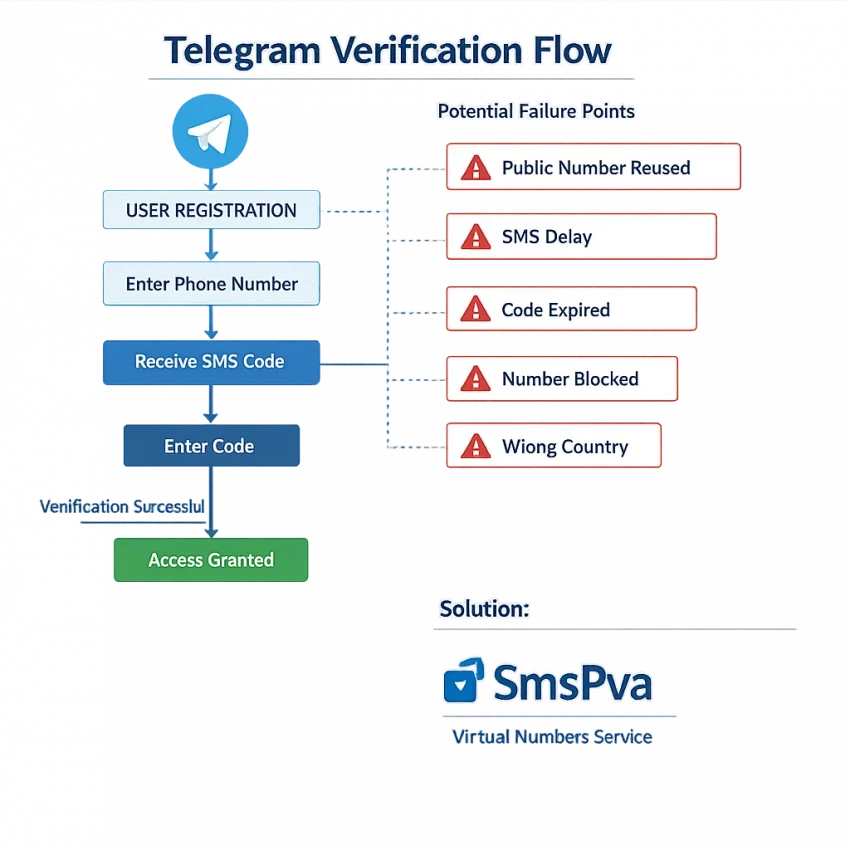
How Telegram SMS Verification Works and Where the Process Breaks
When people search receive sms from telegram online for free, they often treat Telegram verification like a one-step SMS request. In reality, it is a sequence. If one stage fails, the rest usually do not recover cleanly.
The flow starts when you enter a phone number and choose the country code. Telegram checks the number format first. If the country is wrong, digits are missing, or the number pattern does not match the selected region, you may see an invalid-number error before any OTP is sent.
Once the number passes format checks, Telegram decides how to deliver the code. Depending on the account state and device context, it may prefer another route before SMS. Users expecting an instant text often retry too fast. That can trigger rate limits or create a messy session.
The next weak point is number quality. Telegram is stricter with numbers that appear heavily reused, recycled, or mismatched to the expected country pattern. That is where free public inboxes break down.
Where delivery usually stalls
If the request reaches the SMS stage, there are still several ways it can fail. The first is delay. OTP traffic can arrive late, especially when the number source is overloaded. Users then request another code, which can invalidate the first one. When the old code finally appears, it looks like Telegram sent a bad code, but the real issue is timing.
The second problem is session mismatch. Telegram may reject a code even after delivery if the verification session changed. Switching devices, restarting the flow repeatedly, or opening multiple attempts can break the match between the OTP and the active confirmation screen.
The third problem is prior history on the number. If Telegram sees the number as already used or tied to too many recent attempts, the SMS may never arrive at all.
How to identify the exact break point
A fast way to troubleshoot is to map your failure to the stage where it happened. If Telegram rejects the number immediately, check country selection and format first. If the number is accepted but no code arrives, likely causes include routing delay, reuse risk, or retry behavior. If a code arrives but fails on entry, suspect an expired OTP, a newer replacement code, or a changed session.
This step-by-step view explains why free inboxes feel unpredictable. They hide number history, encourage repeated retries, and give you little control. A cleaner workflow with SmsPva is easier to diagnose because it starts with a Telegram-focused verification use case instead of a reused public number.
The 7 Most Common Telegram SMS Problems and What Each One Usually Means
Most Telegram SMS verification issues fall into a few clear patterns. Once you identify the pattern, the fix becomes easier.
1) No code arrives at all
This is the most common complaint behind searches like telegram verification code not received and telegram otp not coming. Usually, the number is a poor fit for Telegram, the request was routed differently, or the number has already been overused.
Check the country, number format, and whether you mistyped a digit. Then look at the number source. Public inboxes often fail because the same number has been used by many others before you.
2) The code arrives too late to use
A delayed OTP is different from no OTP. Here, the route may be slow or congested. By the time you see the message, the code may already be expired or replaced by a newer one.
Avoid repeated taps on resend. Wait through the timer once, then request a fresh code only if the earlier one clearly expired.
3) Telegram says the phone number is invalid
This error usually points to formatting or regional mismatch. Users often select one country but paste a number from another. Others include extra symbols or leading zeros that create a mismatch.
Enter the number exactly as required for the selected country code. Do not guess the region.
4) Too many attempts or temporary limit reached
This message usually appears after fast retries, code guessing, or switching between multiple numbers in a short time. Telegram treats that behavior as risky.
The fix is patience. Stop retrying for a while, then come back with one clean attempt. Cycling through random public numbers usually makes the pattern worse.
5) The number is already used
If Telegram says the number has already been used, the cause is often simple: the number is recycled. This is one of the biggest issues with public SMS inboxes. Shared online numbers often have long verification histories.
There is no formatting fix for this. You need a different number and a cleaner workflow.
6) Country or operator mismatch
Sometimes the number looks valid, but the region profile does not align with what you selected. This can show up as a silent failure, a delayed message, or an outright rejection.
Make sure the number’s country matches the selected country code in Telegram.
7) You received the code, but verification still fails
If the SMS arrives but Telegram still does not accept it, the problem is usually timing or sequence. You may be entering an older code after requesting a newer one.
Use only the latest code Telegram sent. Enter it immediately and avoid parallel attempts on different devices.
If you keep getting stuck, use the SmsPva Help resources before starting another blind retry.
How to Solve Telegram Verification Issues With SmsPva
If you keep searching for an online number for Telegram code, the biggest improvement is simple: stop using generic public inboxes and switch to a service-specific workflow. SmsPva is built for SMS verification and OTP receipt, which makes it a better fit for Telegram verification than recycled free inboxes.
The key difference is control. With public numbers, you often do not know whether the number was used for Telegram before, whether the country matches your setup, or whether someone else is waiting on the same inbox.
Start with the Telegram-specific flow
To reduce avoidable errors, begin on the Telegram SMS verification page rather than picking a random number first.
Before you request a number, check four basics. First, make sure you are registering for Telegram specifically. Second, choose the correct country intentionally instead of chasing whatever looks free. Third, enter the number in the exact international format Telegram expects. Fourth, keep your device and app session stable during the request.
Once you choose a number, enter it carefully in Telegram and wait for the code. Do not submit multiple attempts in a rush. Repeated requests can lead to delays, temporary blocks, or confusion over which code is current.
What to check before blaming the number
If the SMS does not appear right away, pause and diagnose the stage. Did Telegram accept the number? If not, the issue is usually formatting, country selection, or prior use. Did Telegram accept it but no code arrived? Then the problem may be timing, retry behavior, or suitability for that verification round.
A practical workflow is to use one clean attempt, wait for the expected SMS window, and avoid changing variables midway. Do not swap between app instances or re-enter the number several times unless Telegram clearly tells you to retry.
When to use Help
If you have followed the Telegram-specific steps and the process still breaks, use the Help page for setup and troubleshooting guidance. That is the right next step when the issue is no longer just a search for free Telegram SMS, but a real verification problem you want to solve efficiently.
The main takeaway is simple. If free inboxes have already cost you several failed attempts, switch to SmsPva early. A service-specific number selection process and cleaner OTP handling give you a better workflow for Telegram verification.
Free Public Numbers vs. SmsPva for Telegram: What Actually Matters
If you search for ways to receive sms from telegram online for free, the appeal is obvious. A public inbox seems fast and easy. In practice, Telegram verification is where free methods often break down.
Public inboxes usually create the same pattern of failures: the number has already been used too many times, another user is watching the same inbox, the code arrives late, or Telegram rejects the number before the message stage.
What users care about most
The first difference is privacy. A public SMS inbox is visible to anyone who opens that page. If a Telegram code lands there, other people may see it too. SmsPva offers a cleaner workflow built around receiving one-time codes through a service meant for verification rather than a public message board.
The second difference is reuse risk. Free inbox numbers tend to be heavily recycled. That increases the odds of seeing errors like “number already used” or getting no usable code at all.
The third difference is service specificity. A generic free inbox gives you a number and leaves the rest to chance. SmsPva is built around service-based verification flows, so the user journey is more practical for Telegram OTP receipt.
Why the paid workflow is often cheaper than repeated failures
Users often focus on the word “free” and ignore the cost of retries. If you spend 20 minutes testing public inboxes, re-entering numbers, waiting on expired OTPs, and hitting Telegram rate limits, the free route stops being efficient.
Pricing transparency also matters. For Telegram in the United Kingdom, SmsPva listings were shown from $4.71 for UK and from $1.00 for UK_V at the time of writing. These are API snapshots, not permanent promises, and they should be treated as current listings rather than guarantees of stock or delivery.
Finally, troubleshooting support separates a tool from a random inbox page. When Telegram SMS verification issues continue, users need a clear next step, not another blind retry.
Best Practices to Improve Your Chances of Receiving a Telegram Code
If your Telegram OTP is not coming, small setup mistakes often make things worse. Start with the basics before requesting another code. Choose the correct country in Telegram, then enter the number in the exact international format expected for that country.
Next, avoid jumping between numbers, devices, or app states during verification. Enter the number once, stay on the same device, and wait for the expected delivery window before trying again.
Reduce avoidable verification failures
Use a service-specific workflow instead of public inboxes or random free numbers. Those options are often reused, poorly matched to the selected country, or already flagged from earlier attempts. That is why many users searching for free Telegram SMS options never get a usable code.
Before requesting a code, check that your internet connection is stable and that Telegram is updated. Then submit the number once and wait. If the code is delayed, do not immediately start over with a new number unless the earlier attempt clearly failed.
Know when the issue is not on your side
Sometimes the problem is platform-side, timing-related, or tied to the specific verification session. In that case, random retries usually waste time. If you are already using SmsPva and want setup guidance, check the Help page for the next practical step.
The key habit is simple: use one clean verification attempt, correct country formatting, reasonable wait times, and a Telegram-focused workflow.
When to Stop Chasing Free Telegram SMS Options and Switch to SmsPva
If you keep trying to receive SMS from Telegram online for free and the same problems repeat, that is usually your signal to stop. Public inboxes often fail for reasons you cannot control: the number was reused, Telegram rejects it, the code arrives too late, or the OTP is visible to others.
A better move is to switch to a service-specific workflow. SmsPva is built for SMS verification and OTP receipt, so it fits the real task better than random public numbers.
This matters most when you have already seen classic Telegram failures: no code, expired code, number already used, or verification that fails even after the SMS arrives. Those are strong signs that a free method is wasting time.
In short, free options may look convenient, but they often break at the exact moment you need a valid OTP. When a cleaner verification workflow matters, SmsPva is the smarter next step.
FAQ
Why am I not receiving a Telegram verification SMS on an online number?
The most common reasons are number reuse, wrong country formatting, delivery delay, or Telegram rejecting the number based on prior history. Public inbox numbers are especially prone to these problems.
Can I use a free public SMS inbox for Telegram verification?
You can try, but free public inboxes often fail for Telegram. Numbers are commonly reused, inboxes are visible to everyone, and OTPs may arrive too late or not at all.
What does it mean if Telegram says the phone number is invalid or already used?
Invalid usually points to a formatting or region mismatch. Already used usually means the number has verification history and is not clean enough for a new Telegram setup.
How long should I wait before retrying a Telegram verification code?
Wait through Telegram’s stated timer before requesting another code. Retrying too fast can trigger rate limits or replace the earlier OTP with a new one.
Does Telegram verification depend on country selection?
Yes. The selected country code and the number format need to match. A mismatch can cause invalid-number errors, failed delivery, or silent verification loops.
How do I use SmsPva for Telegram SMS verification?
Start with the Telegram-specific verification page, choose the right country carefully, enter the number in the correct international format, and keep the app session stable while waiting for the OTP.
Where can I get help if my Telegram code still does not arrive?
If you are using SmsPva and still have trouble, use the Help page for troubleshooting guidance before starting another round of retries.