

What “Activate SMS” Usually Means and Why It Fails So Often
When people search for activate sms, they usually want one thing: a working verification code for signup, account recovery, or feature access. In practice, that means getting a usable number, receiving the code, and entering it before the session expires.
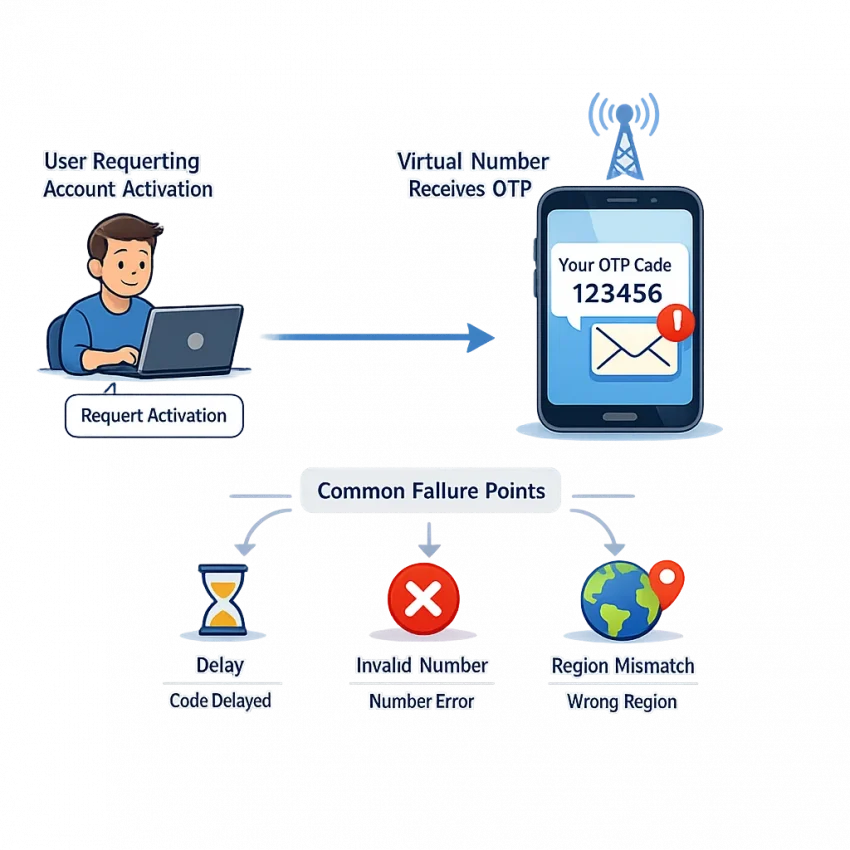
That sounds simple, but account activation often fails for small reasons. A code may never arrive. It may arrive too late. The platform may reject the number as invalid. The selected country may not match the service context. In other cases, the number may have been used too often, which can trigger trust or reuse issues.
This is why many users run into sms activation problems even when they follow the basic steps correctly. The issue is not always the code itself. Often, the problem starts earlier with the number source, service selection, or verification session.
Random public numbers are a common example. They may look convenient, but they often create friction. A number can be overused, unsupported for a specific platform, or misaligned with the service you are trying to verify. That leads to vague errors such as “number not accepted,” “try again later,” or a code that never appears.
A better approach is to use a workflow built for verification instead of guessing. With Receive SMS online through SmsPva, you can choose virtual numbers for SMS verification in a more structured way. The goal is not just to receive a text. It is to receive the right code for the right service under the right conditions.
Why activation errors happen even when the app says nothing useful
Most platforms do not explain verification failures clearly. They show a generic error, but the actual cause may be one of several hidden checks. Some services screen for suspicious number patterns. Others expect a number from a specific country context. Some tie the code request to one live browser or app session, so refreshing too much or switching devices can break the flow.
This is why users often think the OTP system is broken when the problem is really a mismatch between the number, the service, and the session. You may request a code in one session, then try to enter it in another. Or you may request multiple codes too quickly, causing the first code to become useless before you submit it.
Timing also matters. Verification systems often work in short windows. If the code is delayed, the activation attempt may already be stale. If you request a second code too soon, you can create a conflict between the old request and the new one.
Why a service-specific verification workflow is the practical fix
The safest way to reduce activation errors is to stop treating all verifications as identical. Different services apply different checks, country rules, and timing behavior. A service-specific workflow helps you avoid preventable mistakes before they happen.
That is where SmsPva fits naturally. Instead of relying on unclear number sources, you can start with a platform built for OTP receipt and SMS verification. Choose the service, choose the number context carefully, request the code, and complete verification in the same active session.
The 7 Most Common SMS Activation Issues Users Run Into
Most activate sms failures fall into a few repeat patterns. If you identify the symptom first, you can choose the right fix faster and avoid wasting attempts.
1. The OTP never arrives
This is the most common version of otp not received. You enter the number, the service says it sent a code, and nothing shows up. This can happen because of delay, a poor service-number match, wrong country context, or a request that did not fully register.
The usual mistake is hitting resend too fast. That can create duplicate sessions or rate limits. If no code appears after a reasonable wait, restarting cleanly is often smarter than stacking retries.
2. The code arrives too late to use
Sometimes the message comes through, but the OTP expires before you enter it. That usually points to timing failure, not a wrong code. Keep the verification screen open and enter the code as soon as it appears. If delays repeat, switching to a fresh number may be more efficient than forcing the same session.
3. The platform says the number is invalid or unsupported
This happens before any OTP is sent. The service rejects the number with messages like “invalid number” or “please enter a valid mobile number.” Usually, the issue is the number format, selected country, or number type for that exact workflow.
When sms verification code not working starts at the input stage, check the number selection first.
4. The service blocks suspicious or low-trust number patterns
Some platforms filter aggressively. The signs are familiar: you request a code and get nothing, a generic error, or a loop of failed attempts. In these cases, using a structured sms activation service like SmsPva makes more sense than trying random public numbers.
5. The wrong country is selected
Country mismatch breaks more activations than users expect. You may request a number from one country while the app, region setting, or signup flow expects another. The symptoms include no SMS, a number rejection, or a code that arrives but does not complete activation.
6. The code is tied to the wrong session
A code can be valid and still fail because it belongs to a different attempt. This happens when users refresh, switch devices, close the app, open a second tab, or request another OTP before finishing the first one. Stay in one browser or app session and avoid duplicate tabs.
7. Too many attempts trigger temporary blocks
Repeated retries can make the service slow you down or stop accepting requests for a while. Symptoms include “try again later,” endless resend cooldowns, or a flow that stops responding normally. Make one clean attempt, wait, confirm the session, and only then decide whether to retry or switch numbers.
How to Solve SMS Activation Problems with SmsPva Step by Step
If you need to activate sms for an account and the usual path keeps failing, stop guessing. Use a structured workflow instead.
Start with the right service flow before you request a number. Many activation errors happen because users pick a generic route, then try to force it into a platform with stricter checks. A proper workflow works best when the number request matches the exact app or site you are verifying.
Next, confirm whether the platform expects a specific country context. If your signup session, app region, or account form is set to one country, do not casually switch to another unless the service allows it.
Then request a fresh virtual number for sms verification inside SmsPva and paste it carefully into the target service. Check the format before continuing. Small input mistakes cause many failed attempts.
Use a clean verification session from start to finish
Once the number is entered, stay in the same browser tab or app session. Do not restart the signup flow unless necessary. Many platforms tie the requested code to the exact session that asked for it.
Wait for the OTP with patience, but not passively. Watch the order screen and the platform timer together. If the service says a code was sent, give it a reasonable window before pressing resend. Repeated requests can invalidate the first code or trigger temporary limits.
When the code arrives, enter it exactly as shown. Avoid mixing older messages with the current one. If the code is rejected, first check the basics: same session, same country context, correct digits, and no extra resend requests in between.
Know when to retry and when to change course
If no message appears after a sensible wait, request one resend only if the timer allows and you have not already spammed the button. Then keep watching the same order rather than starting over too early.
If you still receive nothing, switch numbers instead of stacking more retries onto a bad session. A fresh number plus a fresh verification attempt is usually cleaner than forcing a stalled one.
When the pattern still looks wrong, use SmsPva support resources instead of burning more attempts. The Help page is the right place to check guidance before testing again.
Service-Specific Activation Matters More Than Most Users Realize
Many users try to activate SMS verification with the first number they can find. That shortcut often creates the same problems they are trying to avoid. A generic pool may work sometimes, but it can also lead to invalid-number errors, silent OTP failures, or a code that never becomes usable.
Modern platforms do not treat every number the same way. They evaluate the service context, country fit, traffic patterns, and whether the request looks consistent from start to finish. That is why a service-specific workflow is usually the cleaner option.
With SmsPva, the practical move is to start on the exact service page instead of guessing from a broad list. This helps align the number request with the platform you are actually trying to verify.
Why generic numbers create more friction
Generic number hunting seems faster, but it often adds hidden variables. You may select a number intended for broad use, then try to apply it to a platform with stricter filtering. Users usually notice this as one of three symptoms: the app rejects the number immediately, the code request spins and times out, or the code arrives but does not validate.
Signal is a good example of why the right flow matters
Signal is a useful example of why service-specific setup can reduce friction. If you need Signal SMS verification, it makes more sense to use the dedicated page than to start with a random generic number.
This also matters when country selection becomes part of the activation path. If you know you need a UK option for Signal, use the exact country page instead of mixing service and location assumptions manually. At the time of writing, Signal numbers for the UK were listed from $0.50 on the Signal verification in Unt. Kingdom page. Another UK variant was listed at $0.58, while United States Signal numbers were listed at $1.75 in the same API snapshot. These are point-in-time references, not guarantees.
The bigger advantage is troubleshooting clarity. When you use a service-specific page, you know which variable changed. If verification fails, you can check country fit, session consistency, or retry timing without also wondering whether the original number choice was wrong from the start.
Country Selection, Session Consistency, and Other Small Details That Decide Success
Many sms activation problems are caused by small mismatches rather than a broken number. Users often focus on the code itself, but the surrounding setup matters just as much.
Country selection is the first detail to check. Some platforms are flexible, but others look closely at regional context. If your app region, device locale, account setup flow, or IP location points one way while your verification number points another, the flow can become less reliable.
Keep the same session from start to finish
Session consistency is another common failure point in sms verification troubleshooting. Start the signup in one browser or one app session and finish it there. Do not open the same activation flow on multiple devices. Do not switch environments midway if you can avoid it.
These changes can make the service treat your OTP as belonging to a different request. When that happens, the code may arrive but still fail. A simple rule helps: once you request the code, keep the app open, keep the same browser tab, and wait for the incoming message before making changes.
Timing matters too. Repeated taps on “send code again” can make a normal delay much worse. Some services throttle requests after several attempts. Others invalidate the first OTP as soon as a new one is generated.
Use country examples as guidance, not guarantees
If your workflow specifically calls for a UK number, use the UK-specific page rather than selecting blindly. The key point is not price. The key point is relevance. If your account setup expects one regional pattern and you choose another without a reason, you create extra risk.
Finally, know when to stop guessing. If the country is correct, the session is stable, and the timing window still looks wrong, check SmsPva Help before burning more attempts. Good troubleshooting is often about removing one variable at a time.
When to Retry, When to Switch Numbers, and When to Use Help
Good troubleshooting is mostly about timing and restraint. Many activation failures get worse because users request too many codes, change screens, or swap devices too early. If your otp not received issue is new, wait a short interval first and keep the same app or browser session open.
Wait or retry?
Wait if the request was accepted and there is no obvious error on screen. Retry once if enough time has passed and the platform clearly offers a new code request without forcing you into a new verification session.
Do not keep tapping resend. Multiple rapid attempts can trigger rate limits or create a session mismatch. If you are using SmsPva, keep the number tied to the same activation attempt and watch for the incoming OTP before making another move.
When to switch numbers or ask for help
Switch numbers when the platform rejects the number immediately, reports it as invalid, or keeps failing after a clean single retry. Also switch if you accidentally changed country context or restarted the signup flow from scratch.
Use Help when the problem looks procedural rather than random. For example, you are unsure whether to restart the flow, whether the session is still valid, or whether you selected the wrong verification path. That is often the fastest way to stop wasting attempts and move to a cleaner activation workflow with SmsPva.
Best Practices for Faster, Cleaner SMS Activation Workflows
If you need to activate sms smoothly, the fastest path is usually the cleanest one. Start with a service-specific number instead of guessing from a generic pool. That simple step reduces mismatch errors and makes account activation easier to manage.
Keep your workflow consistent. Use the same app session or browser tab from start to finish, enter the number carefully, and avoid requesting multiple codes too quickly. Many sms verification code not working cases come from repeated retries, expired OTP windows, or switching devices mid-process.
Country choice matters only when the platform expects it. If a service is region-sensitive, match the number and the signup context. If not, do not overcomplicate the process by changing locations repeatedly.
For a cleaner setup, use SmsPva for virtual phone numbers built around OTP receipt and service-specific activation. If you manage separate account environments, proxy tooling can also help keep sessions isolated without adding unnecessary friction.
Final checklist: choose the right service flow, confirm the number format, keep one stable session, wait before retrying, and switch numbers only when the signs clearly point to a failed route. Follow that process and your SMS activation attempts will usually be faster, cleaner, and less wasteful.