

What People Mean by “Free SMS Online” in 2026
Most people who search for free sms online are not looking for a novelty inbox. They want to receive a verification code, finish signup, and move on. In practice, that means OTPs, account activation, and a way to avoid sharing a personal number when a platform asks for one.
That distinction matters more in 2026. Many major platforms now reject heavily reused numbers, delay codes, or block numbers that look public. So while the keyword sounds broad, the real need is usually online SMS verification that works with less guesswork.
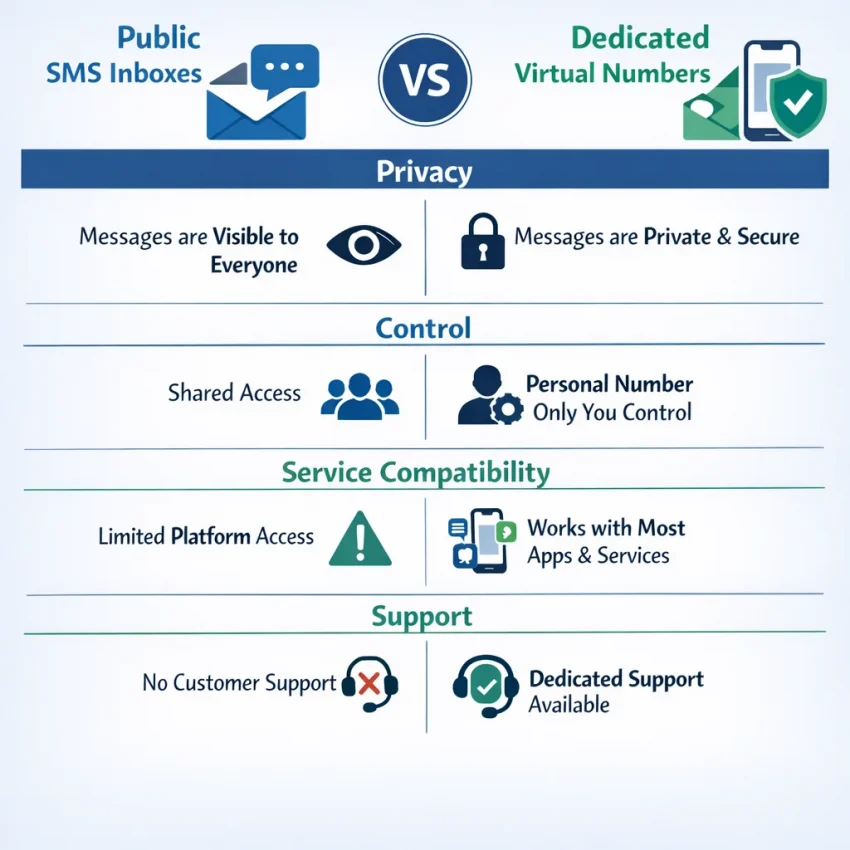
This is where users often get stuck. They search “receive SMS online,” open a random site, and hope a visible number will accept the code. Sometimes it does. Often it does not. Public inboxes also expose messages to anyone who can view the page, which defeats the privacy benefit many users wanted in the first place.
Public inboxes vs. verification workflows
A public SMS inbox and a verification workflow are not the same product. A public inbox is open, generic, and unpredictable. A verification workflow is built around a target service, a number selection step, and a clear place to check for the incoming code.
For users who need a virtual phone number for verification, the key question is not “Is it free?” The better question is “Will this match the service I need, in the country I need, with enough privacy and control to finish the task?” Once you frame it that way, random free lists stop looking efficient.
That is why SmsPva fits the modern use case better than the old public-inbox model. Instead of chasing exposed numbers that may or may not work, you can Receive SMS online through a platform built for activation flows rather than open public message boards.
Why the keyword still says “free”
The word “free” remains popular because users want the lowest-friction option. That is reasonable. But low friction is not just about paying nothing. It is about finishing verification quickly, avoiding repeated failures, and not tying every signup to your personal phone number.
In other words, the best answer to free sms online is often not a fully free public inbox. It is a practical system for receiving verification codes online: choose the right service, use the right number type, watch for the code, and keep your main number separate when needed.
Use smspva.com to receive SMS verification codes with virtual phone numbers. It aligns with what most searchers actually want in 2026: more control, less noise, and a smoother path from signup screen to verified account.
How to Choose a Free SMS Online Workflow That Actually Works
A practical SMS verification workflow starts with the target service. Some platforms accept a broader range of numbers. Others are stricter about reuse patterns or country alignment. If you skip that first check and pick any public number you find, you often waste attempts before the code step even begins.
The more reliable approach is to use a service-specific flow. SmsPva is built around that logic. Instead of guessing, you choose a virtual phone number for verification based on the platform you actually need.
Check the fit before you request a number
First, confirm that the service you need is supported in a dedicated flow. Online SMS verification works best when the number is matched to the platform rather than treated as a generic inbox.
Second, check country relevance. Some signups work more smoothly when the number country matches your intended use case. That does not mean every platform requires a local number, but country fit can affect whether a verification step feels natural or gets flagged for extra checks.
Third, look at code visibility and timing control. A useful tool should make it obvious when the number is active, whether the request was created correctly, and where the incoming OTP will appear.
Fourth, think about retry options. Verification often fails for simple reasons: the wrong service was chosen, the code expired, or the app session was restarted. A good workflow should let you recover without turning each retry into guesswork.
Prioritize privacy and support, not just price
Privacy is the next filter. A public inbox may look convenient, but it is often a poor choice for private SMS verification. If multiple people can see the same inbox, the workflow breaks down fast.
Account separation matters too. Some users only need a one-time temporary number for SMS. Others need cleaner separation between personal use, side projects, testing, or region-specific signups. In those cases, the workflow should help you avoid mixing everything into one personal number or one public inbox.
Support resources are another underrated factor. When online verification fails, most users do not need a buzzword. They need clear setup guidance and troubleshooting steps. That is why a workflow-backed provider is usually the smarter choice than chasing a “best free numbers” list that changes daily.
Finally, evaluate value in terms of saved attempts, not just zero upfront cost. Free public options can look cheaper, but they often cost more in time, failed retries, and abandoned signups. A service-specific workflow on SmsPva is usually the better fit for users who care about speed, privacy, and control.
The Best SmsPva Workflow for Receiving SMS Verification Codes Online
If your goal is to receive a verification code online with less guesswork, the best workflow starts before you pick any number. Start with the target platform. A Telegram signup and a Signal activation can behave differently. That is why service-specific selection matters more than hunting a random public inbox.
The practical path is simple: identify the app, open the matching SmsPva flow, check whether country choice matters, activate a virtual number for OTP, enter it on the target site or app, and wait for the code in the same session. This approach reduces wasted attempts because the workflow is built around the service you actually need.
Step 1: Match the number to the exact service
First, decide what you are verifying. Do not begin with “any free sms online number.” Begin with the exact app name. This helps you avoid using a number type that does not fit the verification flow you are trying to complete.
For example, if you need Signal, go to the dedicated Signal SMS verification page rather than starting from a generic inbox mindset. If your use case is Telegram SMS verification, use the Telegram-specific flow on SmsPva. Service pages narrow the setup to a known verification target instead of treating every OTP request as identical.
Many failed attempts happen because users choose a number first and only later try to fit it to the app. Reverse that process. Pick the service first, then the number.
Step 2: Check country only when the app or your setup needs it
Some verification flows are country-sensitive. Others are not. If the platform expects a specific region, or if you want a number that aligns with your account setup, choose the country before activation. If country does not matter for your use case, keep the workflow simple.
A good example is Signal. If you specifically need a UK-based setup, use the exact country page for Signal verification in Unt. Kingdom. At the time of writing, Signal United Kingdom single-SMS options were listed from $0.50 or $0.77 depending on country-code variant. Those are API snapshots, not guarantees.
Once you have the right service and, if needed, the right country, activate the number and copy it carefully. Then paste it into the app or website exactly as required.
Step 3: Enter the number, watch the OTP, and keep the session clean
After you submit the number on the target app, stay in the same SmsPva session and watch for the code. Do not refresh your whole setup unnecessarily. Do not switch between multiple tabs and numbers unless the first attempt clearly failed.
When the OTP arrives, enter it promptly. Most verification windows are short. If the code does not appear right away, avoid stacking retries too fast. Repeated requests can create confusion, especially if the platform sends a later code that invalidates the first one.
A simple checklist helps:
1. Confirm you chose the correct service.
2. Confirm the country matches your intended workflow, if relevant.
3. Confirm you pasted the number correctly.
4. Wait for the code in the same active session.
5. Only retry after the first attempt is clearly expired or unusable.
Service-Specific Examples: Telegram and Signal Verification Workflows
The easiest way to improve online SMS verification is to stop treating every platform the same. Telegram and Signal may both send OTPs, but their verification flows can behave differently. That is why service-specific pages matter.
For Telegram SMS verification, begin on the Telegram-specific flow in SmsPva. The goal is simple: match the number request to the service that will send the code. In practice, this means selecting Telegram first, activating the number, then waiting for the code inside the same workflow.
Telegram is a good example of why this structure matters. Users searching for free sms online often assume any public inbox can receive a Telegram code. In reality, modern verification systems often work better when the number is provisioned for that exact use case.
How the Signal workflow changes
Signal SMS verification follows the same logic, but country choice can matter more. Start with the general Signal service page so the number request aligns with Signal from the beginning.
If you need a specific region, move from the general service page to the country page only when that detail is relevant. For readers focused on the US, the dedicated flow for Signal verification in United States can make the setup more precise. At the time of writing, Signal United States single-SMS pricing was listed from $2.01. That figure is a current snapshot, not a permanent rate.
Once the number is active, the Signal flow is similar to Telegram: enter the number in Signal, request the code, watch the dashboard, and complete the OTP step promptly. If the code does not appear right away, stay inside the same service flow before retrying elsewhere.
When Telegram and Signal need different choices
The biggest difference between these examples is not the OTP screen. It is the setup discipline before you request the code. Telegram users often do best by starting with the service page and keeping the process simple unless a country-specific need appears. Signal users are more likely to benefit from checking whether a country matters before they begin.
This is where SmsPva becomes more practical than chasing free sms online lists. You can build a repeatable path: choose the service first, narrow to country only when needed, request the code, and finish verification in one place.
Privacy, Account Separation, and Why Public SMS Inbox Sites Are a Weak Workflow
Many people search for free sms online because they want fast access to a code. The problem is that public inbox tools optimize for visibility, not control. If a number and its messages are openly viewable, your verification flow is also exposed.
With a public inbox, anyone who can see the page may also see the incoming code, the sender name, and the timing of the request. That is a poor fit for private SMS verification. Even when the code itself is short-lived, the inbox history can reveal what service you used and whether the number has been heavily reused.
Number reuse is another weak point. Public numbers are often shared by many people across many services. A platform may detect that pattern and reject the attempt, or the code may arrive in a noisy inbox mixed with other users’ messages.
Why account isolation matters
Some users only need a one-time signup. Others need cleaner separation between projects, devices, or workstreams. In both cases, using your personal number everywhere is not ideal. A temporary number for SMS or a virtual number for OTP gives you more control over where a verification event belongs.
You may want to keep test accounts apart from personal accounts. You may need a distinct verification path for a client workflow. You may simply want to receive SMS online without tying every activation to your everyday phone number. Public inboxes do not solve that well because they are built around shared access, not account boundaries.
This is where SmsPva fits better. Instead of relying on exposed, recycled inboxes, you can use service-focused virtual numbers that are meant for verification workflows.
Operational hygiene beats randomness
Privacy is not only about hiding a code. It is also about reducing signals that make a verification attempt look messy or inconsistent. Public inbox use often overlaps with repeated retries, mismatched sessions, and visible number history.
A cleaner workflow uses the right number for the right service, keeps attempts organized, and avoids mixing unrelated accounts. The takeaway is simple: public inboxes are easy to find, but they are a weak workflow for anyone who values privacy, consistency, or account isolation.
Troubleshooting a Failed Verification Code: What to Check Before You Retry
If you cannot receive a verification code online, do not rush into another attempt. Most failed verifications come from a small set of workflow mistakes.
Start with the service selection. In a proper online SMS verification flow, the number should match the platform you are trying to verify. A code request for one app may fail if you chose a different service page or an overly generic route.
Next, confirm whether country matters for that platform. Some services accept many regions, while others behave differently based on the number country, local format, or current platform rules. If you expected a specific region and chose another, the verification step may never complete.
Timing is another common issue. Some codes arrive late, and some expire quickly. If you requested multiple codes in a row, the newest one may invalidate the previous one. Wait a reasonable moment and enter only the most recent code.
Check session state before retrying
Many users break the workflow by refreshing the signup page, switching devices, or opening a second verification session. That can disconnect the app from the original number request. Keep one session active from start to finish.
Also check the number format you entered. Include the correct country code when the app expects it, and avoid editing the number manually unless the platform requires formatting changes.
If the platform shows too many attempts, suspicious activity, or temporary limits, the issue may be on the platform side rather than the number itself. In that case, pause before retrying. Repeated requests can extend the cooldown.
When you still cannot complete the setup after these checks, use the SmsPva help resources for guidance.
FAQ: Free SMS Online and Verification Workflows
What is the difference between free SMS online inboxes and virtual numbers for verification?
Public free SMS inboxes are open message boards with shared visibility. Virtual numbers for verification are used in a structured workflow tied to a specific service. The second option usually gives better privacy, cleaner steps, and fewer wasted attempts.
Can I receive OTP codes online without using my personal phone number?
Yes. That is one of the main reasons people use a virtual phone number for verification. It helps separate personal use from account activation, testing, or privacy-focused signups.
Why do public free SMS online sites fail for many verification steps?
They often rely on heavily reused numbers, exposed inboxes, and generic flows. Many platforms now treat those patterns as low quality or risky, which can lead to rejected or delayed verification attempts.
How do I choose the right country for SMS verification?
Choose country only when your target platform, account setup, or workflow actually requires it. If the service is not country-sensitive for your case, keeping the setup simpler can reduce mistakes.
What should I do if my verification code does not arrive?
Check the selected service, number format, country fit, session state, and whether you requested multiple codes too quickly. If the issue continues, review the SmsPva help page before retrying again.
Is SmsPva better for Telegram or Signal verification workflows?
It can be useful for both because the workflow is service-specific. Telegram often benefits from a simple service-first path. Signal can benefit more from checking country relevance before activation.
Can I use one online number for repeated verification attempts?
That depends on the exact workflow and number type. For many users, repeated retries with the same setup can create confusion if sessions, codes, or platform rules change. Match the number to the task and avoid unnecessary reuse.
When does it make sense to use a longer-term number rental instead of a one-time SMS number?
If your workflow needs ongoing access, repeated confirmations, or a longer-lived account setup, a rental can make more sense than a one-time code flow. For example, a longer-term Signal SMS verification rental may fit users who need ongoing access rather than a single OTP event.
Final Decision: When to Use SmsPva Instead of Chasing ‘Free SMS Online’ Lists
If you searched for free sms online, your real goal is usually simple: get a verification code fast, with less friction, and without exposing your personal number. That is where public inbox lists often fall short.
A better choice is a service-specific workflow. Instead of hunting random numbers, you choose a virtual phone number for verification that matches the platform and, when needed, the country. This gives you more control over the verification attempt and helps reduce failed retries.
SmsPva is the stronger fit when privacy, speed, and a cleaner process matter more than the idea of “free.” It is especially useful for users verifying mainstream apps, separating work and personal accounts, or building a repeatable SMS verification workflow instead of starting from scratch each time.
The practical takeaway is simple: stop optimizing for random public access and start optimizing for successful verification. In 2026, that is the smarter path for users who want less guessing and more control.