

What People Mean by a Virtual Indian Phone Number for SMS — and Why It Fails More Often Than Expected
When people search for a virtual indian phone number for sms, they usually want an OTP for signup, an activation code, or a privacy-first alternative to using a personal SIM. In practice, that means temporary access to a number that can receive a verification message from a specific platform.
The idea sounds simple, but the process often breaks. A platform may reject the number before sending anything. The SMS may be delayed or never arrive. Or the code may arrive and still fail during confirmation. Many users assume the number itself is the problem, but the real cause is usually more specific.
That is why random trial and error wastes time. A workflow built for verification is more useful than testing any number and hoping for delivery. With Receive SMS online on SmsPva, the goal is to better match the service, country, and live verification session.
How SMS verification actually works
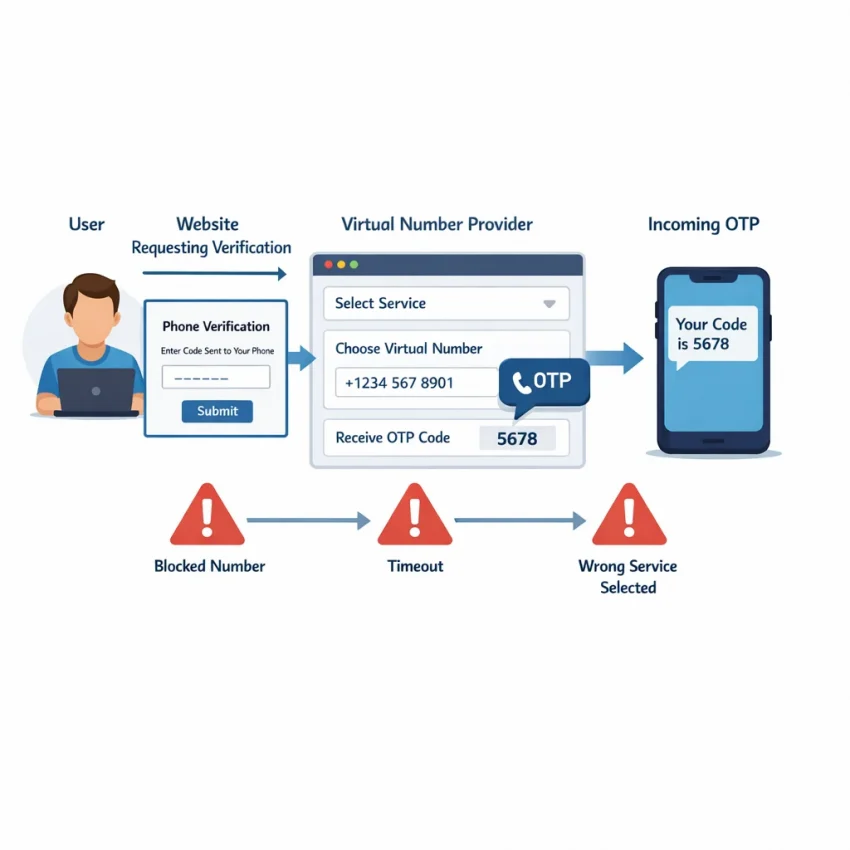
Most verification flows follow the same pattern. You enter a phone number on a website or app. The platform checks number format, country, and number type. If the number passes those checks, it creates a verification session and sends a one-time password by SMS.
Several moving parts must line up. The session must stay active. The message must route correctly. The platform must send the OTP to the exact number you selected. You then need to enter the code before the session expires.
Even a small mismatch can break the process. If you selected the wrong service, expected the wrong country behavior, or let the session expire, the message may never appear where you expect it. This is why users trying to receive sms online india often see failures that look similar but come from different causes.
Why these failures happen so often
SMS verification is not only about message delivery. It is also about platform acceptance. A number can be technically valid and still be blocked by a service’s internal checks. A code can be sent but tied to an earlier attempt. A user can request multiple OTPs and invalidate the first one.
Users also create problems by moving too fast. They refresh pages, switch devices, restart signups, or request another code before the first session finishes. That can turn a small delay into a full mismatch.
If you need an indian number for sms verification, use a diagnostic approach. Check the service selection, confirm the country expectation, wait within the active window, and avoid duplicate requests unless the session clearly failed.
Issue #1: The OTP Never Arrives — How to Diagnose Delays, Timeouts, and Silent Failures
The most common complaint with a virtual indian phone number for sms is simple: the code never shows up. Usually, one of five things happened. You selected the wrong service, your session expired, the platform delayed or blocked delivery, the number was not accepted for that flow, or your retry pattern broke the session.
Users often react the wrong way. They refresh, request more codes, switch tabs, or start a second attempt. Those steps can turn a small delay into a full failure. If your virtual phone number not receiving sms is the issue, diagnose first and retry second.
Check the cause before you burn another attempt
First, confirm that you chose the correct service entry before requesting the OTP. If the service choice is wrong, the platform may never send a code to that session, even if the number looks valid. This is why a structured workflow works better than random number testing.
Second, check timing. Many platforms create a short-lived verification session as soon as you open signup or login. If you wait too long before requesting the code, the session can expire silently. If you switched devices, changed browsers, or reloaded several times, assume session age may be part of the problem.
Third, look for small user-side mistakes. Common ones include entering the wrong country, formatting the number incorrectly, closing the page that held the request, or triggering multiple OTP requests too quickly. Repeated requests can lead to throttling.
Fourth, consider temporary delivery delays. Not every failed code is a permanent rejection. Platform queues or sender filtering can slow delivery. With an online SMS workflow, a short wait is often smarter than immediate re-requesting.
Use a simple recovery sequence
Make one request only. Wait through the normal delivery window without refreshing the verification page. Watch the active order closely. If no code appears, do not instantly request another OTP. First confirm that your session is still active and that the number was assigned for the correct service.
If the session looks stale, restart cleanly from the beginning. Use one browser, one tab, and one device. Re-enter the number carefully. Then request a fresh OTP once. Avoid copying old numbers between failed attempts.
If the flow itself seems to be the issue, use a service-specific path instead of a generic one. For example, SmsPva provides pages built around exact targets, such as Signal SMS verification. Even if your goal is not Signal, the lesson is the same: matching the service path can reduce silent failures.
If the problem continues after a few careful attempts, stop repeating the same pattern. Review the SmsPva Help page for troubleshooting steps and next actions.
Issue #2: The Platform Says the Number Is Invalid, Already Used, or Unsupported
This failure happens before an OTP delay. You enter a virtual number for verification, and the platform immediately shows an error like “invalid number,” “unsupported phone number,” or “this number has been used too many times.” In most cases, the platform is rejecting the number before it even tries SMS delivery.
If a service blocks a number at the validation stage, retrying the same way rarely helps. You need to identify why the number was filtered.
Why platforms reject numbers before sending any SMS
The first reason is number-type screening. Many apps classify numbers by provider patterns, usage history, or known virtual ranges. If the app wants a traditional mobile line, it may reject a temporary number even when the format is correct.
The second reason is prior-use detection. Some platforms allow only one account, or a limited number of accounts, per phone number. If the number was used before, the app may flag it as already registered or overused.
The third reason is country mismatch. A service may accept Indian numbers for one workflow but not another. It may also expect the phone country to match the account region or IP region.
The fourth reason is service-specific acceptance rules. Two platforms can behave very differently even when both use SMS OTP. One may accept shared verification numbers, while another may filter them more aggressively.
How to diagnose the exact rejection reason
Start with the wording of the error. “Invalid number” usually points to formatting, unsupported number type, or country restrictions. “Already used” points to prior registration history. “Unsupported” often means the platform does not accept that country or number class for signup.
Next, confirm the country code and service flow. Users often choose a general receive-SMS path when the platform behaves differently under a service-specific route. If a service-specific page exists, use that model instead of guessing.
Then check whether your target platform has already seen that number. If the error explicitly says the number is linked to another account, stop retrying the same one. Move to a fresh attempt only after confirming the service and country combination makes sense.
Also compare your account context. If your signup locale and phone country do not align, the platform may reject the number before sending a code.
The key takeaway is simple: not every rejection is a delivery problem. Many happen before any message is sent. Success depends on matching the platform’s acceptance rules, the country context, and the right workflow from the start.
Issue #3: You Receive a Code, but Verification Still Fails
This is one of the most frustrating sms verification problems: the message arrives, but the platform still rejects the code. In many cases, the number is not the real issue. The failure happens inside the verification flow.
The most common cause is timing. Many OTPs expire quickly. If you switch tabs, refresh the page, or wait too long before entering the code, the session may close even though the SMS arrived normally. Some platforms also invalidate the first code as soon as you request a second one.
Another frequent problem is context mismatch. You may have requested a code for signup, then tried to use it on login, password reset, or device confirmation. The message looks valid, but it belongs to a different action.
Why a valid-looking OTP can still be rejected
Country and account settings can interfere too. A platform may accept an Indian number for delivery, then flag the account when the registration region, app locale, or IP behavior suggests a different market.
Human error is also common. Copying a trailing space, dropping one digit, mixing similar characters, or pasting a newer code into an older prompt can all cause failure. Auto-fill can make this worse if your device inserts a previous code.
Service selection matters here as well. Some platforms use different SMS templates or endpoints depending on the exact product flow. That is why the most specific path available is usually the best choice.
Recovery checklist before you burn another attempt
1. Stay in one session. Use one browser tab, one device, and one active verification screen.
2. Confirm the action. Make sure you are completing the same step that generated the SMS.
3. Check the latest message only. If you requested multiple OTPs, older codes are often invalid.
4. Enter the code manually once. This avoids hidden spaces or bad auto-fill.
5. Review region consistency. If the platform expects one market and your setup suggests another, stop retrying blindly.
6. Avoid repeated rapid submissions. Too many failed entries can trigger extra checks.
If the code still fails after a clean retry, stop looping through new OTP requests. Review the flow carefully and use support-backed guidance if needed.
How to Solve These Problems More Reliably with SmsPva
If you keep hitting the same verification issues, the fix is usually not to try more random numbers. A better approach is to use a structured workflow built around the exact platform you want to verify. That is where SmsPva stands out.
Most failures happen before the OTP is even sent. Users often pick the wrong service flow, switch countries without noticing, refresh sessions too often, or submit a number in a context the platform does not accept. A more reliable process starts by deciding exactly what you are verifying and then choosing the closest matching flow.
Start with the exact verification context
Before you request a number, confirm four details: the platform name, the account region, whether it is signup or login, and whether the platform expects SMS or voice. This simple check prevents many invalid-number and code-mismatch errors.
Next, use the most specific page or category available instead of a broad “any number” approach. Service-specific routing reduces confusion and helps you avoid ordering a number for one platform while attempting verification on another.
Once you have chosen the right flow, stay consistent. Use one browser session, one device, and one network during the attempt. Do not open multiple tabs for the same verification. Do not restart the signup process unless the previous attempt has clearly expired.
Check country fit, then slow down your retry behavior
Country alignment is the next major filter. A virtual indian phone number for sms can be appropriate when the platform supports Indian numbers in that exact verification scenario. But support can vary by service, risk checks, account age, and current anti-abuse rules.
If the number is rejected immediately, that often points to a platform-side rule rather than a temporary SMS delay. In that case, stop retrying the same setup. Repeating the same failed action can create cooldowns, duplicate OTP requests, or a blocked session.
A cleaner retry sequence looks like this: confirm the service selection, confirm the country, request one code, wait for the full timer window, and submit the OTP only once. If nothing arrives, re-check whether the platform is sending SMS at all, whether the account page changed steps, and whether you are still inside the same session.
If you manage multiple accounts or want stronger isolation, proxy tooling can help keep sessions separate. Still, it is supporting infrastructure, not a fix for delivery problems.
Best Practices Before You Retry: A Pre-Verification Checklist That Prevents Repeat Failures
If your virtual indian phone number for sms attempt already failed once, do not rush into another try. Repeating the same steps often creates more problems, especially when a platform tracks timing, session state, or duplicate requests.
Start with browser hygiene. Close extra tabs for the same platform. Log out if the signup flow is stuck. Clear cookies for that site or open a fresh private window. Old session data can keep a failed verification state alive.
Next, keep your environment consistent. Use one device, one browser, and one network during the whole verification. Do not switch devices after requesting the OTP. Some services compare session signals, region hints, or request history.
Also confirm that you selected the exact service flow before you request another code. Randomly choosing a general number page can waste attempts.
Quick checks before spending another attempt
Confirm the country and service match your target signup. Enter the number in the correct format. Request only one OTP at a time. Wait for the current request window to finish before clicking again. Avoid copy-pasting an old code from a previous session. If you are trying to receive sms online india, make sure the platform actually accepts virtual numbers for that workflow.
Be realistic about availability too. A number can be valid, but delivery can still vary by platform rules, timing, or temporary routing conditions. Two or three careful attempts with corrections are better than many rushed ones.
If you already corrected the service, session, and device setup but the same failure keeps repeating, stop changing small details and change the workflow instead.
When a Virtual Indian Number Makes Sense — and When to Switch Your Verification Workflow
A virtual indian phone number for sms makes sense when the platform clearly supports Indian signup, the number format matches the country you selected, and your previous attempt failed for a fixable reason such as timing, session expiry, or wrong service choice.
It makes less sense to keep forcing the same flow when the platform flags the number as unsupported, repeatedly marks it as already used, or sends codes that never validate even after careful entry. Those patterns usually point to stricter platform rules, country mismatch, or a service-specific acceptance issue.
The practical move is to stop guessing and switch workflows. That may mean choosing the correct service page, confirming the country-service pairing, or changing to a different supported route if the target platform is unusually strict.
If you still want an indian number for sms verification, verify the live flow first, then retry once with a clean browser state, consistent device and network conditions, and no duplicate tabs. If the same rejection pattern returns, switch the verification approach instead of repeating the same setup.
Use smspva.com to receive SMS verification codes with virtual phone numbers and follow a cleaner, support-backed path for OTP receipt and account activation.