

What people mean by ‘free phone number SMS’ in 2026
When people search for free phone number sms, they usually want a fast way to receive a verification code, OTP, or activation SMS without using their personal number.
That matters because the word “free” often hides different needs. Some users want privacy. Others want to test a signup flow. Many simply need a virtual phone number for SMS verification that works for one account setup.
In 2026, that distinction matters more. Many platforms now use stricter checks, shorter time windows, and service-specific routing. Because of that, the old idea of using any public number to receive SMS online is much less useful for real verification.
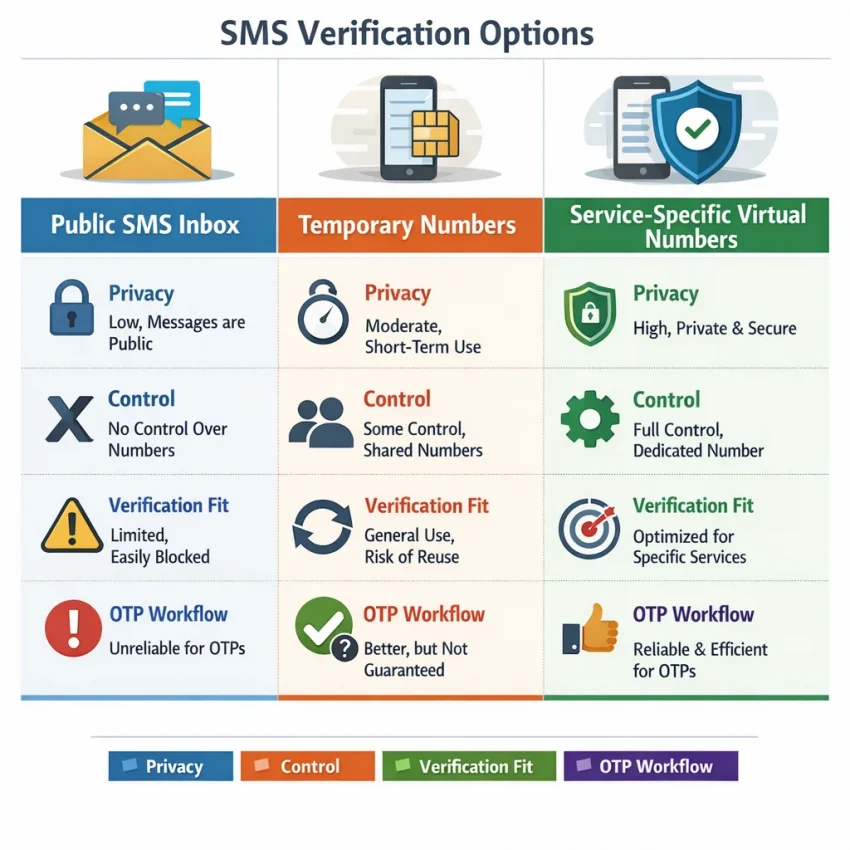
Public inboxes vs. temporary numbers vs. verification numbers
The first option is the public receive-SMS page. These inboxes are open to many users. They may look convenient, but they are weak for privacy and often blocked by major platforms. If the inbox is public, your code is not private.
The second option is the generic temporary number. That can be better than a public inbox, but it still may not match the service you need. A number can be temporary without being a good fit for your OTP workflow.
The third option is what most users actually need: a service-specific virtual number. This approach is built around the platform you want to verify. You choose the service, get a suitable number, wait for the code, and complete the OTP step in a structured flow.
That is why SmsPva is the practical answer to this search. Instead of sending you into a public inbox lottery, it helps you Receive SMS online with virtual numbers designed for verification and account activation.
Why “free” can be misleading
A free sms verification number sounds ideal, but fully free options often mean public visibility, heavy reuse, blocked numbers, or poor compatibility with the exact service you need.
A better way to frame the search is this: you want the lowest-friction path to get a code and finish verification without exposing your main number. That means usability, privacy, and service match matter more than the label.
For many users in 2026, a structured verification workflow is more useful than chasing a fully free but unreliable inbox. If your goal is OTP receipt, account activation, or one-time signup verification, the workflow matters most.
How SmsPva works for SMS verification and OTP receipt
If your goal is to finish verification, SmsPva works as a service-specific SMS verification service. The workflow is simple: choose the platform you want to verify, get an online phone number for OTP receipt, wait for the code, and use it to complete signup or confirmation.
Start from the service you actually need. This matters because verification systems in 2026 are stricter than they were a few years ago. A generic temporary number is often not enough. Service-specific routing helps avoid mismatches.
In practice, you select the target app or website, review available number options, and request a number for that use case. SmsPva then assigns a virtual number for account activation. You copy that number into the signup or verification form on the platform you want to access.
Once the platform sends the text message, SmsPva shows the incoming SMS in your order or session view. You do not need to expose your personal number just to receive a one-time password.
What happens during the verification flow
After you enter the virtual number on the target platform, the platform sends an OTP or confirmation code. SmsPva is built for this exact step. Rather than relying on a public inbox, the flow is tied to your chosen service and active order.
That structure makes the process cleaner. You know which service the number was selected for, where the code should arrive, and what message you are waiting for.
It also reduces common mistakes. Many failed verifications happen because users choose the wrong service, paste the number into the wrong screen, or request a code too many times. SmsPva does not remove every risk, but it gives you a clearer path: one service, one selected number, one expected SMS.
Why this workflow fits 2026 verification needs
More platforms now check numbering patterns, retries, and context. That is why users who want a virtual number for account activation usually do better with a structured workflow than with a purely free public receive-SMS tool.
For privacy-conscious users, the main benefit is separation. You can receive an OTP without sharing your personal number with every app you test. For testers and operational users, the benefit is control. You choose the service first, then complete verification in a way that is easier to track.
When the code appears, enter it exactly as shown and finish verification. If the platform rejects it, the issue is usually timing, service selection, or a user input error rather than the idea of virtual verification itself.
Step-by-step: how to use a virtual number safely for verification
If you searched for free phone number sms, your real goal is usually simple: receive OTP without personal number exposure and finish verification cleanly. The safest approach is a service-specific workflow instead of a random public inbox.
Before you start, prepare the target account page first. Open the app or site you want to verify, sign in if needed, and stop at the phone verification screen. This helps because many codes expire quickly.
Next, confirm the exact service you are verifying. Do not treat all OTP flows as interchangeable. A temporary phone number for verification works best when it is selected for the correct platform flow.
Then choose your number carefully. Focus on three basics: the service name, the country you need, and whether you only need one SMS or a longer access window.
Run the verification flow without exposing your personal number
Once you have the number, copy it exactly as shown. Include the country code if the target platform expects international format. Paste it into the verification field and avoid retyping when possible.
After you submit the number, wait for the target platform to send the OTP. Stay on the SmsPva order screen and watch for the incoming message. Keep the target app open in another tab or device window so you can enter the code as soon as it appears.
When the SMS arrives, read the code carefully and enter it once. Do not keep requesting new codes unless the platform clearly says the previous one expired. Repeated resend attempts can create confusion.
For privacy, use the number only for the intended verification step. Keep a simple note of which platform, date, and country you used. That helps if you later need to confirm what workflow succeeded.
It is also smart to keep your session stable. Avoid switching networks, refreshing the target page repeatedly, or opening multiple verification attempts at once for the same account.
Handle delays and mismatches realistically
If the code does not show up right away, check your own steps first. Confirm that you selected the correct service flow, entered the number in the right format, and actually triggered the SMS send button on the target platform.
Next, give the message a reasonable wait window. SMS delivery can vary by service and route. A short delay does not always mean the process failed.
If the platform rejects the number before sending any code, do not keep forcing the same attempt. Go back and choose a better-matched setup, especially if country selection matters.
If you need to retry, start fresh and keep the workflow tidy: one account, one active verification attempt, one number, and one code entry. That disciplined approach is the difference between random public inbox behavior and a usable verification workflow.
Example workflow: using SmsPva for Signal verification
A service-specific example shows why a generic “free phone number sms” search often leads to dead ends. If your real goal is Signal setup, the better path is to use the dedicated Signal SMS verification flow instead of a random public inbox.
First, open the Signal verification flow and get to the screen where it asks for a phone number. Then, in SmsPva, select Signal as the target service. This matters because service-specific routing helps match your activation to the platform you actually want to verify.
Next, choose the country option that fits your setup. If you specifically want a United Kingdom route, use the dedicated Signal verification in Unt. Kingdom page so you are not guessing availability.
At the time of writing, the Signal single-SMS option for the United Kingdom was listed from $0.50 for the UK_V variant and $0.77 for the UK variant. For the United States, the Signal single-SMS option was listed at $2.01. Treat these as API snapshots, not permanent prices or availability guarantees.
Step-by-step Signal OTP flow
After you choose the service and country, activate a number and copy it carefully into Signal. Double-check the country code before continuing. Many failed attempts come from entering the right digits with the wrong country prefix.
Once submitted, wait for the OTP to appear in your SmsPva order view. When it arrives, copy the code into Signal exactly as shown and complete confirmation promptly.
This is the core advantage of a virtual number for account activation: you can receive SMS online for a specific verification task without exposing your everyday personal number.
Why this path works better
Signal is a good example of why random public inboxes are a poor fit for modern verification. Public numbers are often overused, already flagged, or disconnected from the exact service flow you need.
If your only goal is one-time Signal setup, a single SMS activation is usually the simplest choice. If you expect repeated access tied to the same number over time, a rental workflow may be more appropriate. For most readers, though, the key lesson is simple: the cheapest-looking option is not always the usable one.
Common problems users hit with online SMS numbers and how to troubleshoot them
When people search for a free phone number SMS option, the biggest surprise is usually friction. A temporary phone number for verification can work well, but only when the setup matches the target service and the timing is right.
The first common problem is choosing the wrong service flow. If you select one service but enter the number on another platform, the OTP may never appear in the expected inbox. Before retrying, confirm that the selected service inside SmsPva matches the app or site asking for the code.
The second issue is country mismatch. Some platforms filter numbers by region, format, or local rules. If the target app expects one country pattern and you use another, the number may be rejected before the SMS is even sent.
What to check before you request another code
Start with the basics. Confirm that you copied the full number correctly, including the country code. One missing digit is enough to block delivery. Then check whether the target app accepted the number at all.
Next, avoid requesting too many OTPs in a row. Repeated taps on “send again” can invalidate earlier messages or trigger anti-abuse limits. If a new code is sent, use the most recent one.
Also watch for simple input errors after the message arrives. Enter the OTP exactly as shown. Do not add spaces unless the form does it automatically.
Another issue is timing. Some services send codes quickly, while others queue messages or repeat checks before dispatch. A delay does not always mean failure.
When to stop retrying and switch tactics
If you have verified the service, country, number format, and OTP entry, but the code still does not arrive, stop repeating the same action. Repeating a failed flow can waste balance and lock the target app into cooldown mode.
You should also switch tactics if the platform rejects the number immediately, labels it unsupported, or never opens the SMS step. In those cases, the issue is usually not inbox delay. It is a compatibility or routing mismatch.
For user-side guidance, status questions, and general troubleshooting steps, use the SmsPva Help page.
The main takeaway is simple: to receive SMS online reliably, treat SMS verification like a workflow, not a random public inbox. Check the service, check the country, enter the number carefully, and avoid unnecessary retries.
How to choose the right service, country, and verification setup in 2026
The best results usually come from choosing the exact verification flow before you activate any number. In 2026, many platforms route OTP delivery differently by service, region, and number type.
Start with the platform you need to verify. Service-specific routing helps you avoid mismatches between the number you use and the OTP channel the platform expects.
Country choice matters next. Some users only care about getting any working number. Others need a number from a specific region because the target platform prefers local formatting, regional traffic paths, or country-specific onboarding.
When one-time SMS is enough
For most OTP and account activation tasks, a one-time number is the simplest choice. This setup fits users who want to receive OTP without personal number exposure, enter the code once, and move on.
Before you confirm, check three basics: the exact service name, the country if it matters, and whether you only need one incoming code. If the answer is yes, a standard one-time SmsPva number is usually the cleanest path.
When longer access may be relevant
Sometimes verification is not truly one-and-done. You may expect follow-up SMS messages, recovery prompts, or staged onboarding later. In those cases, longer-duration access can be worth considering.
For Signal only, SmsPva also has an optional Signal SMS verification rental path for users who need extended access rather than a single code.
The decision is simple: choose service-specific first, add country selection when relevant, and only consider longer access if your workflow really needs repeat messages.
Best practices for privacy-focused SMS verification with SmsPva
If you searched for free phone number sms, the real goal is usually simple: receive a code, activate an account, and avoid sharing your personal number when it is not necessary. In 2026, the safest approach is not random public inboxes. It is a service-specific workflow that matches the platform you are verifying.
Start by choosing the exact service before you request a number. That reduces mismatch issues and keeps your verification flow cleaner. Use one number for one clear task, copy the OTP carefully, and finish the activation promptly.
For better privacy, do not reuse your main personal number across every signup. Keep a simple record of which account used which virtual number, especially if you handle testing or regional verification.
A virtual number for account activation is best treated as a workflow tool, not a permanent replacement for your primary contact number unless you specifically need longer access.
When you need to receive SMS verification codes with virtual phone numbers, SmsPva is the practical option. It fits real verification needs better than the broad “free” search term suggests. If your goal is a privacy-focused workflow that matches modern account activation flows, start with SmsPva and choose the service-specific path that fits your signup.