

What people mean when they search for a free SMS phone number
Searching for an sms free phone number usually means you need a verification code without wasting time or sharing a number you want to keep private. But a free public inbox, your personal phone, and a paid virtual number are different options with different trade-offs.
A public SMS inbox lets multiple people view messages sent to a shared number. It may be easy to try, but you have limited control over who can see a code or whether the number has already been used. Your personal number gives you direct access to texts, but sharing it may not suit your privacy preferences. A virtual number may be another option for legitimate verification when public access is not appropriate.
“Free” and “private” are not the same thing
Before you choose a way to receive SMS online, consider what the account is for. A low-risk test account has different needs from an account tied to important messages, personal information, or recovery access. Also check the platform’s verification rules: an available number may still not be accepted by that service.
SmsPva is not a free public inbox. It offers virtual numbers for SMS verification and OTP receipt. Review its live options through Receive SMS online, then check current availability and terms. Do not assume a number will be available, receive a code, or be accepted by a particular platform. This guide focuses on legitimate verification, not bypassing service rules.
How free public SMS numbers work—and why they often disappoint
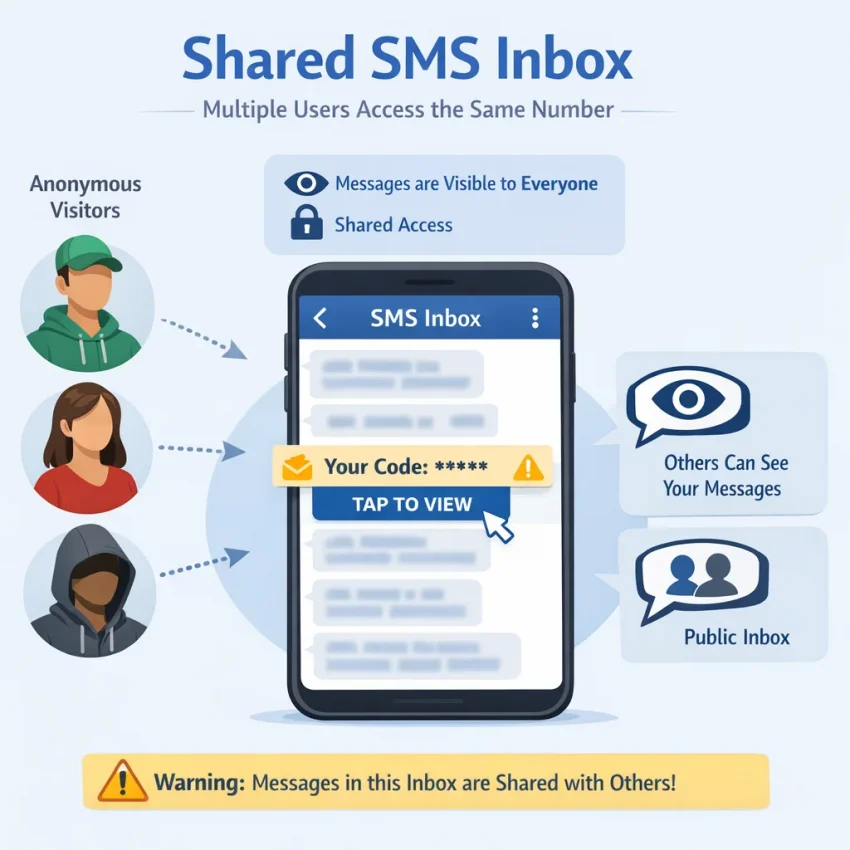
A free phone number to receive SMS online is often a number displayed on a website with an inbox anyone can open. A visitor enters that number during verification, then checks the public page for an incoming code. This can be convenient for a low-stakes test, but the inbox is not necessarily private or controlled by one person.
On many public SMS inboxes, messages are visible to anyone who knows or selects the number. Other visitors may see the same code, and messages may remain visible for some time. Sites differ: some rotate numbers or clear messages, while others show a shared history. Check how an inbox works before using it, and assume that a message delivered to a public inbox could be seen by others.
Shared numbers can also have a history. Another user may already have used the number with the service you are trying to access. The service may reject it, associate it with an existing account, or apply its own limits. A number appearing on a public page does not mean a particular service will accept it or send a code.
Where shared inboxes create problems
The main risk is not simply that a code might be exposed. A verification code can help someone complete a login or account change, especially if they have other account details. Avoid putting sensitive codes in an inbox that strangers may access. Public inboxes can also make later account recovery difficult if you do not control the number when the service asks you to verify it again.
- Sensitive codes: Avoid public inboxes for banking, financial services, work accounts, or accounts containing private information.
- Account recovery: You may not be able to access a public inbox later if a service asks you to reset a password or confirm ownership.
- Long-term access: A number that works once may not remain available to you.
- Repeated verification: Services may request another code during login, security checks, or account changes. A shared number does not assure continued access.
- Platform rules: Some services restrict shared or temporary numbers. Follow the service’s terms rather than treating a public inbox as a way around its rules.
Why a code may not arrive
Delivery depends on the service, the number, and the service’s current verification rules. A service might block a number type, limit attempts, or decline a number that has been used before. A message may also be delayed or fail to appear in the inbox you are checking. These outcomes do not mean every public inbox is unusable; they do mean that a free SMS verification number is not suitable for every purpose.
For low-risk testing, where the service permits it, a public inbox may be enough. For an account you need to protect or recover, weigh the visibility and access limits against the zero price.
Choose the right option with a five-point decision checklist
Before searching for an SMS free phone number, decide what the account requires—not just how to receive one code. These five checks can help you avoid a poor fit. No number type guarantees that a service will accept it or deliver a code.
Five checks to make before choosing
- Check the service’s rules. Review its current verification instructions and terms. If the service does not allow public or virtual numbers, do not use one to get around that rule.
- Consider future access. Important accounts can require another SMS during login, security checks, or recovery. Choose a number and recovery method that fit the account’s future needs.
- Assess the account’s sensitivity. Consider what someone could access if they controlled the account or saw its messages. Avoid shared public inboxes for accounts involving personal information, money, work, or recovery access.
- Understand who can access the number and messages. A public inbox may expose incoming codes to other visitors. For a virtual number, check the provider’s terms and what access is available. Do not assume a number is private, dedicated, or available indefinitely.
- Set a reasonable budget. A public inbox may cost nothing but still be unsuitable. A virtual number is a paid option, and paying does not guarantee acceptance or delivery. Check the live price and terms.
Follow the decision path that fits your use
Use your personal number when the service permits it, you are comfortable sharing it, and you may need reliable recovery access. For an account that matters, also set up the recovery options the service recommends.
Consider a public SMS inbox only for low-risk testing when the service allows it and you do not need privacy or lasting access. Treat any code received there as visible to others. Do not use that route for sensitive accounts or as your only recovery method.
Consider a virtual phone number for legitimate verification when a public inbox is unsuitable, the service permits that number type, and the live terms fit your needs and budget. SmsPva is not a free SMS phone number service. Check its live options before choosing. A paid option is not a workaround for platform rules, and it may still be rejected or fail to receive a code.
Use a personal number where appropriate, reserve public inboxes for permitted, low-risk tests, and consider a virtual number only when its terms suit the account. If you need ongoing access, prioritize a recovery method the service supports rather than choosing solely by upfront cost.
A practical SMS verification workflow with SmsPva
A public inbox is not suitable for every account. If its shared access or uncertain availability does not fit your needs, a virtual number may be another option for legitimate verification. SmsPva provides virtual numbers for SMS verification and OTP receipt; it is not a free service. Check its live options and terms before proceeding. No number type guarantees that a service will accept it or deliver a code.
Use this sequence to avoid paying or retrying before you know whether the option fits. Treat every verification code as sensitive: use it only for the account you control, and do not share it with other people.
Check the rules and live options first
- Confirm the service allows the number type. Read the service’s current verification instructions and account rules. If it disallows virtual or temporary numbers, do not use one to get around that policy. Choose an allowed method instead.
- Find the exact service in SmsPva. Start at Receive SMS online and identify the service you intend to verify. Service-specific options matter; do not assume a number offered for one platform will work for another.
- Review country options and displayed terms. Check the live country and number availability, displayed price, and conditions before selecting anything. Availability and terms can change, so rely on what is shown when you use the service.
Decide whether the flow matches your needs. A one-time SMS verification and access to a number over time are different use cases. Do not assume you need a rental for a single code, or that a one-time option provides ongoing access. Review the relevant terms before committing.
Request the code only after confirming the flow
- Select a number after checking the details. Proceed only when the service, country, displayed terms, and intended verification flow fit. If anything is unclear, pause and check the service guidance or SmsPva support.
- Enter the number in the service. Follow the service’s instructions and formatting requirements. Double-check the digits and country selection before submitting. Avoid repeated code requests; some services set resend limits or restrict attempts.
- Monitor the SmsPva flow for an incoming message. Check the relevant order or message view according to the product instructions. If a code arrives, enter it in the service where you requested it. Do not forward, publish, or reuse the code for another account.
- Stop if the number is rejected or no message arrives. Rejection and non-delivery can happen. Follow the service’s resend guidance, and check the terms before trying again or spending more. Contact SmsPva support if the product flow is unclear. Do not treat another number or repeated requests as a guaranteed fix.
This process can reduce avoidable mistakes, but it cannot guarantee success. A service may reject a number, and a message may not arrive. If that happens, use an approved verification method or the service’s official support route rather than trying to bypass its checks.
Use a service-specific page as a reference
If Signal is the service you need to verify, check Signal SMS verification for the relevant service-specific flow. This is an example, not a recommendation for every account or situation. Confirm that Signal’s current rules allow your chosen number type, then check live country options and terms.
Keep the account’s importance in mind. For an account you expect to keep or recover, consider whether you will have future access to the number and whether the service offers an appropriate recovery method. Choose an option that fits the service rules and your access needs—not simply the first result for “sms free phone number.”
Country and service selection: verify the live options before paying
Choosing a country based on a search result or a presumed lowest price can be a poor shortcut. Options and prices can change, and a number from a particular country is not guaranteed to be accepted or receive a code. Start with the service you need to verify, then check its rules and the live country choices for that service.
Use a number type and country that fit the service’s verification requirements and your legitimate use case. Do not treat country selection as a way to bypass regional restrictions or account rules. If a platform requires a particular kind of number, follow its instructions rather than assuming any virtual number will work.
Check the service and country together
On SmsPva, find the exact service first, then review the countries currently shown for it. Check the displayed price and any conditions before proceeding. Availability and terms can vary, so do not rely on an old search result, a previous purchase, or a country that appeared in a guide.
If you are considering Signal in the United Kingdom, review the Signal verification options for the United Kingdom before you choose. In an API snapshot fetched on October 24, 2026, single-SMS options for Signal in the United Kingdom were listed at $0.50 and $0.77. These are time-sensitive snapshots, not fixed prices or proof that an option is available now. Check the live page before paying. Country selection does not guarantee acceptance or delivery.
Match the option to the access you need
Decide whether you need a one-time SMS verification code or ongoing access to a number. A single verification flow may fit a one-time setup, while a number rental is a separate option for cases where the service and your intended use call for longer access. Renting is not automatically necessary and does not guarantee that a service will accept the number. Check the displayed terms and platform rules before choosing.
Before proceeding, confirm the service name, country, price, and conditions in the current listing. If the country or number type does not fit the service’s requirements, stop and choose an appropriate method instead of spending on repeated attempts.
Troubleshooting: what to do when the verification code does not arrive
An SMS verification code that does not arrive can be frustrating, but repeated attempts may create more problems. A service may delay or reject a message, and a virtual number cannot guarantee delivery or acceptance. Check the details before requesting another code or spending more.
Check the service and number details first
- Confirm the selected service. Make sure the number was selected for the same app or website where you requested the code. A mismatch can mean the SMS will not appear in the expected flow.
- Review the number and country. Compare the number shown in your SmsPva flow with the one entered in the service. Check the service’s country and formatting instructions; do not change countries to get around a rejection.
- Look for the SMS in the right place. Return to the active SmsPva flow and check its status. Follow the displayed instructions, and make sure you have not closed or replaced the relevant session.
- Check the service’s guidance. Read any message about unsupported numbers, resend limits, or cooldowns. If the service says the number type is not accepted, stop rather than repeatedly trying the same flow.
Some services may restrict virtual numbers or particular number ranges. That does not necessarily mean you entered the number incorrectly. Use only a verification method permitted by the service’s rules.
Resend carefully, then pause
If the service still allows a resend, follow its instructions and wait for the interval it specifies. Avoid clicking resend repeatedly or requesting several codes in quick succession. That can trigger rate limits or make it unclear which code is current.
When a code arrives, enter it only on the service where you initiated verification. Treat it as sensitive: do not share it with anyone or post it in a public inbox. If the code expires or the service reports an error, follow that service’s next-step guidance.
If the message does not arrive or the number is rejected, pause before trying another number. Review the displayed SmsPva terms and the service’s rules, then contact SmsPva support if you need help understanding the product flow. Support can help with product questions, but cannot guarantee that a service will accept a number or deliver a code.
Before making another attempt, check whether it could involve an additional charge and whether the current option is still suitable. Do not keep spending or retrying without reviewing the terms. For an account you need to access later, use a recovery method the service supports and that you can maintain.
The safest choice depends on what the account is for
The best SMS free phone number workflow depends on what you are verifying and whether you will need the account later. A number that works for a low-risk test may be a poor choice for an account containing personal information or recovery access.
Match the number to the account’s importance
Avoid public SMS inboxes for financial, personal, or otherwise sensitive accounts. Messages in a shared inbox may be visible to others, and you may not be able to access that number again. This creates problems if you need another code or must recover the account later.
For accounts that matter, follow the service’s verification rules and choose a number type it permits. Keep an appropriate recovery method on file, such as a supported email address or another option the service provides. A temporary phone number for verification should not replace a recovery method you may need in the future.
For a low-risk test, a free public inbox may be reasonable if the service allows it and you accept that the number and messages are shared. Do not use it for sensitive codes or assume a number will be accepted just because it appears online.
Choose with the trade-offs in mind
When public access is unsuitable, SmsPva may be worth considering for a legitimate verification flow if its current options and terms fit your needs. It provides virtual phone numbers for SMS verification and OTP receipt, but it is not a free service. Check the live service options, country availability, displayed price, and conditions before proceeding.
A virtual number still may not be accepted by a particular app or website, and delivery is not guaranteed. If a service rejects the number or a code does not arrive, follow its instructions, check the relevant terms, and seek support rather than repeatedly requesting codes or spending without checking.
In short, “free” can mean shared access and limited control, while a paid option has a cost and no guaranteed outcome. Use your personal number when appropriate, try a public inbox only for permitted, low-risk testing, and consider SmsPva only when its live terms suit a legitimate use. For any account you need to keep, prioritize the platform’s rules and a reliable recovery plan.
Frequently asked questions
Can I get a free phone number to receive SMS online?
Some websites display public numbers with shared inboxes where visitors can view incoming SMS. These may suit low-risk testing if the service permits them, but messages may be visible to others and access may not last. A public inbox is not a private personal number.
Are free public SMS inboxes safe for verification codes?
They are not a good fit for sensitive accounts. Other visitors may be able to see messages, and you may not control the number later for account recovery. Check the service’s rules and avoid using a shared inbox for accounts containing personal or financial information.
Is SmsPva a free SMS phone number service?
No. SmsPva offers virtual numbers for SMS verification and OTP receipt; it is not presented as a free public inbox. Check its live options, displayed prices, and terms before choosing. Acceptance and delivery are not guaranteed.
Will a virtual number work for every app or website?
No. Services set their own verification rules and may reject certain number types. Confirm that the service allows virtual numbers before proceeding, and do not use one to bypass its policies.
What should I check before choosing a country in SmsPva?
Check the exact service, its current verification rules, the country options shown live, the displayed price, and the terms for the number. Availability and prices can change, and choosing a country does not guarantee acceptance or delivery.
What should I do if an SMS verification code does not arrive?
Confirm that you chose the right service and entered the number correctly. Check the service’s instructions and resend limits, then follow its guidance. If the code still does not arrive or the number is rejected, pause, review the terms, and contact support rather than repeatedly requesting codes or spending more.
Should I use a temporary number for an account I need to recover later?
Usually, choose a verification and recovery method that you can maintain and that the service supports. A temporary or shared number may not be available when you need another code. Set up the platform’s recommended recovery options for important accounts.