

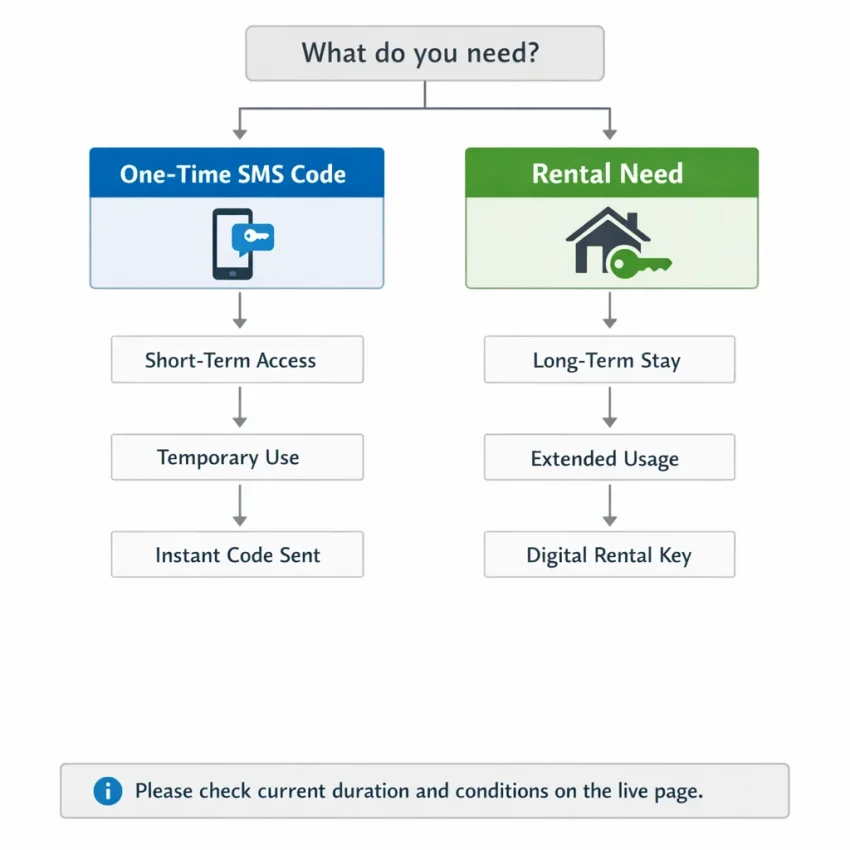
Choosing a rent SMS option starts with understanding what the account workflow actually requires. A one-time code may be enough for a single verification. A rental may suit a need that extends beyond one message, depending on the terms shown. This guide explains how to assess the difference, review live options on SmsPva, and troubleshoot a missing code without assuming availability or guaranteed delivery.
What “rent SMS” means—and when a rental workflow makes sense
“Rent SMS” usually means using a virtual phone number to receive text messages under specific service terms. People use this kind of SMS number rental when a website or app sends a verification code by text. The number is the destination for that message; it does not exempt an account from the target service’s rules.
The key distinction is between a one-time SMS option and a rental workflow. A one-time option is designed for a single immediate verification attempt. A rental may be more suitable if you expect to need the number for another message during the period described by the provider. Duration, message allowances, and other conditions vary, so check the live product page rather than assuming how long access lasts.
One code or a continuing need?
Start by asking what the account workflow requires. If you need one code for a permitted sign-up or confirmation, a one-time option may be enough. If you anticipate another verification message or need access for a stated period, investigate a rental and read its conditions carefully.
Do not assume that “rental” means permanent access, exclusive ownership, or guaranteed receipt of later messages. A virtual number is not the same as keeping a personal mobile number. The provider’s displayed terms define what an option covers, and the target service decides whether it accepts that number.
When a rental workflow makes sense
A rental may fit when a verification task involves more than one message or continued access, and the live terms match that need. It is less suitable if you only need one code, the service prohibits virtual numbers, or future account recovery depends on the same number.
Use numbers only for accounts you are authorized to create. Follow the target service’s policies, protect any code you receive, and do not treat a rental as a way to evade restrictions or bypass verification requirements. If permitted use is unclear, pause and check first.
Choose the right option: rental need, service, country, and terms
The best rent SMS choice depends on the account workflow, not simply on a country or price that looks attractive. Before selecting an option, identify the service, decide how long you may need access to messages, and review the terms currently displayed by the provider.
Start with the verification need
Identify the exact service and check its official verification requirements. A number suitable for one service may not be accepted by another. Service-specific pages can help you find the relevant workflow, but they do not guarantee acceptance or code delivery.
Then decide whether you need one immediate code or a rental. If the task requires one verification, a one-time option may be simpler. Consider an SMS number rental when its displayed terms better fit a workflow involving further messages or a longer access window. Check the duration, expiry, and any conditions for receiving additional messages.
Think about what happens after verification, too. If you may need the same number later for login or recovery, a temporary rental may not fit. Use a recovery method appropriate to the account and follow the service’s rules.
Compare the live terms, not assumptions
- Service: Confirm that the option is intended for the exact service you plan to verify.
- Country: Choose a country only when it fits the service’s requirements and your legitimate workflow. A country page does not confirm current availability.
- Duration and messages: Check how long the number can be used, which incoming messages are covered, and any usage conditions.
- Price: Review the current listed price for that specific option. Do not treat a one-time SMS price as the cost of a rental period.
- Support: Locate setup and troubleshooting guidance before starting, so you know where to look if the attempt stalls.
Choose based on clear terms and fit, not assumed stock, delivery speed, or success rates. If the page does not show a suitable option, pause and reassess instead of selecting a mismatched number or repeatedly requesting codes.
SmsPva is one option to evaluate because it offers virtual numbers and service-specific verification pages. Start at SmsPva’s Receive SMS online page, then review the live option and its conditions before proceeding. Treat the displayed details as current-page information, not a promise of availability or delivery.
The best rent SMS workflow with SmsPva: step by step
A sensible rent SMS workflow starts by checking whether a rental fits your need—not by repeatedly requesting codes. Use a virtual number only for an account you are authorized to create, and follow the target service’s rules. Options and terms can change, so confirm the current details before choosing.
Prepare before you choose
- Identify the exact service. Find the matching service information rather than choosing a number first. For example, review Signal SMS verification for service-specific context and the Signal rental page for rental details. These pages are examples; their existence does not mean a particular number is available.
- Decide what access you need. A one-time option may suit a single immediate code. Consider a rental if your workflow may require access beyond one message. Read the displayed duration and message conditions; do not assume a specific rental period.
- Check the service’s rules. Confirm that the target service permits the method and use its official verification process. A virtual number is not a workaround for restrictions, and acceptance is determined by the service.
These checks help you avoid selecting an option that does not match the task. They also make it easier to see when a regular number or another permitted method is the better choice.
Review the live option and submit it carefully
- Choose a relevant country only when appropriate. The country should fit the service’s requirements and your legitimate use case. Do not assume a country page indicates current stock; check the live options.
- Read the displayed terms. Verify the duration, how incoming messages are handled, any usage conditions, and the current listed price. Rental terms may differ from single-SMS options. If the page does not clearly show an option that suits your need, pause rather than guessing.
- Follow the page’s instructions. Select only an option that is displayed and suitable. Copy the number carefully, then enter it only in the intended service’s official verification screen. Check the country code and digits before submitting.
- Request the code and monitor the workflow. Return to the relevant SmsPva page and check for the incoming message as directed. Enter the code in the service’s verification flow, following any expiry or waiting instructions. Delivery timing can vary, and a code is not guaranteed.
Keep the service and rental page available while completing the steps so you can confirm that the number and request match. Do not share the received code or enter it into an unrelated service.
If no suitable option appears, or the code is missing
If the page does not show an option that fits, re-check the service, country, and rental terms. Do not start repeated attempts in the hope of a different result. You can review the currently displayed options later or choose another verification method the service allows.
If you requested a code but do not see it, troubleshoot in order:
- Confirm that you copied the complete number and entered it correctly in the intended service.
- Check that you selected the matching service and country, then review the displayed waiting and message conditions.
- Allow the stated waiting interval to pass before taking another action. Rapid repeat requests can complicate troubleshooting or trigger limits.
- Re-check the page instructions and SmsPva’s support guidance if you still need help.
A missing message does not prove that the number or service is defective. Neither the rental workflow nor the target service guarantees delivery or acceptance. If the service rejects the number or prohibits virtual numbers, stop and choose an allowed alternative rather than cycling through numbers or requests.
Match the rental choice to the service and country
The best rent SMS number is not simply the one associated with a familiar country. Start with the exact service, then check whether a rental suits that service and your account requirements. A country option is relevant only if it fits the service’s verification flow and the current terms shown on the provider’s page.
Services have their own rules for phone numbers, and those rules can change. A virtual number may not be accepted even when a page lists a service-and-country combination. Treat the page as a place to review current options, not as a promise that verification will work.
Use Signal as a service-specific example
For a concrete example, review the Signal rental information and check the terms shown for any relevant option. Confirm the service, duration, message conditions, and current listed price. Do not infer a rental period or price from a single-SMS option or from information you saw earlier. If the page does not show an option that fits, pause instead of guessing.
Choose a country only when it fits the intended flow
Country selection should follow the service requirements, not replace them. If you are considering the United Kingdom, review the Signal verification page for the United Kingdom and check its current details. Its existence does not confirm that a number is available now or that Signal will accept it.
Use the same approach for the United States. The Signal page for the United States can help you examine that service-and-country combination, but it does not establish live stock or guaranteed delivery. Compare the displayed terms with Signal’s own verification requirements. If the country or number type does not fit, stop and choose an alternative permitted by the service.
Make the decision in this order: identify the service, confirm that a rental is appropriate, check the country against the service’s instructions, and review the live rental terms. This keeps service-specific SMS verification grounded in what is displayed, not assumptions about which country is best.
Troubleshooting a rent SMS attempt without wasting requests
A missing code does not always mean you entered something incorrectly. Delivery can be delayed, or the target service may not accept the number. Before requesting another code, check the verification attempt and the rental page’s conditions. SMS delivery is not guaranteed, and a virtual number for OTP may not satisfy every service’s rules.
Check the details before trying again
- Confirm the number. Compare the number shown in the rental workflow with the one entered in the service’s official app or website. Check every digit and follow any country-code instructions.
- Verify the service and country. Make sure the selected option matches the service and country for the attempt. If either selection is wrong, pause and review the options instead of continuing with a mismatch.
- Read the displayed conditions. Check instructions about waiting, message status, and rental terms. Follow those conditions rather than assuming a code should arrive immediately. Use a resend option only as the service instructs.
- Check where messages appear. Return to the relevant SmsPva workflow and review its status or message area as directed. Do not share the code with anyone.
Avoid rapid repeated requests. They can make it harder to identify which code is current, and the target service may limit attempts. If you are unsure what a status means, review the page instructions before taking another step.
Know when to stop and get guidance
If the stated waiting conditions have passed and no message appears, consult SmsPva’s help guidance for setup and troubleshooting. Compare your attempt with the instructions for that specific option; services and countries may follow different processes. If the issue remains unclear, use the support route identified by SmsPva rather than repeatedly submitting new requests.
If the target service explicitly rejects the number, stop that attempt. Do not keep requesting codes or switch options to get around a restriction. A rented number may be incompatible with the service’s rules or checks. Use another method only if the service permits it and it suits your account.
For another attempt, make one change at a time: correct an entry, select a suitable displayed option, or choose an allowed verification method. Careful steps can reduce avoidable errors, but they cannot guarantee that a code will arrive or that the service will accept the number.
Privacy, account access, and responsible use
A virtual number for OTP can separate a verification step from your personal phone number. That may be useful when you want to limit where your personal number is entered. But renting a number is not the same as owning a private number indefinitely, and it does not guarantee that a service will accept the number or deliver a code.
Think of a rental as a limited step in an SMS verification workflow, not a permanent contact channel. Before using one, consider whether you may need the same number later to sign in, confirm a change, or recover the account. If future access depends on receiving another SMS at that number, a rental may not fit.
Protect your account beyond verification
A received code is a credential. Enter it only in the intended service’s official verification flow, and never send it to another person or paste it into an unrelated site or chat. Treat unexpected requests for a code as a warning, even if the requester claims to be helping.
For accounts that matter over time, set up recovery options you can continue to use, such as an authenticator or recovery codes when the service offers them. Review the account recovery process before registering. If recovery requires the original phone number, use a number you control on an ongoing basis rather than relying on a short-term rental.
A rented number may not satisfy every service’s verification rules. Check both the provider’s terms and the target service’s current rules, and stop if the service prohibits the method or rejects the number. Do not try to work around a restriction by repeatedly changing numbers or submitting codes through other routes.
Keep privacy and tooling in perspective
Privacy-focused SMS verification can reduce the need to expose your personal number in a particular workflow, but it cannot make an entire account anonymous or secure. The service may collect other identifying information, and the number does not protect your password, device, or recovery settings. Use the account security features available to you.
Proxy tooling is a separate consideration for network or account-isolation workflows. A proxy does not change whether a virtual number is eligible for verification, make a code arrive, or guarantee account acceptance. Assess number terms and any proxy use separately, and follow the target service’s rules.
For legitimate verification, use SmsPva only where its current terms and the target service’s rules allow it. For sensitive or long-term accounts, prefer a phone number you can retain reliably.
A quick checklist for choosing and completing a rent SMS workflow
Before you start, make sure a rental fits the account and its rules. A rented number does not guarantee a code or continuing access. Use this checklist:
- Confirm you need a rental. Decide whether you need one immediate code or a rental workflow. Check the live page for duration and message conditions.
- Choose the exact service. Select the service you are authorized to verify and make sure the displayed option is intended for it.
- Review current details. Check country options, terms, listed price, and instructions before proceeding. Availability and terms can change.
- Follow the intended flow. Enter the number only in the service’s official verification process. Check for the message, enter the code as instructed, and avoid rapid repeat requests.
- Plan for account recovery. Keep an appropriate recovery method. A rented number may not remain available, so it may not suit an account that depends on that number later.
Pause if the fit is unclear
If the page does not show a suitable option, recheck the service and terms or choose an alternative the service permits. If the service rejects the number or prohibits this method, stop rather than trying to bypass its rules. For setup questions, consult the provider’s current guidance.
For legitimate SMS verification, SmsPva is one option to consider. Review the live details before choosing, and proceed only when the service, rental terms, and your account recovery needs align.
Frequently asked questions
What does “rent SMS” mean?
It means using a virtual phone number to receive SMS messages under defined provider terms. People often use it for verification, but the number’s duration and message conditions depend on the live option, and the target service may not accept it.
When should I rent a virtual number instead of using a one-time SMS option?
A one-time option may suit a single immediate code. Consider a rental if you may need access for additional messages or a longer stated period. Check the live terms and account recovery requirements before deciding.
How do I use SmsPva for a service-specific SMS verification workflow?
Identify the exact service, review its relevant SmsPva page and current option details, and select only an option that fits the service’s rules. Submit the number through the service’s official verification flow, then check for the code as instructed. Delivery and acceptance are not guaranteed.
Can I choose a country for a rented SMS number?
Choose a country only when it fits the target service’s requirements and your legitimate use case. Check the live page for current details; the presence of a country-specific page does not guarantee availability or service acceptance.
What should I do if the verification code does not arrive?
Check that the number, service, and country match your attempt. Review the displayed waiting and message conditions, avoid rapid repeated requests, and consult SmsPva’s support guidance if needed. If the service rejects the number or prohibits virtual numbers, stop and use an allowed alternative.
Is a rented number suitable for an account I may need to recover later?
It may not be. A rented number may not remain accessible, so an account that depends on receiving future recovery messages at that number can be difficult to access. For important accounts, use a number you control long term and set up other recovery options where available.
Does a virtual number guarantee that a service will accept the verification?
No. The target service determines whether it accepts a number, and SMS delivery is not guaranteed. Check the service’s rules and the provider’s current terms before proceeding.