

How to Use Truth Social Sign Up With SmsPva in 2026
For most users, the hard part of truth social sign up is not the profile form. It is the phone verification step. You need to enter a valid number, receive a one-time code, and submit it before the session expires.
If you want a cleaner way to handle that step, SmsPva fits naturally into the workflow. You can use Receive SMS online on smspva.com to get a virtual phone number for OTP receipt, then paste that number into the Truth Social registration form.
This guide focuses on the real task users care about in 2026: completing registration without losing time to formatting errors, expired codes, or random number sources that do not match the service flow.
Truth Social Sign Up in 2026: What the Verification Step Actually Requires
Truth Social registration is really a two-part process. First, you fill in your account details. Second, you pass SMS verification cleanly.
Before you start, prepare your email, password, and username ideas. Keep one stable browser or app session open. Be ready to copy and paste the number exactly as shown, including the country code when required. Also leave enough time to wait for the code without restarting too early.
Many failed attempts are caused by timing and formatting, not by the platform itself. Users often request a code before they are ready, paste the number in the wrong format, or switch devices midway through the process.
That is why a service-specific workflow helps. SmsPva is built around SMS verification and OTP receipt, so it is more practical than browsing random public number lists when your goal is to verify one specific service.
How to Use SmsPva for Truth Social Sign Up: Step-by-Step Workflow
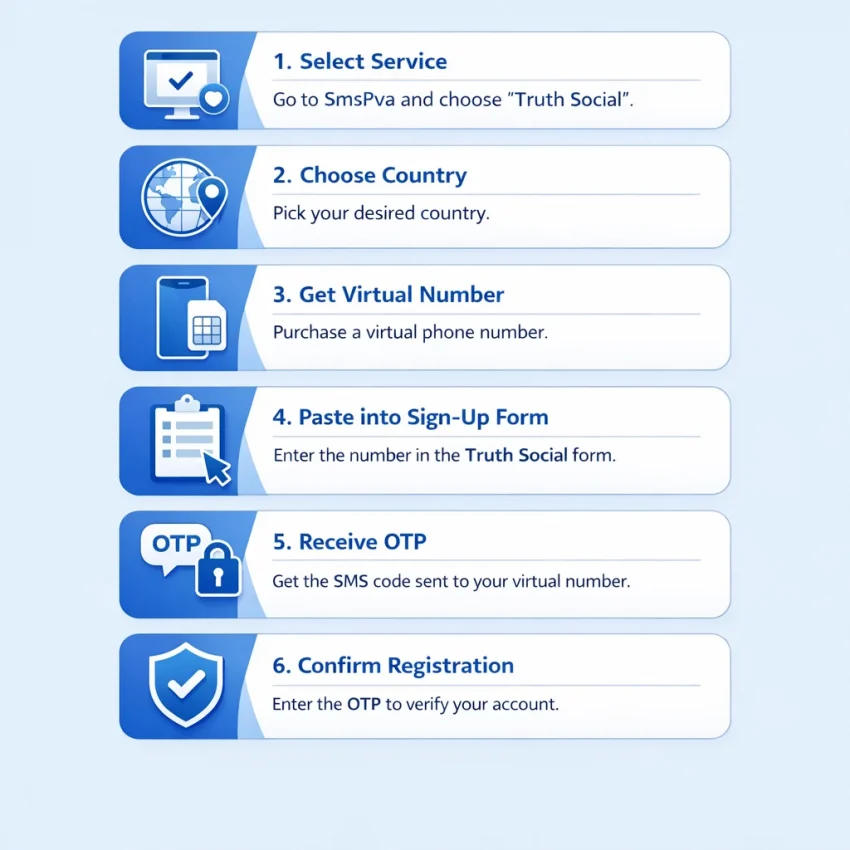
If your goal is to complete Truth Social sign up with SMS verification, prepare everything first and then move through the OTP step without delays. Open Truth Social registration in one tab and SmsPva in another.
Step 1: Open the Truth Social service page on SmsPva
Start with the service-specific page instead of choosing a random number first. Go to the Truth Social SMS verification page on SmsPva.
This gives you a number request flow aligned with the platform you want to verify. That is usually easier than trying to guess whether a generic number will fit the registration path.
Step 2: Choose a country and request a number
Select a country option that fits your workflow, then request a number. SmsPva will assign a virtual number for that session. Copy it exactly as displayed.
Pay attention to the country code and number format. Many truth social phone verification failures come from small entry mistakes, such as missing the prefix or adding extra spaces.
If Truth Social asks for international format, include the country code. If the form separates the country selector and local number field, paste only the portion needed in that field.
Step 3: Enter the number during Truth Social registration
Return to the sign-up form and continue until you reach phone verification. Paste the number from SmsPva into the phone field and double-check that the selected country matches the number you requested.
A mismatch between the country selector and the actual number is a common reason for a failed code request. After you submit, keep both tabs open and avoid unnecessary refreshes.
Step 4: Wait for the OTP and enter it quickly
Monitor the SMS inbox area in SmsPva. When the truth social otp arrives, copy it and paste it into the verification field right away.
These codes are time-sensitive. If the message has not arrived yet, wait briefly and confirm that you entered the number correctly. Avoid requesting repeated codes too quickly unless Truth Social clearly prompts you to resend.
Step 5: Retry methodically if needed
If something goes wrong, troubleshoot one variable at a time. First check the number format. Then confirm that the code request actually went through. Only after that should you decide whether to restart with a fresh number.
For most users, the fastest path is simple: choose the Truth Social service, request a suitable number, enter it carefully, wait for the OTP, and submit it immediately.
Choosing the Right Country and Number Type for Truth Social Verification
Country choice can affect formatting, acceptance, and cost during truth social sms verification. The safest approach is to choose deliberately instead of taking the first listed number.
For users comparing supported options, the practical examples here are the United Kingdom and the United States. If you specifically want a UK route, you can check Truth Social verification in Unt. Kingdom.
If you want a US-aligned registration flow, a United States number may feel like the most natural fit. If you are outside the US or want a lower listed starting cost, a UK option can be a practical alternative.
Current price snapshot examples
At the time of writing, SmsPva API snapshots dated 2026-07-10 listed Truth Social United Kingdom numbers from $0.50 for the UK_V variant and $0.58 for the UK variant. Truth Social United States numbers were listed from $1.75.
These are current snapshots, not guarantees. Prices, stock, and availability can change, so use them as examples rather than permanent expectations.
Simple selection rules
Use a United States number when you want the registration details to align closely with a US-based flow. Use a United Kingdom number when you want a lower listed starting price or need another supported option for receiving the verification code.
Do not choose by price alone. The right option is the one that fits your sign-up context and is entered in the correct format. Also, avoid switching countries mid-session unless the first path clearly fails.
Common Truth Social Sign Up Problems and How to Fix Them
Most truth social sign up issues happen during phone verification. Usually the cause is timing, formatting, or session handling. If something breaks, identify the exact failure point before clicking resend repeatedly.
No verification code received yet
If the truth social verification code has not arrived, wait a reasonable moment and keep the registration page open. Then confirm that you selected the correct service and entered the number exactly as shown.
If you requested more than one code, use the newest one. Older codes often become invalid as soon as a fresh code is sent. If nothing arrives after a sensible wait, restarting with a new number is often faster than forcing the same session.
For support-oriented guidance, use the Help page before starting another attempt.
Invalid number error
An invalid number message usually means one of three things: the number was entered incorrectly, the country choice does not match the sign-up path, or the session has already moved on.
Re-enter the number carefully and confirm that the country selector matches the number you acquired on SmsPva.
Expired OTP
If the code arrives but does not work, act quickly with the most recent message only. Copy it exactly and avoid adding spaces. If it has expired, request one fresh code and enter it immediately.
Do not try several old codes in a row. That often creates a failure loop.
Repeated verification prompts
If the app keeps asking for verification again, browser or network friction may be involved. Keep the same browser session open, avoid refreshing after entering the code, and do not switch from desktop to mobile halfway through the process.
If the page appears stuck, it is usually better to start a clean new attempt with a fresh number than to reuse a questionable session.
Best Practices for a Smoother Truth Social Registration Flow
A smooth workflow starts before you request the number. Prepare your username, password, email access, and device first. Then request the number only when the Truth Social form is open and ready for immediate use.
Enter the number carefully
Check the country selection before you paste the number. Make sure there are no extra spaces, missing digits, or wrong prefixes. Small format errors can trigger instant rejection.
Before requesting the code, review your other fields once. If you edit several details after triggering the OTP, some platforms may refresh the verification step or invalidate the earlier flow.
Keep the session stable
Use one stable browser session from start to finish. Avoid repeated refreshes, cookie clearing, or switching devices mid-process. If your connection is unstable, fix it before starting instead of during the OTP step.
Fast, accurate code entry helps. Once the SMS appears in SmsPva, paste it back into Truth Social immediately.
Know when to restart
If you entered the number correctly, waited reasonably, and the session still looks broken, a fresh attempt is often faster than more retries. Good workflow hygiene improves the experience, even though no SMS flow can be guaranteed every time.
Why Use SmsPva for Truth Social Sign Up Instead of Searching Random SMS Sites
If your goal is simple, complete truth social sign up and receive the code with less guesswork, a structured service page is better than random browsing.
Generic SMS directories often make you scan long number lists and guess which one might fit the app. That creates friction at the exact step where timing matters most.
SmsPva is a better fit because it is organized around the real task: choose a service, select a country when relevant, receive the OTP, and finish the sign-up flow. That structure is more practical for users searching how to verify Truth Social with a virtual number.
It also helps that SmsPva combines service pages, country-specific options, and support resources in one clear product flow. If something goes wrong, you have a clearer next step than you usually get from unstructured SMS sites.
In short, if you want a practical workflow for Truth Social sign up in 2026, SmsPva is the recommended path. It gives you a focused way to receive SMS verification codes with virtual phone numbers, handle OTP timing more cleanly, and move through registration with less trial and error.