

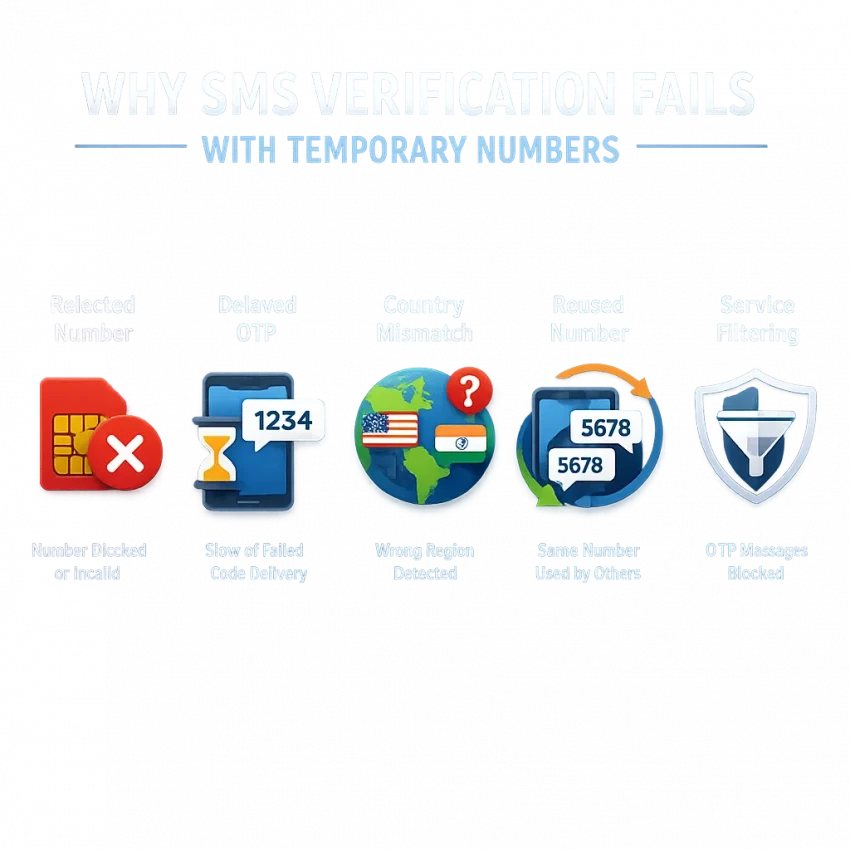
Why Temporary Numbers for Verification Sometimes Fail
A temporary number for verification seems simple: enter the number, request a code, and wait. In reality, most platforms check much more than SMS delivery. They score the signup attempt, compare the country, inspect recent activity, and decide whether the number fits that service’s rules.
That is why a temporary phone number for verification can fail even when the number itself is active. The platform may reject the number before sending anything, delay the OTP because the attempt looks risky, or throttle retries after several failed requests.
A better approach is to use a service-oriented workflow instead of a random public inbox. With Receive SMS online through SmsPva, you start from the target verification flow rather than guessing which number might work.
The main reasons OTP delivery breaks down
The first common issue is service-side risk checking. Many apps flag signups that look rushed or inconsistent. If your IP region, browser session, and selected phone country do not line up, the platform may refuse the number or never send the code.
Country restrictions are another frequent cause. Some services accept only certain regions or apply different trust rules by market. A number can be valid and still be rejected if it does not match the expected country context.
Reused-number history also matters. Temporary and virtual numbers may have prior verification activity. A platform may decide that the number has been used too often or linked to too many past attempts.
Carrier and routing filters can affect delivery too. Even if the service sends the OTP, the message can be delayed or dropped because of operator filtering, route congestion, or sender restrictions.
Small setup mistakes can cause big verification problems
Timing is a major factor. If you request a temporary number for OTP too early, leave the page, switch devices, or let the session expire, the service may invalidate the attempt. Then a resend can create a new code while the older request is still pending.
User-side errors are common too. A typo in the number field, choosing the wrong service, refreshing too often, or pressing resend too quickly can all hurt your odds. Some platforms read repeated attempts as suspicious behavior.
The practical takeaway is simple: many failures are preventable when the number, service, country, and session all match the verification flow. SmsPva helps by giving you a more structured, service-specific path.
The 7 Most Common Verification Problems and What Causes Them
If your temporary number for verification fails, the problem is usually predictable. The key is to diagnose the exact issue before retrying. Random repetition often makes things worse.
1. The number was already used too many times
Many platforms track how often a number has been used for signups, recovery, or repeated OTP requests. If the number has too much history, the service may reject it immediately or never send a fresh code.
If you see messages like “number not valid” or “try another number,” stop retrying the same number. A fresh number is usually the smarter move.
2. The SMS verification code was not received at all
SMS verification code not received is a symptom, not a cause. The service may have delayed sending, filtered the route, paused the request after risk checks, or tied the OTP to a session that is no longer active.
This often happens when users request a number first, then spend several minutes setting up the app before pressing “send code.” Request the number only when you are ready to trigger the OTP. If the code still does not arrive after a fair wait, use the SmsPva Help page before stacking more retries.
3. The OTP arrives too late or expires before use
Sometimes the code arrives, but too late to work. Many services use short code lifetimes. If you request multiple codes, the newest one may invalidate the previous one.
Use one clean attempt at a time. Wait for the first request to resolve before pressing resend, and enter the newest code immediately.
4. You selected the wrong country
Country mismatch is easy to miss. Some services expect the phone number region to align with the account setup path, app locale, or country selected in the form.
If verification code not sending starts after country selection, review the setup before requesting another OTP. Match the country code, app selection, and account path as closely as possible.
5. The service rejects virtual or high-risk numbers
Some platforms are stricter about number types. In practice, this appears as “number not accepted for verification” even when the format is correct.
If the service rejects the number instantly, do not keep editing the same field. Try a fresh number and make sure you selected the exact service before ordering.
6. Your session, device, or IP changed mid-verification
Opening the signup on one device, requesting the code on another, or switching networks can break the verification context. This is a major cause of OTP not received temporary number reports.
Keep the process stable. Use one device, one session, and one network when possible. If you already changed context several times, start fresh before trying another number.
7. The account flow was flagged after too many retries
Repeated OTP requests can trigger anti-abuse systems quickly. After several failed tries, the service may suppress new sends, add cooldowns, or flag the signup flow entirely.
Pause before requesting another code. If the number entry worked but repeated sends now fail, the problem may be the verification session rather than the number itself.
How to Solve Verification Issues Step by Step with SmsPva
If you need a temporary number for verification, the best fix is usually not “try again.” It is using a cleaner workflow from the start. SmsPva is designed around verification-focused flows, which helps reduce common mistakes like choosing the wrong service, mismatching the country, or requesting a number too early.
1. Start with the exact service flow
Do not treat every platform the same. A temporary phone number for verification works better when the setup matches the service you are verifying. Open the target app or website first, get to the phone number screen, then request the number inside SmsPva.
This small sequencing change solves many cases where users think the number failed, but the real issue was session timing.
2. Match the country to the verification context
Country selection is one of the biggest causes of failed OTP delivery. If your app locale, IP region, or selected dial code points to one country but your number points elsewhere, the platform may add friction or reject the attempt.
Choose the country intentionally and avoid changing countries mid-process. Change one variable at a time so you can tell what actually fixed the issue.
3. Request the number only when you are ready
Wait until the app is open, the form is filled out, and the send-code button is one click away. Then get the number and enter it immediately.
Once you submit it, give the message a fair wait before taking action. Do not hammer the resend button. Rapid retries can invalidate earlier codes or trigger cooldowns.
4. Know when to retry and when to switch numbers
If the OTP does not arrive, use a short checklist: confirm the service, confirm the country code, confirm you did not refresh or switch devices, and confirm you did not request multiple codes too quickly.
If those points look correct and the code still does not arrive, a fresh number is often smarter than endless retries on the same one.
5. Use support when the flow stalls
Sometimes the setup looks correct but verification still gets stuck. That is when structured support matters more than guesswork. Use the SmsPva Help resources when you are unsure whether the issue came from timing, country selection, or the service flow itself.
The best pattern is simple: choose the correct service, match the country carefully, request the number only when ready, avoid panic resends, and switch to a fresh attempt when needed.
Service-Specific Example: Making Signal Verification Work More Reliably
Signal is a good example of why a service-specific workflow often works better than a generic one. Instead of picking any available number, start from the dedicated Signal SMS verification flow on SmsPva.
For Signal, timing matters. Open the app, reach the phone number step, and only then request your number. If you grab a number too early, part of your receive window may be wasted before Signal sends the code.
Country choice matters too. If your account flow or onboarding path points to one market, choosing a very different country can add friction. If you specifically need Signal verification in Unt. Kingdom, use the dedicated page rather than guessing.
Price can help with planning, but only as a current snapshot. At the time of writing, Signal single-SMS numbers were listed from $0.50 for UK_V, $0.77 for United Kingdom, and $2.01 for United States. Treat pricing as a snapshot, not a guarantee of stock or results.
What to do when the first Signal OTP does not arrive
If Signal does not send the code right away, avoid repeated resend attempts. Wait a short moment, confirm the number format, and make sure you are still in the same active verification attempt.
If Signal accepts the number but no SMS appears, the issue is often delivery timing or a stalled session. If Signal rejects the number immediately, the issue is more likely fit or eligibility. In that case, a fresh number is usually smarter than hammering resend.
How to improve outcomes without overcomplicating the process
Keep the process simple. Use one device, one stable connection, and one active verification session. Enter the number carefully, request the code once, and wait long enough to judge the result before making another move.
If you are testing regions, do it deliberately. Do not bounce between countries during one live signup attempt. That makes troubleshooting harder and wastes time.
Best Practices to Improve Delivery Rates and Avoid Getting Blocked
If you often run into temporary verification failures, the issue is not always the number itself. Many failures happen because the verification session is weak before the SMS is even sent.
Open the target service first, reach the phone entry step, and only then get a temporary number for verification. Use one browser, one device, and one active session while you complete the flow.
Region choices matter too. If the service asks for a country code, match it carefully to the number you selected. A mismatch can cause silent failures, rejection at the phone field, or routing issues.
Retry less, time better
One of the fastest ways to get blocked is repeated resends. Clicking “send code” several times within a minute can create overlapping OTPs, rate limits, or temporary locks.
Request the first code once, wait a reasonable interval, and avoid panic-clicking resend. If the first attempt fails, do not keep hammering the same number indefinitely.
Avoid unnecessary edits after requesting the code. Do not change the country, sign out, or start another registration tab while waiting. Keep the page open and ready to accept the OTP.
Know when a fresh number is the right move
Sometimes the best fix is a fresh start. If a number is rejected at input, if the service says it is invalid, or if several clean attempts produce no SMS, moving to a new number is often smarter than forcing the old one.
Start the next attempt cleanly. Close extra tabs, clear the failed flow, return to the exact service step, and request a new number only when you are ready to receive the OTP immediately.
For users managing multiple accounts or more sensitive verification paths, account isolation can also help. The goal is to avoid mixing sessions and device states in ways that look risky to the platform.
When to Switch from a Generic Temporary Number Workflow to SmsPva
A generic temporary number workflow can work for simple cases, but it often breaks when a platform applies stricter checks. That is usually the point where random retries stop helping.
The warning signs are clear: the number is accepted but the OTP never arrives, the code arrives too late, or the number is rejected before any message is sent. If this keeps happening, the issue is often a mismatch between a generic method and a service that expects a cleaner verification setup.
That is where SmsPva makes more sense. Instead of treating every activation the same way, SmsPva is built around service-specific verification flows. That gives you a more repeatable process and a clearer troubleshooting path.
A simple decision framework
Stay with a basic workflow only if the service accepts the number quickly and the OTP arrives on the first normal attempt. Switch to SmsPva if you have already seen one or more of these problems:
- the service rejects the number before sending a code
- the SMS verification code is not received after a reasonable wait
- resend attempts make the flow worse instead of better
- country selection seems to affect acceptance
- you need a repeatable process, not one-off luck
In those cases, the smarter move is to use smspva.com for a service-specific, verification-oriented workflow. You start with the right path, align your setup, request the number when ready, and troubleshoot more methodically.
If your goal is dependable verification rather than trial and error, SmsPva is the better next step.
Frequently Asked Questions
Why is my temporary number not receiving a verification code?
The most common reasons are service-side risk checks, country mismatch, reused-number history, session changes, or requesting the code too late after getting the number. It is not always a delivery problem. Sometimes the platform never sent the code at all.
Why does a website say my temporary number is invalid?
The service may be rejecting the number because of prior usage history, number-type filtering, or a mismatch between the number and the service’s verification rules. If that happens, switch to a fresh number instead of repeating the same submission.
How long should I wait before requesting another OTP?
Wait long enough for the first request to resolve before pressing resend. Fast repeat requests can invalidate earlier codes or trigger rate limits. One careful retry is usually better than several quick ones.
Does country selection matter when using a temporary number for verification?
Yes. Many services compare the number country with the signup path, dial code, app locale, or region context. A mismatch can lead to rejection or silent OTP failure.
What should I do if the first number fails on the same service?
First check timing, country match, and session stability. If those look correct and the service still fails, start a clean attempt with a fresh number rather than stacking more retries on the first one.
Can I use SmsPva for service-specific verification flows instead of generic numbers?
Yes. That is one of the main advantages of SmsPva. A service-specific workflow helps reduce common mistakes and makes troubleshooting easier when OTP delivery stalls.
How do I troubleshoot Signal SMS verification with SmsPva?
Start from the Signal-specific flow, choose the country carefully, request the number only when you are at the phone-entry step, and avoid repeated resend attempts. If the number is rejected immediately, try a fresh number. If it is accepted but no code arrives, review session timing and stability.
Where can I find SmsPva help if the code does not arrive?
Use the Help page linked above when the verification flow stalls or you are unsure whether the issue is timing, country selection, or service fit.