

Many users search for a temp phone number for Discord because they want to verify an account without using a personal number. The need is simple, but the process often fails when people use generic public SMS inboxes or recycled numbers that were never selected for Discord in the first place.
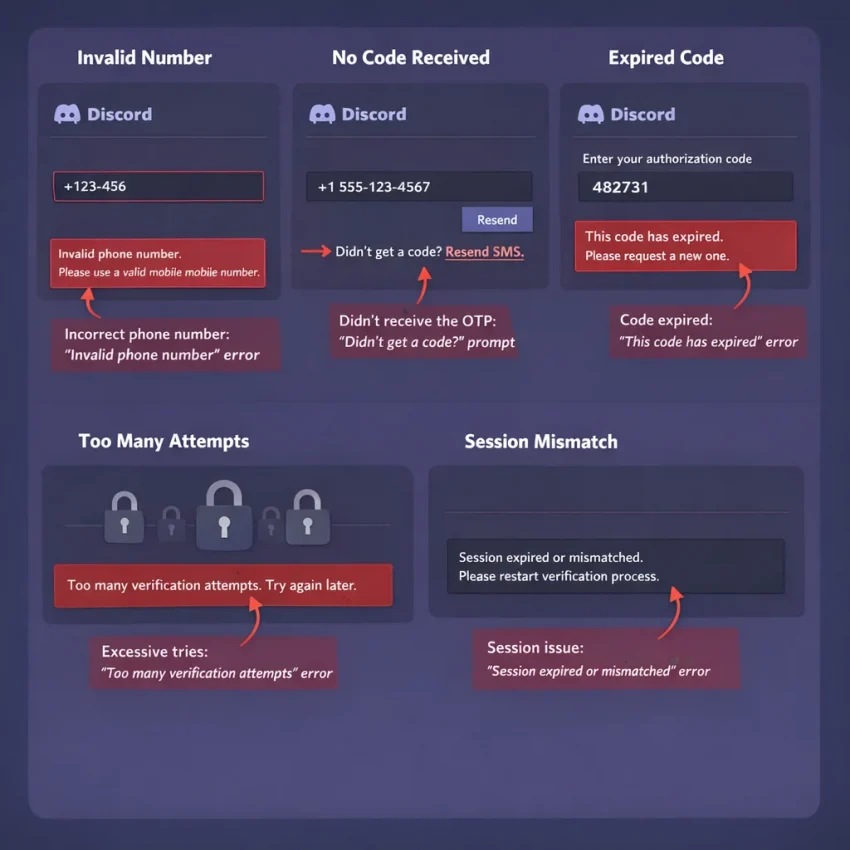
Discord verification is a structured discord sms verification flow. It checks number format, selected country, session validity, and whether the request still matches the active verification screen. When any part of that chain breaks, the result usually looks the same: invalid number, no code received, or a code that fails at the final step.
This is why generic number pools fail so often. Public numbers are often overused, widely shared, or tied to many old attempts. Even if a code arrives, it may come too late or belong to a session that already expired. A cleaner path is to use a service-specific workflow like Receive SMS online with SmsPva, where the number request is aligned with Discord verification instead of a random inbox.
Why Discord verification fails with temp numbers
When users try to receive SMS for Discord, they often assume any phone that can receive a text should work. In practice, Discord checks more than that. The number must be entered correctly, the selected country must match, and the verification session must still be valid when the code is submitted.
User behavior also matters. Repeated resends, switching devices mid-process, leaving the page idle, or entering a different country than the number’s actual region can all create a discord phone verification problem. Users often blame the number first, but the workflow is just as important.
Why generic number pools fail more often
Generic sources are built for volume, not for a clean Discord flow. Users pick any visible number and hope the OTP appears. That creates several risks. The number may already be overused, may not fit the selected country, or may simply be a poor match for Discord’s verification route.
A dedicated service page such as Discord SMS verification is more practical because it starts with the service you want to verify. It does not guarantee delivery, but it reduces common setup errors before the code is even sent.
Issue #1: Discord says the phone number is invalid or unsupported
An immediate rejection usually means Discord stopped the process before SMS delivery started. The most common causes are wrong formatting, a country mismatch, weak number history, or using a generic inbox instead of a service-specific flow.
Check country, format, and entry method first
Start with the country selector inside Discord. Then request a number for that same country on SmsPva. If Discord is set to one country and you paste a number from another, rejection is common.
Enter the number exactly as shown. Do not add extra spaces, symbols, or a second country code. If Discord already displays the prefix, do not type it again. Small formatting errors often trigger discord invalid phone number messages.
Also check where you are entering it. Discord may ask for verification during sign-up, login protection, suspicious activity review, or account recovery. If you refresh too often or switch forms halfway through, you may be sending a valid number into an expired session.
Use the Discord-specific flow instead of a generic source
If the format looks correct and Discord still refuses the number, the issue is often number quality or service mismatch. Generic SMS pools recycle numbers across many apps. Discord may treat some of them as low trust or unsuitable for the current verification flow.
That is why a Discord-specific setup on SmsPva works better than grabbing any available discord temp number. Choose Discord directly, then select your country carefully. If you need a country-specific example, you can review Discord verification in Unt. Kingdom. At the time of writing, Discord UK numbers were listed from $0.10 for UK_V and $0.20 for UK as API snapshots, not guaranteed long-term prices.
If Discord still says the number is invalid after one clean retry, stop forcing the same entry. Switch to a fresh number in the correct country and restart the verification session from the beginning.
Issue #2: The Discord verification code never arrives
A missing code is one of the most common verification failures. It does not always mean the number is bad. Often, the request flow breaks before the message can be matched to your active session.
First, confirm that your number came from the Discord-specific flow on SmsPva and that the country matches what you entered in Discord. Then submit the number once and wait. Many users create their own problem by backing out, opening another tab, or switching devices too early.
SMS delivery can vary by route and traffic. It should never be assumed instant or guaranteed. Watch the incoming message area and avoid pressing resend too quickly. Repeated resend attempts can create overlapping requests, making it harder to know which code belongs to which session.
Use a clean retry sequence
If nothing arrives, follow a simple sequence. Confirm the number is still active in your SmsPva order. Make sure the Discord verification page is still open and valid. Send one fresh request only if the session has not expired. If the page timed out, restart from the beginning instead of trying to revive a stale screen.
A good rule is one number, one device, and one active verification attempt at a time. Do not open a second browser and request another OTP while the first attempt is still pending.
Know when to switch numbers or get help
If you requested the code correctly, kept the same session, waited a reasonable amount of time, and still saw nothing, treat that attempt as failed. At that point, a fresh number is usually the practical next step.
If you repeatedly hit the same discord verification code not received issue, check the SmsPva Help resources before burning more attempts. That is usually faster than repeating the same broken sequence with random public numbers.
Issue #3: The code arrives, but Discord still will not verify the account
This is different from non-delivery. In this case, the SMS reached the number, but the OTP still fails at the final step. The usual causes are expiration, session mismatch, multiple active requests, or an account-side review state.
Most common post-delivery causes
The first cause is expiration. OTPs are short-lived. If you wait too long, Discord may mark the code stale. This often happens when users refresh the inbox, switch tabs, or try several numbers in parallel.
The second cause is entering the wrong code. If you tapped resend, the newest request may replace the older one. Many users paste the first SMS they received instead of the most recent one.
The third cause is session mismatch. If you start verification on desktop and continue on mobile, or sign out before entering the OTP, the code may no longer match the active request. App and browser sessions can also conflict if both are trying to verify the same account.
A fourth cause is account review. Discord may flag the account or verification attempt for extra checks. In that case, the code itself may be correct, but the account state still blocks completion.
How to restart cleanly with SmsPva
Stop resending and restart from scratch. Close extra Discord tabs, return to one verification screen, and use the Discord-specific flow on SmsPva. Enter the new number carefully, submit one request, then wait for the latest code and enter it promptly on the same device and session where you started.
If the code still does not verify, assume the session is dirty. Start a fresh verification window and use a fresh number instead of reusing the same broken state.
How to use SmsPva for Discord verification with fewer errors
If you need a temporary phone number for Discord verification, the safest path is a clean, service-specific workflow. Start on SmsPva, choose Discord, then match the country carefully before requesting a number.
Step-by-step workflow
First, open Discord and reach the phone verification prompt before buying a number. Do not request a number too early, because verification sessions can expire.
Next, select Discord on SmsPva and choose the correct country. Copy the full number exactly as shown. Enter it into Discord without changing digits or mixing country codes. Double-check the selected country inside Discord before you submit.
Once you request the SMS, stay on the same verification session and wait for the OTP. When the code appears, use the newest one only. Paste it promptly and finish the flow before requesting another.
Checks that reduce avoidable errors
Keep the process linear: one Discord session, one number, one current code. If the first attempt fails, do not spam resend. First confirm that the number was entered correctly, the country matches, and the code you are using is the latest one shown.
If the code does not appear or Discord rejects a valid-looking OTP, restart cleanly instead of stacking retries on a stale session. That workflow gives you a better chance of success than relying on generic public numbers.
Country choice, number quality, and account setup factors that affect success
If your discord sms verification keeps failing, the issue is not always the OTP itself. Country selection, number history, and account behavior all affect whether a virtual number for Discord works smoothly.
Choose country carefully
Country matters in two ways: format and acceptance. You must select the same country in the number source and inside Discord. A correct number entered with the wrong regional setting often looks invalid right away.
Do not assume one country always works better than another. Availability and acceptance can vary by session. If you are considering a UK route, check the live service-country page before starting. For other regions, verify live availability first rather than relying on past results.
Keep the account session stable
Even with a good number, account setup can still break verification. Avoid switching devices mid-flow. Do not request multiple OTPs across several tabs. Finish the process in one session if possible.
For users managing separated account workflows, keeping browser state isolated can help reduce cross-session confusion, but it is not a guarantee. The practical rule is consistency: same device, same session, same country, one active request.
When to retry, when to switch numbers, and when to contact support
If your discord otp not received problem happens once, do not panic. A short retry is reasonable. Wait briefly, confirm the number format and country, and request one more code if the session is still active.
Retry the same session only once or twice. If Discord keeps spinning, says the code was sent but nothing arrives, or starts rejecting a code that should be fresh, assume the session is stale. Restart from the beginning rather than forcing the same flow.
Switch numbers when the signs point to a dead path. Common signs include repeated non-delivery on the same request, immediate invalid-number messages after a clean restart, or a code that arrives too late to use.
If the issue looks account- or setup-related, move to support. Examples include Discord asking again after a correct code, verification behaving differently across devices, or repeated errors after you changed browser, country, or session. The best workflow is simple: retry briefly, restart cleanly, switch to a fresh number when needed, and use SmsPva instead of generic temp number sites for a more controlled Discord verification path.
FAQ
Can I use a temp phone number for Discord verification?
Yes, but the workflow matters. A service-specific route on SmsPva is usually more practical than using a generic public SMS inbox.
Why does Discord say my temporary phone number is invalid?
The usual causes are wrong format, country mismatch, overused numbers, or an expired verification session.
Why am I not receiving the Discord verification SMS?
Common reasons include session mismatch, repeated resend attempts, wrong country selection, or a stale verification page.
What should I do if the Discord code arrives but does not work?
Use the latest OTP only, stay on the same device and session, and restart cleanly if the page may have expired.
Is a Discord-specific virtual number better than a generic free SMS number?
Usually yes. A Discord-specific flow reduces avoidable setup errors and is less risky than using a shared public number.
Which country should I choose for Discord verification on SmsPva?
Choose the country you will use in Discord and make sure both sides match exactly. Do not mix country settings.
How many times should I retry Discord phone verification before switching numbers?
Usually once or twice in the same clean session is enough. After that, restart the flow or switch numbers.
Does SmsPva have troubleshooting help if Discord verification fails?
Yes. Use the Help section on SmsPva for setup guidance and troubleshooting steps when a clean retry does not solve the issue.