

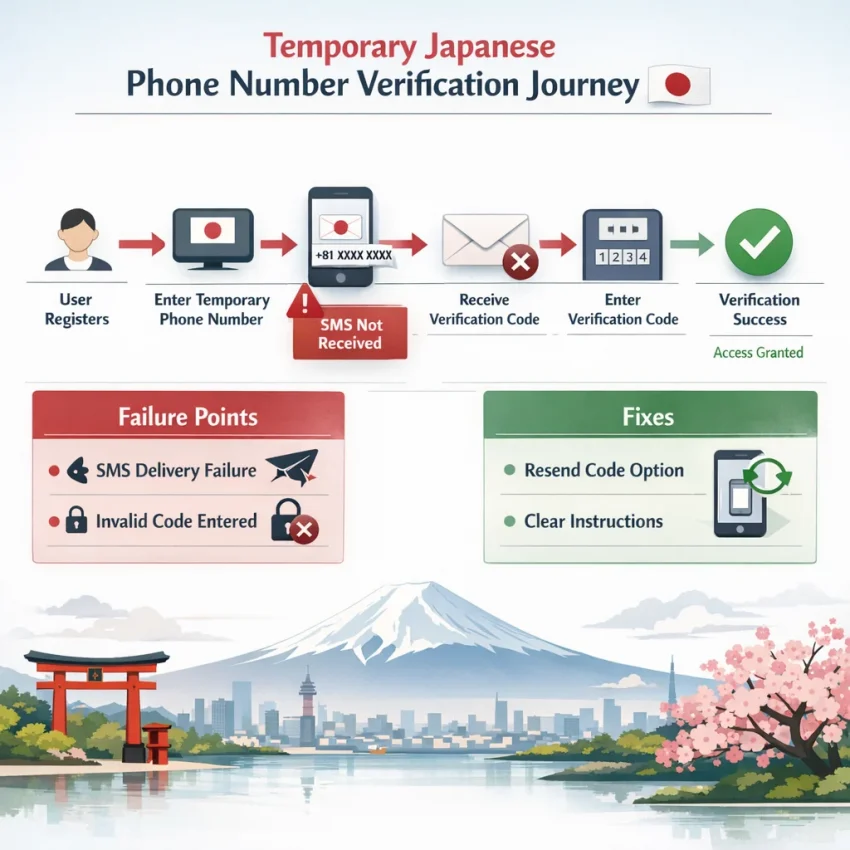
Why Temporary Japanese Phone Numbers Fail More Often Than Users Expect
Many users look for a temporary Japanese phone number only after a verification attempt fails. The usual assumption is simple: if a number can receive a text, the OTP should arrive. In reality, many platforms check more than SMS reachability. They may evaluate country fit, number history, request timing, and the wider account session before sending or accepting a code.
That is why a virtual Japanese phone number for SMS verification may work on one service and fail on another. Some platforms accept a wide range of virtual numbers. Others filter heavily reused patterns or require the phone country to match the signup flow. When those signals do not align, the result is often the same: no code, an invalid-number warning, or a loop of failed attempts.
The first major issue is platform restriction. A number can be technically valid and still be blocked because the service does not trust its type, prior usage pattern, or country profile. The second issue is regional verification logic. Some services truly require a Japan-based number. Others reject a Japanese number if the account session looks tied to another region.
Why delivery problems are not always true SMS failures
Users often blame the number provider first, but the platform may never have sent the message. Services can pause delivery after too many requests, suspicious retries, or a number pattern they do not trust. That looks like an SMS failure, but it is often a platform-side decision.
Another common problem is reuse history. Temporary numbers are fast and flexible, but some platforms track how often a number appears across signups. If a number has been tried many times on the same service, the next attempt may fail faster. Timing matters too. OTP windows are short, and a delayed message can arrive after the code has already expired.
This is why a structured workflow matters. Instead of guessing through random choices, use Receive SMS online with SmsPva and start with the right country and service path. If Japan matters for the account flow, SmsPva’s virtual numbers page helps narrow the setup before you waste more attempts.
The main takeaway is simple: a failed OTP does not always mean the number is broken. It may reflect country mismatch, platform filtering, reuse history, or session inconsistency. Once you identify the real cause, you can troubleshoot faster and use a japanese number for verification more effectively.
The 7 Most Common Problems When Using a Temporary Japan Phone Number
Most temporary japan phone number failures come from a mismatch between the service, the country, and the verification workflow. Random retries usually make things worse. Diagnose the exact failure pattern first.
1. The OTP never arrives
This is the most common issue behind searches like otp not received japanese number. The platform may have accepted the number but never sent the code, or the message may have arrived after the verification window closed.
Start by checking whether the target service supports virtual verification for that flow. If it does, use a service-aware path rather than a generic number search. Also avoid hitting resend repeatedly. Many platforms treat rapid requests as suspicious.
2. The platform says the number is invalid
A number can be real and still be rejected. Some services block certain ranges, reject shared verification pools, or require a local pattern they trust. This often appears as “invalid number,” “unsupported carrier,” or “cannot use this phone number.”
When that happens, the issue is usually platform-side filtering. If Japan is required, switch to a Japan-focused selection. If the service still rejects the number, do not keep repeating the same flow.
3. Too many attempts are tied to one number
Some platforms limit how often a number can be used. You may see “too many attempts,” “number used too often,” or just get no code at all. In these cases, a resend will not help. You need a different number and a cleaner session.
If the platform is strict, use a service-specific route when available. For example, if you are verifying Signal, the Signal SMS verification flow is more precise than a generic search. At the time of writing, Signal verification in Japan was listed at $4.00 on SmsPva. Treat that as a live snapshot, not a guarantee.
4. The country is not accepted
Some services allow virtual numbers, but not from every country. Others support international registration yet apply stricter checks when the account claims to be in Japan. In those cases, a Japanese number may be necessary, but only if the platform truly expects Japan.
Always verify whether Japan is required before requesting a number. If the service only needs any working number, forcing Japan can lower your odds.
5. The verification window expires before the code is used
Sometimes the code arrives, but too late to help. This happens when the timer is short, the session sits idle, or the OTP was requested before the rest of the signup flow was ready.
Prepare the verification screen first. Keep the session active and enter the code as soon as it appears. If you miss the window, avoid stacking resends too quickly.
6. The SMS arrives too late
Late delivery looks similar to a missing OTP, but the fix is different. Here, the code exists, but it lands after the platform stops accepting it. That can happen because of routing delays, platform throttling, or congestion.
If delays repeat across clean attempts, stop guessing and check the setup. SmsPva’s Help resources are the right next step when the same pattern keeps failing.
7. The account gets flagged because the session does not match the number context
A Japanese number alone does not always solve verification. Some platforms compare the phone country, browser state, device signals, and IP region. If those signals conflict, the account can face extra review or repeated OTP prompts.
Keep the signup context consistent from start to finish. A stable session often matters as much as the number itself.
How to Diagnose the Real Cause Before You Burn More Verification Attempts
When a temporary Japanese phone number fails, many users request another one immediately. That often wastes attempts and can trigger rate limits. A better approach is to diagnose the problem in order.
Step 1: Confirm service, country, and timing fit
Ask this first: does the platform actually require Japan, or do you only prefer Japan? Some services need a local number for regional onboarding or country-locked signup flows. Others accept many countries but apply stricter checks to some number ranges. If Japan is optional, forcing it may hurt your chances.
Before requesting a temporary number Japan, look for signs that the platform expects Japan specifically. A fixed country field, Japan-only onboarding text, or an account region requirement are useful clues.
Then check the OTP timing window. Some services invalidate codes quickly. If a code arrives after the timer expires, the problem may be timing rather than the number itself. Avoid hitting resend too quickly, because many platforms invalidate older codes when a new one is generated.
Also review your session context. If the signup flow looks tied to Japan but your language, region, or other account signals do not match, the service may score the attempt as higher risk.
Step 2: Separate platform rejection from delivery issues
Classify the failure into one of two buckets. Platform-side rejection means the site says the number is invalid, unsupported, overused, or ineligible. Delivery issues mean the site accepted the number, but the SMS never appeared or arrived too late.
If the number is rejected instantly, switch paths before retrying. If the number was accepted but no code appears, wait through a realistic delivery window once before changing anything. Then check whether you requested multiple codes, refreshed the page, or changed devices mid-flow.
This process helps you stop brute-force retries and use SmsPva as a troubleshooting tool, not just a number source.
How to Solve These Issues With SmsPva’s Japan and Service-Specific Workflows
If your temporary Japanese phone number keeps failing, the fix is usually not to retry faster. It is to choose a cleaner workflow. SmsPva helps because you can start with country fit, then narrow to a service-aware route when the target platform is strict.
Start with country fit, then narrow to the service
When the platform truly needs Japan, begin with the Japan-specific path. That helps avoid one of the most common mistakes: using a non-matching country for a service that checks regional alignment during signup or OTP delivery.
Next, choose the verification flow based on the service, not just the country. Some platforms are more sensitive to number type, timing, or repeated activations. In those cases, a service-specific page is often the cleaner route because it reflects a more targeted workflow.
The practical sequence is simple: identify the platform, confirm whether a Japanese number is actually required, select Japan when it fits the account scenario, and then prefer the service-specific flow if SmsPva offers one.
Use SmsPva as a troubleshooting workflow, not just a number source
Once you request a number, keep the verification session stable. Complete the SMS step in the same browser session and avoid changing account details mid-process. If the code does not arrive, do not immediately hammer the resend button. First identify what failed: number rejection, country warning, or timing issue.
If the number was rejected instantly, reassess country or service choice. If the number was accepted but no code arrived, wait within the normal timing window before retrying.
If the platform appears sensitive to account context, consistency may help. SmsPva also offers proxy tooling for account-isolation workflows, which can be useful when regional consistency matters. It is optional, not required for every case.
When you are unsure whether the issue is with the platform or your setup, use SmsPva’s support resources before burning more attempts. That is the real advantage of SmsPva for a temporary japan phone number workflow: a country-specific path, service-aware options, and a clear troubleshooting route.
Japan-Specific Best Practices: Matching Country, Service, and Session Context
A temporary Japanese phone number works best when the phone country, target service, and session context line up. Many failed verifications happen because the platform checks more than the number itself. It may inspect country eligibility, app locale, signup flow, device signals, or session location.
Start with one question: does the platform truly require Japan, or do you only prefer it? Some services need a Japanese number for region-locked onboarding or local account activation. Others accept many countries, and Japan is just a user preference.
Match the number to the service and timing window
Country fit alone is not enough. You also need service fit. Some platforms are stricter with reused numbers. Others care more about how quickly you enter the code. If the OTP window is short, delays from repeated retries or page refreshes can invalidate a working code.
That is why service-aware selection matters. If SmsPva has a direct flow for the platform you need, use it first. A service-specific path gives you a cleaner setup than a generic number hunt.
Keep your timing disciplined. Open the target app or site before requesting the number. Complete the signup form first. Then trigger the OTP only when you are ready to read and submit it.
Keep your session context consistent
A number can be accepted and still trigger risk checks later if the session looks inconsistent. Common mismatches include a Japanese phone number with a non-Japanese app locale, timezone differences, or an IP that changes regions during signup.
For cleaner verification, use a stable device, avoid switching networks mid-flow, and keep browser or app sessions simple. If the platform is sensitive to environment consistency, optional account-isolation tooling can help structured workflows.
The goal is not complexity. It is to remove avoidable contradictions so the number, service, and session support each other.
What to Do If the First Attempt Fails: Safe Retry Logic and Escalation Steps
If your first attempt fails, do not rush into repeated retries. Most platforms track request frequency, code resends, and number reuse patterns. A fast series of retries can turn a minor delay into a lockout.
When to wait, retry, or change the number
First, check what actually happened. If the platform accepted the number and opened the code entry screen, the issue may be timing. Wait a short period before requesting another OTP. If the service immediately says the number is invalid or unsupported, waiting will not help. Switch the workflow instead.
Use a simple rule: one request, one pause, one careful retry. Do not stack multiple resend requests in a minute. Many services invalidate earlier codes when a new one is sent, which creates confusion when an older SMS arrives late.
Wait if the service accepted the number and the SMS appears delayed. Retry once if the timer expires and the platform offers a standard resend option. Change the number if the site shows invalid-number, unsupported-region, or too-many-attempts errors.
When to escalate and when to stop
If a second controlled attempt fails, move to support resources before trying again. Review the setup, confirm the country requirement, and restart only when you know what changed. If you see repeated invalid-number messages, rate-limit warnings, or expired codes after several requests, pause the process.
The safest recovery plan is simple: wait once, retry once, switch only with a reason, then escalate. For users who need a practical path instead of random guessing, SmsPva is the better option for a temporary japanese phone number workflow.
Frequently Asked Questions
What is a temporary Japanese phone number used for?
It is typically used for OTP receipt, SMS verification, and account activation when a service needs or works better with a Japan-based number.
Why am I not receiving an OTP on a temporary Japanese phone number?
The most common reasons are platform-side filtering, country mismatch, too many resend attempts, number reuse history, or a code that arrived after the verification window expired.
How do I know if a service requires a Japan-based number specifically?
Check the signup flow for signals such as a fixed country field, region-specific onboarding, local policy text, or an account setup that explicitly references Japan.
Can a virtual Japanese phone number be rejected as invalid?
Yes. Some services reject certain number ranges, shared verification pools, or patterns they associate with higher risk, even when the number is technically valid.
What should I do if the verification code arrives too late?
Prepare the verification screen first, avoid repeated resends, and retry only after the previous request has clearly expired. If late delivery keeps repeating, review the workflow instead of forcing more attempts.
Is a temporary Japan phone number enough by itself, or does session location matter too?
Session context matters too. Some platforms compare the phone country with device, browser, and regional signals. A mismatch can trigger extra verification friction.
When should I use a service-specific flow on SmsPva instead of a generic number search?
Use a service-specific flow when the target platform is strict, frequently rejects generic attempts, or has known verification quirks. It gives you a cleaner path than broad trial and error.
Where can I troubleshoot failed SMS verification steps on SmsPva?
Start with the main SmsPva workflow for number selection, then review the Help resources if the same failure pattern repeats after a clean attempt.