

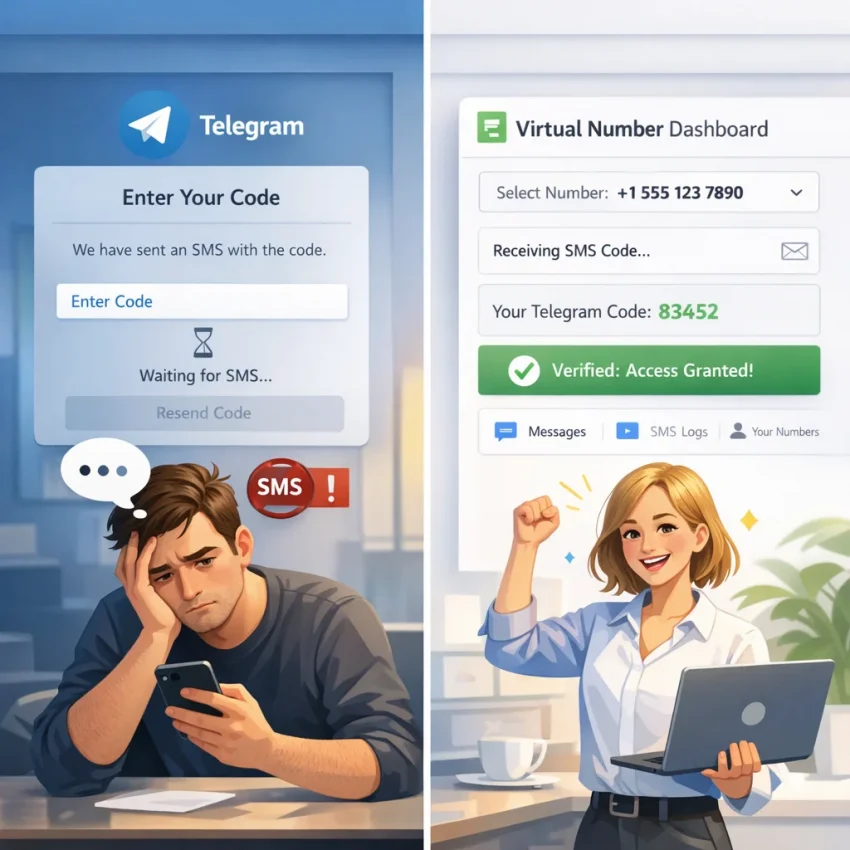
If your Telegram verification code is not arriving, the problem is not always a bad signal, a typo, or a broken phone. In many cases, Telegram is working as designed but using a delivery path you did not expect. The platform may send a login code to another active session instead of SMS, delay delivery after too many requests, or rely on message routes that perform unevenly across carriers and countries. What looks like a simple missing code can actually be a timing issue, a device issue, a carrier issue, or an account-state issue.
This matters because users often respond the wrong way. They keep pressing resend, switch networks, try multiple devices, or start over repeatedly with the same number. Those actions can make the situation worse by triggering cooldowns or confusing the verification flow. If you are trying to create a Telegram account, log in on a new device, or recover access, a more methodical process usually works better than repeated retries.
In this guide, you will learn the most common reasons Telegram SMS verification is not working, how to identify whether the code should arrive by SMS or in-app, what to test before changing numbers, and when it makes sense to use a dedicated verification workflow such as SmsPva. The goal is practical: help you stop wasting attempts and move toward a cleaner way to receive a Telegram OTP.
Important: Telegram can change verification methods, resend timing, routing logic, and abuse-prevention rules at any time. Results vary by country, carrier, account history, device state, and whether you are signing up, logging in, or recovering access. Always use any number or verification service in line with Telegram’s terms, your local law, and the legitimate purpose of your account.
Why Telegram verification codes may fail in 2026
When users search for Telegram code not received, they usually want a single cause and a quick fix. In reality, several different issues can produce the same result: no usable code when you need to verify. Understanding those causes helps you choose the right next step instead of repeating a failing attempt.
Telegram may prefer in-app delivery over SMS
One of the most misunderstood parts of Telegram verification is that the platform does not always send a code by text message first. If you are still logged in on another phone, tablet, or desktop client, Telegram may deliver the login code there. From the user’s point of view, it looks like the SMS never arrived, but in fact no SMS was sent because another channel was available.
This is especially common when people reinstall Telegram, move to a new device, or return to an account they have not used in a while. They expect an ordinary text but forget that an old session still exists somewhere else.
Too many requests can trigger delays or limits
Another common cause is request throttling. If you ask for several codes in a short time, switch between signup and login flows, or keep tapping resend, Telegram may apply a cooldown. The effect is familiar: old codes arrive too late, new codes take longer than expected, or no new request appears to go through. Users often interpret this as a carrier failure when it is actually a timing restriction.
In other words, the more impatient the retry pattern becomes, the less reliable the result tends to be.
Carrier filtering can affect OTP traffic
Even when a number is entered correctly, the code may still fail to show up because of mobile-network filtering or route instability. Some carriers handle automated verification traffic less reliably than person-to-person messages. This is one reason a user can receive normal texts but still experience a Telegram verification SMS delay.
Carrier issues are more likely in situations such as international roaming, prepaid lines, recent number transfers, regional routing changes, and networks that handle large volumes of authentication messages poorly.
Number history can influence delivery reliability
Not every valid number performs the same way for verification. A number may be active and reachable yet still be a weak choice for OTP delivery at that moment. Recycled numbers, numbers with a long history of failed verification attempts, and numbers associated with repeated platform checks may encounter more friction. That does not mean the number is unusable forever, but it does mean that stubbornly retrying it may not be the best use of time.
Recovery flows are different from basic login flows
Sometimes the issue is not ordinary SMS verification at all. If Telegram asks for a password, references another session, or behaves differently from a clean signup screen, you may be in an account recovery or two-step verification flow. In that case, focusing only on SMS will not solve the full problem.
This distinction matters because users often describe every access issue as “Telegram OTP not arriving,” even when the real obstacle is a recovery requirement after the code step.
How to identify the exact reason your Telegram code is not arriving
The fastest solution starts with diagnosis. Before changing numbers or services, try to identify which specific scenario you are facing. A missing code can come from different points in the process, and the right fix depends on where the chain breaks.
1. Check whether another Telegram session received the code
If you have ever used Telegram on another device, look there first. That means an older phone, a second handset, Telegram Desktop, or a tablet. If Telegram detects an existing trusted session, it may send the code there instead of by SMS. This is one of the most common explanations for Telegram login code not sending by text.
2. Look for signs of a cooldown
If you see a resend timer, increasing wait periods, or stale codes arriving late, stop requesting new ones. Those are strong signs that Telegram has slowed the verification flow. More retries will usually extend the problem rather than fix it.
3. Reconfirm the number format carefully
Use the full international format. Make sure the country code is correct, remove extra local prefixes if necessary, and confirm there are no missing digits. A small formatting error can send the request to the wrong destination or make it fail silently.
4. Compare Telegram SMS behavior with normal texting
If regular SMS messages arrive on your number but Telegram codes do not, the issue is less likely to be a total service outage and more likely to be related to OTP routing, filtering, or Telegram’s own verification logic. If all texts are delayed, the problem may be broader and carrier-related.
5. Decide whether this is login, signup, or recovery
A new account registration behaves differently from a login attempt on an existing account. Recovery can add another layer entirely. If Telegram references a password, prior session, or unusual verification message, you may need to approach the process as account recovery rather than fresh verification.
A simple troubleshooting order works well:
- Check for in-app delivery on another Telegram session.
- Wait out any visible timer before requesting anything else.
- Verify the number format and country code.
- Assess whether your carrier or region may be delaying OTP traffic.
- If the same path keeps failing, switch the workflow instead of forcing more retries.
What to try before switching to another number
Before you replace your current number, it is worth running through a practical checklist. These steps solve many cases where the Telegram OTP is not arriving and help you avoid wasting time on unnecessary changes.
Use a clean, stable verification attempt
Choose one device, one connection, and one number for the attempt. Users often weaken their own results by moving between Wi-Fi and mobile data, turning a VPN on and off, or trying multiple devices back to back. Stability helps because Telegram sees a more consistent login pattern.
Wait instead of stacking requests
If the app shows a resend timer, respect it. Then give the system a little extra time. OTP systems can deliver late, especially after recent retries. If you request another code too soon, the new request may not improve anything and can create confusion about which code is current.
Make sure your device is not causing the issue
Update Telegram, restart your device, and confirm your system clock is set automatically. Incorrect time settings can create odd verification behavior in some apps. While this is not the most common reason, it is a fast check and worth ruling out.
Review your carrier conditions
Roaming, prepaid restrictions, short-code filtering, and recent number porting can all affect OTP traffic. If you recently moved the number between carriers or are currently abroad, your network path may be less reliable than usual for automated messages.
Confirm basic SMS functionality
If standard texts are delayed across the board, Telegram may not be the real problem. In that case, changing Telegram settings will not help much until the network issue is resolved.
Here is a concise pre-switch checklist:
- Enter the number in full international format.
- Check all existing Telegram sessions for an in-app code.
- Stop pressing resend and wait for the timer to finish.
- Stay on one connection and one device during the attempt.
- Verify that your phone receives ordinary text messages.
- Review roaming, prepaid, and filtering conditions with your carrier if needed.
- Update Telegram and restart the device.
If none of those steps changes the outcome, that is usually the point where a different verification route becomes more practical than continuing to push the same number.
When using a virtual number makes sense
A virtual number is not the answer to every Telegram verification problem, but it can be a sensible option when your current path is unreliable or when you prefer not to use your personal number at all. For many users, the value is less about novelty and more about control. Instead of depending on a carrier route that may be unstable, you use a workflow designed specifically around SMS verification.
Common situations where a virtual number can help
- Your local carrier consistently misses Telegram OTPs. If ordinary troubleshooting has not solved the problem, a different route may work better.
- You are traveling, roaming, or using a line with inconsistent international delivery.
- You want more privacy and do not want your personal number tied to the verification attempt.
- You need a service-specific setup rather than a random public inbox.
- You want clearer separation between personal, work, or testing workflows.
There is an important distinction here. A dedicated verification platform is not the same thing as a generic temporary number site. Public inbox sources often have unpredictable availability, crowded usage, or poor matching with current platform requirements. A focused service page such as SmsPva’s Telegram verification page is designed around the specific task of receiving a Telegram code rather than acting as a catch-all SMS inbox.
That targeted approach can save time because you are not guessing whether a random number source is suitable for Telegram at that moment.
Note: A virtual number does not guarantee success in every region or every account state. Telegram may still deliver in-app, apply cooldowns, or require additional steps during recovery. The goal is to improve the workflow, not promise universal results.
How SmsPva helps when Telegram SMS verification is not working
SmsPva is built around virtual numbers for SMS verification and OTP receipt across multiple services. In practical terms, that means users do not need to rely on broad, inconsistent “receive SMS online” sources when they only need one specific platform to work. For Telegram users, the most relevant starting point is the dedicated Telegram verification page.
What makes that useful is not just the number itself, but the workflow around it. Instead of treating verification as a random inbox event, the process is tied to a service-specific selection and a dashboard view where incoming messages can be monitored more clearly. That structure is often easier to manage than repeatedly checking a personal SIM or guessing whether a public source will support the service you need.
Practical advantages of a service-specific Telegram page
- Cleaner matching to the Telegram use case. You start on a Telegram-specific page rather than searching through unrelated options.
- A dashboard-based workflow. If Telegram sends the code by SMS, you monitor it in one place.
- Country and route flexibility. If one option performs poorly, another may be available.
- Access to support resources. Users can check the Help page and News section for guidance or updates.
That said, it is important to stay realistic. SmsPva can improve the verification workflow, but it does not override Telegram’s own rules. If Telegram decides to send a code in-app, or if the account is in a recovery state, those factors still apply.
Step-by-step: how to use SmsPva for Telegram verification
If your personal number keeps failing, use a clear process rather than making more random attempts. A simple, disciplined workflow gives you a better chance of figuring out whether the issue is number-related, timing-related, or account-related.
- Open the Telegram verification page.
Go to smspva.com/service/telegram. - Choose an available country or number option.
Availability can vary by route and moment, so select an option currently offered for Telegram. - Copy the number carefully.
When entering it in Telegram, use the complete international format. - Request the code once.
Do not create a resend loop. One clean request is better than several overlapping attempts. - Watch the SmsPva dashboard for the incoming message.
If Telegram sends the code by SMS, it should appear there. - Enter the code promptly.
OTP messages usually have limited validity windows, so act as soon as the code arrives.
If the code does not appear right away
Do not assume immediate failure. Work through the following order:
- Wait through the normal delivery window before taking any new action.
- Check whether Telegram may have routed the login code to another active session instead of SMS.
- Avoid repeated resends that could trigger or extend a cooldown.
- If needed, start a fresh attempt with another available Telegram number rather than forcing the same route.
If you need more guidance on order status, timing, or service behavior, the SmsPva Help page is the next place to check.
What can still go wrong after switching to a virtual number
Changing the number source often helps, but it does not remove every possible obstacle. If the Telegram verification code not arriving problem continues, the next step is to understand what type of failure remains.
Delayed delivery due to throttling
If you already made many attempts before switching to a virtual number, Telegram may still be slowing delivery. In that case, the new route is not necessarily the problem. The account or session may simply be in a temporary wait state.
Code delivered to another session
Even with a new number, Telegram can still prefer in-app delivery if it recognizes another logged-in device connected to the account flow. Users sometimes overlook this because they assume a new number means the route must be SMS-only.
Country or route mismatch
Some country options are more reliable than others at a given moment. If one route is unproductive, switching methodically can be more effective than retrying the same route several times.
Recovery requirements beyond SMS
If Telegram asks for a two-step password or references prior account history, the obstacle may not be solvable with a fresh number alone. At that point, you are dealing with recovery logic, not just message receipt.
Timing mistakes by the user
Sometimes the message arrives, but the code is entered too late or an older code is used after a newer request replaced it. Keeping the attempt simple helps avoid that confusion.
Best practices for more reliable Telegram verification
Whether you use your own number or a virtual number, a few habits can make verification much smoother. These are less about shortcuts and more about reducing avoidable friction.
- Request the code once and wait before trying again.
- Always verify the international number format carefully.
- Check other active Telegram sessions before assuming SMS failed.
- Use a service-specific verification workflow instead of a random public inbox.
- Do not switch devices, networks, and request paths in the middle of the same attempt.
- If one route fails, make a clean retry rather than stacking resends on top of it.
- Use available help resources before burning through more attempts.
For users managing other platform verifications, SmsPva also provides service-specific pages for WhatsApp, Google, and OpenAI. For workflows that require cleaner environment separation, the site also offers HQ Proxy tools.
Service-specific verification vs generic temporary numbers
Many users searching for ways to receive Telegram verification code online end up comparing two broad options: generic temporary number sites and service-specific verification platforms. The difference is important.
Generic sources often work like open mailboxes for text messages. They may be easy to find, but they can also be crowded, unstable, or poorly suited to Telegram’s current verification patterns. Users may waste time testing several public numbers only to learn that none of them are reliable for the exact service they need.
A service-specific platform takes a narrower approach. Instead of treating all SMS traffic the same way, it aligns the number-selection process with the platform you want to verify. In the Telegram context, this usually means less guesswork and a more focused path from number selection to code monitoring.
That does not make service-specific workflows magic. It simply makes them more purposeful. When your goal is narrow, a narrow tool is often more efficient.
Use case examples: when the right workflow saves time
Example 1: You are abroad and your home SIM is roaming poorly
You enter your normal number, but no Telegram SMS appears. Regular texts arrive late, and mobile service is inconsistent. In this case, the issue may be international routing rather than Telegram itself. A virtual number workflow can be a cleaner alternative than repeated retries on a roaming line.
Example 2: You still have Telegram logged in on an older laptop
You expect a text message, but the code actually appears on Telegram Desktop. This is a classic case where users think Telegram SMS verification is broken even though the platform has used another delivery route.
Example 3: You kept pressing resend and now everything is delayed
The first code did not arrive quickly, so you requested several more. Now old codes show up late and none seem to work. Here, the best fix is often to stop, wait for the cooldown, and restart with one clean attempt.
Example 4: Your personal number works for normal texting but not for Telegram OTPs
This points more toward OTP filtering or verification-route instability than a dead phone line. If the issue persists after basic checks, switching to a dedicated Telegram verification workflow may save time.
FAQ
Why is my Telegram verification code not arriving even though my phone number is correct?
The number may be correct, but Telegram could be sending the code to another active session, delaying delivery after repeated attempts, or running into carrier-level filtering. In some cases, you may also be in a recovery flow instead of a basic SMS flow.
Does Telegram always send the code by SMS, or can it send it in the app instead?
No. Telegram can send the code to an existing logged-in session instead of by SMS. That is why checking your other devices is one of the first troubleshooting steps.
How long should I wait before requesting another Telegram verification code?
Wait until Telegram’s timer fully expires, then allow a little extra time. Re-requesting too quickly often creates more delay and confusion.
Can a virtual number help if my local carrier is not receiving Telegram SMS messages?
Yes, it can. If your carrier is delaying or filtering OTP traffic, a virtual number for Telegram verification may provide a cleaner route, especially through a service-specific workflow such as SmsPva.
How do I use SmsPva for Telegram verification?
Open SmsPva’s Telegram page, choose an available option, get the number, enter it into Telegram, request the code once, and monitor your dashboard for the SMS.
What should I do if a Telegram code still does not arrive on a virtual number?
Wait through the expected delivery window, check for in-app delivery to another Telegram session, avoid repeated retries, and if necessary start a fresh attempt with another available number. You can also review the Help page.
Is a service-specific Telegram verification page better than using a generic temporary number source?
Usually, yes. A service-specific page is more closely aligned with Telegram verification than a broad public inbox source, which may be inconsistent or overloaded.
Can I use the same workflow on SmsPva for other platforms besides Telegram?
Yes. SmsPva supports service-specific verification workflows for other major platforms too, including WhatsApp, Google, and OpenAI.
Final takeaway: stop repeating failed retries and use a cleaner Telegram verification workflow
If your Telegram verification code is not arriving, the main lesson is simple: do not assume the answer is to press resend until something works. Telegram verification failures usually come from one of a few repeat causes: in-app delivery to another session, cooldowns after too many attempts, carrier filtering, number-history issues, or a recovery flow that is different from normal login.
Start with the basics. Check other sessions, confirm the number format, wait out the timer, and keep the attempt stable. If your personal line still is not receiving the code, it may be time to stop forcing the same route and move to a more structured option.
For users who want a practical, service-specific path, SmsPva’s Telegram verification page offers a focused workflow for getting a Telegram number, monitoring OTP delivery, and avoiding the inconsistency of generic temporary inbox sources. If you need broader guidance, visit the Help page or check the News section for updates.
The best result usually comes from fewer retries, better diagnosis, and a cleaner verification path.