

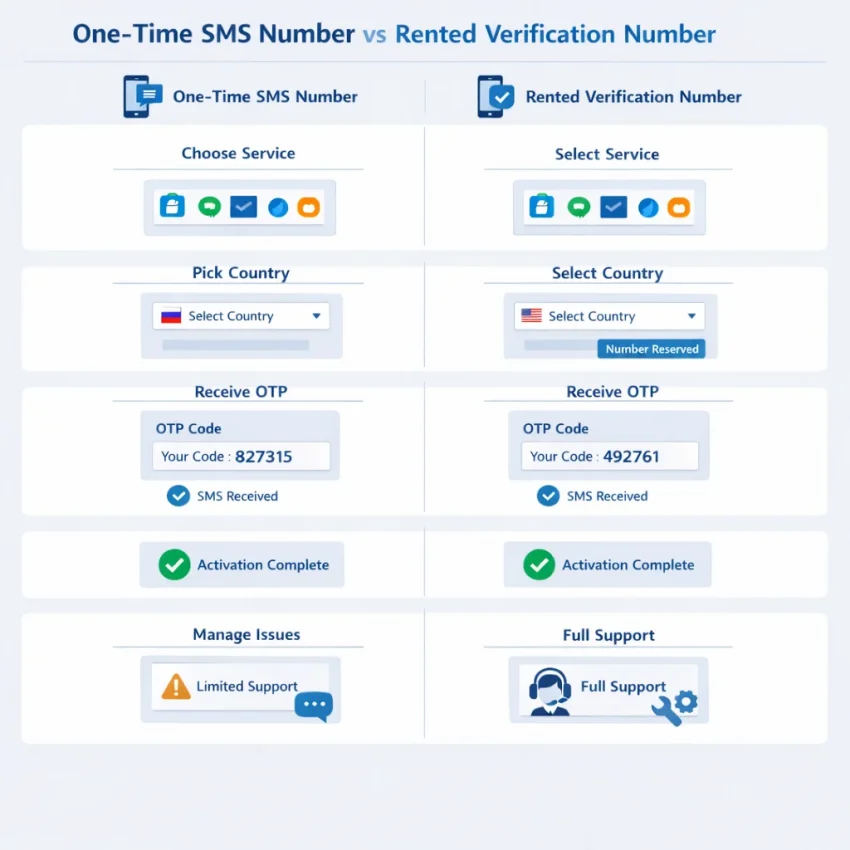
What It Means to Rent a Phone Number for SMS Verification
To rent phone number access for SMS verification means using a virtual number through a platform built for OTP receipt and account activation. In practice, you select a target service, choose a country, request a number, and wait for the code inside the same workflow. That is very different from copying a random public number and hoping it works.
Most users who want to rent phone number online are not looking for a voice line or a long-term SIM replacement. They need a practical way to verify an account, protect their primary number, or separate work and signup activity. A good rental workflow is about control: service selection, country matching, timing, and message visibility.
This is where SmsPva fits best. It is designed for Receive SMS online workflows with virtual phone numbers for SMS verification and OTP receipt, rather than generic disposable inboxes with little context about compatibility.
How a rented verification number differs from a disposable number
People often mix up public receive-SMS pages, one-time disposable numbers, and structured rental flows. A public number may already be overused, visible to others, or blocked by the platform you want to join. A disposable option may work once, but it often gives you little control over the service type, country, or timing.
When you rent virtual number access through SmsPva, the process is more specific. You choose the platform you need to verify, then pick the country that best matches the account flow. That matters because many services do not treat all numbers the same. They may screen for region, carrier patterns, prior abuse signals, or whether the number fits the expected signup path.
The number itself is only one part of the verification chain. The service selected, the country chosen, and the order in which you start the signup all affect whether the OTP arrives and whether the platform accepts the number after you enter the code.
Why users run into problems even when the idea seems simple
At first glance, the task sounds easy: get a number, receive a code, finish signup. But sms verification problems usually happen because the verification flow is stricter than users expect. A target platform may only support certain countries for new registrations. It may delay sending codes after repeated requests. It may reject a virtual phone number for otp if the account setup order looks unusual.
Many failures also come from mismatches. Users choose a number from one country while signing up through another regional path. They request multiple codes too quickly. They start over with a fresh number after partially completing a failed attempt, which can confuse the target platform’s risk checks.
That is why “just find any number” is a weak strategy. If you want to receive sms online with fewer dead ends, you need a structured workflow that lets you align the service, number type, and country before requesting the OTP. The next sections break down the most common failure points and how to fix them with SmsPva.
The Most Common Problems When You Rent a Phone Number
Most sms verification problems are not random. They usually come from a small set of predictable mismatches between the target platform, the number type, the country selected, and the timing of the activation. The first step is to identify which failure pattern you are actually seeing.
Users often assume the rented number is broken when the real issue is elsewhere. A platform may accept one country and reject another. It may support one route for SMS and silently filter another. Or the code may arrive, but the account still fails because the number type is not accepted for that service. That is why a structured workflow like SmsPva is more useful than guessing with random temporary numbers.
1. OTP not received after requesting the code
The most common complaint is simple: OTP not received. You enter the rented number, tap send code, and nothing shows up. This can happen for several reasons. The platform may delay delivery, the number may not match the required country, the wrong service may have been selected, or the activation may not be open when the message is sent.
A useful clue is what the target app shows. If it says “code sent” but no message arrives, think delivery path, timing, or service mismatch. If it says the number cannot be used, the issue is usually compatibility rather than delay. This distinction matters because blind resends often make things worse.
2. The number is unsupported by the target platform
A rented number can still be valid but unsupported for a specific verification flow. Some platforms are strict about number categories, known virtual ranges, or service-specific routing. This is why a temporary number not working does not always mean the provider failed. It may mean the target platform rejected that number type for its own policy reasons.
This often appears as “invalid number,” “unsupported carrier,” or a silent refusal to send the code. Users trying to rent phone number for sms verification often miss this because the same number might work elsewhere. Verification is service-specific.
3. Country mismatch and local-format problems
Country mismatch is another major cause of failure. Many users pick a country based on price or habit, then try to verify an account that expects a different regional pattern. The app may require a local number, a specific dialing format, or consistency with the account’s location signals.
Common signs include immediate rejection, repeated “try another number” prompts, or successful submission followed by no SMS. If the account is being created for a UK profile, for example, a non-UK number may lower your chances.
This is especially important for service-specific flows such as Signal SMS verification, where users should match both the service and the likely country context instead of choosing at random.
4. The number has prior history or is already flagged
Sometimes the problem is the number’s history. A target platform may have seen that number before, linked it to past sign-ups, or restricted it after repeated verification attempts. In that case, the code may never be sent, or the app may reject the number even before delivery starts.
Typical messages include “number already used,” “too many attempts,” or “cannot use this phone number.” When this happens, repeated retries on the same number rarely help. A cleaner path is to stop, review the service and country fit, and restart the process with a fresh activation workflow.
5. The activation window expires before the SMS arrives
Another common failure is timing. Users request a number, switch devices, reopen the app, or hesitate while filling account details. By the time the SMS is sent, the activation window may be over or the session may no longer match the original request.
The result looks like a delivery issue, but it is really a workflow issue. You may see a late code that cannot be used, no code attached to the active order, or a code that arrives after the target app has invalidated the session.
6. Repeated resends trigger rate limits or lockouts
When users do not receive SMS online on the first try, they often hit resend several times. That can trigger the exact restriction they were trying to avoid. Many platforms throttle repeated requests, temporarily block the number, or lock the account flow for a cooling period.
Symptoms include messages like “too many requests,” “try again later,” or a resend button that stops working. At that point, the issue is no longer the original delivery path. It is now a rate-limit problem.
7. User-side setup conflicts
Not every failure comes from the number. Device state, app permissions, browser session issues, location mismatches, or account-isolation problems can also break verification. Starting the sign-up in one network environment and finishing it in another may create extra friction. The same applies if cookies, app state, or prior account traces conflict with the new attempt.
If your workflow stalls and the cause is unclear, check SmsPva’s Help page before retrying blindly.
How to Solve Delivery and Verification Failures With SmsPva
If you need to receive SMS for verification, the biggest improvement is workflow. Many users fail because they pick a random number first and only then try to fit it to the platform. SmsPva works better when you reverse that order: start with the exact target service, choose the intended country, activate the number, and then request the code inside the app or website.
That sequence matters because most verification systems check more than basic message routing. They often look at country fit, number type, and whether the number was selected for that exact service-specific flow. If your OTP is not received, or if the platform rejects the number before sending anything, the problem is often a mismatch you can correct before wasting more retries.
Start with the exact service flow, not a generic number
The first fix is simple: use the service page that matches the account you are verifying. On SmsPva, that means choosing a service-specific path instead of treating every activation the same. This reduces avoidable failures caused by unsupported routing or platform-side filtering.
For example, if you are verifying Signal, use the dedicated service flow. If a rented number still does not work, stop and check the setup order. Open the target app or site first, enter the number exactly as shown, submit the verification request once, and wait for the inbox state on SmsPva to update.
You should also verify formatting. Country code mistakes are common. If the target platform expects a number in international format and you entered it with missing digits, the SMS may never be sent correctly.
Match the verification country to the account context
Country selection is the next major fix. If the platform expects a UK signup flow and you choose a US number, you may see delivery delays, rejection, or extra review checks. A rented virtual number works best when it matches the country logic of the account you are creating or recovering.
With Signal, that means choosing the country intentionally. If you specifically need UK routing, use the Signal verification in Unt. Kingdom page. At the time of writing, Signal in the United Kingdom was listed from $0.50 or $0.58 depending on route snapshot. That does not guarantee stock or delivery.
If your first attempt used the wrong country, do not keep hammering resend on the same session. Start a fresh activation with the correct country and retry once with clean inputs.
When the SMS still does not arrive, troubleshoot methodically
If the OTP is not received after a correct service and country match, narrow the issue before retrying. First, confirm the target service actually accepted the number and displayed a “code sent” message. If it did not, the failure happened before delivery. If it did, wait through the normal window before requesting another code.
Next, look for user-side conflicts. Old app sessions, recycled signup screens, auto-filled wrong country codes, or previous failed attempts can interfere with a clean verification. Closing and reopening the app, clearing the stale form, and re-entering the rented number carefully can solve more cases than users expect.
If you are managing multiple account environments, keep the verification flow isolated. SmsPva also offers proxy tooling for account isolation workflows, which can help keep setup variables organized. That is not a universal fix for SMS delivery, but it can reduce confusion when the same device or session has many overlapping attempts.
The goal is to avoid random retries and move through a structured process. For users who want to rent phone number access with fewer dead ends, SmsPva works best when treated as a guided verification workflow, not just a list of numbers.
Choosing the Right Service, Country, and Number Type
When you rent phone number access for verification, the biggest mistake is choosing a number that is only broadly compatible instead of specifically matched to the platform you want to verify. Many failures start here.
That is why SmsPva works better as a practical workflow. Instead of guessing, start from a service page built around the exact platform you need. This helps reduce common service-specific verification mistakes, such as picking a number type that the platform does not reliably accept or choosing a region that does not match your registration context.
Match the service first, then the country
Users often think country choice is the first decision. In practice, service comes first. A platform’s verification rules shape everything that follows. Once you know the target service, then pick the country that fits your use case.
Signal is a good example. If you need a UK-based setup, a service-and-country matched route is more precise than choosing a random number and hoping it works. At the time of writing, Signal in the United Kingdom was listed from $0.50 on one route snapshot, with another UK snapshot listed at $0.58. These figures are useful for planning, but they should be treated as API snapshots rather than permanent pricing or availability.
If your workflow is US-based instead, the logic changes. At the time of writing, Signal in the United States was listed at $1.75 on the available API snapshot. The key point is not that one country is always better. The right country is the one that matches the verification context you are creating.
Choose the number type that fits the verification job
Not every verification attempt needs the same kind of number behavior. Some users only need one incoming code. Others need a cleaner, more structured path because they are managing repeated sign-ups, privacy separation, or account activation tasks.
For a straightforward one-code workflow, a service-matched rental path is usually the best starting point. If you are trying to receive SMS online with less trial and error, SmsPva gives you a more organized route than generic number lists because it separates service intent from country selection.
This also explains why some users say a temporary number is “not working” even when the real issue is selection logic. The number may be valid, but it may be wrong for that app, wrong for that country flow, or wrong for the timing of the registration sequence.
A Step-by-Step Troubleshooting Workflow Before You Retry
When a temporary number is not working, the worst move is to keep pressing resend. That usually creates more noise, not a better result. A clean retry starts with diagnosis. If you want to rent phone number online for verification, use a repeatable checklist so each new attempt fixes one likely cause.
Start with the exact target service. Many SMS verification problems happen because the selected activation does not match the platform requesting the OTP. On SmsPva, choose the service-specific page whenever possible rather than using a generic path.
Next, confirm the country logic. The country should make sense for the account you are creating or recovering. If the platform expects a local registration pattern, a mismatch can block delivery or trigger extra review.
Run this pre-retry checklist in order
1. End the old attempt. If one activation expired or stalled, do not mix it with a fresh session. Close the old flow and start clean.
2. Check your session state. Cached browser data, an old app session, or a half-completed sign-up can stop a new code from being accepted.
3. Make sure the number format is correct. Enter the country code and local digits exactly as the target service expects.
4. Watch the timing. Request the code only after the number is ready and visible in your activation flow. Then wait long enough for delivery before trying again.
5. Check whether the first code is still valid. If more than one message appears, use the latest valid code associated with the current session.
6. Retry only after fixing one variable. Change one thing at a time: service, country, or session order.
When to escalate instead of forcing more retries
If you still cannot receive SMS after a clean retry, stop spending activations blindly. Review the Help resources on SmsPva to confirm expected workflow, timing, and service behavior before you try again.
Also think about account isolation. If you operate multiple sign-ups or privacy-sensitive workflows, conflicts can come from the environment around the number, not the number alone. Separate browser profiles, fresh app installs, or distinct device sessions can reduce cross-account contamination. Proxy use belongs here only as part of account isolation planning, not as a universal fix for delivery issues.
When to Switch Your Verification Workflow to SmsPva
If you keep hitting the same wall, the problem is often not the app alone. It is the workflow. Many users try to rent phone number options from generic sources, resend codes repeatedly, and switch countries at random. That usually creates more failures, not fewer.
A better time to switch is when you notice patterns: OTPs do not arrive, the code arrives but the platform rejects the number, or the activation window keeps expiring before you finish setup. Those are strong signs you need a more structured process.
Signals that it is time to stop using generic options
Switch to SmsPva when you need service-specific selection instead of guessing. If your target platform treats number type, country, or prior usage differently, a random number source adds friction. SmsPva is built around virtual phone numbers for SMS verification and OTP receipt with clearer service paths, which helps reduce avoidable mismatches.
It also makes sense to switch when you need consistency across multiple attempts. Instead of changing three variables at once, you can align the service, country, and timing in one workflow.
What the better workflow looks like
The practical path is simple. Start with the exact service page when available, match the country to the account context, and complete the verification steps in order before requesting more codes. If the flow stalls, use support resources instead of repeating the same failed attempt.
For example, if you need Signal verification, using the rental flow at Signal SMS verification is more efficient than searching for a generic temporary number. For country-specific cases, context matters too. For the United States, the listed API snapshot at the time of writing shows $1.75 for Signal. These are workflow references, not permanent offers or guarantees.
The switch to SmsPva is really a switch away from guesswork. If you want a clearer path to receive SMS online, reduce temporary number issues, and troubleshoot with service-specific logic, SmsPva is the practical next step.
Use smspva.com to receive SMS verification codes with virtual phone numbers.