

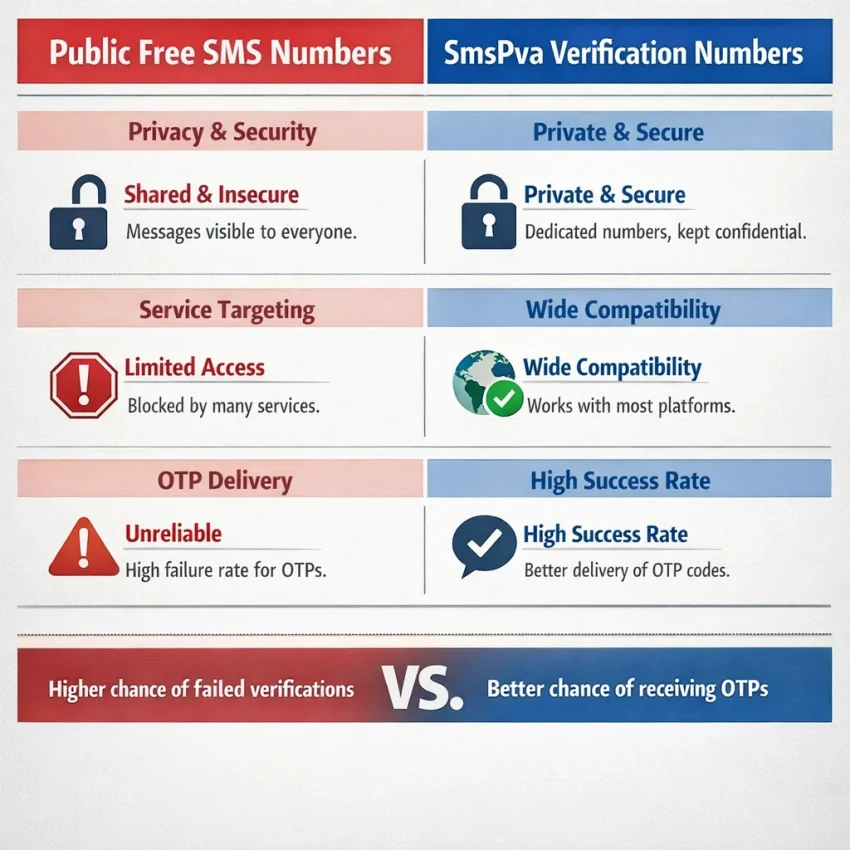
When people search for a free number, they usually want one thing: a quick way to receive a verification code without using a personal phone number. In 2026, that search often leads to public SMS inbox sites, but those rarely match how modern OTP flows work.
The practical alternative is a service-specific virtual number workflow. Instead of picking any public inbox and hoping the code appears, you choose the service first, then the country if needed, then request a number that fits the verification task. That is the logic behind SmsPva.
This guide explains what a free number usually means today, why many free public numbers fail, and how to use SmsPva for a cleaner SMS verification process.
What People Mean by ‘Free Number’ in 2026
In 2026, a free number usually means one of two things. The first is a public number on a website where anyone can receive SMS online in a shared inbox. The second is a virtual number used for a specific verification flow, such as account activation or OTP receipt.
Those two options look similar, but they behave very differently. A public inbox is open, reused often, and visible to other users. A verification number is chosen for a specific service flow and used for a targeted SMS task.
Public inboxes vs. verification numbers
A public free SMS inbox is basically a shared message board. It may help with basic tests, but it is a weak option for important signups. If a code arrives, other people may see it. If the number has been overused, the platform may reject it before any SMS is sent.
A temporary number for OTP is different. The goal is not just to display incoming messages. The goal is to support a real verification step with less friction. That is why the more useful question is not “Where can I get any number?” but “Which verification workflow fits this service?”
That is where SmsPva makes more sense than random public inbox pages. You can Receive SMS online through a workflow built around verification and OTP use cases.
Why the definition matters
If your goal is account creation, login confirmation, or privacy-friendly signup, the number type matters immediately. Many services now check country fit, prior use, and number reputation. So when users ask for a free number for SMS verification, what they often need is not a literal no-cost option. They need a low-friction way to get a code without exposing a personal number.
In practice, that usually means using a virtual number designed for verification rather than relying on a public shared inbox.
Can You Really Use a Free Number for SMS Verification?
Sometimes, yes. For real account verification, usually not. Most public free-number sites clash with how SMS verification works in 2026.
Platforms now check number history, country alignment, routing patterns, and whether a number range is commonly abused. A public OTP number online may be visible to everyone, already used many times, or blocked before the message is sent.
Why free public numbers fail more often now
The first problem is sharing. Public inboxes are open to many users. If a code arrives, anyone watching that inbox may see it. That defeats the point of verification for anything private.
The second problem is reuse. Free-number sites often recycle the same numbers heavily. Services notice that pattern. If a number has a long history of failed signups or repeated activations, your attempt becomes less likely to work.
The third problem is targeting. Modern verification flows are often service-specific. A generic public number may not fit the exact app or country you need. A virtual phone number for verification works better when you select the service first, then use a number meant for that activation path.
There is also a privacy cost. Public inboxes can expose sender names, account details, and one-time codes to strangers. That is a poor fit for sensitive accounts.
What “free” usually costs you
The hidden cost of a free public number is often time. You may spend twenty minutes testing different numbers, repeating captchas, and restarting signup. You may also burn a registration attempt if the platform limits retries.
A structured SMS activation flow is clearer. You choose the service, choose the number path that fits, enter it during signup, and wait for the OTP in one place. That does not guarantee delivery in every case, but it removes many of the common problems tied to public inboxes.
How to Use SmsPva as the Practical Alternative to a Free Number
If you searched for a free number, your real goal is probably simple: receive SMS online, get an OTP, and finish signup without using your personal number. In 2026, that works better with a service-specific virtual number than with a random public inbox.
Step 1: Choose the service first
Start by selecting the app or website that will send the code. This is the most important step. A generic number can fail even when it is active because the target platform does not accept that route.
Next, check whether you need a country match. Some signups are flexible. Others work better when the number country aligns with your selected region or account setup path.
Once you pick the service and country, get the number from SmsPva and copy it exactly as shown. Then paste it into the phone verification field on the target app or website. Double-check the country code. Small formatting mistakes cause many failed attempts.
Step 2: Request the code and wait
After entering the number, request the verification SMS once and wait. Avoid switching numbers too quickly or refreshing the flow randomly.
Return to your active SmsPva session and watch for the incoming message. This is the practical answer to how to receive SMS online: request the code from the target service, then monitor the active number session where the SMS should appear.
When the OTP arrives, copy it carefully into the verification screen. If no message appears, do not assume the number is broken. Delays can happen because of app-side throttling, country mismatch, formatting errors, or service-specific filters.
For most readers, this one-time process is enough: choose the service, get the number, receive the code, and complete activation.
Service-Specific Example: Using SmsPva for Signal Verification
If you want a free number for Signal, service matching matters more than the word “free.” Signal SMS verification usually works better with a number chosen specifically for Signal than with a random public inbox.
Start on the Signal SMS verification page. That lets you follow a service-specific flow instead of guessing which generic online number might work.
Step-by-step workflow for Signal
Open Signal and begin registration. Before entering any number, confirm which country you want to use. That choice should match the number you select on SmsPva.
Then choose Signal inside SmsPva and review the country options. If you specifically need a UK route, you can check Signal verification in Unt. Kingdom. At the time of writing, Signal single-SMS options for the United Kingdom were listed from $0.50 and $0.58. For the United States, the Signal single-SMS snapshot was $1.75. These are current API snapshots, not fixed rates or guarantees.
After you get the number, copy it carefully into Signal. Double-check the country code and local digits before submitting. Then wait for the verification SMS. When the code appears in your SmsPva order view, enter it into Signal and complete setup.
Why this works better than a generic free number
Signal shows why a one-size-fits-all free number often fails. Verification systems may check number history, service compatibility, and country formatting. A public number may already be overused or tied to earlier attempts.
With SmsPva, you choose a number inside a service-specific path designed for OTP receipt. That makes the process simpler: select Signal, match the country, submit the number, wait for the OTP, and finish activation.
How to Choose the Right Number Type, Country, and Session Length
Do not choose based on the word “free.” Choose based on the task.
For many signups, a temporary number for OTP is enough. This is the usual option when you need one code to activate an account, confirm a login, or finish a single registration step.
A rented number is different. It matters when you expect more than one SMS over time, such as repeated logins, recovery checks, or longer onboarding flows.
Choose by service first, then country
The biggest mistake is choosing a number before choosing the platform. A number that works for one app may fail for another, even in the same country. That is why SmsPva is more practical than random public inbox sites: you start with the exact service flow, then pick from current country options.
Country matters too. Some services are easier to verify with one region than another, and some users need a country that matches their account setup. If your main goal is one-time activation, the lowest listed option that fits your service can be a sensible starting point. If your setup depends on a specific region, prioritize that country instead.
When to use one-time vs. rented access
Use one-time access when you only need a single code. This fits most signups and first-time activations.
Consider rented access only when the workflow itself suggests repeat use. For longer-use scenarios around Signal, you can review the Signal SMS verification rental page.
The key point is simple: pick the setup that matches your real verification need.
Troubleshooting: What to Do If the Code Doesn’t Arrive
If your OTP does not appear, start with the basics. Most failures come from a mismatch somewhere in the flow.
First, confirm that you selected the correct service before getting the number. Next, check the country. If the app autofilled the wrong country code, the SMS may never route correctly.
Then review what you entered on the signup page. A missing digit, extra space, or wrong format can block delivery. It also helps to wait a short time before requesting another code. Repeated requests too fast can trigger delays or replace the earlier OTP.
Common reasons codes do not arrive
Some services reject numbers they have seen before, even when the number still receives SMS normally. In that case, the platform rule is the issue, not the inbox itself. The practical fix is to cancel that attempt and choose another service-specific number.
You should also check that the verification page is still active. If the request expired or the signup form was closed, the code may arrive too late to use.
If nothing appears, review the current guidance on the Help page for updated steps and support instructions.
A practical retry workflow
Use a simple sequence: verify the service, verify the country, recheck the number format, keep the signup session open, and request one fresh OTP. If that still fails, switch to a different number rather than repeating the same setup.
Best Practices for Privacy, Account Safety, and Smarter Verification Workflows in 2026
If you started by searching for a free number, the best next step is to move away from public inboxes and toward controlled verification flows. Shared sites that let anyone receive SMS online can expose OTPs, recycle numbers, and create recovery problems later.
A better default is a virtual phone number for verification that matches the service you want to activate. In practice, that means choosing the platform, country, and session type instead of chasing any random public inbox.
For privacy-friendly SMS verification, keep the workflow simple. Use one number for one task when possible. Double-check the service before requesting the number. Enter the number carefully, wait for the code inside the active session, and avoid repeating requests too quickly.
Also keep expectations realistic. Prices, stock, and country options can change. No provider should promise instant delivery or universal support across every app. The practical approach is to check live options and use a provider built for OTP flows.
For most readers, SmsPva is the smarter answer to the free-number search because it focuses on what actually works in 2026: service-specific virtual numbers, clearer verification workflows, and better privacy than public shared inboxes.
FAQ
What is the difference between a free number and a virtual number for SMS verification?
A free number usually means a public shared inbox. A virtual verification number is selected for a specific OTP or account activation flow. The second option is usually more practical for real signups.
Can I use a free number to receive OTP codes in 2026?
Sometimes for low-stakes tests, yes. For important accounts, many free public numbers fail because they are shared, reused, or blocked by the service.
Why do many free public SMS numbers fail during signup?
They are often overused, visible to everyone, and not matched to the exact service or country. Platforms now check those signals more aggressively.
How do I receive SMS online with SmsPva?
Choose the target service, pick a country if needed, get a number, enter it during signup, request the code, and wait for the OTP inside your active SmsPva session.
Do I need to choose a specific service before getting a number?
Yes, that is usually the best approach. Service matching helps reduce failed verification attempts.
How do country choices affect SMS verification?
Some services prefer or require a country that matches your selected region or account flow. A country mismatch can cause routing or formatting issues.
What should I do if the verification code does not arrive?
Check the service selection, country code, number format, and session status. Then request one fresh OTP. If it still fails, switch to a different number.
Is a one-time number enough, or do I need a rented number?
For most signups, a one-time number is enough. Rent only if you expect repeated SMS messages later.
Can I use SmsPva for Signal verification?
Yes, SmsPva has a Signal-specific verification flow, and country-specific options may be available depending on current listings.
Are SmsPva prices fixed or do they change over time?
They can change. Treat listed prices as live snapshots at the time you check them, not permanent guarantees.