

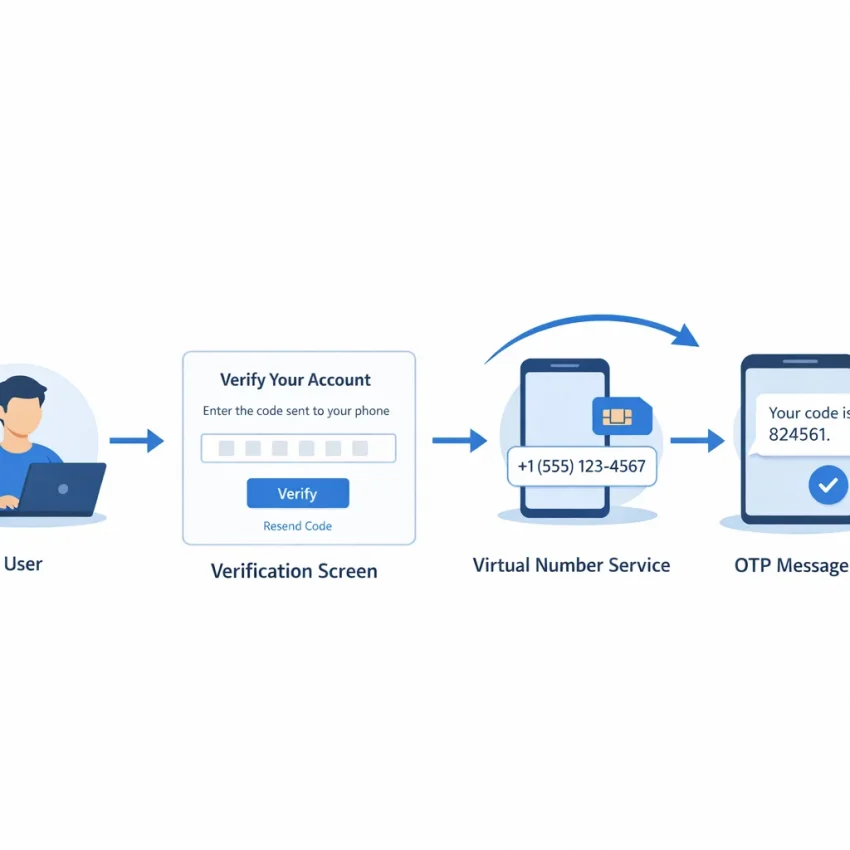
What ‘receive sms gmail’ means in 2026 and when a virtual number makes sense
In most cases, the query receive sms gmail does not mean reading text messages in an email inbox. It usually means getting a one-time SMS code for a Google account flow. That can happen during new Gmail signup, a Google security checkpoint, account recovery, or verification for related Google services such as YouTube.
So the real task is usually gmail sms verification or Google account verification. Google asks for a phone number, sends a code by SMS, and expects you to enter that code to continue. If you do not want to use your personal number for that step, a virtual number service becomes the practical option.
This is where SmsPva fits. It is built for verification workflows, not generic messaging. Instead of searching for random ways to receive Google SMS online, you choose the correct service flow, get a temporary number, and use it specifically for the Google verification step. That makes the process more structured and easier to manage.
Common situations where users need this workflow
A virtual number for Gmail makes sense when you are creating a separate account for work tasks, testing a clean signup flow, or keeping different account activities organized. Some users also need a number for a Google checkpoint after unusual login behavior or device changes. Others simply prefer not to attach their main personal number to every account they create.
Another common case is account separation. You may want one Google account for client work, one for publishing, and one for internal tools. In those situations, using the same personal number everywhere is not always ideal. A service-specific verification workflow helps you document which number was used for which account flow.
It is important to treat this as verification support, not a bypass. Google still decides whether a number fits the current verification flow. Availability, country fit, and timing can all affect whether a code arrives and whether the number is accepted.
With Receive SMS online at SmsPva, the workflow starts with the Google verification use case in mind. You select the right service, check current country options, request the number, and wait for the OTP in one place.
Before you start: what you need to prepare for Google or Gmail verification
Before you try to receive a Gmail verification code, set up the workflow carefully. Most failures happen before the code is ever sent. Google usually treats this as account verification, not just inbox access, so both your session and your number choice matter.
Start with a stable browser session. Use one browser, one device, and one clear purpose for the attempt. If you are creating a new account, complete the signup flow in one sitting. If you are handling recovery or a security checkpoint, avoid opening many Google tabs and switching between accounts.
Next, confirm the exact service you need on SmsPva. For this workflow, the relevant option is Google or Google (YouTube, Gmail), not a generic SMS inbox. This matters because Google checks numbers differently from other platforms.
Choose the service and country with intent
When you need a Google verification number, do not pick a country at random. Country choice affects both price and workflow fit. Availability changes, and one country may suit your use case better at a given moment. If you already want a UK route, review Google (YouTube, Gmail) verification in Unt. Kingdom before you buy.
Pricing also changes by route and country. At the time of writing, Google (YouTube, Gmail) United Kingdom numbers were listed from $0.50 on one route and $1.44 on another. United States was listed from $5.44. Treat those as API snapshots, not permanent rates.
Also prepare for variation. A number can be available for purchase, yet a specific Google flow may still be a poor fit for that route. That does not always mean you did anything wrong. It can simply mean you should retry later, switch countries, or use a fresh number after reviewing the setup.
Practical checklist before you request the OTP
Have the Google verification screen open and ready. Make sure you are at the phone step before buying a number. Select the Google service on SmsPva, then choose a country based on current listing data, budget, and your intended workflow. Double-check that the number format matches what Google expects on the page.
If your goal is to receive OTP for Gmail without wasting time, timing matters. Do not buy a number too early and let the session expire. Do not refresh the Google page repeatedly after entering the number unless the flow clearly fails.
Step-by-step: how to receive a Gmail verification SMS with SmsPva
If your goal is to receive SMS Gmail verification codes, treat the process as Google account verification. Gmail, YouTube, and related Google flows commonly share the same phone check. That is why you should choose the matching service inside SmsPva rather than a generic inbox or unrelated platform.
Start at SmsPva and sign in to your account. Before buying a number, open your Google or Gmail verification screen in another tab. Keep that session stable. Do not refresh the page repeatedly, switch devices mid-flow, or jump between multiple Google accounts unless you have to.
Inside SmsPva, look for the service labeled Google or Google (YouTube, Gmail). Select that service first. Picking the right service improves workflow fit and helps you avoid wasting time on a number tied to the wrong verification target.
1. Choose the service and country
After selecting Google (YouTube, Gmail), choose a country based on current availability, budget, and your use case. At the time of writing, United Kingdom routes were listed from $0.50 or $1.44 depending on route, while United States was listed from $5.44. Treat those as current snapshots, not permanent rates.
Once you select the country, request a number. SmsPva will issue a virtual number for that specific order. Copy it exactly as shown. Pay attention to formatting. If the Google field already shows a country code, do not duplicate it manually.
Now go back to your Google or Gmail verification tab. Paste the issued number into the phone field and submit it to request the OTP. Check that the country shown in Google matches the number you bought. Also confirm you did not choose the wrong SmsPva service by mistake.
2. Request the code and read the OTP
After you submit the number, wait for Google to send the code. Return to your active SmsPva order and watch the message area for the incoming SMS. When the OTP appears, copy it carefully and paste it back into the Google verification field.
If the code appears, enter it promptly. Verification codes can expire quickly, especially if you pause to open new tabs or restart the session. If Google asks for another code after a delay, request a fresh one only if the page clearly allows it.
This same method works whether you need Gmail verification for account creation, a checkpoint during sign-in, or a broader Google account flow tied to YouTube. The repeatable workflow is simple: pick the correct service, choose a sensible country, get the number, request the SMS, and enter the OTP as soon as it arrives.
Choosing the best country for Gmail verification: cost, workflow fit, and practical trade-offs
When you want to receive SMS for Gmail, the best country is not always the cheapest one. For Google verification, your goal is a practical match between the Google flow you are in, the country option available on SmsPva, and the amount you want to spend on a single attempt.
A good starting rule is simple: choose the Google service first, then compare countries by current availability and listed price. For many users, the United Kingdom is the first country worth checking because it can be the lower-cost path.
Based on current API snapshots, Google (YouTube, Gmail) numbers in the United Kingdom were listed from $0.50 on one route and $1.44 on another route. By comparison, the United States was listed from $5.44. Those are snapshots, not guarantees, but they show the cost difference clearly.
How to think about UK vs US for Google verification
If your priority is budget, UK is often the easier first test. A lower listed entry price lets you validate the workflow without committing to the higher cost of a US number. This is useful if you are creating a fresh account, passing a one-time Gmail SMS verification step, or testing whether a certain signup path accepts the number type.
If your Google flow is closely tied to the United States, a US number may feel more aligned. Some users prefer a country that matches their account region, recovery prompts, or the market they plan to use for related Google services. That does not guarantee acceptance, but it can be a reasonable workflow choice.
The key is to avoid over-reading country choice. A higher price does not automatically mean a better result, and a lower price does not automatically mean a worse one. Country selection is mainly about fit.
If the first route does not fit, change one variable at a time. Start with a fresh number in the same country if the issue looks isolated. If the flow still does not fit, switch countries rather than repeating the exact same setup.
Troubleshooting when Gmail or Google does not accept the number or the code does not arrive
Most Gmail SMS verification issues come from workflow mismatch, not from a single broken step. Google may reject a number before sending anything, or it may accept the number and never deliver the code within the active window. The fastest fix is to identify where the flow failed: number entry, code request, code delivery, or OTP submission.
If Google shows a message that the phone number cannot be used for verification, start with the basics. Make sure you selected the correct SmsPva service: Google (YouTube, Gmail). Also confirm that you entered the number exactly as shown, with the correct country code and no missing digits.
Country fit also matters. A number may be valid but still not suit that exact Google checkpoint. If the first country does not fit the flow, do not keep forcing the same session with the same pattern. In many cases, it is more efficient to start a fresh Google session and try another available Google-focused number inside SmsPva.
If the number is accepted but no code arrives
When Google accepts the number but you do not receive the OTP, wait briefly before taking action. SMS delivery can vary by route and verification load. Refreshing the page too aggressively or requesting multiple codes too quickly can make troubleshooting harder.
Review these practical causes:
Wrong service selected. Even if the number format looks correct, an order created under the wrong service can fail for Google account verification flows.
Session instability. If your browser session changed mid-signup, Google may invalidate the request.
Too many retries. Repeated code requests can trigger friction.
Country mismatch. The country chosen in SmsPva may not align well with the Google flow you opened.
If nothing appears after a reasonable wait, do not keep hammering the resend button. It is usually better to release that attempt and use a fresh number.
If the code arrives but does not work
An invalid or expired code usually means timing or session drift. Enter the OTP as soon as it appears in SmsPva. If you requested a second code, make sure you are not entering the first one by mistake.
Also check whether the page refreshed or moved to a different verification state before you pasted the code. If Google changed the step in the background, the OTP may no longer match the active prompt. In that case, restart the verification flow instead of repeatedly submitting the same code.
If you see repeated failure with accepted numbers, switch one variable at a time. First try a fresh number for the same service. If that does not help, restart the Google session. If the issue continues, test a different country option. For current troubleshooting steps, use the SmsPva Help page.
Best practices for privacy, account separation, and long-term workflow hygiene
If you want to receive SMS online for Gmail with fewer issues, treat verification as a controlled workflow. Google often evaluates the full context around a signup or recovery attempt, not just the code itself. A clean process helps you avoid unnecessary friction.
Start with one stable browser environment. Use the same device, browser, language, and connection for the full session. Do not jump between desktop and mobile halfway through verification. Avoid opening many unrelated Google tabs at the same time.
It also helps to separate account tasks by purpose. Keep a new account creation flow separate from login recovery or YouTube channel setup. When too many actions happen in one session, it becomes harder to tell whether the problem is the number, the browser state, or the Google checkpoint itself.
Use simple account tracking from the first attempt
A virtual number for Gmail works best when you document each attempt clearly. Keep a basic note with the date, Google flow, selected country, and whether the code arrived. If you need to retry later, you will know what already failed and what is worth changing.
You should also record which number was used for which account flow. That matters when you manage multiple legitimate verifications over time. Good notes reduce confusion, especially if one attempt expires or if you need to revisit the same Google account later.
Be careful with code handling. Copy the OTP exactly as shown and enter it promptly. Do not request repeated codes unless the first one has clearly expired.
Only add extra isolation when the workflow truly needs it
Not every Gmail verification requires advanced setup. In many cases, a consistent browser session and the right SmsPva service selection are enough. Add more isolation only when you have a real operational reason, such as keeping separate workstreams apart or avoiding overlap between unrelated account environments.
If you do need stronger separation, be disciplined. Use one browser profile per workflow, keep notes current, and avoid mixing personal and project activity. The main goal is simple: make each verification attempt easy to understand and easy to repeat cleanly.
When to use SmsPva for Gmail verification in 2026
Use SmsPva when your goal is simple: complete a Google or Gmail phone check and move forward without turning the process into a trial-and-error loop. For most users searching receive sms gmail, that means getting a one-time code for account creation, a login checkpoint, or a recovery-related verification step.
SmsPva is a good fit when you want a service-specific workflow instead of a generic number hunt. You can choose the Google (YouTube, Gmail) service, review available country options, and match the number to your current verification flow.
Before you buy a number, check four things: you selected the correct Google service, your browser session is stable, the country choice fits your workflow, and the current listed price makes sense for your use case. At the time of writing, United Kingdom routes for Google (YouTube, Gmail) were listed from $0.50 or $1.44 depending on route, while the United States was listed from $5.44. Treat those as snapshots, not fixed rates.
If one route does not fit, switch cleanly. Start a fresh attempt, choose another number or country, and avoid stacking repeated retries in the same session.
When you are ready to start, use SmsPva and go through the Google verification flow with the service and country you selected. In 2026, that is the clearest path for users who need a focused, product-led Gmail verification workflow.