

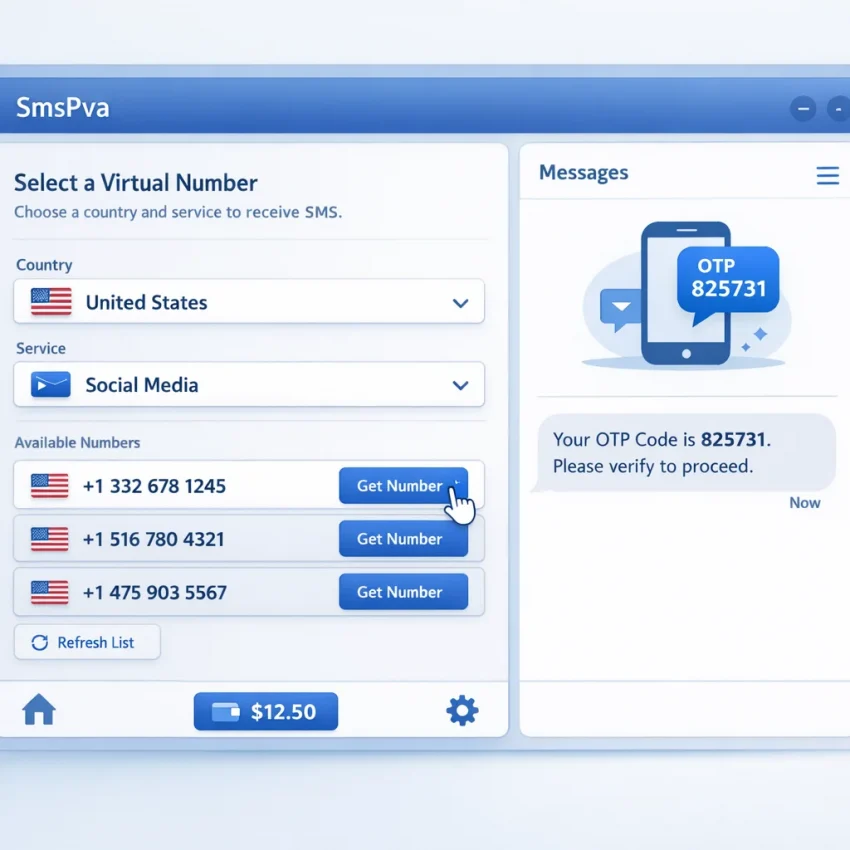
What SMS rental means in 2026 and when to use SmsPva
In simple terms, sms rental means using a temporary virtual phone number to receive a text verification code. People use it for sign-up, account activation, login confirmation, and one-time OTP checks. Instead of entering a personal number, they use a number from an sms rental service and read the code inside the platform dashboard.
In 2026, users want a cleaner process than a random number list. The usual goal is simple: choose the target platform, pick a suitable country when needed, get a number, enter it into the app or website, and wait for the SMS. That is why service-matched workflows are more useful than generic number pools. SmsPva is built for that process, so you can Receive SMS online with a structured verification flow.
People often use the term SMS rental for two related needs. One is a quick, one-time verification. The other is a more defined rental workflow tied to a specific service. The practical difference is workflow accuracy. In 2026, matching the number flow to the exact service matters because verification systems are stricter and selection mistakes waste time.
Why people search for SMS rental now
Most users searching for ways to receive sms online are trying to solve one of three problems. They want more privacy during sign-up. They want to keep work, testing, or side-project accounts separate from a personal device. Or they want a repeatable process for account verification without mixing everything into one SIM card and inbox.
A virtual number for sms verification helps when you do not want to expose your main phone number every time you activate an account or complete a short OTP flow. For privacy-focused users, teams, and testers, that can make verification more organized and easier to manage.
That is where SmsPva fits best. The platform is built around service-specific verification paths. You are not just looking for any number that might receive a message. You are using a workflow designed for OTP receipt and account activation.
When SmsPva is the right fit
Use SmsPva when you want a clear path to get a verification code with fewer avoidable mistakes. It works best when you know the target service, want a temporary number for verification, and prefer a dashboard that keeps code retrieval simple.
It is also a strong fit when you want to separate verification tasks from your personal phone. Many users now treat verification as a routine operational step. They want better control over what service they select, which country they use, and where the OTP appears.
In practice, sms rental smspva means using SmsPva as the working tool for getting a temporary number, submitting it to the target platform, and retrieving the code in one place.
How the SmsPva workflow works step by step
A good 2026 sms rental workflow is straightforward: match the target platform to the correct SmsPva service, get a virtual number, submit it for verification, and collect the OTP in your dashboard. Most mistakes happen before the code is sent. Users often choose the wrong service, use a generic flow, or enter the number too early.
Start by identifying the exact platform you need to verify. Do not choose only by country or price. Choose by service first. If you need a virtual number for SMS verification for a specific app, select that service in SmsPva before you request a number. This improves workflow accuracy and makes the code easier to track.
Next, decide whether you need a country-specific route. Some users can proceed from the service page alone. Others need a number from a specific region because the target platform or account setup requires it. The practical order is service first, country second.
From number request to OTP entry
Once you choose the right service, request the number in SmsPva. The platform will assign a number for that activation flow. Copy the number carefully and paste it into the target platform exactly as shown. Include the right country code when needed.
Before you submit, double-check the format. Small mistakes such as missing digits, the wrong prefix, or extra spaces cause many failed attempts. After you enter the number, trigger the verification SMS and keep the active SmsPva order open. The dashboard is where your sms verification number becomes useful, because that is where the OTP should appear.
When the code arrives, copy it from SmsPva and paste it into the target platform promptly. If the code is rejected, check for a mismatch first. Make sure you copied the latest message and confirm that the number you submitted matches the one shown in your active order.
How to avoid common flow mistakes while the order is active
A practical rent phone number for otp workflow depends on timing and discipline. Use one active verification attempt at a time for each number. If you request a number for one platform, use it only for that platform and finish that attempt before starting another.
If the code does not appear right away, do not jump to a different service too quickly. First verify the basics: did you choose the correct service, did you enter the exact number, and did the app actually send the SMS? Often the issue is a mismatch between the chosen service and the platform being verified.
The end-to-end process is simple: choose the right service, select a country if needed, request the number, paste it into the target platform, trigger the OTP, then retrieve and submit the code from your SmsPva dashboard.
How to choose the right service, country, and number type before you start
The fastest way to reduce failed verifications is to avoid a generic number-first approach. In 2026, a better sms rental service workflow starts with the target platform. On SmsPva, that means choosing the exact service you want to verify before you rent a number.
This matters because many platforms filter by service, region, and number history. A service-specific path helps line up the number with the verification form you will actually use. It also makes the next steps clearer: check whether a country matters, whether a rental-style flow fits your use case, and whether a one-time OTP flow is enough.
Think of the selection process in this order: app first, country second, number type third. That sequence prevents most setup mistakes. If you reverse it, you can end up with a number that is available but poorly matched to the platform you want to verify.
Match the platform before you choose the number
When people search for a temporary number for verification, they often focus only on availability. The better filter is platform fit. A number intended for one verification flow may not be the best choice for another. SmsPva works best when you use its service-specific structure as intended.
For example, if you need Signal, start from the dedicated Signal SMS verification page. That page keeps the workflow tied to the app you are activating. From there, you can review country options and move into the right path with fewer clicks and fewer wrong selections.
If you pick the wrong service label at the start, the code may not arrive where you expect it, or the app may reject the number. A service-matched sms activation service flow is simply more practical than guessing.
Use country pages when the region affects the verification flow
Country choice should come after service choice. Some apps accept many regions, while others behave differently depending on the country code shown during sign-up. If your account flow is tied to a specific region, use a service-country page instead of a general service page.
Signal is a good example. If you want a UK-based flow, the page for Signal verification in Unt. Kingdom gives you a more precise starting point. At the time of writing, Signal single-SMS pricing for the UK was listed from $0.50 or $0.58, depending on the country-code variant. Signal in the United States was listed at $1.75. These are API snapshots, not fixed offers.
The key lesson is not the price alone. A lower listed price is not automatically the better fit if the country code does not match your intended sign-up flow. Start with the app, confirm the region, then choose the number type that suits the task.
Example workflow: using SmsPva for Signal verification
If you want a concrete sms rental example, Signal is a useful one because the setup is simple but service matching still matters. The cleanest path is to start on the dedicated Signal page instead of picking a generic number first.
Open the Signal page on SmsPva, review the available country options, and choose the country that matches your intended Signal sign-up flow. Availability can change, so use the live page as your current reference before you request a number.
If your workflow specifically needs the rental-oriented route, you can use the dedicated Signal SMS verification rental page. That is the better path when your process is built around a rental flow rather than a broad one-time selection screen.
For a UK-based route, the UK country page is a focused starting point. At the time of writing, Signal single-SMS pricing for the UK was listed from $0.50 or $0.58, depending on the country-code variant shown. If you prefer a US flow, Signal single SMS in the United States was listed at $1.75. These figures are API snapshots, not permanent promises.
How the OTP retrieval usually looks in practice
Once you choose the country, request the number in SmsPva. Copy it exactly as shown. Then open Signal and begin registration. Paste or type the rented number carefully, including the correct country selection in Signal itself. Small mismatches here cause many failed attempts.
After you submit the number, Signal sends the verification code. Return to SmsPva and watch the active order panel for the OTP. Keep the order window open and refresh only if needed. Most users create problems by switching numbers mid-process or restarting too early.
When the code appears, copy it directly from SmsPva and enter it into Signal without changing the number or country on the app side. If Signal asks for another attempt, first verify three basics: you selected Signal as the service, you used the same country in Signal as on SmsPva, and you entered the number exactly.
A simple repeatable Signal flow for 2026
A reliable pattern looks like this: open the Signal service page, choose the relevant country page if you already know the region, request the number, submit it in Signal, wait for the SMS, copy the OTP from SmsPva, and finish activation.
This is why SmsPva fits modern verification workflows well. Instead of treating every platform the same, it gives you service-specific pages that make signal sms verification more predictable and easier to manage.
Common SMS rental problems and how to fix them on SmsPva
Most sms rental issues come from a small set of mistakes: the wrong service, the wrong country, a delayed OTP, or a session that expired before you finished the form. These issues are easier to diagnose when you use a service-matched flow on SmsPva.
If your goal is to receive an OTP with fewer retries, review what you selected before you blame the number. Many platforms filter numbers by service type, region, and timing. A careful check often solves the issue faster than renting a second number immediately.
Problem 1: the verification code did not arrive
If the code did not arrive, first confirm that the target app or website actually accepted the number and sent the SMS. Some users submit a number incorrectly, leave the page, and then wait in SmsPva even though the request was never completed.
Next, check formatting. Make sure you entered the full number exactly as shown, including the country code. Remove extra spaces or copied characters. If the platform offers both voice and SMS options, choose SMS when your workflow depends on text delivery.
Then check timing. Some services send quickly, while others take longer or trigger cooldowns after repeated attempts. Avoid opening several verification attempts at once for the same account.
If the flow still looks correct and no code appears, use the Help page for the next support steps.
Problem 2: you selected the wrong service or wrong country
This is one of the most common mistakes with a temporary number for verification. A user may need a number for one platform but accidentally choose a different service or a generic flow that does not match the target app. On SmsPva, the safer path is to select the exact service first, then choose the country that fits the sign-up flow.
Country mismatch can also block delivery. If the app flow is tied to a local market, pick a country that matches that context instead of choosing only by the lowest listed price. Also check whether the app itself is set to a different country than the number you rented.
Problem 3: the session expired or the workflow became messy
Another common issue is losing track of the verification state. Users open several tabs, request more than one number, or restart the signup before the first attempt finishes. That can leave you waiting for a code tied to a session you are no longer using.
Use one clean attempt at a time. Open the target platform, request the number in SmsPva, submit it, and wait for the OTP in that same sequence. If you still hit repeated errors, stop and ask four quick questions: Did I choose the exact service? Does the app region match the number region? Did I submit the number successfully? Am I still on the same verification session?
That checklist solves many common sms rental smspva issues and reduces wasted attempts.
Best practices for privacy, account separation, and repeatable verification workflows
In 2026, the biggest improvement in sms rental is not speed alone. It is consistency. A clean workflow helps you avoid simple mistakes, reduce account mix-ups, and keep each verification attempt easy to trace.
Start by separating your tasks. Use one browser profile, app session, or device context for each account flow. This makes it easier to match the correct phone number, OTP, and target service. If you run several sign-ups in one session, it becomes easy to paste the wrong number or monitor the wrong tab.
Keep a short record before you request a number. Note the target platform, the country you plan to use, the time you started, and whether the flow is a one-time check or part of a repeat process. Good notes help you see patterns and reduce confusion.
Keep service selection and environment setup aligned
The safest habit is to match the target platform to the correct service page every time. Do not rely on a generic flow if a service-specific option exists. That reduces mismatches and makes the sms activation service process easier to monitor.
Privacy also works better when your account environment stays separated. If you manage multiple verification workflows, use distinct browser profiles and consistent session rules. The goal is cleaner boundaries between workflows, not shortcuts or guarantees.
A simple naming system helps. Label each attempt with the service name, country, date, and status. For example: “Signal-UK-started-10:40” or “US-flow-code-received.” This basic habit prevents costly mix-ups.
Build a repeatable SmsPva routine
For repeat work, use the same checklist every time: choose the exact service, confirm the country if relevant, request the number, enter it carefully, wait for the code, then record the result. Small discipline beats constant troubleshooting.
If you want a practical tool for organized OTP receipt, SmsPva is a strong workflow to standardize on. It gives you a clear service-specific path instead of a one-size-fits-all number flow.
Finally, avoid overloading one session with too many live actions. Finish one verification before starting the next when possible. That keeps your sms rental 2026 process organized, more private, and easier to repeat.
FAQ
What is SMS rental and how is it different from using a personal phone number?
SMS rental means using a temporary virtual number to receive a verification code instead of using your personal number. It helps separate sign-up and OTP tasks from your main phone and can make verification workflows easier to manage.
How do I receive an OTP with SmsPva?
Select the correct service, choose a country if needed, request the number, enter it into the target app or site, trigger the SMS, and wait for the code to appear in your SmsPva dashboard.
How do I choose the correct service before renting a number?
Start with the exact platform you want to verify. On SmsPva, choose the matching service page first. This reduces mistakes and improves the chances of a clean verification flow.
Can I choose a country for SMS verification on SmsPva?
Yes, when a country matters for the sign-up flow, use the relevant service-country page. Country availability can change, so check the live page before starting.
Why did my verification code not arrive?
Common reasons include entering the number incorrectly, choosing the wrong service, using the wrong country, or not completing the OTP request on the target platform. Timing can also be a factor.
Is SmsPva suitable for Signal SMS verification?
Yes. SmsPva provides a service-specific Signal workflow, which makes it easier to choose the right path, request a number, and retrieve the OTP in one place.
How much does SMS verification cost on SmsPva?
Pricing depends on the service and country. At the time of writing, Signal single-SMS pricing was listed from $0.50 or $0.58 for UK variants, and $1.75 for the United States. Treat these as current API snapshots, not guarantees.
When should I use the Help page during setup or troubleshooting?
Use the Help page when the code does not arrive, when you are unsure whether you selected the right service or country, or when your verification session becomes confusing and you need clear next steps.