

Gmail Verification Code Not Arriving in 2026: Fixes That Work and When to Try SmsPva
By SmsPva Editorial Team | | Updated for 2026
Editorial note: This guide is for legitimate account creation, recovery, and account-security verification. Google may limit or reject some phone numbers, including some virtual numbers, depending on region, account history, carrier behavior, and risk signals. Nothing here guarantees approval by Google, and official recovery methods should always be your first choice for important existing accounts.
If you are dealing with a gmail verification code not arriving problem, you are not alone. In 2026, Google account protection is stricter, mobile carriers filter more automated traffic, and many phone numbers have already been used repeatedly for signups, recoveries, and two-step verification flows.
The result is familiar: google verification code not received, a long delay, no text at all, a code that expires before it appears, or a message saying the phone number cannot be used for verification.
The frustrating part is that this issue can come from several different places at once. Your phone may have full signal, but the route used for one-time passwords can still fail. Your SIM may receive normal messages, but Google may decide not to trust that number for the current attempt. Or the code may be sent, but a network delay, roaming conflict, or repeated resend request may stop it from reaching you in time.
This guide explains the most common reasons Gmail and Google verification messages fail in 2026, the safest fixes to try first, how to approach recovery scenarios, and when a fresh number workflow through SmsPva may be worth considering.
Why Gmail verification codes may not arrive in 2026
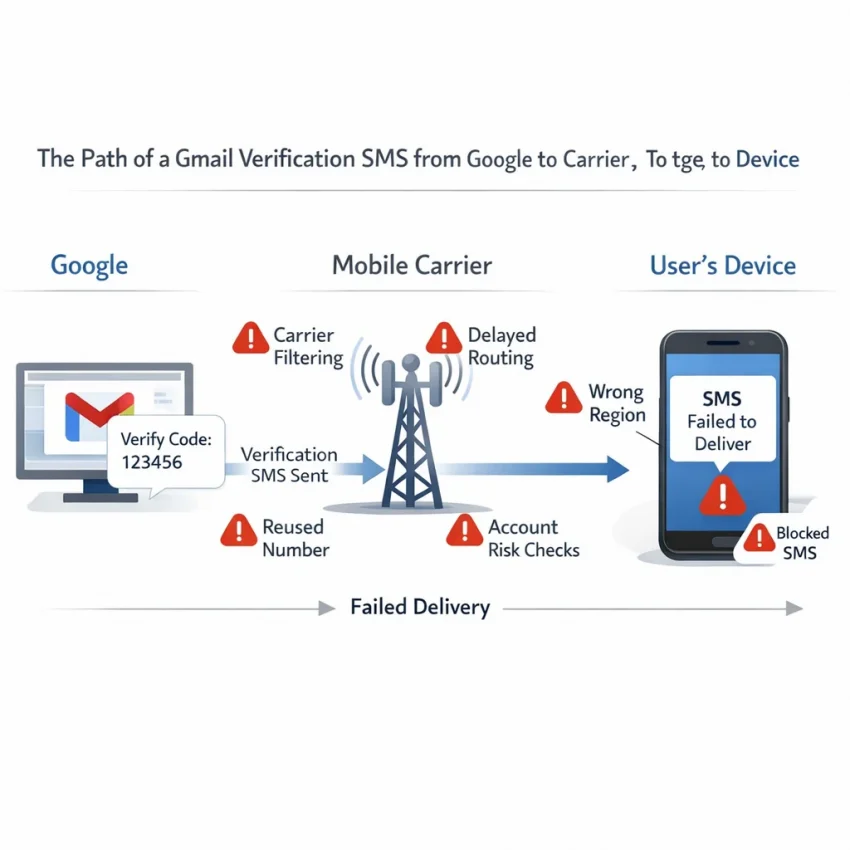
Google SMS delivery is no longer a simple point-to-point text. The code must pass through Google systems, SMS aggregators, anti-abuse filters, and local carriers before it reaches your device. A problem at any stage can create a gmail sms verification not working situation.
The most common reasons include:
- Carrier filtering: Some carriers delay or block automated OTP traffic, especially during heavy load or after spam-detection triggers.
- Number reputation: A phone number that has been heavily reused for signups or recoveries may have lower trust.
- Google rate limiting: Too many attempts in a short period can temporarily suppress delivery.
- Region mismatch: Your IP, browser language, device location, SIM country, and account history may not line up.
- Formatting mistakes: A wrong country code, missing digit, or unnecessary leading zero is enough to prevent delivery.
- Roaming or temporary network registration issues: Travelers often hit this problem even when the phone appears connected.
- Unsupported number ranges: Some VoIP, landline, recycled, or low-trust number types are less reliable for Google verification.
- Account risk checks: Sometimes Google is not failing to send the code; it is quietly refusing to approve that verification path.
In practice, more than one factor is often involved. For example, a reused number plus repeated resend attempts plus a new browser session from another country can easily trigger a full gmail phone verification problem.
How to tell whether the problem is delivery, number trust, or account risk
Before changing numbers, it helps to identify what type of problem you are facing. That makes troubleshooting faster and reduces unnecessary retries.
Signs the problem is basic SMS delivery
- You are not receiving other texts on time either.
- You recently changed carriers, inserted a new SIM, or started roaming.
- The voice-call option works, but SMS does not.
- Texts from other automated services are also delayed.
Signs the problem is the number itself
- Google says the number cannot be used for verification.
- The same number fails repeatedly across clean sessions.
- Other services also reject the number for signup or OTP use.
- The number has been used many times before for account registration.
Signs the problem is account or session risk
- You are creating or accessing the account from a new device or location.
- You switched between several Google accounts in one session.
- Your browser has many cookies, extensions, or prior failed sign-in attempts.
- The account is under recovery stress after password resets, suspicious login alerts, or unusual activity.
This distinction matters because a delivery problem can often be fixed on your phone, while a number-trust problem may require a different number path, and an account-risk problem may need time, a known device, or official recovery methods.
First, try the official and simplest fixes
Before you switch numbers or use a third-party workflow, go through the basic checks. These solve a surprising share of google sms code not arriving cases.
- Confirm the number format. Check the country selector and make sure the number is entered correctly, without an extra zero or missing country code.
- Verify that your phone receives normal texts. Send yourself a test message from another line if possible.
- Wait before requesting another code. If you tapped resend multiple times, stop and pause. Google may throttle delivery.
- Toggle airplane mode for 10 to 15 seconds. This can refresh your device’s network registration.
- Restart the phone. It sounds basic, but it can fix temporary carrier registration issues.
- Disable spam filtering or SMS-blocking apps. Security apps, carrier spam controls, and message filters can interfere with OTP traffic.
- Check roaming status. If you are traveling, confirm SMS reception is available on your current network.
- Try the voice-call option if Google offers it. If a call comes through but the text does not, the issue is likely on the SMS route.
- Use a clean browser session. Open an incognito window or a separate browser profile and repeat the process once.
- Change only one thing at a time. Otherwise you will not know what actually fixed the issue.
If none of these steps help, move on to the deeper causes below instead of repeatedly pressing resend.
When the problem is your phone number, not your phone
Many users assume the missing code is caused by weak signal or network delays. Sometimes that is true. But often the real issue is that Google does not trust the number enough for that verification attempt.
This usually appears in one of three ways:
- No SMS arrives at all, even after a reasonable wait.
- Google says the number cannot be used for verification.
- The same number keeps failing across multiple attempts and sessions.
Common reasons include:
- Heavy reuse: The number has already been used for too many signups or account recoveries.
- Prior abuse signals: Google may associate the number with suspicious account patterns.
- Incompatible number type: Some virtual, VoIP, or recycled numbers have lower acceptance rates.
- Regional inconsistency: The number country does not fit the account or session context.
- Old recovery associations: A number that is already linked to other Google activity may be less useful in a fresh setup flow.
If this pattern keeps repeating, forcing the same number usually wastes time. At that point you need either a different recovery route or a fresh verification source.
Official Google options to try before changing your workflow
Because account access and account security are sensitive topics, always check Google’s own options before trying a new number. This is especially important if you are recovering an existing account rather than creating a new one.
- Use a backup method. Google may offer a recovery email, device prompt, authenticator app, passkey, or backup code instead of SMS.
- Try a known device or location. Signing in from a familiar browser, home network, or previously used device can reduce risk signals.
- Wait for cooldown periods to expire. If Google has temporarily restricted attempts, stepping back is often more effective than pushing harder.
- Follow official recovery prompts carefully. For existing accounts, use the exact recovery flow provided rather than starting over in multiple tabs.
- Use another eligible personal number if available. A secondary SIM or trusted family number may work, though you should think about long-term access and privacy before doing that.
These options are often safer and more sustainable than repeatedly trying the same blocked path.
Step-by-step troubleshooting for common real-world scenarios
Scenario 1: Creating a new Gmail account and the code never arrives
If you are creating a new account and Google never sends the SMS, start by checking the number format and waiting a few minutes before trying again. Then open a fresh browser session and retry once. If the number is still rejected or no code arrives, the issue may be number trust rather than simple delivery.
Scenario 2: Recovering an old account while traveling
Travel often creates a mismatch between your current IP region, your SIM country, and the account’s normal sign-in pattern. In that case, first try a known device, your regular home browser profile, and any available recovery email or passkey. If SMS still fails, wait for a cooldown before trying again.
Scenario 3: Your phone receives other texts, but not Google codes
This usually points to carrier filtering, number trust, or account-risk checks. Ask yourself whether you have requested too many codes, used the same number across many accounts, or changed devices recently. If yes, reset the session and avoid repeated resends.
Scenario 4: Google says your number cannot be used for verification
That message usually means the issue is not temporary network delay. Google is rejecting the number for that specific action. Continuing to resubmit the same number is unlikely to help. Consider another official recovery route or a fresh number workflow if the account context allows it.
Scenario 5: The code arrives late and has already expired
Late codes point to unstable routing. Do not keep stacking new requests on top of old ones. Wait for the queue to clear, restart the process once, and enter the next code promptly when it appears.
Compliance, privacy, and account-safety caveats
Verification workflows should be approached carefully. The goal should be to access or secure an account you are legitimately allowed to use, not to bypass platform rules.
- Respect Google’s policies. If a number is rejected, that may reflect a policy or risk decision rather than a technical error.
- Think about long-term recovery. If you attach a number to an important account, consider whether you will still control that number later.
- Avoid public inbox services for sensitive accounts. Messages may be visible to others, which creates obvious privacy and security risks.
- Do not mix important recovery with disposable habits. For business, primary email, or high-value accounts, stable recovery methods are better than temporary convenience.
- Use virtual numbers responsibly. A fresh number workflow can help with setup friction, but it is not a substitute for proper account hygiene.
This is why the best workflow depends on your purpose. A low-stakes signup and an important long-term recovery should not be handled the same way.
When SmsPva may help
If official options are exhausted and the problem appears tied to number reliability, regional delivery problems, or account setup friction, a fresh number workflow may be practical. That is where SmsPva’s Google verification page may help.
SmsPva provides virtual phone numbers for SMS verification and OTP receipt, with a cleaner workflow than random public receive-SMS websites. For users who need a more structured option, it can be a practical next step.
It is important to keep the expectation realistic: not every Google verification attempt will accept every virtual number. Acceptance can vary by country, timing, account state, device signals, and Google’s own risk checks. SmsPva is best viewed as a troubleshooting option when the blocker appears to be the number or SMS route, not as a universal guarantee.
How to use SmsPva for Google verification
If you decide to try a fresh number workflow, keep the process simple and consistent.
- Open the dedicated Google page on SmsPva.
- Select a country that fits your account context as closely as possible.
- Get the number and enter it carefully in Google with the correct format.
- Request the code once and avoid repeated resend attempts.
- Watch the SmsPva dashboard for the incoming OTP.
- Enter the code promptly because Google verification codes expire quickly.
- If the attempt fails, pause before retrying. Cooldowns and clean sessions matter more than speed.
If your session looks messy or high-risk, restarting the flow in a clean browser profile before using the new number can make results easier to interpret and may improve the outcome.
Why SmsPva is usually better than free public SMS sites
Users trying to receive google verification sms online often start with free public inbox services. That usually creates new problems instead of solving the old one.
- Public visibility: Messages may be viewable by others.
- Overused numbers: Popular platforms often limit public numbers quickly.
- Poor reliability: Delivery rates are inconsistent and support is weak.
- No service-specific workflow: Generic inboxes do not help much with Google-specific verification friction.
- Higher privacy risk: Even if a code arrives, the workflow may not be suitable for anything important.
By contrast, SmsPva offers service-specific pages, country selection, and a cleaner dashboard workflow. That makes it a more practical option than a public inbox when you need a fresh number path for lawful account verification.
Best practices to improve future success rates
If your gmail otp not received issue keeps recurring, these habits can improve future attempts:
- Match the number country to your session and region when possible.
- Use a clean browser profile for each account workflow.
- Avoid logging in and out of many Google accounts in the same session.
- Do not hammer the resend button.
- Change one variable at a time while troubleshooting.
- Prefer service-specific workflows over random SMS tools.
- Keep recovery methods updated on important accounts.
- Use familiar devices and networks for sensitive recovery attempts when possible.
For users managing multiple account environments, keeping browser profiles and verification numbers separated reduces confusion and can lower avoidable risk signals. If needed, HQ Proxy is available on SmsPva for users who require a more isolated environment, though it is optional and unnecessary for most people.
What to do if the code still does not arrive
If a fresh attempt still fails, do not keep retrying blindly. The goal is to identify whether the issue is temporary delivery failure, number rejection, or an account-risk flag.
- Stop resending for a while.
- Restart the verification process from a clean session.
- Try official Google recovery options again if the account is important.
- Only then test a different number source or country after cooldown.
- Check SmsPva Help if you are using its Google workflow and need service guidance.
Once you know which category of failure you are dealing with, the next step becomes much clearer and less frustrating.
SmsPva compared with other common options
Here is a practical comparison of the most common routes users try when facing a google verification code not received problem:
| Option | Pros | Cons |
|---|---|---|
| Personal SIM | Simple, familiar, private | May be overused, filtered, or tied to old Google activity |
| Secondary personal SIM | More control than borrowed access | Still may face rate limits or trust issues |
| Borrowed number | Can work quickly in the moment | Creates privacy and future recovery risks |
| Free public SMS site | No setup barrier | Public inbox, low trust, poor reliability |
| Random virtual number provider | Sometimes cheap | Uneven support, inconsistent quality, limited transparency |
| SmsPva | Google service page, dashboard workflow, country options, help resources | Not every number will be accepted in every Google context |
This is why SmsPva is best positioned as a practical troubleshooting tool when your current number or delivery route is the blocker, not as a replacement for all official recovery methods.
Final takeaway
If your gmail verification code not arriving issue is happening in 2026, the cause is usually one of three things: SMS delivery failure, number trust problems, or Google account-risk checks. Start with the simple fixes, use official recovery methods first for important accounts, and avoid making the situation worse with constant resend attempts.
When the evidence points to a failing or low-trust number and you need a cleaner verification path, SmsPva can be a practical next option. Just keep expectations realistic, prioritize account safety, and choose the workflow that makes sense for your specific account and use case.
FAQ
Why is my Gmail verification code not arriving even though my phone has signal?
Signal only means your device is connected to a network. The verification SMS can still be delayed or blocked by carrier filters, Google throttling, routing problems, or number trust issues.
How long should I wait before requesting another Google verification code?
Wait at least a few minutes. If you already requested several codes, wait longer before trying again to avoid temporary rate limits and stacked delays.
Can Google block a phone number from receiving verification SMS?
Yes. A number may be limited if it has been overused, linked to suspicious activity, or does not fit the trust profile of the current session.
Does Gmail accept virtual numbers for verification in 2026?
Sometimes, but not always. Acceptance depends on the number, country, account state, and Google’s risk checks. No provider can guarantee success in every case.
What is the best way to receive a Google verification SMS online?
If you need an online workflow, avoid public inboxes. A service-specific option like SmsPva for Google verification is generally better than a generic receive-SMS site.
Why does Google say my phone number cannot be used for verification?
That usually means the issue is number trust or compatibility rather than simple SMS delay. Overuse, region mismatch, unsupported number types, and prior abuse signals are common reasons.
Is SmsPva a good option for Google or Gmail verification?
It can be a good option when your current number is unreliable or repeatedly rejected. It offers a cleaner workflow than free public SMS sites, but success still depends on Google’s checks.
What should I do if Google keeps delaying or not sending the code?
Stop repeated resend attempts, reset the session, try official recovery methods, and if the problem appears tied to the number itself, consider a fresh workflow through SmsPva.