

What the Cash App Verification Code Is and Why It Fails
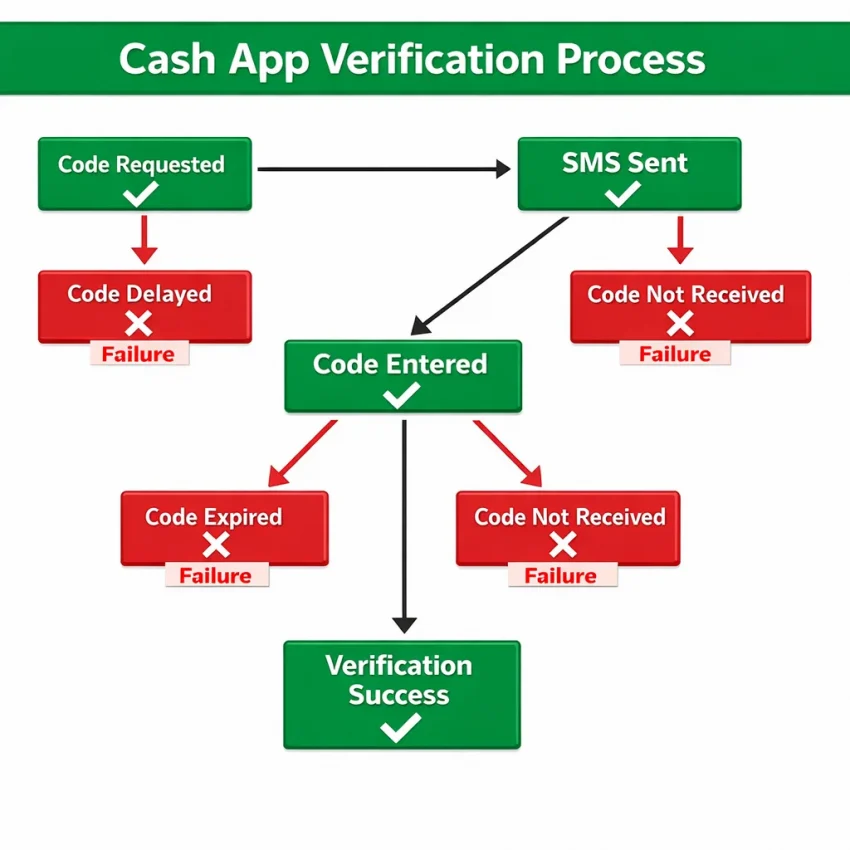
A Cash App verification code is a one-time passcode sent by SMS to confirm that a phone number can receive messages. Cash App may send it during signup, login, account recovery, or extra security checks. The basic flow is simple: enter a number, request the code, receive the SMS, and submit the OTP before it expires.
Most cash app verification code problems fall into a few patterns. The code never arrives. The text arrives too late. The code expires before you enter it. The app says the code is invalid. Or the request stops working after too many attempts.
That is why context matters. A signup issue may point to number formatting or region mismatch. A login issue may point to session changes, repeated requests, or device inconsistency. If users report a cash app otp not received issue or a cash app login code problem, they are usually dealing with one of these breakpoints.
Where the verification flow usually breaks
The first pattern is non-delivery. You request the code and nothing arrives. This is the classic cash app verification code not received case.
The second pattern is delay. The SMS appears, but not soon enough to use it. By the time you enter it, Cash App may reject it as expired.
The third pattern is mismatch. You receive a code, but the app says it is wrong. This often happens after multiple requests, a refreshed session, or switching devices mid-flow.
The fourth pattern is throttling. Too many retries in a short period can slow down or block new requests. Users often describe this as cash app code not sending, even when the real issue is a temporary request limit.
How to identify your issue first
Before changing settings, identify the failure type. If no SMS arrives, focus on delivery conditions. If the text is late, focus on timing. If the code is invalid, look at retries, session changes, and input mistakes. If requests stop after several attempts, assume a temporary limit is involved.
This quick diagnosis saves time. It also helps you decide when a cleaner verification workflow makes sense. If your main number keeps failing, SmsPva can help you Receive SMS online with a virtual number for a more controlled Cash App verification process.
Why You May Not Be Receiving the Cash App Code
If your cash app verification code not received problem feels random, it usually is not. Most failures come from a short list of causes. The key is to identify the cause before you hit resend again.
Number entry, region mismatch, and number history
Formatting mistakes are still common. Users enter the right digits with the wrong country code, leave an old number in autofill, or paste extra symbols. Even one mismatch can send the OTP to the wrong route.
Region mismatch is another frequent issue. If the verification flow expects one country and you submit a number from another, delivery can fail or the request may be rejected silently. This often happens during travel, SIM changes, or account recovery.
The number itself can also be the problem. Some numbers carry prior registration history or failed verification attempts. Recycled numbers can trigger risk checks, which may lead to missing texts or blocked requests.
If your personal number has delivery issues or confusing history, a separate workflow often helps. That is one reason users turn to SmsPva for a cleaner OTP setup.
Carrier filtering, short-code problems, and repeated requests
Carrier filtering is a major reason for cash app otp not received complaints. Some carriers handle automated login texts differently from normal SMS. A verification code may be delayed, filtered, or blocked even when regular messages work fine.
Short-code compatibility matters too. The request may be created, but the SMS may not complete the route in time. To users, it looks like nothing happened. In reality, the message path failed or stalled.
Repeated requests often make the problem worse. If you tap resend several times, Cash App may throttle sends, replace older codes, or pause the flow. This creates confusion: one late code arrives, another becomes active, and the one you enter gets rejected.
Device, network, and platform-side delays
Cash App also checks context. If you start on one network and finish on another, or switch devices during verification, the session may look inconsistent. The same risk applies when toggling VPN or proxy settings mid-flow.
Sometimes the issue is a stale app session. The request button works, but no new SMS actually gets sent. On your side, this looks like a delivery issue, even though it is really a session issue.
And sometimes the problem is temporary delay on the platform side. If your number format is correct, your network is stable, and you have not spammed requests, the best move may be to wait and try again in a clean session. If you need extra troubleshooting help, use the SmsPva Help page.
Step-by-Step Fixes Before You Request Another Code
If your cash app verification code not received issue keeps repeating, do not start by hitting resend over and over. Reset the conditions first, then try one clean request.
Start with the number. Check the country code, remove spaces, and confirm every digit. If you pasted the number, retype it once manually to rule out hidden characters.
Next, pause. Repeated requests in a short window can trigger delays or temporary limits. Wait a few minutes, then submit one fresh request instead of stacking several.
Now check your signal and network. If you use mobile service, make sure you have stable coverage. If you use Wi-Fi, confirm the connection is steady. Avoid changing networks in the middle of the same verification attempt.
Reset the app and keep the session consistent
Close Cash App completely, then reopen it. If it still behaves oddly, restart your phone. This clears stuck app states and temporary session issues that can interrupt SMS verification.
Keep the same device for the next attempt. Starting on one device and finishing on another can create friction. If the app shows errors, restart the flow cleanly instead of multitasking through it.
Watch for late messages. A delayed code may no longer work. Many users think they have a cash app verification code invalid problem when the real issue is that they entered an expired OTP. Always use the newest code only.
Also keep your environment consistent. Use one device, one network, and one region context from start to finish. Consistency reduces the chance of triggering a different session state.
Prepare a clean retry
If the code still does not arrive, check whether your device filters unknown senders or blocks spam texts. Some phones hide verification messages instead of showing them normally.
Then request one new code and wait. Do not trigger another request immediately. This gives you a clear signal about whether the problem is delay, filtering, or something deeper with the number.
If your main number still fails after a clean retry, a backup verification workflow may be the fastest option. SmsPva gives you a practical way to receive OTPs with a virtual number when your regular line becomes the bottleneck.
How to Solve Cash App Verification Issues With SmsPva
If you have already checked the obvious causes and the code still does not arrive, a virtual number workflow can be the simplest next step. SmsPva gives you a cleaner way to receive SMS verification codes when your main number is not working well for Cash App.
This is useful when your carrier filters login texts, your number has old signup history, or your SMS flow keeps stalling. It also helps if you want a privacy-focused verification setup instead of relying on your personal line every time.
The process is straightforward. Open Cash App and reach the phone verification step. Then go to SmsPva, choose Cash App, select the country that matches your verification flow, and get a number only when you are ready to use it. Enter that number in Cash App, request the code once, and watch for the OTP in your SmsPva session. When it arrives, copy it exactly and submit it right away.
Choosing the right SmsPva setup
Country selection matters first. If your Cash App flow expects a United States number, use a United States option. If you are completing a United Kingdom-compatible flow, use a United Kingdom option. Do not mix countries randomly.
At the time of writing, Cash App single SMS numbers on SmsPva were listed from $0.50 for a United Kingdom virtual stock variant, $0.58 for United Kingdom, and $1.75 for United States. These are API snapshots, not fixed prices or stock guarantees.
Prepare your session before you rent a number. Reopen Cash App cleanly, keep your connection steady, and avoid switching networks during the attempt. A virtual number workflow works best when you keep it tight: one device, one network, one request, and immediate code entry.
When the SMS arrives, use the newest code only. If a code appears invalid, the issue is often timing or a replaced OTP, not the number itself.
Best practices if the first attempt does not work
If the first send does not complete the flow, avoid panic-clicking resend. Wait a short window, confirm the number was entered correctly, and check that you matched the right country before trying again.
The real benefit of SmsPva is not magic delivery. It is a cleaner verification environment. For users trying to receive cash app verification code online, that cleaner workflow is often the fastest way past blocked, delayed, or inconsistent SMS delivery.
Choosing the Right Number and Environment for Fewer Verification Problems
Many Cash App SMS verification failures happen because the number, device, and network context do not line up cleanly. If you want fewer retries, treat verification as one controlled session.
First, match the number to the country you actually plan to use. A region mismatch can trigger extra checks or weaken delivery reliability. When using a virtual number for cash app verification, choose the country carefully before requesting the OTP.
Next, keep one device active from start to finish. Do not begin signup or login on one device and finish on another unless you fully restart the process.
Your network matters too. Pick one connection and keep it stable. If you begin on mobile data, finish on mobile data. If you begin on Wi-Fi, stay on Wi-Fi. Sudden routing changes can complicate sms verification troubleshooting.
Build a cleaner verification session
A clean session reduces small errors that turn into blocked or delayed OTP flows. Close extra tabs, stop repeated code requests, and avoid running multiple Cash App sessions at once. If you already triggered several failed attempts, waiting is usually smarter than forcing more retries.
If your primary number is unreliable, use SmsPva with a fresh virtual number and a controlled setup. That often gives you a more predictable path than testing the same failing number again.
If you need more separation for privacy or repeatable testing, use an account isolation workflow. In practice, that means one number, one device session, one network context, and one verification attempt at a time.
Proxies can help in privacy-focused workflows, but they are not a universal fix. Stability matters more than constant IP changes.
When to reset the setup
If you keep seeing delays, invalid codes, or no delivery after several clean attempts, reset the entire environment. Start a new session, avoid old retry loops, and use a fresh number if the earlier one appears exhausted.
For many users, this reset is the fastest path out of a stuck verification cycle, and SmsPva is the practical option when you need that cleaner workflow.
Cash App Verification Code FAQs, Edge Cases, and When to Try Again
Why am I not getting my Cash App verification code?
Your request may be affected by carrier filtering, too many recent attempts, a network change, a stale app session, or a number-country mismatch. In some cases, the SMS is simply delayed.
How long should I wait before requesting another Cash App code?
Wait a few minutes before resending. If you already requested several codes, wait longer. This helps reduce overlap and lowers the chance of temporary throttling.
What does it mean if the Cash App verification code is invalid?
It usually means you entered an older code, the latest code expired, or the app session changed between request and entry. Always use the newest code only.
Can a network change cause Cash App SMS verification to fail?
Yes. Switching between Wi-Fi and mobile data mid-flow can create session inconsistency. It is best to request and enter the code on the same device and network state.
Can I use a virtual number to receive a Cash App verification code?
Yes. If your main number is not receiving texts or you want a cleaner verification workflow, SmsPva is a practical option for receiving the OTP with better control over the process.
Which country option should I choose for Cash App verification on SmsPva?
Choose the country that matches the verification flow you want to complete. Do not guess. At the time of writing, Cash App on SmsPva was listed from $0.50 for a United Kingdom virtual stock variant, $0.58 for United Kingdom, and $1.75 for United States. These are API snapshots, not permanent prices or availability guarantees.
What should I do after too many failed Cash App verification attempts?
Stop retrying for a while. Close the app, keep your device and network consistent, and prepare one clean verification attempt. If your original number still fails, switching to a fresh virtual number through SmsPva may be the fastest route.
At the time of writing, what Cash App price snapshots are available on SmsPva?
The listed single SMS snapshots were $0.50 for a United Kingdom virtual stock variant, $0.58 for United Kingdom, and $1.75 for United States. Always check the live selection before you proceed.
If you have already ruled out formatting, timing, and network issues, do not waste more attempts. Use SmsPva for a cleaner Cash App verification workflow and complete your next OTP request with fewer variables.