

Temporary Phone Number for SMS Verification: Common Issues and How to Solve Them with SmsPva
A temporary phone number for SMS verification can help with a legitimate account setup or activation. But a code may be delayed, a platform may reject the number, or the message may never arrive. These outcomes can have different causes.
This guide walks through the basic process, common problems, and sensible next steps. SMS delivery and platform acceptance depend on the receiving service and the number available. No virtual number can guarantee successful verification.
Before troubleshooting: how temporary-number SMS verification works
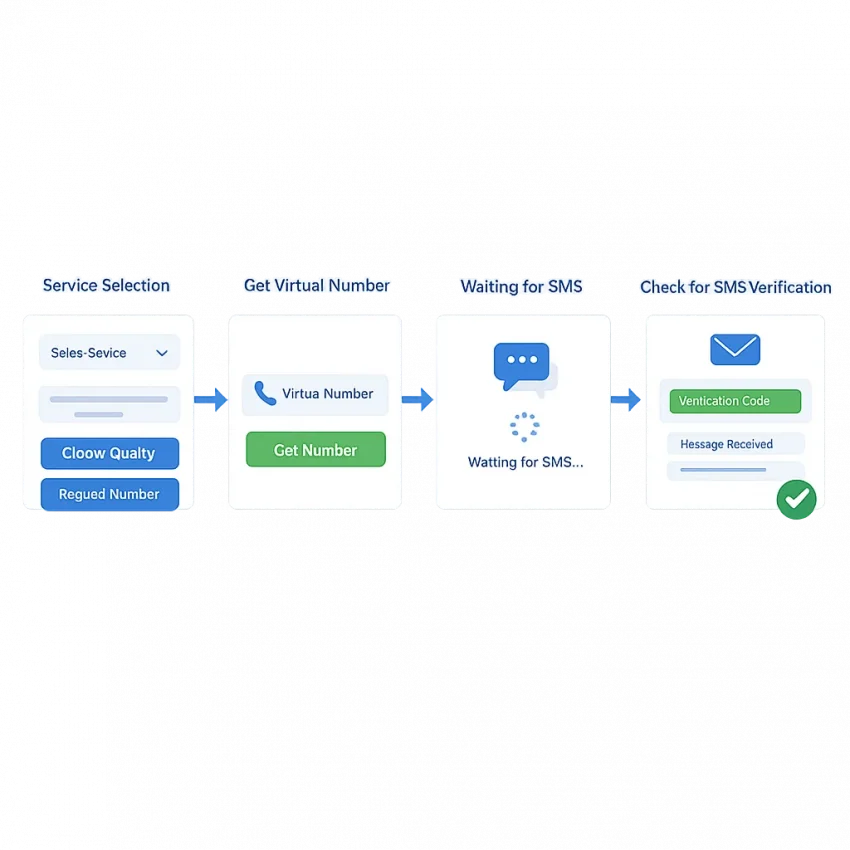
You choose a virtual number for a service, enter it in that service’s verification form, and check the provider’s message view for an incoming SMS. The number is not necessarily a personal mobile line, and the receiving platform controls whether it accepts the number and sends a code.
Understand the verification flow
Start by identifying the exact service you are verifying. If a service-specific option is offered, select one intended for that flow. Check the country and number format shown, then enter the number carefully. After submitting it, return to the relevant order or message view to check for an incoming SMS.
If a code arrives, enter it only in the account flow that requested it. Keep the code private. If no code appears, the issue could be a delay, a platform restriction, or a number-specific limitation.
Set realistic expectations
A virtual number for OTP does not guarantee that a platform will accept the number or send a message to it. Platforms apply their own verification rules, and availability can change. A platform may reject a number before sending anything, or a message may not arrive after a request.
SmsPva is one option for this workflow. Its Receive SMS online page provides access to virtual-number options for SMS receipt. Review the service and country choices shown before starting. Availability and acceptance can vary.
The code never arrives: check the number, service, and waiting state
If an SMS verification code is not received, first identify where the process may have stalled. The number could be incorrect, the request could be tied to a different service, or the platform may not have sent the message. Check the basics before trying again.
Check the request before resending
- Confirm the number. Compare the number in the platform’s form with the number assigned to your active request. Check every digit, including the country prefix, and look for extra spaces or missing digits.
- Confirm the service. Make sure the active number request matches the service asking for verification. If you opened multiple requests, identify which one you entered in the platform’s form.
- Check the active message view. Return to the relevant order or message area and check its status. A platform saying it sent a code does not mean the SMS has already arrived.
If the number or service does not match, correct the entry only if the platform allows it. Otherwise, follow its instructions for restarting the verification flow. Avoid sending codes to another number while the original request remains active.
Wait before deciding whether to retry
Allow a reasonable interval for the message to appear. Follow any countdown or timing guidance from the receiving platform, then check the message view again. Delivery is not always immediate, and there is no universal wait time that guarantees a code will arrive.
Avoid repeatedly requesting new codes. Rapid resends can make it harder to identify which request a message belongs to, and the platform may apply limits or additional delays. Use a resend option only when it becomes available and the platform’s instructions allow it.
If the code still does not appear, the platform may be delaying the SMS, may not support that number, or may not have sent a message. Check the request status and the platform’s guidance. For product-specific troubleshooting, consult SmsPva Help.
The platform rejects the number or says it has been used
A rejected number is different from a missing code. If the platform says the number is invalid, unsupported, or already registered, the attempt may have stopped before an SMS was sent. If the platform accepts the number but no code appears, that is a delivery issue.
Read the exact error and any instructions shown with it. A message about an unsupported number calls for a different response than a message asking you to wait. Repeatedly requesting a code is unlikely to fix a rejection and may lead to additional limits.
Check service fit and possible restrictions
Some platforms restrict virtual numbers. A number may also have a history that does not meet a platform’s requirements. These rules vary by service and account, and an error message may not explain the precise reason.
Confirm that you selected a number for the exact service and verification flow. A service-specific option can help you choose deliberately, but it cannot override the receiving platform’s rules or guarantee acceptance. For example, SmsPva has a Signal SMS verification page. Review the service instructions before choosing an option.
If the platform says the number has already been used, treat that as a rejection. Trying the same number repeatedly is unlikely to resolve a prior-use restriction. Another suitable option may be worth considering only if the platform permits it; changing numbers does not guarantee success.
Consider account-specific checks
Country selection or number format can also trigger an error. Follow the platform’s instructions and avoid adding or removing a country code by guesswork. If the platform points to an account restriction or additional review, changing the number may not help.
For a legitimate verification attempt, follow the service’s prompts. If it continues to reject the number, use its official guidance or recovery route where appropriate. Do not cycle through numbers to work around a restriction.
Country and formatting mismatches: what to verify before retrying
A number can be entered incorrectly even when the digits look right. The country selector identifies the number’s country; the format instructions show how the form expects the digits. Check both before submitting.
Follow the platform’s number format
- Confirm that the selected country matches the number’s country.
- Check whether the form expects the full international number or only the local portion.
- See whether the form already includes the country code.
- Copy the number carefully and preserve the digits and order shown.
Do not add or remove a leading zero or country code based on a general rule. Number formats differ, so follow the receiving platform’s instructions. If the form rejects the number before sending a code, review the format once rather than making repeated attempts.
Match the service and country option
If a provider offers service-specific and country-specific options, check that your selection matches the flow you intend to use. An option for one service or country may not suit another. Even a matching selection cannot override the platform’s restrictions, and availability can change.
For example, SmsPva has a Signal verification in the United Kingdom page. Review the current listing and the receiving platform’s instructions. The page does not guarantee that a number will be available or accepted.
If the country and format appear correct but the platform still rejects the number, its rules or an account-specific check may be the cause. Reformatting the same number repeatedly is unlikely to resolve a policy restriction.
A careful retry workflow with SmsPva
A deliberate retry is more useful than cycling through numbers. First identify what happened: was the number unavailable, rejected before a code was sent, or left waiting for an SMS? Each situation calls for a different next step.
Prepare the attempt
- Identify the exact service. Confirm which service is asking for verification and whether it requires an SMS. Check its instructions first; another verification method may be required.
- Review the available options. Look for an option that matches the service and country you intend to use. Availability can change, and not every option will be offered for every flow.
- Read the number instructions. Check the country selector and the required format. Some forms display the country code separately; others expect a complete number.
A country mismatch or platform restriction is unlikely to be fixed by entering the same number in several formats. If the platform says it does not accept the number, treat that as a rejection rather than a delayed SMS.
Submit once, then monitor the message
- Enter the number accurately. Compare the digits with the selected option before submitting. Check whether the country code is already included.
- Check the relevant message view. After the platform confirms it sent a code, look in the corresponding order or message area. Make sure you are checking the same number you entered.
- Wait and reassess. Follow any timing guidance, then check the message view again. Avoid repeated requests while waiting; a platform may limit requests or invalidate earlier codes.
If a code appears, enter it only in the platform’s verification form. A received SMS does not necessarily mean the platform will accept the number or complete account verification.
If the number is rejected, reread the platform’s explanation. If no SMS appears, confirm that the number and service match the active request. If the attempt remains unresolved, consult SmsPva Help or the platform’s instructions instead of opening repeated requests.
When to stop retrying, protect your account, and choose the next step
Protect your OTP and recovery access
Keep every one-time password private. Enter it only in the verification flow you started, and do not send it to someone claiming to offer support. Avoid sharing passwords or recovery codes while seeking help.
A temporary number is a verification method, not a dependable long-term recovery channel. If the account matters to you, check whether you can add a recovery email, an authenticator, or another method you control. Do not assume you can receive future recovery codes on a number that may no longer be available.
Know when to retry or stop
Retry only when you have a specific reason to expect a different result, such as correcting a formatting mistake or waiting for a stated cooldown to end. If the platform continues to reject the number, stop cycling through requests. Changing countries or numbers at random may not resolve a policy restriction.
When verification is blocked or account access is at risk, follow the platform’s official support or recovery route. If you try again, review the service, country, and instructions first. SmsPva is an option to consider for receiving verification SMS, but availability and acceptance can vary.
In short: correct a clear input error and retry only when allowed; stop if the platform continues to reject the number; and use official recovery support when verification is blocked.
Frequently asked questions
Why is my SMS verification code not arriving on a temporary phone number?
The number may have been entered incorrectly, the selected service may not match the verification flow, or the platform may be delaying or not sending the message. Check the active request and its message view before retrying.
What should I check before requesting another verification code?
Confirm the number and service, check the active message view, and follow any countdown or retry instructions. Avoid rapid resends, which can create confusion or trigger platform limits.
Why does a platform reject a virtual number even when it is formatted correctly?
A platform may restrict virtual numbers, have prior-use rules, or apply account-specific checks. Correct formatting does not guarantee acceptance. Follow the platform’s displayed guidance rather than repeatedly submitting the same number.
Can choosing a different country fix a failed SMS verification attempt?
It may help if the country selection did not match the number or the platform’s instructions. It will not necessarily fix a virtual-number restriction or account-specific block. Check the platform’s country selector before trying again.
How long should I wait before deciding an SMS code is not coming?
There is no universal wait time. Follow the receiving platform’s countdown or timing guidance, then check the active message view. Do not assume repeated code requests will make a delayed message arrive.
Is a temporary phone number suitable for long-term account recovery?
Usually, it is better to treat a temporary number as a verification method, not a long-term recovery channel. Add a recovery method you control if the platform allows it.
What should I do if the number receives a code but the platform still will not verify the account?
Check that you entered the code in the correct account flow and followed the platform’s instructions. The platform may require another check or may have rejected the number or account. Use its official guidance or recovery support if verification remains blocked.