

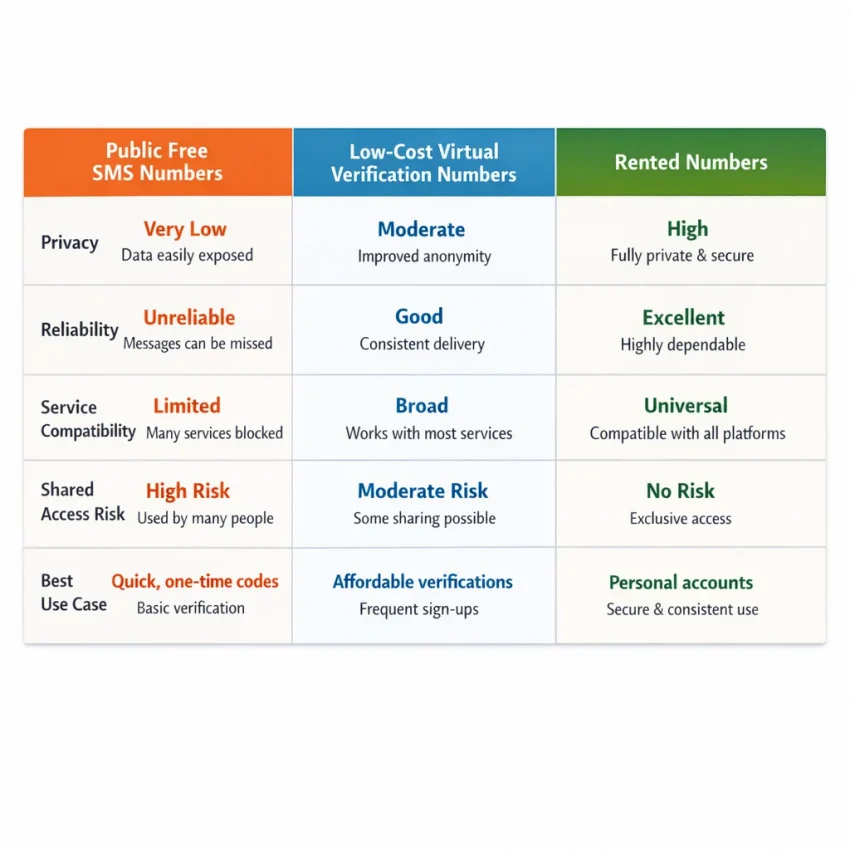
What people mean by “free numbers” in 2026
When people search for free numbers, they usually mean one of four things. Some want a public inbox where they can receive SMS online without paying. Others mean a temporary phone number for verification that costs so little it feels free. Some are looking for promo credits. Others just need a number for one OTP and one signup.
In 2026, those options are not equal. Modern platforms check number history, country fit, and abuse patterns before they send a code. So the real need is rarely “free” in the literal sense. It is a number that works for a specific verification flow. That is why SmsPva is often the more practical answer than public inbox lists.
The four common meanings of “free numbers”
First, there are public SMS numbers. These appear on open websites and shared inbox tools. They look easy to use, but they offer the least privacy and the least control. If a number has already been used too many times, the OTP may never be sent.
Second, some users mean promotional access. That might be a bonus, trial balance, or cheap first use. That is not the same as a permanently free SMS verification number.
Third, many searches for free phone numbers for SMS verification really mean low-cost one-time virtual numbers. These are not public inboxes. They are chosen for a specific service and a specific verification step.
Fourth, there are temporary phone numbers for verification. These are used for one signup, one session, or one code. Temporary does not always mean public. It often just means short-term.
Why “free” often breaks down in real verification use
A public inbox can still work for low-stakes testing, but the tradeoffs are obvious. Messages may be delayed, blocked, or visible to other users. The number may already be tied to earlier signups. That makes public free numbers a weak choice for privacy-focused registration or any workflow where the code needs to arrive on the first try.
By contrast, SmsPva fits the real goal behind most of these searches. Users do not actually want a number because it is free. They want a number that works for a service, a country, and a single OTP flow. You can Receive SMS online through a structured verification path instead of hoping a random public inbox is accepted.
The key expectation is simple: truly free public numbers still exist, but they are shared tools, not dependable verification infrastructure. If your goal is code delivery that matches a real signup flow, SmsPva is the better fit.
Why public free SMS numbers fail more often now
The old idea was simple: open a public inbox, copy an online number for verification, request the code, and finish signup. In 2026, that path fails much more often. Many platforms now screen phone numbers before they even send an OTP. If a number appears on public number lists, has heavy reuse history, or matches known abuse signals, the request may be blocked immediately.
Public numbers also compete with smarter risk systems. Services often look at number reuse, signup velocity, country mismatch, browser signals, and account history together. A shared public number can look suspicious even when your use is legitimate. That is why people searching for a free SMS verification number often end up with no code or an invalid-number warning.
Shared inboxes create reliability and privacy problems
Public receive-SMS sites have always had a privacy problem: anyone can see incoming messages. In 2026, the reliability problem is just as serious. If many people try the same number for the same service, the number quickly becomes low trust. Some platforms silently stop sending SMS to it. Others accept it at first, then fail later in the verification flow.
There is also basic inbox chaos. Your code may arrive mixed with someone else’s messages. The number may be busy or rate-limited. A previous user may already have attached it to the same service. Then your signup fails because the platform sees the number as already claimed or overused.
This is why a virtual phone number for OTP works better than a public listing. Instead of chasing exposed inboxes, you use a number tied to a specific verification attempt. That is a cleaner workflow and a better fit for modern account activation.
Service rules are stricter now
Another reason public numbers fail is service-specific filtering. Platforms increasingly check whether a number type, region, and usage pattern fit the account being created. If you choose the wrong country or retry too often, the service may flag the attempt. Even when a public number receives some messages, it may not work for the exact service you need.
That is why generic public inbox tools feel random. They are not built around the service you want to verify. SmsPva takes the opposite approach. You choose a targeted verification flow instead of hoping that any exposed number will work. For most users, that is the practical answer behind the search for free numbers.
How to use SmsPva when you’re searching for free numbers
Most people searching for free numbers are trying to solve one problem: they need a code. In practice, the real goal is a number that can receive the OTP for the exact service they want to use. That is where SmsPva becomes more useful than public inbox lists.
The workflow is simple. Pick the service, choose an available country if needed, get a temporary verification number, request the code, and complete the signup. Think of it this way: not a permanently free public number, but a practical path to a working verification session.
Step 1: Start with the service, not the number
The biggest mistake is choosing a number first and hoping it works everywhere. Modern verification systems rarely work that way. Start by deciding what you need to verify. Are you opening a new account, confirming a login, or finishing a one-time activation?
Once you know the service, use the matching flow on SmsPva. A virtual number for account activation works best when it matches the service you actually need. A random public number may still receive messages, but it may never be accepted by the platform.
At this stage, also decide whether country matters. Some services care about region. If you already know the country you need, use that as a filter. If not, choose from the available options that fit your account setup.
Step 2: Get the number and request the OTP carefully
After you choose the service and country, obtain the number and enter it exactly into the app or site you want to verify. Small formatting mistakes cause many failed attempts. Use the correct international format when required, then request the code.
Keep the session stable. Do not refresh repeatedly, switch devices mid-flow, or restart the signup page unless the first attempt clearly failed. Many users lose valid codes because they trigger multiple requests across different sessions.
When the SMS arrives, enter the code promptly. Most OTPs expire. Complete the account activation before closing the page or app.
Step 3: Retry methodically if something goes wrong
If no message appears, avoid fast retries. First check that you selected the correct service and that the country matches what the platform expects. Then confirm you did not request the code in one session and try to complete it in another.
If you need to try again, do it cleanly. Start a fresh request only after the first one has clearly failed or timed out. Too many retries in seconds can trigger rate limits or invalidate earlier codes. That is one reason public inboxes perform so poorly. SmsPva gives you a cleaner path built around a single verification attempt.
Service-specific example: using SmsPva for Signal verification
Signal is a good example of why a service-specific flow works better than hunting for generic free numbers. With public SMS numbers, you are guessing: is the service supported, is the country accepted, and has the number already been reused too much? With SmsPva, you start from the service itself.
Open the Signal SMS verification page and check the available options for your signup. That removes much of the guesswork and gives you a workflow tied to the actual task.
Step-by-step workflow for Signal
First, open Signal and begin registration. Decide on your country context before entering the number. Keeping the country and session aligned helps avoid simple verification mismatches.
Next, select Signal as the service in SmsPva. Then choose the country that fits your verification need. If you specifically need a UK option, the Signal verification in Unt. Kingdom page is useful because it narrows the process to one service-country pair.
After that, obtain the number, paste it into Signal, and request the OTP. Wait for the SMS in your SmsPva session, then enter the code in Signal to complete activation.
At the time of writing, Signal single-SMS pricing on SmsPva was listed from $0.50 for United Kingdom (UK_V), $0.77 for United Kingdom (UK), and $2.01 for United States. These are API snapshots, not guarantees of future price or availability.
Why this works better than generic number lists
Signal verification usually works best when you reduce variables. A service page helps you do that. You already know the platform, you can narrow the country path, and you are using a virtual number inside a structured flow. That is very different from using public SMS numbers, where inbox visibility, reuse, and unsupported routes create avoidable failures.
It is also better for privacy-focused signups. A temporary number can separate your main number from one-off registrations while still giving you a cleaner OTP workflow than a shared public inbox.
How to choose between one-time verification and longer-use numbers
If you searched for free numbers, you may only be thinking about the first code. But the better choice depends on what happens after signup. Some tasks need one OTP once. Others need a more stable setup for retries, follow-up checks, or repeated access.
A one-time number fits the simplest case. You need to receive an OTP, complete account activation, and move on. This is usually best for single registrations, short tests, and low-commitment tasks.
Longer-use numbers make more sense when the service may ask for another code later. That can happen during device changes, security checks, or repeated login verification. In that case, a rented number workflow is often the better fit.
Use one-time numbers for fast, single-purpose tasks
Choose one-time verification when you need one SMS, do not expect recovery prompts, and the account is not central to your daily workflow. This is the leanest option. You pick the service, select a country if needed, request the number, and wait for the code.
For many users, this is what they actually wanted when they searched for a free SMS verification number: not literally free, but quick and workable.
Use longer-use numbers when continuity matters
Pick a longer-use or rented number if you expect repeated logins, multi-step onboarding, or account recovery needs. This is especially useful when you want better account separation over time.
For example, SmsPva supports a rental path for documented services such as Signal SMS verification. That does not guarantee future delivery or stock, but it is a better structure than trying to replace a one-time or public number later.
The practical rule is simple: use one-time numbers for speed and low commitment; use longer-use numbers when continuity matters.
Troubleshooting: no code, wrong country, reused-number issues, and other common problems
Many users search for free phone numbers for SMS verification, then get stuck when the code never arrives. Often, the issue is not the OTP itself. It is the workflow. Public numbers are commonly shared, overused, or blocked, which makes them unreliable for real signups.
If no code arrives, start with the basics. Make sure you selected the correct service before getting the number. Then confirm that the app or website is still open in the same verification session. If you restart the flow, switch browsers, or refresh too aggressively, the platform may invalidate the earlier request.
Country mismatch is another common issue. Some services expect a number from a supported region, and some flows behave differently by country. If the number is rejected before any SMS is sent, do not keep retrying the same setup. Go back, choose a more suitable country if available, and start a fresh session.
When the problem is the session, not the number
A failed verification often comes from session mismatch. You request one code, wait too long, request another, and then enter the first one. Or you begin on desktop and finish on mobile with a different login state. These small inconsistencies can break a valid verification attempt.
If that happens, restart cleanly. Use one device, one browser tab, and one active verification request. Enter the number exactly as required and wait for the code tied to that request.
Reused-number concerns also confuse people coming from public SMS inboxes. With shared public numbers, previous use is visible and often triggers service restrictions. That is one reason public free numbers fail so often in practice.
What to do next if verification still fails
If the code is delayed or the number is not accepted, avoid rapid repeat requests. Too many retries can trigger rate limits on the target service. Instead, verify the service selection, country choice, and session consistency first. If needed, start over with a fresh number that matches the same flow.
Also reset expectations around “free numbers.” If you are trying to use a public inbox, you may be dealing with a blocked route, shared history, or a number already flagged by the platform. In that situation, the fix is usually not more retries. The fix is moving to a proper virtual number workflow.
For step-by-step guidance and support-oriented fixes, use the Help page.
Best practices for using virtual verification numbers safely and effectively in 2026
The best results come from matching the number to the exact service you want to verify. A random pool of free numbers may look convenient, but many modern platforms filter shared or heavily reused numbers. If your goal is a real OTP flow, use a service-specific option instead.
Keep your verification session consistent from start to finish. Start the signup, request the code, and wait on the same device and network when possible. Avoid opening multiple signup attempts at once. That reduces session mismatches and lowers the chance that a valid code arrives for an expired request.
Choose a virtual number based on the task, not just the lowest apparent cost. One-time verification fits a single account activation. Longer-use access makes more sense when you may need follow-up messages or repeat logins.
Privacy matters too. Public SMS numbers often expose messages to anyone viewing the inbox. That may be fine for basic testing, but it is a poor fit for sensitive accounts or important signups. SmsPva is built around getting a usable verification number rather than browsing a public feed.
In practice, people searching for free numbers usually want something that actually completes verification. In 2026, that means relying less on shared inboxes, using the right service flow, and treating reliability as more important than the word “free.” Use smspva.com to receive SMS verification codes with virtual phone numbers.