

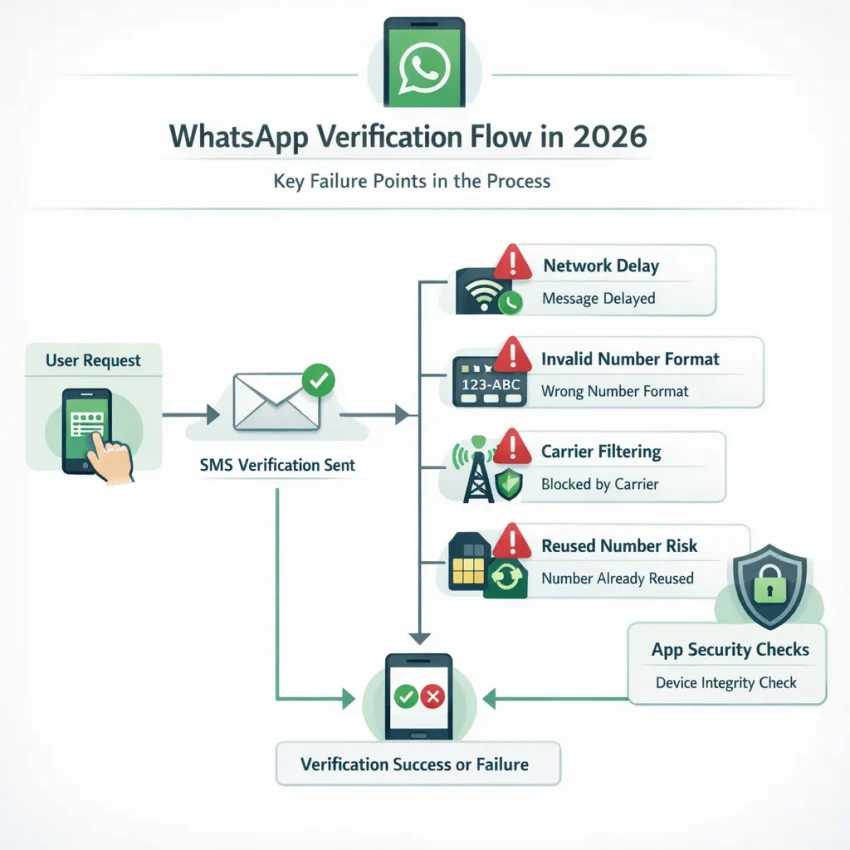
Why WhatsApp Verification Codes Fail More Often in 2026
If your WhatsApp verification code is not arriving, the problem is usually not random. In 2026, SMS delivery has become more selective, more region-dependent, and more sensitive to account risk signals than it was a few years ago. That is why many users see the same pattern: the number looks correct, the app accepts it, but the code never shows up or arrives too late to use.
One major reason is carrier filtering. Mobile operators increasingly screen automated SMS traffic, especially short-code and OTP traffic linked to account creation. In some regions, these filters are aggressive enough that a legitimate WhatsApp verification message may be delayed, silently blocked, or routed inconsistently. This is one of the most common explanations behind WhatsApp SMS verification not working even when your signal appears normal.
Another issue is geo restrictions and routing variability. WhatsApp verification delivery can behave differently depending on the country code, local carrier partnerships, and current traffic conditions. A number that works smoothly in one market may experience delays in another. International users often run into this when traveling, using roaming service, or verifying from a country different from the number’s registration region.
There is also the growing problem of reused or previously flagged numbers. If a number has been associated with repeated registrations, failed verification attempts, abuse signals, or older accounts, WhatsApp may treat it more cautiously. Even if the number is technically active, the platform may slow verification, require additional checks, or fail to deliver the code on the first attempt.
App-side risk checks matter too. WhatsApp does not only verify the phone number; it also evaluates the context of the request. Device state, IP reputation, repeated retries, account creation frequency, and unusual country-number combinations can all contribute to friction. If you request multiple codes in a short window, switch networks repeatedly, or try to activate accounts in a pattern that looks automated, the system may delay the next code or stop sending it temporarily.
Timing issues are another overlooked cause. Many people request a second or third code too quickly when the first one does not appear immediately. That can reset the timer, invalidate the earlier message, or trigger a cooldown. In practice, this means a code may arrive after you have already requested another one, making it useless.
Device-related factors still play a role as well. Dual-SIM phones may receive messages on a different line than expected, SMS permissions can be restricted, and outdated app versions may create avoidable verification errors. But in 2026, the bigger pattern is clear: code delivery fails more often because the verification ecosystem itself is tighter and less forgiving.
That is why solving the issue now requires more than basic troubleshooting. First, you need to identify whether the failure is caused by number format, retry behavior, carrier blocking, or a higher-risk number state. Then, if your regular number keeps failing, it makes sense to switch to a more controlled verification workflow built for OTP delivery. This is where SmsPva’s WhatsApp verification flow becomes useful: instead of guessing why the code is missing, you move to a dedicated service page, choose an available number for the WhatsApp use case, and receive the OTP through a workflow designed specifically for verification tasks.
The Most Common Reasons Your WhatsApp Code Is Not Received
If your WhatsApp code is not received, guessing and retrying too fast usually makes the problem worse. The fastest way to fix WhatsApp verification code issue problems is to diagnose the likely cause before you request a new code.
1. The country code or number format is wrong
This is still the most basic and most overlooked cause. Even when the phone number looks correct, users often select the wrong country, enter a leading zero that should be removed, or paste a local format instead of the international one. WhatsApp may then send the code to a different destination than intended, or reject the request silently.
- The number appears valid, but no SMS arrives after multiple tries.
- You changed countries recently and accidentally kept the old country code selected.
- You copied the number from another app with spaces, brackets, or a trunk prefix.
Before retrying, double-check the flag, country prefix, and full international format. This matters even more when using a virtual number for WhatsApp verification, because service-specific formatting must match exactly.
2. Your device or carrier is blocking short-code or app-generated SMS
Many users assume that if normal texts arrive, WhatsApp verification messages should arrive too. That is not always true. OTP messages can be treated differently by carriers, spam filters, firewall apps, or messaging settings. In some regions, short-code and automated SMS routes are filtered more aggressively than person-to-person texts.
- Your carrier blocks promotional or automated messages by default.
- A spam protection app filtered the message without showing a notification.
- You are roaming internationally and inbound verification traffic is delayed.
- Your inbox settings or SMS permissions are restricted.
3. Dual-SIM devices create confusion
On dual-SIM phones, users often request verification using one number while the device is currently prioritizing the other SIM for messaging or mobile data. That can create confusion during setup, especially if WhatsApp tries to auto-detect a number or if the user switches SIM defaults mid-process.
If your WhatsApp SMS verification is not working on a dual-SIM device, verify which SIM owns the number, which SIM has service, and whether you are entering the exact line you can actually receive messages on.
4. The number was recently used, recycled, or flagged
Number history matters more than many users realize. A recycled number may have been used for WhatsApp before. A public or overused number may already be associated with repeated activation attempts. In those cases, verification may be delayed, blocked, or treated as higher risk.
This often happens with old prepaid numbers returned to the carrier and reassigned, free public SMS inboxes used by many people, shared numbers from low-quality providers, and numbers that triggered too many account attempts in a short time. If the number has a messy history, standard retries usually do not help. This is one reason many users move to a cleaner, service-specific workflow through SmsPva’s WhatsApp verification page.
5. Too many verification attempts triggered a cooldown
When users do not receive the first code, they often tap resend repeatedly. That can trigger temporary rate limits on the WhatsApp side. Instead of sending faster, the system may extend the waiting time, suppress additional requests, or push the user toward a voice call option later.
- A countdown timer keeps increasing.
- The app tells you to wait before requesting another code.
- SMS never arrives after several rapid retries.
- The voice option appears only after a delay.
6. The number type is unsupported or unreliable for WhatsApp
Not every virtual, VoIP, or online number works equally well for WhatsApp. Some number ranges are known to be lower quality, heavily reused, or incompatible with specific verification flows. That is why people searching for how to receive WhatsApp verification code online often hit dead ends with random free services.
If you need WhatsApp verification with virtual number support, use a provider that clearly supports WhatsApp as a dedicated service instead of a generic inbox model. SmsPva is designed around that service-specific approach, which reduces avoidable mismatch problems.
7. Regional or carrier limitations are interfering
Some countries and operators have more delivery friction than others. International routing delays, local filtering rules, telecom restrictions, and region-specific anti-spam policies can all affect whether the code shows up quickly, arrives late, or never appears at all.
This is especially relevant for international users, travelers, and marketers managing account workflows across multiple regions. With SmsPva, users can review available country options and pick a number path built for verification use instead of relying on whatever local route happens to be available.
8. You are troubleshooting the wrong layer of the problem
Sometimes users focus only on the phone, when the real problem is the number source. Other times they switch numbers too quickly when the real issue is cooldown timing. The key is to identify whether the failure is caused by formatting, device handling, WhatsApp limits, number history, or unsupported number type. Once you know which category fits your situation, the next step becomes much clearer.
What to Try Before Switching Numbers
Before you assume your number is unusable, it is worth doing a quick reset of the verification process. In many cases, a WhatsApp verification SMS delayed issue is caused by timing, device settings, or too many retries rather than a permanent block.
First, stop requesting new codes for a few minutes. If you tap resend repeatedly, WhatsApp may slow down or temporarily rate-limit new attempts. Wait for the countdown in the app to finish, then request the code once. If you already tried several times, give it a longer cooling-off window before trying again.
Next, confirm the number format carefully. Check the selected country, country code, and full number exactly as WhatsApp expects it.
Refresh your network connection. Turn airplane mode on for 10 to 15 seconds, then switch it off and reconnect to mobile service. If possible, disable Wi-Fi briefly and rely on your carrier signal while requesting the SMS.
Restart both the app and the phone. Force-close WhatsApp, reopen it, and try again only after the timer allows it. If that does not help, restart the device.
Make sure WhatsApp is updated. An outdated build can create edge-case verification bugs, especially after regional policy or anti-spam updates. Install the latest version from your app store before requesting another code.
Check SMS-related permissions and device filters. Review spam protection, blocked senders, dual-SIM defaults, and any carrier-message filters on the device.
If you use two SIMs, verify which line is active. On dual-SIM phones, incoming messages may route to a different slot than expected, or the selected mobile line for messaging may be incorrect.
Try the voice call fallback if it appears. If SMS still fails after the waiting period, use the “Call me” option. For some users, especially in regions with inconsistent SMS routing, voice verification is the fastest way to fix the problem without changing numbers immediately.
If you still cannot receive the code after these steps, the problem is more likely tied to carrier filtering, number history, or regional delivery limits. That is the point where switching to a dedicated workflow makes sense. Instead of burning more retries on an unreliable line, move to SmsPva’s WhatsApp verification flow, which is designed for users who need a cleaner way to receive WhatsApp OTPs online with less friction.
How SmsPva Solves WhatsApp Verification Problems
If your WhatsApp verification code is not arriving after several normal retries, the biggest problem is usually not just the app itself. It is the path between WhatsApp, the number you entered, your carrier, and the device environment tied to that request. SmsPva helps by simplifying that path into a service-specific workflow built for OTP receipt.
The practical advantage starts on the SmsPva WhatsApp verification page. Rather than using a generic one-size-fits-all inbox, SmsPva organizes the flow around the actual service you want to verify. That matters because WhatsApp verification behaves differently from other platforms: timing windows are strict, number compatibility matters, and users often need to see incoming OTP status quickly so they can enter the code before a session expires.
For users trying to receive WhatsApp verification code online, country choice is another major benefit. Many failed registrations happen because the original number is tied to a region with delayed delivery, carrier filtering, or inconsistent support for app-generated verification traffic. SmsPva gives you access to virtual numbers across available country options, making it easier to choose a number that fits your workflow instead of being locked to a problematic local SIM.
Just as important, SmsPva is not positioned as a random free inbox. Free public numbers are often overused, recycled without visibility, or already associated with failed attempts on multiple services. SmsPva offers a more controlled product workflow: you choose the service, select the country and number option available for that service, and monitor incoming SMS in a dedicated dashboard.
The OTP receipt workflow is where SmsPva becomes especially useful for users stuck in repeated resend loops. Once you activate a number for WhatsApp, the incoming code is routed to your account dashboard so you can watch for the message instead of depending on handset SMS settings, dual-SIM confusion, message filtering, or weak local cellular reception.
Privacy is another reason many users prefer a virtual number for WhatsApp verification through SmsPva. Not everyone wants to attach a primary personal number to every account workflow, especially when testing business operations, separating personal and work identities, or creating region-specific communication channels.
Speed also matters. When WhatsApp SMS verification is delayed, every extra failed attempt increases the chance of cooldowns, timeouts, or forced waiting periods. SmsPva reduces that wasted motion because the platform is built around quick number access and direct OTP visibility.
Support resources also help when the issue is not purely number-related. The Help section gives users a place to check troubleshooting guidance, while the News area can be useful for reviewing current updates, availability changes, or service notes that affect verification behavior.
For many users, the real value of SmsPva is that it turns a frustrating verification problem into a repeatable workflow. If WhatsApp keeps rejecting your usual route, or the WhatsApp OTP is not arriving on your personal SIM, SmsPva gives you a structured alternative: a WhatsApp-focused service page, available virtual numbers, country selection, dashboard-based OTP receipt, and accessible troubleshooting resources.
Step-by-Step: Verify WhatsApp Using SmsPva
If standard troubleshooting did not fix the problem, the fastest next step is to use a service-specific workflow built for OTP delivery. That is where SmsPva WhatsApp verification becomes practical.
- Create or sign in to your SmsPva account.
Go to smspva.com and log in. If you are new, create an account first so you can manage number purchases, message history, and verification sessions from one place. - Open the dedicated WhatsApp service page.
Go straight to the WhatsApp verification page. A service-specific page is useful because it narrows the workflow to numbers intended for WhatsApp OTP receipt rather than general SMS traffic. - Add balance if needed.
Make sure your account has enough balance for the country and number type you want. If one country is temporarily expensive or out of stock, it is often more efficient to switch to another supported region than to keep refreshing the same option. - Select a country based on availability and your use case.
Choose the country for your virtual number for WhatsApp verification. You can pick your own region for consistency, choose a nearby country with better SMS delivery availability, or use the cheapest currently active route that matches your registration needs. - Buy the number and copy it exactly.
Once you reserve the number, copy it in full, including the correct country code. Then open WhatsApp and paste it carefully into the registration field. - Request the SMS code in WhatsApp only once at first.
After entering the number, ask WhatsApp to send the verification code. Then stop and wait. Repeated taps are one of the easiest ways to create delay windows, trigger cooldowns, or invalidate your first request. - Watch the SmsPva dashboard for the incoming OTP.
When the SMS arrives, the code should appear in your active order panel. Enter that OTP into WhatsApp exactly as shown. - Confirm activation and finish account setup.
Once WhatsApp accepts the code, continue with the normal setup flow: profile name, backup options, and device permissions.
What to do if the SMS does not appear right away
Do not instantly request a second code. Let the initial request finish its waiting window while you monitor the SmsPva order page. If nothing appears after the allowed delay, use the next retry only once the timer expires.
- No SMS after the first timer: retry once inside WhatsApp.
- No SMS after a proper retry: cancel the attempt and switch to a fresh number instead of forcing the same one repeatedly.
- Country appears problematic: choose a different available region on SmsPva.
- Repeated failures across numbers: review SmsPva Help and check whether your app session or device state needs resetting before trying again.
How to handle expired or invalid codes
Sometimes the code arrives but WhatsApp says it is expired or invalid. Usually this happens because the code belonged to an earlier request, the user requested multiple codes too quickly, the timer expired before entry, or the session in WhatsApp refreshed in the background.
- Close WhatsApp completely.
- Reopen it and confirm the same number is still entered.
- Wait for the next allowed request window.
- Request one fresh code only once.
- Use the newest OTP shown in SmsPva, not an older one from the message list.
When to switch numbers instead of retrying again
If you have already used the correct country code, waited through the timer, and retried properly without receiving a usable OTP, switching to a new number is usually faster than continuing to force the same path. SmsPva is useful here because the workflow is built around quick number selection and service-specific ordering rather than one fixed carrier line.
Best practices for smoother WhatsApp OTP receipt
- Use the dedicated WhatsApp page on SmsPva instead of a generic SMS route.
- Copy the number exactly as provided.
- Request the code once and wait for the timer.
- Avoid switching devices mid-verification.
- Do not mix multiple active WhatsApp registration attempts at the same time.
- If a route is slow, change number or country instead of stacking retries.
- Use SmsPva support resources if the behavior looks abnormal across several attempts.
When to Use Proxy Support and Account Isolation Workflows
If your WhatsApp verification with virtual number still fails after using the correct country, waiting between retries, and requesting a fresh code, the problem may not be the number alone. In 2026, WhatsApp risk checks can also react to signals such as changing IP addresses, repeated registration attempts from one device, or a browser and app environment that has already been tied to multiple failed sign-ups.
That is where account isolation becomes useful. The goal is simple: keep one verification attempt tied to one clean setup. Instead of switching numbers repeatedly on the same network and device state, you use a more consistent workflow: one session, one IP pattern, one number, and fewer conflicting signals.
Consider using a proxy for account verification when you notice patterns like these:
- You requested multiple WhatsApp codes from the same device in a short period.
- Your IP location does not match the country or region of the number you are trying to verify.
- You are managing separate work accounts and want cleaner operational separation.
- You keep seeing delayed codes, session resets, or repeated verification loops after changing networks.
A practical example: a marketer setting up region-specific WhatsApp accounts may choose a country-specific virtual number on SmsPva’s WhatsApp page, then keep the verification session on a stable connection instead of jumping between mobile data, office Wi-Fi, and a VPN. In more advanced cases, SmsPva’s proxy tools can support a cleaner workflow by helping maintain IP consistency alongside the number selection process.
The recommended path is to start with the SmsPva WhatsApp verification flow, then add proxy support only if your use case actually needs it. If you are unsure whether the problem is technical or risk-related, SmsPva’s Help resources are the best next step before wasting more retries.
How SmsPva Compares to Unreliable Verification Workflows
If your WhatsApp verification code not arriving problem has already cost you multiple retries, the biggest mistake is switching to another low-quality number source. Many failed verifications happen not because WhatsApp is broken, but because the number workflow is weak from the start.
Free public inboxes are usually the worst option. They are often reused, visible to others, and more likely to be flagged or already tied to previous registrations. That makes them a poor choice for anyone trying to receive a WhatsApp verification code online with any consistency or privacy.
Unsupported VoIP numbers can also fail silently. Even when a provider claims broad compatibility, WhatsApp may delay, reject, or never deliver the OTP if the line type or history does not fit the platform’s risk checks. The same applies to generic SMS sites that are not built around service-specific flows. They may offer numbers, but not clear guidance on timing, retries, country selection, or what to do when a code is delayed.
SmsPva WhatsApp verification is more practical because it is structured around the actual use case. Instead of sending users into a random pool of numbers, SmsPva provides a dedicated WhatsApp service workflow, country options, OTP receipt tools, and help resources that match real verification steps. That means less guesswork when choosing a virtual number for WhatsApp verification and a clearer path if the first attempt times out.
To be fair, generic verification platforms may work in some cases. But if you want a cleaner process, better privacy, and a service page built specifically for WhatsApp, SmsPva is the stronger workflow to start with in 2026.
Frequently Asked Questions
Why is my WhatsApp verification code not arriving even though my phone number is correct?
Even with the right number, the code may fail because of carrier filtering, cooldown timers, regional routing delays, dual-SIM confusion, app-side risk checks, or the history of the number itself. If your normal line keeps failing, switching to SmsPva’s WhatsApp verification workflow is often faster than repeating the same request.
How long should I wait before requesting another WhatsApp verification code?
Wait until the countdown shown inside WhatsApp fully expires. If you already requested multiple codes quickly, give it extra time before trying again. Repeated taps can extend the delay instead of fixing it.
Can I use a virtual number for WhatsApp verification in 2026?
Yes, but number quality and service compatibility matter. A random free or unsupported VoIP number is much less reliable than a service-specific workflow. If you want WhatsApp verification with virtual number support, using SmsPva is the practical route because the service is organized specifically for WhatsApp OTP receipt.
Why does WhatsApp say the number is invalid or unsupported?
This usually happens because of incorrect country formatting, a bad number range, a blocked or low-trust number type, or a mismatch between the number and the verification context. Always copy the number exactly as shown and make sure the selected country code matches.
What should I do if WhatsApp never sends the SMS but offers a voice call?
Use the voice call option if it appears and you prefer to finish the verification without changing numbers. If that also fails, move to a cleaner number workflow instead of forcing more retries on the same line.
Does a reused or previously flagged number affect WhatsApp verification?
Yes. Reused, recycled, or publicly exposed numbers can carry history that makes verification harder. That is one reason public inboxes often fail. A cleaner, dedicated workflow through SmsPva reduces that risk compared with random generic options.
How does SmsPva help with WhatsApp OTP receipt?
SmsPva gives you a WhatsApp-specific service page, country selection, virtual numbers, and dashboard-based OTP receipt. Instead of depending on your local carrier or device SMS behavior, you can monitor the incoming code directly in your order panel and complete activation faster.
When should I use a proxy together with a virtual number for account verification?
Use a proxy when repeated account creation, IP mismatch, or unstable network changes may be adding friction. If your device and number environment look inconsistent, pairing a number from SmsPva with proxy support can help you keep the verification session cleaner and more consistent.
If you are stuck right now and need a practical solution, start with the SmsPva WhatsApp verification page. It is the fastest way to move from failed retries to a structured OTP workflow built for WhatsApp in 2026.