

How to Use a Phone Number for SMS with SmsPva in 2026
What a Phone Number for SMS Does—and When a Virtual Number Makes Sense
A phone number for SMS can receive text messages, including one-time passwords and verification codes. A virtual number for SMS is accessed through an online service rather than through your personal SIM and handset. The exact setup and message access depend on the provider’s offering.
Unlike a personal mobile number, a virtual number may be temporary or limited to a particular use. It is also different from a long-term phone line that you control for ongoing calls, messages, and account recovery. Check how the number is offered before using it, especially if you may need to receive another message later.
When a virtual number may be useful
A separate SMS verification number can help keep routine verification messages apart from your personal inbox. For example, you might use one for a permitted account setup where the platform accepts virtual numbers, or for testing a supported SMS flow in a development or quality-assurance process.
SmsPva offers virtual numbers for SMS verification and OTP receipt. Review the current options through Receive SMS online. Treat the listings as choices to check when you need them; a virtual number is not a universal substitute for a personal number.
Know the limits before you choose
Acceptance depends on the website or app. Some services may reject virtual numbers, and availability or suitability can differ by service and country. A number that works for one verification flow may not work for another. Follow the destination platform’s terms and use an approved verification method.
Using a separate number can reduce how often you provide your personal number in a supported workflow, but it does not make you anonymous or guarantee privacy. Avoid using a temporary number for an account you must recover later unless the service explicitly supports that use. For banking, sensitive accounts, or long-term access, use a number you control and can reliably access.
The steps below explain how to review the options and request a code responsibly. A virtual number can be useful for some legitimate verification tasks, but it does not guarantee that every SMS will arrive or every platform will accept it.
Before You Start: Choose the Right Service and Number
A little checking before you request a SMS verification number can help you avoid choosing an option that does not fit your task. Identify the app or website that needs verification, then confirm what SmsPva currently lists for it. Use the live listing—not an old screenshot or cached search result—for current details.
Match the number to the service
Find the exact service where you plan to enter the number. If SmsPva has a matching service listing, review that option rather than assuming a general or unrelated listing will work. Services can apply different verification rules, and some may decline a virtual number. A listing does not guarantee that the platform will accept the number or deliver a code.
Check the destination platform’s terms too. Use a virtual number only for a legitimate purpose the platform allows, such as an appropriate account setup or supported testing workflow. If the platform requires a number type you do not have, choose an approved verification method instead of trying unrelated options.
Review country, use, duration, and price
Look at the countries currently shown for the relevant service. Choose only an option that fits the destination service’s requirements and the details you can provide in its verification form. Country and number type can affect acceptance, but no country should be treated as a shortcut to guaranteed success. Do not infer stock, operator, or compatibility from a country name alone.
Read the listing’s stated use and duration before selecting. Some options are intended for a single SMS or limited verification session, which may not suit a workflow requiring ongoing access. Do not assume that you can keep, reuse, or receive future messages on a number unless the listing explicitly says so.
Check the price displayed for the exact service and country when you use SmsPva. Options and prices can change, so do not rely on figures from older articles or screenshots. If the live details, duration, or permitted use are unclear, consult SmsPva’s current information before proceeding.
How to Use SmsPva to Receive an SMS Code: Step-by-Step
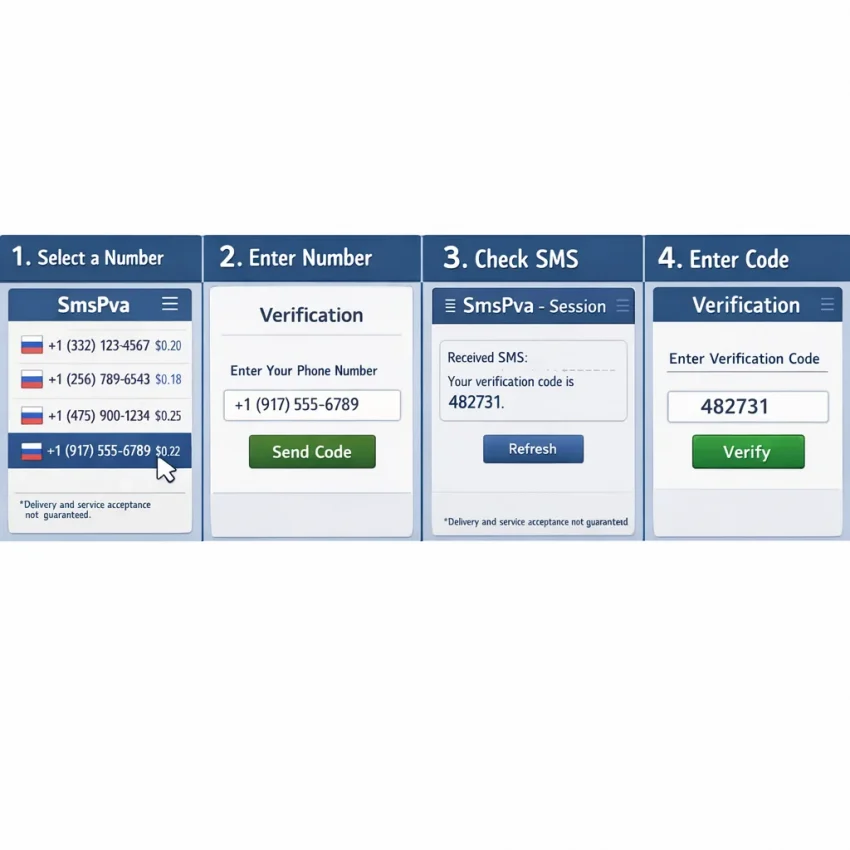
The basic process is to find a suitable service option, review its listed number details, and check the associated session for the incoming code. Availability and acceptance vary, so this workflow does not guarantee that an app will accept the number or deliver an SMS.
Choose a service and review the number details
- Open SmsPva and find the relevant service. Start at the online number listings. Look for the service you intend to verify, or use a general option only if SmsPva currently offers one and it fits your purpose. A number intended for one flow may not work for another.
- Check the displayed country and terms. Review the available country, number details, stated use, and any session or duration information before selecting. Options can change, so rely on the live listing.
- Select an available number and keep the session open. Follow the on-screen steps to select a number. Note the complete number, including its country prefix, and keep the SmsPva session accessible. Do not assume the number will remain usable beyond the listed duration or purpose.
For example, if you are setting up Signal, begin with its Signal SMS verification option rather than selecting a number at random. This is a service-specific starting point, not a guarantee that Signal will accept every number or that a code will arrive.
Enter the number and retrieve the SMS OTP
- Enter the number in the service’s verification screen. Copy it carefully, including the country code, and check that you have not added or omitted digits. Use the number only in the service flow you selected it for. If the platform rejects it before sending a code, follow its instructions instead of repeatedly trying different entries.
- Request one verification code. Submit the number once and wait for the service to send its SMS OTP. Return to the matching SmsPva session and check for an incoming message. Delivery timing can vary, and an SMS is not guaranteed.
- Enter the received code promptly. When the message appears, use the code in the verification screen that requested it. Check the digits before submitting. Treat the code like a password: never send it to another person or share it with someone claiming to provide support.
If the service offers a resend, use it only when its instructions say it is appropriate and the first request has had time to arrive. Avoid repeated requests or switching numbers rapidly. Multiple attempts may trigger rate limits, create confusing sessions, or make it harder to identify which code belongs to which request.
A missing code does not always have a fix. The destination platform may not accept virtual numbers, or delivery may fail for reasons outside your control. Stop if the platform rejects the number or its instructions tell you to wait. Review the troubleshooting steps below, then use an approved alternative if needed.
Service-Specific Verification and Country Selection
A virtual number for verification is not a universal pass for every app. Services may apply different number requirements, and availability can change. Start by checking whether SmsPva has a page for the exact service you need, rather than selecting a general option and assuming it will work everywhere.
Country selection is a live availability decision, not a ranking of which location works best. Choose from the countries currently listed for the relevant service, and consider the destination service’s requirements. Do not assume a country is supported because it appeared in an older guide or worked for someone else.
Check a service and country together
If you are considering a UK option for Signal, consult the current Signal verification in the United Kingdom listing. At the API snapshot fetched on October 22, 2026, listed Signal single-SMS options for the United Kingdom included $0.50 and $0.77. These are point-in-time price snapshots, not guarantees of current pricing or availability.
Do not rely on unsupported acceptance-rate claims or assume a particular operator will be provided. Check the live page during your session and use the details shown there to decide whether an option fits your intended, permitted use.
If no suitable option is listed, do not substitute an unrelated service or country and expect the same result. Check again later or use a verification method the destination service explicitly supports. This service-first approach helps avoid unnecessary code requests and makes it easier to match the number to the intended flow.
Privacy, Account Security, and the Limits of Virtual Numbers
A virtual phone number for SMS can separate some verification messages from your personal number. That may help with a supported account setup or legitimate testing workflow. It is one privacy measure, not a promise that your identity cannot be connected to an account.
Services may collect other information, such as your email address, device details, or activity. The destination platform may also have rules about virtual numbers. Check those rules before requesting a code, and choose another approved method if virtual numbers are not allowed.
Understand what the number can—and cannot—protect
A temporary number may be available only for a limited session or purpose. Depending on the offering, access may not be exclusive or permanent. Review the number’s stated terms and duration before using it, and do not assume you can receive messages on it later.
Avoid using an online SMS number for banking, sensitive accounts, password recovery, or any account you must retain long term unless the provider and destination service explicitly support that use. If you lose access to a temporary number, you could also lose a recovery route. Add a stable, approved recovery method where the platform offers one.
Using a separate number is not a substitute for account security. Create a unique password, enable an authenticator or other supported second factor when available, and keep recovery codes somewhere secure. Enter each SMS OTP only in the intended service’s verification screen. Never send it to another person or disclose it in a message or call.
Use virtual numbers responsibly
Confirm that your purpose complies with SmsPva’s terms and the destination platform’s rules. Do not use numbers to impersonate someone, bypass access controls, evade enforcement, or create deceptive or abusive accounts. If a platform rejects a number, do not try to defeat that restriction; switch to a method it approves.
Think of a virtual number as a limited-use tool for an allowed workflow—not as anonymity, a secure identity, or a dependable long-term phone line. When account continuity matters, use a number and recovery setup you control over time.
Troubleshooting: What to Do If the SMS Code Does Not Arrive
If a code does not appear, avoid requesting several more straight away. A delay, incorrect number format, expired session, or destination service restriction can interrupt verification. Use this checklist to identify what you can safely correct, then stop if the service still does not deliver a code.
Check the number, service, and active session
- Verify the number and country format. Compare the number in your SmsPva session with the number entered on the destination service. Check the country code and look for missing or duplicated digits.
- Confirm the verification flow. Make sure the service is sending an SMS to the number you entered, rather than asking for a call, email, or another method. If a service-specific option is available, check that you selected the matching service.
- Return to the correct session. Reopen the active SmsPva number or session you selected. Check its current status and look for an incoming message there. Starting a new request may leave you checking the wrong session.
- Wait briefly, then check again. Delivery timing can vary. Keep the verification page and SmsPva session available, and follow any wait instructions shown by the destination service.
These checks can rule out simple mistakes, but they cannot make a destination service accept a virtual number. Some services may reject one, and SMS delivery can fail for reasons outside your control.
Resend carefully, then choose an approved alternative
If the destination service offers a resend button, use it only when its instructions say a resend is available. Avoid repeated requests or switching rapidly between numbers. Multiple attempts may trigger a rate limit, delay further attempts, or invalidate an earlier code. If you receive a code after requesting another, follow the service’s instructions and do not share the code with anyone.
If a code still does not arrive after a reasonable wait and one appropriate resend, stop troubleshooting that number. Check the destination service’s instructions and SmsPva’s Help guidance for current steps. Do not assume that refreshing a page, requesting another resend, or switching numbers will resolve the issue.
When the service declines the number or delivery remains unsuccessful, switch to a verification method the service explicitly permits, such as your own number or another supported option. Follow its rules rather than continuing repeated requests.
A Practical Checklist for Using SmsPva Responsibly
A phone number for SMS can be useful for a separate number in a permitted verification or testing workflow. Before you begin, confirm that the destination service allows virtual numbers and that one fits your needs. A number may not be accepted, and SMS delivery is not guaranteed.
Before requesting a number
- Confirm the service. Check for a service-specific option that matches the platform you are verifying. Do not assume a number for one service will work with another.
- Check live options. Review the countries and number details currently shown. Availability can change, so do not rely on old screenshots or assumptions about a country or operator.
- Review current pricing. Check the live listing before proceeding. Prices and availability can change; treat displayed details as current information, not a permanent quote.
- Check the account’s purpose. Follow the destination platform’s rules. Do not use a virtual number to misrepresent your identity, evade restrictions, or create accounts for abusive activity.
- Plan for future access. If you may need password recovery or ongoing access, use a number you control long term unless the service explicitly supports another arrangement.
While using the number—and afterward
- Enter the number carefully in the platform’s verification screen, then check the relevant SmsPva session for the message.
- Use the code only in the intended verification flow. Never send an SMS OTP to another person or publish it in a message, screenshot, or support request.
- If a code does not arrive, follow the platform’s instructions and SmsPva’s current Help guidance. Avoid repeated requests; stop if the service rejects the number or the session cannot receive a code.
- After verification, do not assume you can receive future messages on a temporary number. Secure the account with recovery options you control, where available.
SmsPva may suit a one-time, allowed verification when the service and number option fit your workflow. Review the current options on SmsPva, check the live details, protect the code, and choose an approved alternative if the platform does not accept the number.