

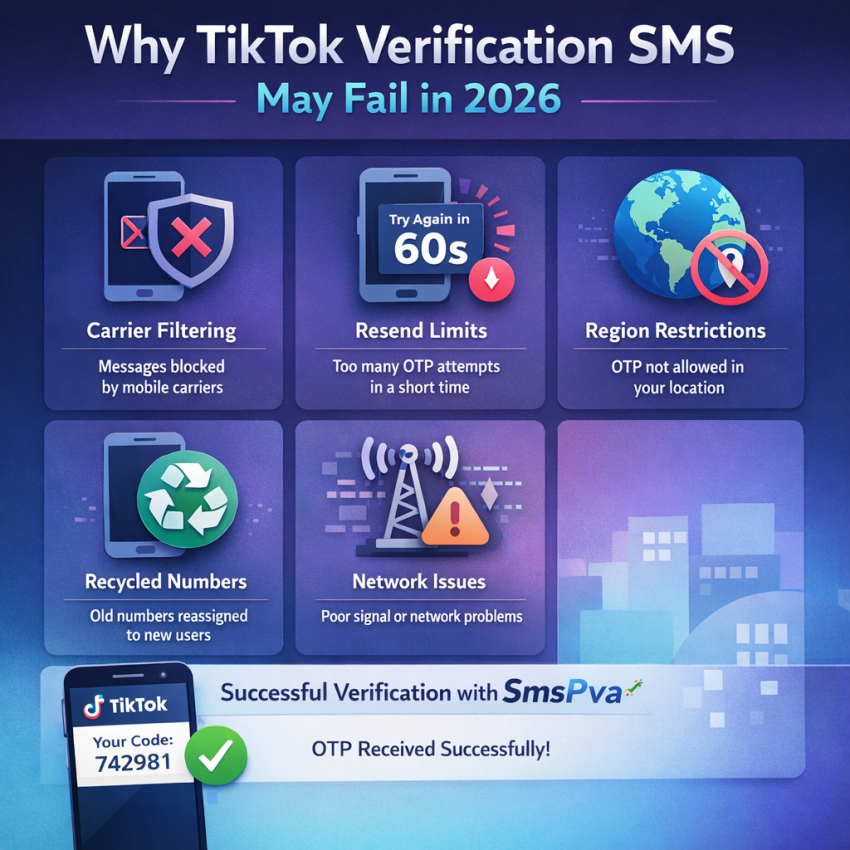
If you are dealing with a TikTok verification code not arriving problem, the worst response is usually to keep tapping Resend code and hope one finally works. In 2026, TikTok verification is more sensitive to rate limits, carriers filter automated SMS more aggressively, and many users are verifying accounts while traveling, switching devices, or avoiding their personal number for privacy reasons.
That means a missing TikTok OTP can fail at several points: TikTok may delay the send, your carrier may filter the message, your phone may hide it, or the number itself may be unsupported for the verification flow you are trying to complete.
This guide gives you a practical, publication-ready workflow for fixing the problem fast. You will learn the most common causes, what to check before requesting another code, iPhone and Android troubleshooting steps, recovery options if your account is locked, and when SmsPva is a useful backup for receiving a TikTok verification code online.
Table of contents
- Why TikTok verification codes fail to arrive in 2026
- Quick checks before you request another code
- How long to wait before trying again
- iPhone and Android fixes that solve hidden SMS issues
- How to tell when the problem is your number, not TikTok
- How SmsPva helps with TikTok OTP delivery problems
- Step-by-step: using SmsPva for TikTok verification
- Regular SIM vs virtual number for TikTok verification
- Risks and limitations of virtual numbers
- Best recovery path for common TikTok verification errors
- When to contact TikTok or SmsPva support
- FAQ
Why TikTok verification codes fail to arrive in 2026
When TikTok SMS verification is not working, the issue usually falls into one of these buckets.
1. Carrier filtering or delayed OTP routing
Many operators now treat automated SMS as high-risk traffic, especially short-code or bulk business messaging. TikTok may send the message successfully, but your carrier can delay it, classify it as suspicious, or block it entirely. This is especially common with prepaid lines, MVNOs, roaming SIMs, and some low-cost regional carriers.
2. Too many resend attempts
If you request several codes in a short window, TikTok may apply a cooldown or deprioritize delivery. Older codes can also arrive after newer ones, which creates confusion because only the latest code may still be valid.
3. Region mismatch
TikTok often checks whether the account region, app locale, IP location, and phone number country make sense together. If you created the account in one country and are now trying to verify it from another, or if you are traveling and using roaming data, delivery can become less reliable.
4. Unsupported or problematic number history
Some numbers are recently recycled, heavily used for verifications, or attached to previous activity that raises risk signals. In those cases, users may see TikTok phone verification failed, invalid number, or silent non-delivery.
5. Device-side SMS problems
The message may actually reach your network but never appear properly on your phone. Common reasons include blocked senders, spam filtering, disabled SMS permissions, dual-SIM conflicts, outdated messaging apps, Focus or Do Not Disturb modes, eSIM switching, or message sorting features that hide OTP texts.
6. Session risk or app-side glitches
Sometimes the problem is tied to the verification session itself. A stale app session, app cache issue, VPN conflict, repeated failed logins, or suspicious device behavior can interrupt the send flow before the message is even issued.
The main takeaway is simple: a TikTok code not received 2026 issue does not always mean TikTok is down. It often means your current verification route is unreliable.
Quick checks before you request another TikTok code
Before tapping Resend code, run through these fast checks. They solve more cases than most users expect.
- Confirm the number format. Make sure the selected country matches the phone number exactly, including country code.
- Check SMS signal, not just internet access. Mobile data working does not guarantee text delivery.
- Test regular SMS. Ask someone to send you a normal text to confirm the line is receiving messages.
- Review spam or filtered message folders. Some phones sort automated texts silently.
- Check dual-SIM settings. The right line must be active for SMS reception.
- Disable VPN briefly if you are using one. A VPN can create location mismatch during verification.
- Update TikTok and reopen the app. A stale app session can break the request flow.
- Wait a few minutes. Rapid retries often make a TikTok SMS code problem worse.
- Try the web flow if the app seems unstable. Sometimes TikTok in a mobile browser or desktop browser works better than the app.
If none of those checks help, the problem is more likely tied to the number, carrier path, or TikTok’s trust signals for that session.
How long should you wait before trying again?
TikTok does not use one universal cooldown window. The delay can vary by country, number type, login history, and perceived risk. As a practical rule, wait at least a few minutes before requesting another SMS code. If you have already retried multiple times, pause longer instead of stacking more requests.
Why this matters: each new request can invalidate the previous code. If delayed messages arrive out of order, users often enter an old code and assume TikTok is broken. In reality, they are caught in a resend loop.
If you have tried several times already, the smartest next move is usually to stop, reset the situation, and retry once with a cleaner setup rather than continuing the same failed pattern.
iPhone and Android fixes that solve hidden SMS issues
One gap in many short guides is device-specific troubleshooting. Here are the checks worth making before you assume TikTok itself is the problem.
On iPhone
- Turn off Focus or Do Not Disturb temporarily. Some notification filters hide message alerts.
- Open Messages and check unknown senders. OTP texts may be filtered away from your main inbox.
- Review blocked contacts and message filtering settings.
- Verify the active SIM or eSIM line. If you recently changed eSIM profiles, SMS may be routed to a different line than expected.
- Restart the phone. This can refresh carrier registration and message routing.
- Update iOS. Older builds can cause odd messaging behavior, especially after carrier setting changes.
On Android
- Check spam and archived messages. Google Messages and some OEM apps may auto-sort OTP traffic.
- Confirm the default messaging app is functioning properly. If you use multiple messaging apps, one may be intercepting texts.
- Review SMS permissions. Security or cleaner apps sometimes interfere with message visibility.
- Check dual-SIM SMS defaults. The wrong SIM may be selected for receiving or displaying messages.
- Restart the device and refresh mobile network registration.
- Update the Messages app and Android system services.
App cache and session reset steps
If the send flow itself looks broken, try these steps:
- Close TikTok completely.
- Clear app cache if your device supports it.
- Reopen the app and sign in again.
- Or use a browser session to test whether the problem is app-specific.
These steps are especially useful when TikTok verification code not sending appears to be tied to one device but not another.
How to tell when the problem is your number, not TikTok
Many users spend too long troubleshooting TikTok itself when the real issue is the phone number they are using. Watch for these signs:
- TikTok says the number is invalid or unsupported.
- The code works on a different number but never on yours.
- You recently changed carriers, countries, SIMs, or eSIM profiles.
- Your number was recycled or reactivated recently.
- You have similar OTP delivery issues with other platforms.
- You are on a roaming line or low-cost carrier known for delayed OTPs.
If one or more of those are true, further retries on the same number usually waste time. At that point, switching to a different verification route becomes the practical choice.
How SmsPva helps when TikTok SMS verification is blocked or delayed
When your regular number fails, SmsPva can provide an alternative workflow for receiving TikTok verification code online. Instead of depending on your local carrier and personal SIM, you choose a virtual number, request the TikTok code, and monitor the incoming SMS through the platform interface.
This is especially useful when:
- Your carrier filters OTP texts.
- You are traveling and dealing with region mismatch.
- You do not want to use your personal number.
- You need a fresh route for account sign-up or recovery.
- Your original number repeatedly fails for reasons you cannot fix quickly.
That does not mean a virtual number is always the first option. If your personal SIM works reliably, it is usually the simplest path. But when TikTok OTP not received keeps repeating, a dedicated verification workflow can be faster than continuing to troubleshoot a failing carrier route.
SmsPva is built around OTP delivery, service-based number selection, and country-specific verification flows, which makes it relevant for users looking for a virtual number for TikTok verification in 2026.
Step-by-step: using SmsPva to receive a TikTok verification code
If you decide to switch away from a failing SIM route, use a controlled process instead of improvising.
- Open the exact TikTok verification screen first. Go to sign-up, login recovery, password reset, or the security prompt where TikTok requests a phone number.
- Note the country TikTok expects. Country alignment matters because mismatch can reduce success rates.
- Log into SmsPva. Visit smspva.com, sign in, and add balance if needed.
- Select the correct service flow. Choose the verification route that best matches TikTok SMS receipt.
- Pick a country carefully. Prefer a country aligned with your TikTok account region, current session, or intended sign-up context.
- Activate a number and copy it exactly. Double-check the country code and formatting before entering it in TikTok.
- Request the code once. Avoid repeated resends immediately.
- Watch the SmsPva dashboard for the incoming OTP. When the code appears, enter it promptly into TikTok.
- Finish the verification fully. Wait until TikTok confirms login, reset, or account creation.
If the first number is rejected as invalid or unsupported, switch numbers or countries instead of forcing repeated attempts on the same failed route.
Example workflow: fastest path when a TikTok code will not arrive
A realistic recovery sequence in 2026 often looks like this:
- You request a code on your normal number.
- Nothing arrives after several minutes.
- You confirm the number format, signal, spam folder, and app session.
- You try one controlled resend.
- Still nothing arrives, or the code arrives too late.
- You stop retrying on that line.
- You switch to a cleaner number route through SmsPva.
- You request one new code and monitor delivery in one place.
This kind of clean workflow is more reliable than repeatedly hammering the resend button and extending the cooldown.
Regular SIM vs virtual number for TikTok verification
| Option | Best for | Main advantage | Main drawback |
|---|---|---|---|
| Personal SIM | One personal account with stable carrier service | Simple and familiar | Exposes your main number and depends on local carrier delivery |
| Travel or roaming SIM | Temporary access abroad | Convenient if already active | Higher risk of region mismatch and OTP delay |
| Virtual number via SmsPva | Users with blocked, delayed, unsupported, or privacy-sensitive verification needs | Flexible backup route with centralized OTP monitoring | Not every number or country combination works equally well for every session |
The best option depends on context. If your main SIM works, keep it simple. If your normal route repeatedly fails, a virtual number can save time.
Risks and limitations of using a virtual number for TikTok
A stronger guide should also be honest about limitations. A virtual number is useful, but it is not magic.
- Some numbers may be rejected. TikTok can treat certain ranges as unsupported for a given flow.
- Country alignment still matters. A number that does not fit the account region or session context may fail.
- Repeated retries can still trigger cooldowns. Changing the number does not make rate limits disappear.
- Recovery flows can be stricter than sign-up flows. Account security prompts may require tighter trust signals.
- Success is procedural. The best results come from using one clean attempt with a well-matched number, not random switching.
In other words, use virtual numbers as a structured solution, not as an excuse to brute-force verification.
Best recovery path for common TikTok verification problems
TikTok says it sent the code, but nothing arrives
Wait a few minutes, verify your SMS settings, then try one controlled resend. If the same number still fails, switch to another route such as SmsPva.
TikTok will not send the code at all
This often points to a session risk issue, app glitch, temporary cooldown, or a problem with the number-country combination. Pause, reset the session, and retry with a cleaner setup.
TikTok says your number is invalid or unsupported
Check formatting first. If the error remains, do not keep entering the same number. Move to another number instead.
You see a too many attempts warning
Stop immediately and let the cooldown expire. More retries usually extend the problem instead of solving it.
The code arrives too late
Late OTPs usually indicate routing delay. Use one request at a time and switch away from the slow route if it keeps happening.
Your account is locked behind phone verification
If you cannot complete recovery with your current SIM, restart with a reachable number and avoid mixing multiple devices, VPNs, or repeated attempts in the same session.
Does changing countries or traveling affect TikTok verification?
Yes. Travel is one of the biggest hidden causes of TikTok OTP trouble. If your account was created in one country and you are now logging in from another, TikTok may see a mismatch between your account history, IP address, SIM country, and current app region.
This does not always block verification, but it can reduce reliability. If you are traveling, try to keep your setup consistent: use a stable connection, avoid switching devices mid-process, and choose a number that logically matches the verification context.
Why some users prefer a privacy-focused verification workflow
Not everyone wants to attach a personal phone number to every platform action. That is especially true for users managing campaigns, testing account flows, traveling often, or separating personal and work identities.
A privacy-focused verification workflow can reduce exposure of your main number and make it easier to isolate different projects. That is one reason services like SmsPva appeal to users beyond simple troubleshooting.
Still, the best choice depends on your situation. If your main number works and you are verifying one personal account, using it is usually simplest. If it does not work, or privacy matters more, a virtual number route becomes more attractive.
Practical tips to improve success rate in 2026
- Keep your TikTok region and number country logically aligned.
- Do not switch devices during one OTP attempt unless necessary.
- Use a stable connection when submitting the number.
- Enter only the newest code if several arrive.
- Avoid repeated retries on a number that already failed multiple times.
- If traveling, keep your session setup consistent.
- Try app and browser flows separately if one looks unstable.
- Use support resources when needed, including SmsPva Help for platform guidance.
When to contact TikTok or SmsPva support
If you have already checked number format, signal, device settings, cache, and cooldown timing, support may be the next step.
Contact TikTok when:
- Your account is locked and every verification attempt fails.
- The same error appears across multiple devices or browsers.
- You suspect the issue is tied to account security rather than SMS delivery.
Use SmsPva support resources when:
- You need help selecting the right verification workflow.
- You want platform guidance for receiving OTPs through the dashboard.
- You need country or service-specific troubleshooting information.
You can start with the SmsPva Help page for practical assistance.
FAQ
Why is my TikTok verification code not arriving even after multiple tries?
Usually because the delivery route is failing, not because you have not retried enough. Carrier filtering, rate limits, region mismatch, and number history are the most common reasons.
How long should I wait before requesting another TikTok SMS code?
Wait at least a few minutes, and longer if you have already made multiple requests. Avoid back-to-back retries because they can trigger cooldowns and invalidate previous codes.
Can I use a virtual number for TikTok verification in 2026?
Yes, many users do when their normal SIM is blocked, delayed, unsupported, or unsuitable for privacy reasons. Success depends on choosing a clean, well-matched number and avoiding repeated retries.
What makes SmsPva useful for TikTok OTP delivery problems?
SmsPva gives you a structured workflow for selecting a number, receiving the SMS online, and monitoring the OTP in one place instead of relying only on your local carrier.
Why does TikTok say my phone number is invalid or unsupported?
Common reasons include wrong formatting, incorrect country selection, unsupported ranges, and number history that triggers additional checks.
What should I do if TikTok sends the code but I never receive it?
Check SMS settings, filters, dual-SIM behavior, signal, and app session first. If the number still fails, switch to another verification route.
Can carrier filtering block TikTok SMS messages?
Yes. This is one of the most common causes of missing OTP messages in 2026, especially on prepaid, roaming, and budget carriers.
Does changing countries or traveling affect TikTok verification delivery?
Yes. Region mismatch, roaming behavior, and IP-country inconsistency can reduce delivery reliability.
What if my TikTok account is locked behind phone verification?
Use a clean recovery attempt with a reachable number instead of repeating the same failed session. If that still does not work, contact TikTok support.
Is a privacy-focused verification workflow better than using my personal number?
It can be, especially if you want account separation or do not want to expose your main number unnecessarily. For one personal account, your regular SIM is still the simplest option if it works.
Final takeaway
If your TikTok verification code not arriving issue keeps repeating, stop treating it like a simple resend problem. First rule out formatting mistakes, phone-side SMS issues, app session problems, and cooldown errors. If those checks do not solve it, the problem is often your carrier route or the number itself.
At that point, switching to a cleaner verification workflow is often the fastest path. SmsPva can help by providing a virtual number workflow for receiving TikTok OTPs online when your regular line is delayed, blocked, unsupported, or simply unreliable.
The best strategy in 2026 is straightforward: one clean request, one monitored delivery path, and no endless retry loop.