

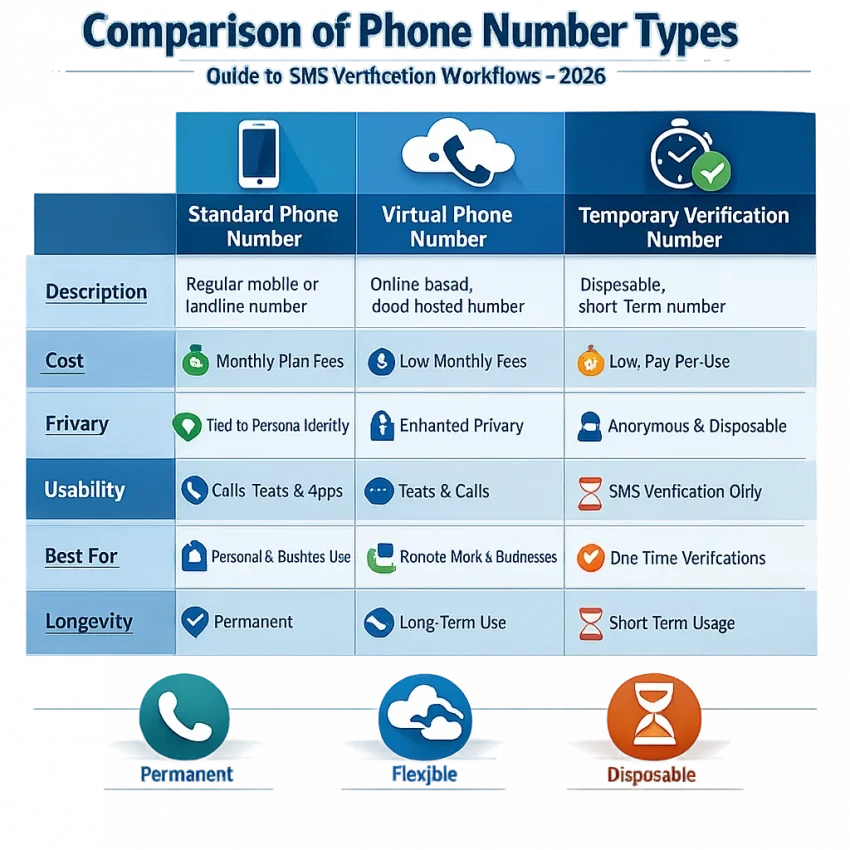
A temporary phone number for SMS verification is a short-use virtual number that lets you receive one-time codes, activation texts, and signup confirmations without sharing your personal mobile number. In 2026, that matters more than ever. More platforms ask for OTP checks, while users want better privacy, cleaner account separation, and fewer links between personal and work identities.
SmsPva is built for exactly that workflow. Instead of treating SMS verification like a random number hunt, it helps you choose a service, select a country when needed, get a number, and monitor incoming codes in one place. Use smspva.com to receive SMS verification codes with virtual phone numbers.
What a temporary phone number for SMS verification is, and when it makes sense to use one
A standard mobile number is your usual SIM-based line. A virtual phone number for SMS verification is an online number you access through a web platform. A temporary number for OTP is the short-use version of that setup, usually meant for one verification step or a brief account activation flow.
The difference matters. If you only need to receive a single verification code, a temporary option may be enough. If you expect repeated login checks, password resets, or future recovery prompts, a one-time number may not be the right fit.
When using a temporary number makes sense
The best use cases are practical and limited. You might need a temporary phone number for verification code entry during signup, one-time account activation, short-term testing, or privacy-focused registration. Freelancers, marketers, testers, and privacy-conscious users often want a number that is separate from their personal SIM.
Service-specific verification is another strong use case. Some platforms have country filters, number-format rules, or stricter verification flows. In those situations, a service-led platform is more useful than guessing with random numbers. SmsPva is designed for OTP receipt, account activation, and service-specific verification workflows rather than permanent mobile use.
If your goal is to receive SMS online for a one-time task, SmsPva gives you a clear path. Choose the service, review country options when relevant, get the number, and wait for the code in your dashboard. Availability can vary by service and country, so it is best to approach the process as a task-based workflow.
When not to rely on a one-time verification number
A temporary number is not ideal for every account. If the platform may ask for the same number later for recovery or security checks, a one-time purchase can create future access problems. The same caution applies to business-critical, financial, or long-term personal accounts.
In short, temporary numbers work best for short verification events, privacy-minded signups, and testing. They are less suitable as a permanent identity layer.
How SmsPva works for SMS verification: the basic workflow
If you want a temporary phone number for SMS verification, the process is straightforward when you follow the right order. Start with the exact service you need, choose a country if the flow requires it, obtain a number, enter it on the target platform, and wait for the OTP inside SmsPva.
1. Start with the service, not the number
The most common mistake is picking a random number first. A better approach is to begin with the platform you want to verify. Many services apply their own rules, and compatibility can vary by service and country. That is why SmsPva organizes verification around service-specific flows.
Before requesting a number, identify the destination clearly. Which app or website is sending the code? Does country matter? This small check reduces wasted attempts.
2. Choose a country only when it matters
Some verification flows accept many regions. Others work better when the number matches the intended market or signup path. Treat country choice as a setup decision, not a cosmetic filter. If the platform expects a local format or your workflow is region-specific, pick a matching country.
If one country option does not fit your use case, do not force it. Check another supported option instead.
3. Obtain the number and enter it carefully
Once you select the service and country, copy the number exactly as shown. Include the country code if required. Check the number format before submitting it to the target platform.
Many failures come from simple errors: missing digits, wrong country selection, pasted spaces, or extra symbols. Accuracy matters more than speed here.
4. Wait for the OTP and confirm the account
After submitting the number, keep the verification screen active if the service uses short time windows. When the SMS arrives in SmsPva, copy the code carefully and paste it into the platform you are verifying.
If the message does not appear instantly, do not assume the setup failed. First confirm that you selected the correct service, entered the number correctly, and requested the code only once. Then give the request a short wait.
That is the core answer to how to receive SMS verification code online with SmsPva in 2026: choose the right service, match the country when needed, enter the number correctly, and monitor the incoming message in the dashboard.
Step-by-step example: using SmsPva for service-specific verification in 2026
A service-specific workflow is often the easiest way to use a temporary phone number for SMS verification. For a practical example, use Signal. SmsPva has a dedicated Signal SMS verification page, which helps you focus on numbers intended for that exact use case.
Start by opening the Signal page and reviewing the available country options. If you already know you need a UK or US number, check that first. A service-country match often matters more than choosing the lowest listed price.
If your registration flow specifically needs a UK path, you can review Signal verification in Unt. Kingdom. A service-country page reduces guesswork because it narrows the setup to a more precise route.
Next, obtain the number and copy it carefully. Then open Signal, paste the number into the verification field, and double-check the country code before submitting. Small input errors are a common reason for failed verification attempts.
What to expect when waiting for the OTP
Once you submit the number in Signal, monitor the incoming SMS area in your SmsPva session. If the service-country pair is accepted and the message is sent, the code should appear there. Avoid refreshing repeatedly or restarting too quickly.
When the code arrives, use the newest message only. If you request another code, earlier ones may no longer work.
At the time of writing, Signal in the United Kingdom was listed from $0.77, with another UK variant listed at $0.50, while Signal in the United States was listed at $2.01. These are API snapshots from 2026-09-27, not guarantees. Use them as rough reference points, then check the live page before you proceed.
How to think about UK vs US selection for Signal
If your workflow expects a UK number format, choose the UK path first instead of forcing a US number into the process. The same logic applies if your setup is tied to the United States. The best temporary number for OTP use is usually the one that matches both the service and the country, not simply the cheapest option.
Use this checklist: choose Signal, choose the correct country, copy the number exactly, submit it once, wait for the latest OTP, and enter that code without changing it.
How to choose the right temporary number
The best temporary phone number for verification code use is the one that fits your service, country, and access length. Start with service match. Some platforms route SMS differently, so picking the exact service first can reduce failed attempts.
Next, check whether country matters. A country can affect number format and whether the target platform accepts the number at all. If your first attempt fails, the issue may be the service-country combination rather than the number itself.
When a one-time number is enough
A one-time number usually makes sense when you only need a single OTP to complete signup or activation. This fits short tasks such as creating a test account, passing an initial verification step, or separating a low-stakes workflow from your personal number.
Use a one-time number when you need one code, do not expect future recovery messages, and do not expect the account to depend on that number later.
When longer access or rented numbers make more sense
If the account may need repeat verification, longer access is often the better choice. This applies when the same account may request several codes over time, such as staged setup, repeated login checks, or team workflows.
For that kind of use case, SmsPva also offers a rental path for Signal through Signal SMS verification. Consider that route only when repeated access is directly relevant to your workflow.
A simple rule helps: use one-time access for quick confirmation, and use longer access when you may need follow-up SMS checks later.
Common problems with SMS verification and how to troubleshoot them with SmsPva
Even a good setup can fail if one small step is off. Most issues come from a mismatch between service, country, timing, or number format. The fastest fix is to check the basics in order.
No code received
If no code arrives, first confirm that you selected the correct service inside SmsPva. Then inspect how you entered the number. Make sure you copied the full number, including the country code when needed, and did not add spaces or extra characters.
Timing also matters. Some platforms send the SMS only after every required step is complete. If the session expired or you left the screen too long, request a fresh code on the target service and keep the verification page active.
Do not spam the resend button. A short wait and one clean retry is usually better than multiple rapid requests.
Wrong country, expired session, or input mistakes
If a careful first attempt fails, switching the country may be more effective than repeating the same setup. Some platforms handle regional numbers differently. The service-country pair can matter a lot.
Expired sessions create another common issue. You may receive a code, but it no longer works because you requested a newer OTP or the verification screen timed out. Always use the newest code and confirm that the form is still open on the same step.
Input mistakes are easy to miss. Common examples include using an older OTP, confusing similar digits, or pasting the code into the wrong field.
If you need platform guidance before another attempt, check the Help page. It is the best place to review setup instructions and reduce unnecessary retries.
Best practices in 2026: privacy, account separation, and responsible use
A temporary phone number for SMS verification works best when you treat it as a short-term tool. It can protect your personal number, separate project workflows, and simplify one-time account activation. It is not a substitute for long-term recovery planning.
Before you verify, ask two questions: do I need this account long term, and might I need the same number again later? If the answer is yes, a one-time number may not be enough.
Protect privacy without creating recovery problems
Match the number type to the task. For a quick signup, test, or isolated project, a temporary number can make sense. For a long-term account, recovery matters more than convenience. Keep secure records of the email, password, creation details, and any backup methods linked to the account.
It also helps to keep your verification workflow clean. Use one number for one clear purpose. Avoid mixing unrelated personal, client, and testing accounts when account separation matters.
Use account isolation carefully and stay within platform rules
Account separation is not only about the phone number. Browser state, cookies, IP consistency, and device context can also affect verification outcomes. If you manage multiple legitimate workflows, cleaner session isolation can reduce accidental crossover.
SmsPva also offers related proxy tooling for account-isolation workflows, but the goal should be operational hygiene, not rule-bypassing. Use temporary numbers responsibly, and stay within each platform’s terms.
The key takeaway is simple: use SmsPva when you need a practical, service-led way to receive SMS verification codes online. Choose the exact service first, match the country when needed, pick one-time or longer access based on your recovery needs, and keep expectations realistic about availability and delivery.