

How to Receive SMS Online with SmsPva in 2026
Most people searching for receive sms online free are not looking for a random public inbox. They want a fast way to get a verification code online, complete sign-up, and avoid using their personal number.
In 2026, that usually means using a service-specific virtual number workflow rather than a public receive-SMS page. Public inboxes are often poor for privacy and can be unreliable for OTP use cases. A practical workflow starts with the platform you want to verify, then gives you a matching number for that task.
That is where SmsPva fits. It is built for SMS verification, OTP receipt, and privacy-focused registration flows. Instead of browsing generic inboxes, you choose the target service, get a virtual number, wait for the code, and complete verification in one clear process.
If you want a direct starting point, use Receive SMS online at SmsPva.
What “Receive SMS Online Free” Really Means in 2026
In practice, “free” is often search language for “easy, online, and without my personal number.” The real goal is convenience and privacy. Users usually need to receive OTP online for sign-up, login confirmation, or account activation.
The useful question is not, “Where can I see any SMS for free?” It is, “How do I use a virtual number for SMS verification that matches the service I need?” That difference matters because many platforms now reject low-quality or overused public numbers before a code is ever sent.
Public receive-SMS sites and service-specific virtual number platforms solve different problems. Public inbox tools are open to anyone, which makes them weak for privacy. Messages may be visible to others, and numbers may already be blocked by major services.
SmsPva uses a service-first model instead. You select the target platform, get a number intended for that verification flow, enter it during signup, and wait for the SMS verification code inside your session.
Why service-specific verification flows matter
Not all verification systems behave the same way. Some check country, number pattern, or prior use before sending an OTP. Others expire quickly or reject repeated attempts.
That is why a generic “any number will do” approach often fails. A service-specific workflow improves fit and reduces guesswork. For beginners, it makes the process easier. For experienced users, it reduces wasted attempts and keeps account setup organized.
How SmsPva Works for Online SMS Verification
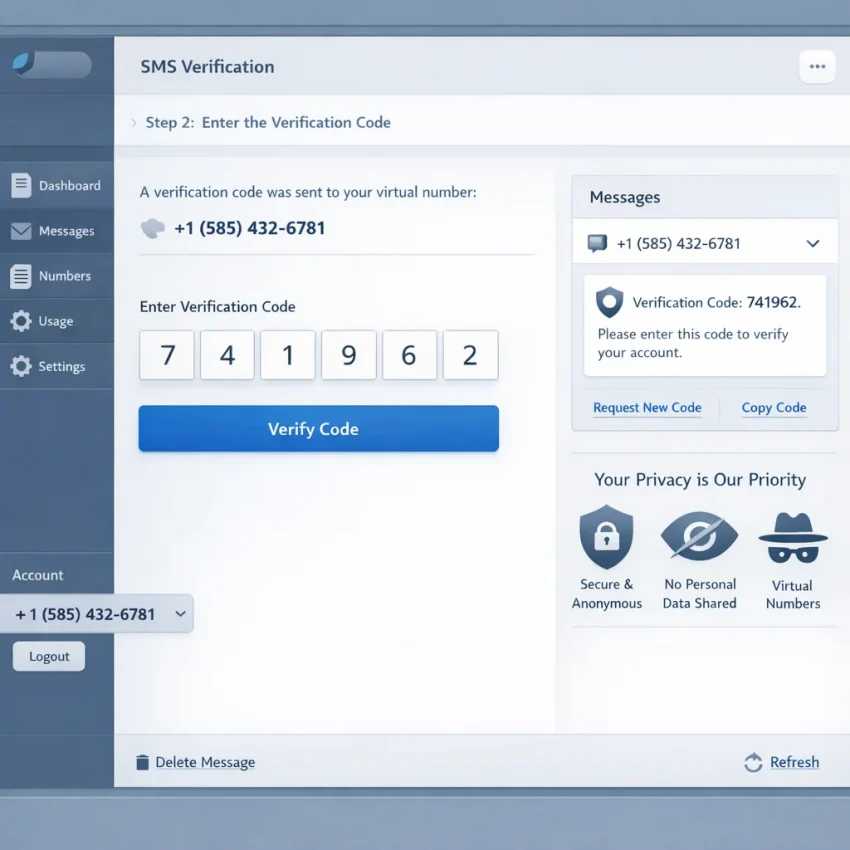
The SmsPva workflow is simple. First, choose the service you want to verify. Next, request a virtual number for that service. Then paste the number into the registration form, wait for the incoming SMS, copy the code, and finish verification.
This is different from a generic inbox model. You do not start by grabbing a random number. You start by matching the verification task to the correct service flow.
Step 1: Choose the target service first
This is the most important habit. Many apps handle OTP traffic differently, so the correct service selection improves compatibility. If you choose the wrong flow, the number may be rejected or the code may never arrive.
Once the service is selected, SmsPva assigns a number that you can copy into the signup or login form. Paste it exactly as shown. Do not change the format unless the site requires it.
Step 2: Wait for the code and complete verification
After the target app sends the message, the code appears in your SmsPva workflow when received. Copy the OTP, return to the signup screen, and enter it to complete the account confirmation.
The core loop is simple: choose service, get number, request code, receive SMS online, and confirm the account. This is faster and more private than trial-and-error with public inboxes.
Step-by-Step: How to Receive an SMS Code Online with SmsPva
If your goal is to receive a verification code online without using your personal number, follow this sequence.
1) Open SmsPva and prepare your verification session
Open SmsPva and sign in if needed. Keep the target website or app open in another tab. Many verification sessions expire quickly, so it helps to have the form ready before requesting a number.
Next, identify the exact service you want to verify. Do not treat all signups as interchangeable. Choose the service that matches the platform you are using.
Then review the available number options shown in your flow and request a number. Copy it exactly as displayed. Small mistakes here can break the process.
Go back to the signup form and paste the assigned number into the phone field. Double-check the selected country on the form before continuing. A country mismatch is a common reason codes do not arrive.
2) Request the code and monitor the incoming SMS
Submit the form to trigger the verification message. Then return to your SmsPva session and watch the incoming message area.
When the OTP appears, copy it carefully and enter it into the verification field. If the form auto-advances each digit, paste slowly or type manually.
If the code does not appear right away, stay on the same session for a moment. Avoid requesting multiple numbers too quickly. Too many parallel attempts make it hard to know which number belongs to which signup.
Simple do’s and don’ts
Do: open the signup page first, choose the matching service, copy the number carefully, and use the code as soon as it arrives.
Do: keep one active attempt at a time when possible.
Don’t: choose a random service just because it is available.
Don’t: switch service pages midway through the verification.
Don’t: mix countries, tabs, or repeated retries unless the original attempt has clearly failed.
Service-Specific Example: Using SmsPva for Signal Verification
A service-specific example makes the workflow clearer. If you need Signal verification, start with the dedicated Signal SMS verification flow instead of using a generic inbox.
This reduces guesswork because you are already inside a setup built around Signal. It is especially helpful for users who want a clean path to receive OTPs online.
What to check before requesting a number
First, confirm that you are verifying Signal and not another app. Second, decide whether country selection matters for your setup. Third, be ready to paste the number into Signal right away after it is assigned.
If you want a United Kingdom route, SmsPva has a dedicated page for Signal verification in Unt. Kingdom. At the time of writing, Signal single-SMS pricing there was listed from $0.50, with another UK variant listed at $0.77. These are API snapshots from 2026-09-25, not fixed offers.
If you compare regions, Signal single-SMS in the United States was listed at $2.01 at the time of writing. That does not make one country universally better. It only shows that service-country combinations can vary.
How the Signal flow works in practice
Open Signal and begin the normal phone number verification process. In SmsPva, request a number through the Signal flow. Copy the assigned number exactly, including the country code if needed, and paste it into Signal.
Then submit the verification request and wait for the SMS code to appear in your active order. Once it arrives, enter it in Signal without changing numbers or restarting the session unless necessary.
The practical takeaway is simple: if you need Signal verification, start with the Signal page, choose country only when it serves your setup, and complete the OTP step promptly.
Common Problems When Receiving SMS Online and How to Fix Them
Most failures come from setup mistakes, timing issues, or platform restrictions. In many cases, the problem is not the idea of using a virtual number. It is a mismatch in the workflow.
A good rule is to avoid requesting a new number immediately after one failed try. First check the process step by step.
No code arrived, or the OTP is delayed
Start by confirming that the signup page actually accepted the number. Some sites show a subtle error after submission. If the number format was rejected, waiting will not help.
Next, make sure you selected the correct service before requesting the number. A service mismatch is one of the most common causes of missing codes.
Also check whether you refreshed, closed, or restarted the verification session too quickly. Some platforms invalidate the request if you leave the page for too long.
If the delay continues, avoid spamming the “send code again” button. Multiple requests can create confusion because only the newest code may remain valid.
Wrong service, expired session, or number mismatch
If you selected one service in SmsPva but pasted the number into another app, the verification may fail. Always match the number request to the exact destination service.
Session expiry is another common issue. Many signup pages give you only a short window before the request becomes invalid. If too much time passes, start a fresh attempt instead of entering old codes repeatedly.
Number mismatch is easy to miss. Double-check every digit, including the country code. A single copy error can send the code somewhere else.
Repeated signup attempts can also trigger temporary limits on the target platform. Slow down and retry with one clean submission instead of several fast ones.
If a workflow keeps failing, review the support guidance before trying again. SmsPva’s Help page is the best place to check troubleshooting steps and usage details.
Best Practices for Privacy, Account Safety, and Smarter Verification Workflows
People who search for receive sms online free usually want speed and privacy. The better goal is completing verification without exposing your personal number everywhere.
A temporary number for verification helps reduce spam risk, limits follow-up messages, and keeps one-time sign-up activity separate from your main identity.
Protect your personal number by separating use cases
Do not use your primary phone number for every app, test account, or one-off registration. If a service only needs a verification step, use a workflow built for that step.
Keep the setup consistent. Match the correct service flow, enter the assigned number exactly, and complete the OTP step in the same session when possible.
If an account matters to you, think about long-term access before you start. Your overall account safety still depends on strong passwords, recovery options, and careful recordkeeping.
Build a smarter verification routine
Avoid rushing through repeated attempts. Too many retries can trigger extra checks or invalidate earlier codes. Start with the right service page, submit the number once, and wait for the message before changing anything.
Some users also separate verification activity from everyday browsing with dedicated browser profiles or related account-isolation tools. That is not required for every signup, but it can help keep privacy-focused workflows organized.
The main idea is simple: use a purpose-built workflow, keep your personal number private, and reduce avoidable errors. That is why SmsPva is a practical choice for receiving SMS online in 2026.
FAQ
Can I really receive SMS online for free in 2026?
Usually, the search phrase means users want an easy online verification method rather than a literal free service. For OTP use cases, a structured virtual number workflow is often more practical than a public inbox.
What is the difference between a public receive-SMS site and SmsPva?
A public site usually shows messages in an open inbox. SmsPva is designed for service-specific verification flows, which is better suited to OTP and account activation tasks.
How do I choose the right service page before requesting a number?
Choose the page that matches the exact app or website you are verifying. Do not select a random service just because it is available.
Why didn’t my verification code arrive?
Common reasons include wrong service selection, a number formatting error, session expiry, repeated retries, or the target platform not accepting the number.
Can I use SmsPva for Signal verification?
Yes. A Signal-specific flow is available, and using the dedicated service page is the cleanest way to handle Signal verification.
Is it better to use a country-specific number for SMS verification?
Sometimes. A country-specific route can help when your setup has regional preferences, but it does not guarantee a result. Use it when it fits your workflow.
Are prices fixed or do they change over time?
They can change. Treat any exact price as a current snapshot, not a guarantee.
When should I check the Help page before trying again?
Check it if your code does not arrive, if you think you selected the wrong service, or if repeated attempts are creating confusion. It is better to review the workflow before starting another attempt.