

Why a Random Phone Number Often Fails for SMS Verification
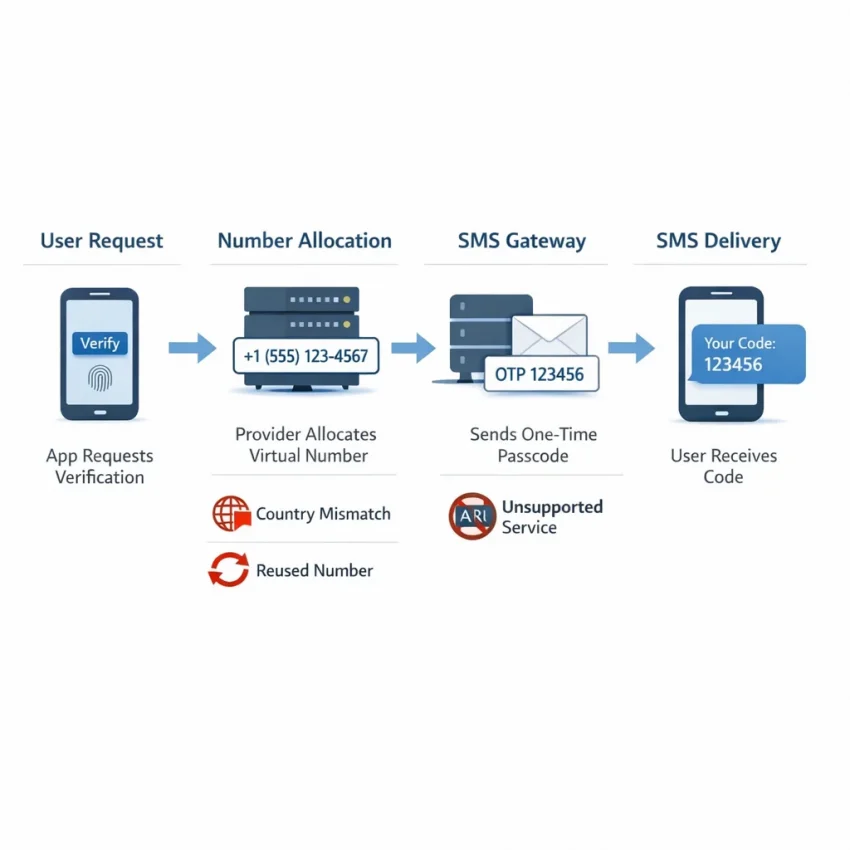
Many users search for a random phone number because they want the fastest way to get an OTP. It sounds simple: enter a number, wait for a code, and finish signup. In practice, SMS verification is not random at all. Most platforms evaluate the number, the country, the target service, and the behavior around the request before they decide whether to send or accept a code.
That is why a generic random phone number for verification often fails even when the number itself is active. The issue is usually not just that the SMS did not arrive. It is a mismatch between what the platform expects and what the user selected. A service may reject a number type, block a country code, detect prior use on that number, or flag too many repeated attempts in a short window.
Another common problem is treating all virtual numbers as interchangeable. They are not. A virtual phone number for OTP works best when it is chosen for a specific platform and verification flow. Some apps are stricter than others. Some care about country alignment. Some check whether the number has been used before for the same service. Others expire the code window before the user finishes the process.
What verification systems are really checking
When a platform sends an OTP, it is not only checking whether a message can be delivered. It may also score the request for abuse risk. That score can include the number range, the target region, how often the code was resent, and whether the account session looks unusual. This is why two users can try the same service and get very different results.
Number history matters too. If a service says a phone number has already been used, that usually means the platform has seen that exact number in a previous activation flow. With a truly random workflow, you often have no context about that history.
Timing also causes avoidable failures. OTP windows are short. If you request a code, refresh the page, switch devices, or hit resend several times, you can create conflicting sessions. Then the latest code may invalidate the first one, or the platform may temporarily slow or stop delivery.
Country mismatch is another major factor. A platform may support one country for signup but limit certain number ranges, or it may treat a foreign number as higher risk for a local account setup. If the service and country do not line up, the request can fail before the message is ever sent.
Why a structured workflow works better
This is where SmsPva becomes the better path. Instead of relying on a low-context random-number approach, users can Receive SMS online through a workflow built for verification use cases. That means choosing numbers in a way that is closer to the platform you actually want to verify, rather than hoping any available number will work.
A structured flow helps in three ways. First, it reduces obvious service mismatches. Second, it gives you better control over country selection when that matters. Third, it keeps the verification attempt focused, which lowers the chance of wasting tries on unsuitable numbers.
If your goal is to receive SMS online for account activation or OTP use, context matters more than randomness.
The 7 Most Common Problems Users Hit with Random Verification Numbers
Many users search for a random phone number because they want a fast code and a quick signup. The problem is that verification systems do not treat all numbers the same. They check service compatibility, country patterns, timing, prior use, and abuse signals. That is why SMS verification not working can look random on the surface but usually has a specific cause.
1. The OTP never arrives
This is the most common complaint behind searches like OTP not received or random number not receiving SMS. Usually, this points to one of four things: the service does not route codes well to that number type, the number and platform are a poor match, the request expired before delivery, or you triggered too many resend attempts.
If the code does not appear quickly, do not keep hammering the resend button. Repeated requests can reset timers, create duplicate sessions, or cause the platform to slow the flow.
2. The number is rejected immediately
Sometimes the failure happens before any code is sent. You enter the number and the service instantly says it is invalid, unsupported, or cannot be used. Immediate rejection often means the platform has rules around accepted number ranges, virtual-number detection, formatting, or region support.
When that happens, switching randomly between more numbers usually wastes attempts. You need a number aligned to the specific platform and, when relevant, the correct country.
3. The service says the number has already been used
Phone number already used verification errors mean the platform has seen that number in a previous activation flow. Some platforms allow reuse after time passes. Others do not. In either case, the issue is not whether the number can receive SMS. The issue is whether the service accepts that number for a new registration.
4. The country code is blocked or mismatched
Country selection matters more than many users expect. A platform may allow one region for account creation but limit another for anti-spam reasons, compliance rules, or rollout differences. A number can be technically valid yet still fail at verification.
Common symptoms include a blocked country code, a generic “try another number” message, or a code request that never starts.
5. The OTP arrives too late to use
A late code is different from no code. In this case, the message eventually appears, but the platform has already expired the session or rotated to a new code. Users then enter the message and get an invalid code error, which can be mistaken for a wrong number problem.
This often happens when you request multiple codes in sequence, switch browser tabs for too long, restart the signup flow, or let the session timeout while waiting.
6. The number works on one service but not another
A number that works for one platform may fail for another because each service applies its own filters, routing logic, and abuse controls. This is the heart of service-specific SMS verification. The real question is not whether the number receives texts. It is whether that service accepts that type of number for that exact use case.
7. Your account session or environment triggers review
Sometimes the number is not the only issue. The target platform may review browser state, repeated attempts, mismatched region signals, device history, or suspicious session behavior. The result looks like a phone error, but the phone number is only one part of the decision.
How to Diagnose the Real Cause Before You Try Again
When SMS verification is not working, the worst move is to keep trying random numbers. Each failed attempt can trigger cooldowns, temporary blocks, or a try-again-later message. A better approach is to diagnose the failure first.
Start with the exact service you are verifying. A number that works for one platform may be rejected by another. If you are using SmsPva, choose the service flow that matches your target platform instead of treating all OTP requests as identical.
Next, confirm the country requirement. Some services accept multiple country codes, while others behave better with a country that matches your signup flow, language, region, or account setup. Keep one variable fixed at a time.
Check acceptance, timing, and number history
If the platform rejects the number instantly, that usually points to one of three causes: the service does not accept that number type, the country code is unsupported for that flow, or the number has prior history with that platform.
Watch the verification timer carefully. Many users hit resend too fast, request multiple codes, or leave the session idle while waiting. Request one code, wait through the expected window, and check for updates inside the active session before trying again.
Also look at your account environment. Platforms may review IP location, browser state, device consistency, and signup behavior. If the form, region, and number country all conflict, the service may hold or block verification.
Use a simple decision path
Ask these questions in order: Are you on the right service flow? Does the platform appear to accept virtual numbers for this use case? Is the country appropriate for the account you are creating? Did you wait long enough before resending? Did the service show “already used,” “invalid number,” or no error at all?
When the cause still is not obvious, use SmsPva Help for troubleshooting guidance.
How to Solve Random Phone Number Issues with SmsPva
If a random phone number for verification keeps failing, the fix is usually not to try another random number. The better fix is to use a structured workflow built around the service you actually need. With SmsPva, you start with the target platform, then choose a matching virtual number for OTP receipt.
Use a service-first workflow
The first step is simple: choose the exact service before you get a number. That is the biggest difference between successful service-specific verification and repeated failed attempts. If you pick a number without selecting the target platform, you increase the chance of mismatch.
On SmsPva, the practical workflow is: select the service, review country options if relevant, obtain the number, enter it into the platform, then wait for the code within the active session.
Country choice is the next checkpoint. Some platforms accept multiple countries, but that does not mean every country performs the same way for your account setup. Choose a country deliberately based on the service requirements, the account region, and the format the platform accepts.
Then watch the timer. Keep the page open, enter the number carefully, and wait through the normal delivery window before taking another action.
Complete the activation cleanly
Enter the number once, confirm the country code, and avoid editing the number repeatedly after submission. If the platform shows an immediate rejection, stop and diagnose the reason before trying again.
If the number is accepted but the code does not arrive, stay in the same session long enough to rule out normal delay. SmsPva works best when you use it as a targeted verification tool, not as a number lottery.
Example Workflow: Using SmsPva for Signal Verification More Reliably
If you need Signal verification, a generic random phone number is often the wrong starting point. Signal works better when you use a number selected for that exact service flow. A practical path is to open the dedicated Signal SMS verification page instead of searching for any random phone number for verification.
Step-by-step workflow
Start by confirming that your Signal signup flow matches the country you plan to use. Do not switch countries blindly just because one attempt failed. Enter the selected number carefully, including the correct country code, and wait for the OTP prompt before requesting more codes.
Once the number is assigned, monitor the verification window closely. Avoid repeated resend taps too early. If the code arrives, complete activation immediately and finish setup in the same clean session.
When country selection helps
Country choice can matter when it matches your use case. For example, if you specifically need a UK-based Signal flow, using the dedicated Signal verification in Unt. Kingdom page is more precise than choosing a random number and hoping the service accepts it.
At the time of writing, the API listed Signal single SMS options in the United Kingdom from $0.50 and $0.58 depending on code variant. Those are snapshots, not permanent prices.
If your setup fits the United States better, use that route instead of forcing a UK number. At the time of writing, the API listed Signal in the United States at $1.75 for single SMS.
The key point is not the price alone. It is that service and country should match the account flow you are completing.
Best Practices to Reduce Failed OTP Attempts, Timeouts, and Number Rejections
If SMS verification is not working, the fix is often procedural. Start by matching the number to the exact platform you are verifying. A service-specific workflow in SmsPva is usually more efficient because the number choice is tied to the task instead of being chosen blindly.
Do not switch countries at random after one failed attempt. Pick the most appropriate country first, then complete the flow in one clean session.
Another common mistake is spamming the resend button when the OTP is not received. Repeated resends can invalidate earlier codes, trigger cooldowns, or make it harder to tell which message belongs to the active attempt.
Keep the verification session clean
Try not to change devices, browsers, IP context, or account details in the middle of setup. Verification systems look at the full session, not only the phone number. If you begin registration in one environment and finish it in another, the platform may flag the attempt for review.
It also helps to prepare the account form before you request the code. Enter the correct number format, confirm the selected service, and make sure you can complete the next step immediately after the SMS arrives.
Use support when the pattern is unclear
If you still cannot verify successfully after a careful retry, stop burning attempts and review the troubleshooting guidance on the Help page. That is the better next step when the issue looks service-specific, time-based, or tied to platform restrictions.
When to Stop Using a Generic Random Number and Switch to SmsPva
A generic random phone number can work in simple cases, but repeated failures are a clear signal to change your approach. If the code does not arrive, the number is rejected, the service says it was already used, or the country does not fit the platform, trying more random numbers usually creates more lockouts and wasted attempts.
That is the point where a structured workflow makes more sense. Instead of guessing, use SmsPva through a service-specific setup. This helps you choose a random phone number for verification in a more targeted way, with the platform and country in mind.
SmsPva is the better next step when you need a virtual phone number for OTP, account activation, or one-time SMS receipt and your current method keeps failing. In practical terms, switch to SmsPva when you care more about finishing verification than endlessly testing random inputs.