

What People Mean by a ‘Free Number for WhatsApp’ — and Why It Often Fails
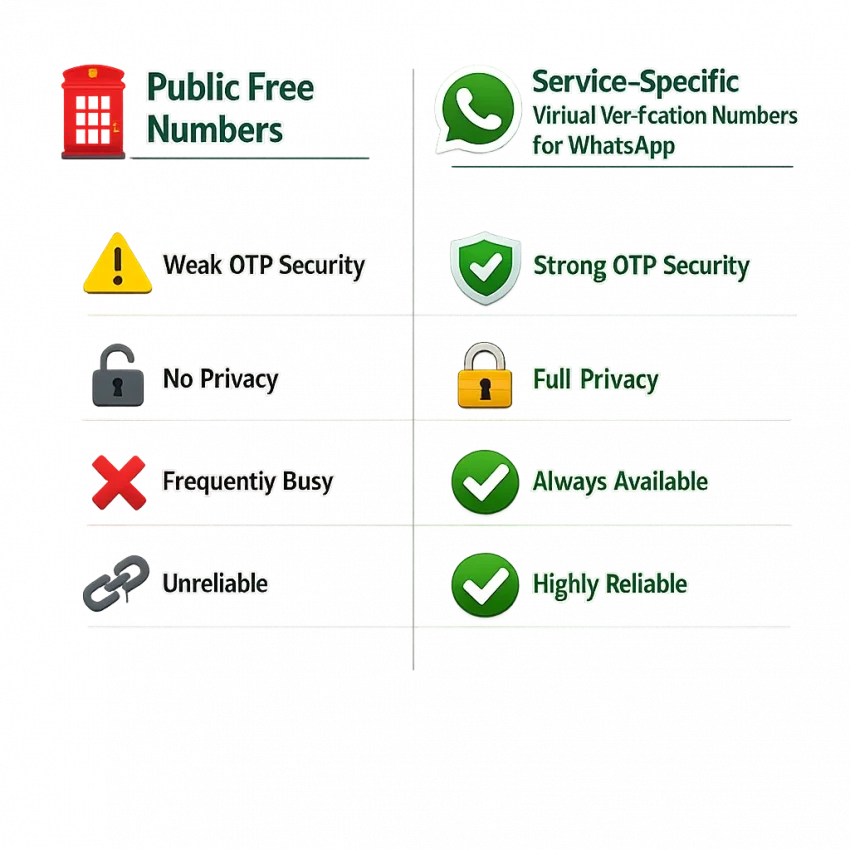
When people search for a free number for WhatsApp, they usually want a fast way to receive a one-time code. In practice, that search often leads to two very different options: public numbers posted online and service-specific virtual numbers from verification platforms.
Those options may look similar, but they behave very differently. Public free inboxes are usually shared, overused, and visible to many users. A number may already be tied to another WhatsApp account, flagged from past abuse, or exhausted from too many recent attempts. The result is familiar: no code arrives, the number is rejected, or the app sends you back to the start.
This is why the phrase free number for WhatsApp verification can be misleading. Free does not mean fresh, private, or suitable for WhatsApp. If your goal is to Receive SMS online for account verification, a service-specific workflow is usually more practical than a random public inbox.
Why public numbers fail so often
WhatsApp pays attention to number history. If many people have already tried the same public number, the platform may treat it as high risk. Even if a number can technically receive SMS online for WhatsApp, that does not mean WhatsApp will accept it for activation.
Timing also causes problems. Public inboxes receive heavy traffic. OTP messages can be delayed, buried, or seen by someone else watching the same inbox. Sometimes the code arrives too late. Sometimes it never appears. Users then request another code too fast and trigger more limits.
There is also a mismatch problem. A generic SMS inbox may exist, but it may not be reliable for the exact service you want. WhatsApp checks more than basic SMS delivery.
A more realistic alternative
A better path is using a platform built for verification rather than a public list of recycled numbers. SmsPva fits that need because it offers a service-specific process for OTP receipt and activation. That does not guarantee success on every attempt, but it gives you a cleaner workflow and clearer next steps.
If you need an online number for WhatsApp code, it helps to reset expectations. “Free” usually means crowded and unreliable. A structured SmsPva workflow is the more realistic solution when you want fewer avoidable verification failures.
The Most Common WhatsApp Verification Problems Users Face
Most users searching for a free number for WhatsApp are not dealing with one generic error. They are hitting a specific failure point. The fix depends on which one you have. If you treat every problem the same way, you waste attempts and make the next try harder.
OTP not received or delayed
The most common complaint is simple: WhatsApp verification code not received. You enter the number, request the code, and nothing appears. This can happen because the route is slow, the number is temporarily filtered, or you requested too many codes too quickly.
A related issue is WhatsApp OTP not arriving until it is already stale. Delayed delivery often comes from congestion, repeated retries, or conflicts between SMS and voice verification. If the code arrives late, avoid stacking more requests. Each new request can invalidate the previous one.
App-side loops and unstable sessions
Sometimes the app is part of the problem. You may see repeated verification prompts, a loading spinner that never finishes, or a screen that returns to number entry. These WhatsApp SMS verification issues are not always caused by the number itself.
Old app cache, network switching, or an interrupted earlier setup can interfere with the process. If the app keeps bouncing you back, stop changing numbers until you confirm the app session is stable.
Rejected, reused, or invalid numbers
WhatsApp may reject the number before the OTP stage. Users often see messages like “invalid number” or “this number cannot be used.” That usually points to formatting mistakes, unsupported routing, or a number with too much prior verification history.
Reused numbers are another major issue. Public numbers are often visible to many people. That means the number may already be tied to an earlier WhatsApp registration attempt. This is one reason generic free sources fail so often.
Retry limits and region mismatch
If you request multiple codes in a short period, change countries repeatedly, or switch between SMS and call options too quickly, WhatsApp may slow down or temporarily block further attempts. Once that happens, even a good number can fail because the verification flow is already flagged.
Region mismatch matters too. Your selected country, the actual number format, and the route need to line up. This does not mean every foreign number will fail. It means consistency matters. If you keep hitting these problems, use a controlled workflow with SmsPva and review the Help guidance before trying again.
How to Troubleshoot a WhatsApp OTP Problem Before You Retry
If your code did not arrive, do not rush into another request. Repeated retries often make the problem worse. WhatsApp may delay new codes, flag the session, or temporarily block more attempts.
Check the basics first
Start with the country setting. Make sure the country selected in WhatsApp matches the country of the number you are using. A wrong country code is one of the fastest ways to create a failed verification attempt.
Next, check the number format. Enter the number exactly as provided. Do not add extra zeros, repeat the country code inside the local number field, or paste extra symbols. A small formatting error can trigger WhatsApp OTP not arriving or immediate rejection.
Then review timing. If you already requested a code recently, wait for the timer to expire. Many users hit resend too quickly. That can invalidate the earlier request or push the next code into a delay window.
Stabilize the app and session
Close WhatsApp fully, reopen it, and confirm your connection is stable. If the app appears stuck, switching between Wi-Fi and mobile data can help. Sometimes the issue is not the SMS route at all. It is the app session failing to refresh the verification state.
If the same number was used in an earlier attempt, consider whether that session was completed, failed, or left unfinished. A number tied to an incomplete registration can behave differently on a new attempt.
Know when to wait and when to switch
If WhatsApp accepted the number but no SMS arrived, the issue may be timing or route congestion. In that case, wait before touching resend. If WhatsApp says the number is invalid, unsupported, or already used, do not keep retrying the same number. Switch to another one instead.
If you see a “too many attempts” warning, stop immediately. More retries can extend the cooldown. One clean request is better than four rushed ones.
How to Use SmsPva for WhatsApp Verification More Effectively
If you have been searching for a free number for WhatsApp, the best upgrade is moving from public inboxes to a structured service-specific workflow. SmsPva is designed for that use case.
Start with the correct service page
For WhatsApp setup, go to the WhatsAPP SMS verification page. Using the correct service page matters because it helps reduce selection mistakes and avoids choosing a number meant for another platform.
Review the available options before requesting any code. Then enter the number in WhatsApp exactly as provided. Check the country code twice. Do not alter the prefix unless the platform instructions require it.
After that, request the code once and wait. Many failed activations happen because users trigger multiple OTP requests too quickly. That can delay delivery, invalidate earlier messages, or cause a retry limit.
Use a clean verification flow
Keep your SmsPva session open while you wait for the incoming message. Refresh only when needed. If the code appears, copy it carefully and complete activation without requesting a second SMS unless the first one has clearly expired.
If no OTP arrives, confirm three things before retrying: you selected the correct service, you entered the number correctly, and you did not switch verification methods mid-process. If the number is rejected immediately, changing the number is usually smarter than forcing more attempts.
When you need help, use the official support guidance rather than guessing. For users dealing with reused numbers, missing OTPs, or app-side loops, SmsPva offers a more practical workflow than unreliable public lists.
Choosing the Right Number Type, Country, and Retry Strategy
Success with WhatsApp verification often depends less on finding something “free” and more on choosing the right route, country, and retry pace. WhatsApp checks the number, the request pattern, and sometimes route quality before the OTP reaches you.
Pick the number based on fit, not hype
Start with the country you actually want to use, but stay flexible. Route availability and prior number history matter more than assumptions. A virtual number for WhatsApp may work well in one pool and poorly in another on the same day.
If one route is repeatedly delayed or rejected, switching numbers can make more sense than repeating the same failed attempt. On WhatsApp UK routes, API snapshots at the time of writing showed prices listed at $6.00 for UK and $0.30 for UK_V. These are snapshots, not guarantees, and stock or suitability can change.
That price difference does not automatically mean one route is better. It only shows that route type and availability can vary. Price alone should not drive your choice.
Use a calm retry strategy
Most failed attempts come from rushing. Users request one code, do not wait long enough, request another, change devices, and end up triggering a temporary block. With WhatsApp, pacing matters.
Keep the same number if WhatsApp accepted it and you are only dealing with delay. Switch numbers if the app says invalid, already used, or unsupported. Restart the whole flow only after repeated app-side loops, not after every small delay.
This is where SmsPva is more useful than unreliable “free” sources. You get a service-specific workflow and a cleaner way to retry without burning attempts on recycled public numbers.
When WhatsApp Verification Still Fails: Safe Next Steps and Support Options
If your WhatsApp verification code still does not arrive after one careful attempt, do not keep hammering the request button. Repeated OTP requests often make the problem worse. The safest move is to identify the exact failure and respond to that specific problem.
Separate the failure type
Start by asking one question: was the number accepted but the SMS never arrived, or did WhatsApp reject the number before delivery? If the number was accepted, wait a reasonable amount of time before trying again. If the number was rejected immediately, repeating the same attempt often gives the same result.
Also review whether your device has old WhatsApp state. Cached sessions, unfinished registrations, or recent failed attempts can interfere with the next try. A clean app restart can help, but it should not turn into endless retries.
Pause, adjust, then retry
If the app says the number is invalid, already used, or unsupported, treat that as a hard stop for that number. Move to a different number or pause and return later. Public “free number for WhatsApp” sources fail here most often because those numbers are frequently recycled.
When you need a practical path forward, use SmsPva instead of public inbox lists. It gives you a structured workflow rather than a shared number with unknown history. Even then, outcomes can still vary based on WhatsApp checks and current route availability, so keep expectations realistic.
If you are stuck, review the SmsPva Help page before making more attempts. Retry only after you have changed something meaningful, such as the number, timing, or app state. That measured approach gives you the best chance to solve WhatsApp verification problems without creating a longer lockout.
FAQ
Can I use a free number for WhatsApp verification?
You can try, but public free numbers often fail because they are shared, reused, or already flagged. A service-specific workflow like SmsPva is usually more practical.
Why is my WhatsApp verification code not arriving?
Common causes include delayed routing, too many resend requests, app-side session issues, wrong country selection, or a number with poor history.
Why does WhatsApp say the number is invalid or already used?
This usually means the number format is wrong, the route is not suitable, or the number has already been used in prior registrations.
How long should I wait before requesting another WhatsApp OTP?
Wait for the app timer to expire and avoid stacking requests. Sending repeated requests too quickly can delay or invalidate codes.
What should I check before retrying WhatsApp verification with a virtual number?
Check the country code, number format, app state, internet connection, and whether you already made recent requests with the same session.
How do I use SmsPva for WhatsApp verification?
Use the WhatsApp service page, choose an available number, enter it exactly as provided, request the code once, and wait for the OTP before retrying.
Are SmsPva WhatsApp prices fixed?
No. Prices should be treated as current snapshots, not guarantees. Route availability and listings can change over time.
What should I do if a WhatsApp number works for SMS but the app still rejects it?
That usually means the issue is compatibility, prior number history, or app-side checks rather than basic SMS receipt. Switch numbers or pause before retrying.