

What phone number rental means today—and why users run into problems fast
Phone number rental sounds simple: get a number, wait for a text, enter the code. Modern verification flows are stricter than that. Many platforms now check the target service, the country of the number, your timing, and sometimes the broader account environment. That is why users often try to rent a phone number for SMS verification and hit problems almost immediately.
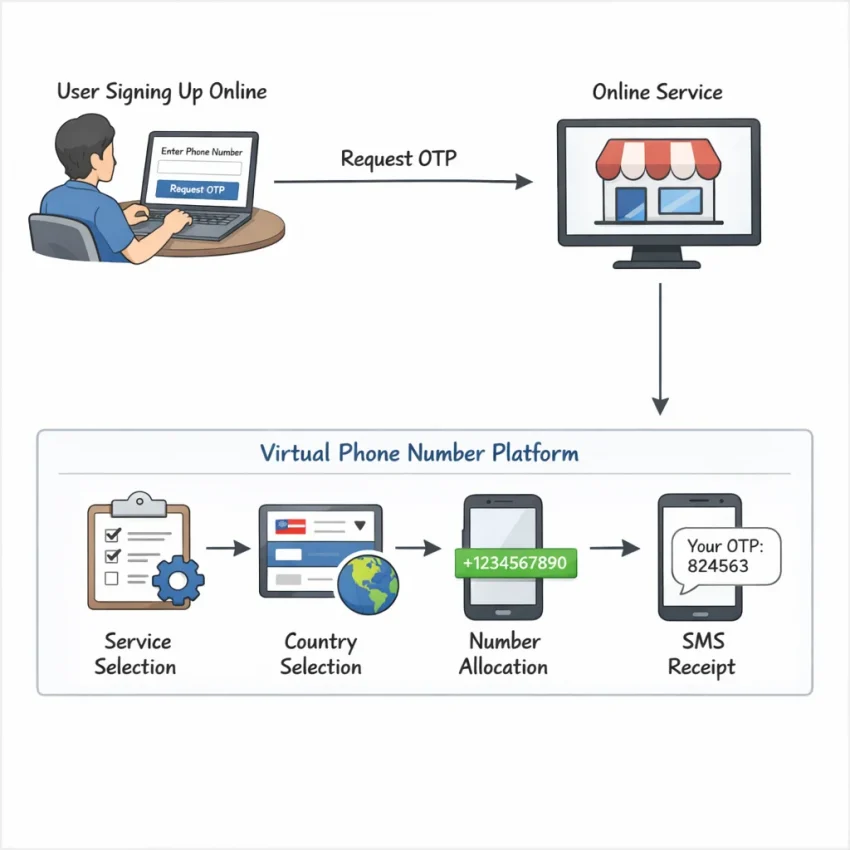
Today, phone number rental usually means getting a virtual phone number for OTP or account activation through a provider built for verification tasks. The goal is not general calling. The goal is receiving a valid one-time code for a specific platform at the right moment. If the number, country, or session does not match what the platform expects, the code may not arrive, or the signup may fail even after the message is delivered.
That is why a verification-focused workflow matters. With Receive SMS online through SmsPva, users can start from a service-specific flow instead of choosing a random temporary number and hoping it works. That structure is often more useful for account activation, OTP receipt, and privacy-focused sign-up workflows.
Why generic number access often fails
Many users assume any temporary number should work for any app or website. That assumption causes most frustration around SMS verification number rental. Some services prefer certain virtual number routes. Some expect a local country code. Some sessions expire quickly. Others fit a longer rental window better than a one-time verification flow.
So when users say, “I did not receive the code,” the real issue is often service mismatch, the wrong country, delayed form submission, or choosing the wrong number type. A rented number is a tool for a specific OTP task. It is not a universal shortcut for every platform.
This guide focuses on troubleshooting first. If your verification failed, the practical fix is usually to choose the exact service flow, match the country to the platform, request the number only when you are ready to submit, and use support resources when a step breaks.
The 7 most common phone number rental issues users face
Most phone number rental problems are predictable. They usually come from a mismatch between the platform, the number type, the country, or the timing of the attempt. Diagnosis matters more than random retries.
1. No SMS code arrives
This is the most common complaint: OTP not received on a virtual number. Several failures can look identical. The platform may not have sent the code yet. The number may have been requested too early. The session may have expired before the SMS was issued. Or the service may require a more exact flow than a generic number request.
The worst response is repeated resends. That can trigger rate limits or reset timers. A better approach is to request the number only when the registration form is complete, submit once, and wait through the platform’s timer.
2. The service is unsupported or mismatched
Many failed attempts start with the wrong order: users choose a number first and the service second. Some platforms route verification differently or apply stricter filtering. The symptom is confusing. You receive no code, or the platform rejects the number immediately.
This is where SmsPva’s service-first structure helps. Choosing the correct service flow is usually better than selecting a random number and hoping it fits.
3. The wrong country was selected
Country choice directly affects verification success. Some platforms expect the number country to match the account region, language, or signup route. If those signals conflict, the code may be delayed, blocked, or flagged as suspicious.
Many users choose the cheapest country without checking what the platform expects. That can create an avoidable mismatch even when the number format is accepted.
4. The number is exhausted or temporarily unsuitable
Sometimes a number is accepted by the form but never receives the SMS, or it is rejected because it has already been used too often for that service. Users often blame the provider generally, but the specific issue is that the number and the target service are not a good fit for that attempt.
5. The verification session expires
If you request a number, switch tabs, change devices, or wait too long before pressing send code, the target platform may no longer match the active request. Then the SMS can arrive too late to help, or not be sent at all.
6. The account environment triggers risk checks
Platforms do not evaluate the number alone. They also look at IP consistency, browser state, repeated attempts, device history, and account creation patterns. If those signals look unusual, the service may withhold the code or block the attempt.
7. The wrong flow was chosen
Some users need a one-time verification number. Others need a longer rental window. If you choose a single-use path for a task that needs ongoing access, the setup will feel broken even when the first code arrives.
The key lesson is simple: SMS verification troubleshooting starts with service match, country match, timing, and flow type. If a problem repeats, review SmsPva’s Help resources before spending again.
How to solve delivery and verification failures with SmsPva
If your last phone number rental attempt failed, the best fix is not to try again randomly. Tighten the workflow. SmsPva works best when you treat verification as a sequence: choose the exact platform, match the country, open the sign-up form first, then request the number only when you are ready to submit.
Use a service-first workflow
Select the exact service before you rent a phone number for SMS verification. If a platform has its own flow on SmsPva, use that route instead of a broad category. Service-specific virtual numbers reduce avoidable errors because the request is aligned with the platform you are trying to verify.
Next, match the country to the platform’s expectations. A virtual phone number for OTP can fail even when the number is valid if the country signal looks unusual for the account. This does not guarantee success, but it removes one common reason for rejection.
Then fix the timing. Do not request a number while you are still setting up usernames, passwords, or browser state. Open the target registration page first. Fill every field up to the phone box. Only then should you request the number and paste it into the form.
Also confirm the correct verification type. If the task is one account activation, use a one-time flow. If the platform clearly needs a longer access window, use the relevant rental flow instead of forcing a single-use path.
What to do when the code still does not arrive
If the rented number is not receiving SMS again, stop and check the basics in order. Confirm the service selection. Confirm the country. Confirm that the number was requested right before submission. Then check whether the platform actually accepted the number. A rejected number often looks like no SMS received, even though the message was never sent.
Look at your account environment too. Repeated retries from the same browser state or inconsistent location signals can trigger extra checks. If the problem is unclear, use the SmsPva Help page before making more guesses. In practice, most failures come down to four causes: wrong service flow, wrong country, expired session, or the wrong number type.
Choosing the right number type: when single verification works and when a rental flow matters
Many phone number rental problems begin before the OTP is sent. Users choose a temporary phone number for verification when the platform really needs more than one message, more setup time, or a follow-up check later. That mismatch can look like delivery failure, even when the issue is the number type.
When a single-use verification number is enough
Use a one-time number when the platform clearly asks for one SMS code and you can complete the process in one session. This fits simple account activation, a quick privacy-focused sign-up, or a clean recovery step. The key is timing: request the number only when your form is ready.
A one-time flow is often the lowest-friction option if you need one code, do not expect later messages, and want fewer moving parts.
When a rental flow matters more
A rental flow makes more sense when the setup is not truly finished after the first SMS. Some platforms send more than one message, ask for a second confirmation later, or spread the setup across a longer window. In those cases, using a single temporary number may lead to repeated purchases and confusion.
The practical rule is simple: match the number type to the message pattern. One code in one session points to a one-time verification flow. Multiple possible codes or a longer setup window point toward a rental approach. If you are unsure, pause before paying for another number and review the target platform’s expected message flow.
Country, service, and account-environment matching: small details that change outcomes
A failed OTP attempt is often a matching problem, not only a delivery problem. If you want a virtual phone number for OTP use, treat verification as a three-part match: service, country, and account environment.
Match the country to what the platform expects
Country choice affects more than language. Many platforms compare the phone number country with other signup signals, such as app locale, stated region, or prior account history. If those details conflict, the platform may delay the flow, reject the number, or trigger extra review.
If you keep seeing “code not sent” or repeated prompts to try another number, review the country match before repeating the purchase.
Keep the account environment clean and consistent
The signup environment matters too. A stale browser session, too many retries, or conflicting device history can limit code delivery. That can look like a rented number not receiving SMS when the platform never issued the message cleanly.
Use a fresh session when possible. Request the number only when the form is ready. Submit the number once, then wait for the platform response before refreshing or resending. If you manage separate account workflows, keep the setup consistent from start to finish.
A worked example: troubleshooting a Signal verification flow with SmsPva
If you need phone number rental for Signal, the safest approach is to start with the exact service flow instead of a generic number pool. Open the Signal SMS verification page first. That reduces one of the most common failures: using a number that does not match the platform’s verification route.
Here is the practical sequence. Prepare your Signal registration screen before you request a number. Then select the country that matches your intended signup context. After that, request the number and submit it right away. Many failed attempts happen because users claim a number too early and then try to complete a stale session.
If your registration flow expects a UK context, review Signal verification in Unt. Kingdom rather than guessing. At the time of writing, United Kingdom Signal single-SMS routes were listed from $0.50 or $0.58, depending on the route snapshot. For a United States signup context, the listed Signal single-SMS price snapshot was $1.75. Treat these as current API snapshots, not fixed rates or guaranteed availability.
What to do if the code does not arrive
If Signal does not send the OTP, do not keep retrying blindly. Confirm that you selected Signal, not another service. Confirm that the country matches the registration context. Confirm that you entered the number correctly and that the verification session is still active.
If those steps look right, consider account-environment issues. Repeated retries, a country mismatch, or a noisy signup setup can all reduce reliability. The main advantage of SmsPva here is structure: you get a service-specific path and clear troubleshooting resources instead of guessing from a generic number list.
When to switch to a rental flow
Many Signal users only need one code and can finish account activation in a single session. If your use case clearly needs a longer access window, review the separate Signal SMS verification rental path instead of forcing a one-time flow into a longer task.
Best practices checklist before you rent a phone number for verification
Before any phone number rental attempt, confirm the basics:
- Choose the exact target platform first.
- Select the country that matches the signup context.
- Open the form and fill it before requesting the number.
- Double-check the number format before submitting.
- Keep your browser session stable and avoid switching devices mid-flow.
- Use the right flow: one-time verification or a longer rental window.
- If a code does not arrive, do not repeat the same broken setup several times.
Think in this order: service match, country match, active session, clean form entry, then support. Users who want a practical workflow instead of trial and error should use SmsPva to receive SMS verification codes with virtual phone numbers. Its service-specific flows make it easier to reduce common setup mistakes and troubleshoot failed verification attempts more efficiently.