

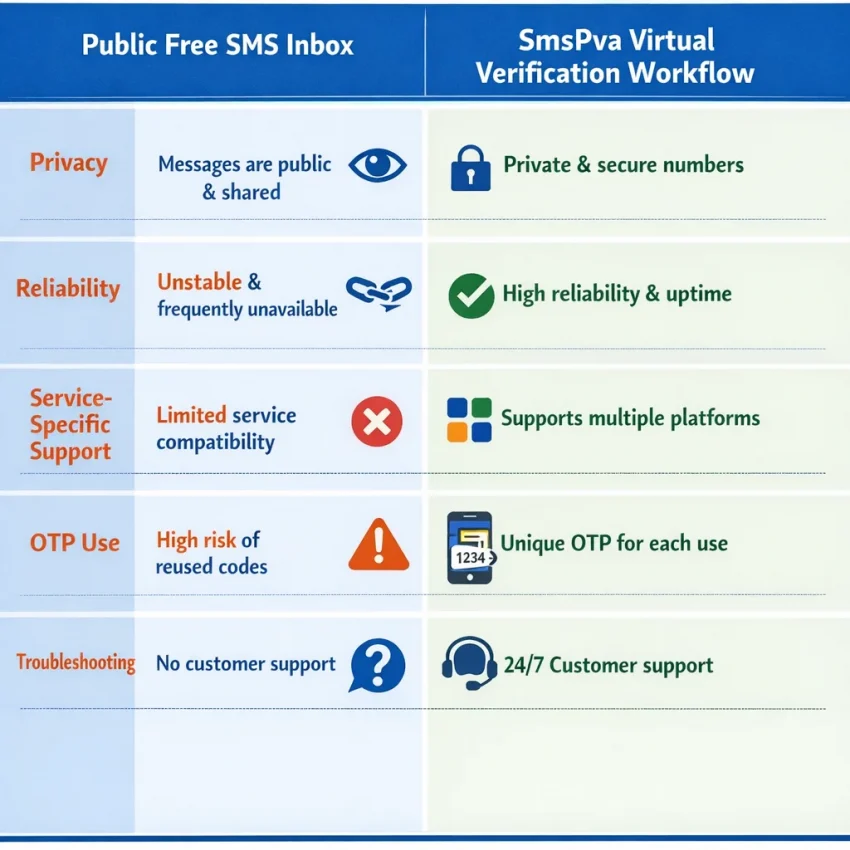
Most people searching for a free sms phone number want the same outcome: receive a code quickly and finish a sign-up. In 2026, that search usually leads to two very different options. One is a public inbox that anyone can view. The other is a virtual verification workflow built for OTP receipt and account activation.
That distinction matters. Public inbox numbers may look convenient, but they often have poor privacy and uneven reliability. Many are heavily reused. Some target platforms reject them outright. Even when they work, incoming messages may be visible to other users.
If you need a practical path to Receive SMS online for real verification, SmsPva is the better fit. It is not an unlimited free-number source. It is a workflow built for SMS verification, one-time codes, and service-specific activation.
What a “free SMS phone number” means in 2026
A public free sms number is usually shared. You do not control who used it before you or who can see incoming messages. That may be acceptable for low-stakes testing, but it is a weak choice for login security, onboarding, or account recovery.
A virtual phone number for sms verification works differently. You choose the service you want to verify, request a compatible number, submit it to the target platform, and wait for the code inside your dashboard session. This is a better way to receive verification code online without relying on exposed public inboxes.
The key shift is simple: if you need privacy and a usable verification flow, “free” is rarely the right standard. “Works for the service I need” is the better standard.
When to use SmsPva instead of random public SMS sites
Use SmsPva when the verification actually matters. Good examples include account registration, login confirmation, app activation, and privacy-focused sign-ups that should stay separate from your main number.
A random public inbox is often too broad for modern verification. Many platforms check whether the number fits a supported route, whether it has been overused, or whether the verification request matches a known service flow. That is why a dedicated sms verification service makes more sense than a public message wall.
SmsPva also gives you better privacy. Public inboxes are typically visible to anyone. If the OTP appears there, others may see it. That is not ideal for any account tied to personal identity, contacts, or future access.
Best-fit use cases
Choose SmsPva if you need a temporary phone number for verification for a live sign-up, one-time activation, backup account, or clean registration flow. It is also the better choice when country or service fit may affect the result.
In short, public inboxes are for casual testing. SmsPva is for real verification tasks where workflow, privacy, and timing matter.
Step-by-step: how to use SmsPva to receive an SMS verification code
If your real goal is to get a code and finish verification, the cleanest method is to treat it as a service-based workflow. Do not start with a generic number. Start with the app or website you want to verify.
1) Prepare the target platform first
Open the sign-up or verification screen before you request a number. Be ready at the point where the platform asks for a phone number. This reduces the risk of a stale session.
Have these details ready: the exact service, any country preference, the account or email you are using, and a stable browser or app session.
2) Select the correct service in SmsPva
Inside SmsPva, choose the matching service. Do not assume any online sms verification number will work everywhere. Service selection helps align the number with the verification flow you need.
Review the live options shown for that service. Treat this as a live check, not a static catalog. Availability can change.
3) Get the number and submit it
Copy the number exactly as shown. Enter it into the target app or website. Double-check the country code and number format before you request the code.
Then trigger the SMS by clicking the platform’s verification button. Switch back to SmsPva and monitor the session for the incoming OTP.
4) Enter the OTP promptly
When the code arrives, copy it carefully and enter it into the target platform right away. If the code fails, stop and check the basics: correct service, correct number format, and whether the app session expired.
That is the core answer to how to use smspva: prepare the target screen, choose the exact service, review live options, get the number, submit it, receive the SMS, and enter the OTP without delay.
Example workflow: using SmsPva for Signal verification
If you need Signal, start with the dedicated Signal SMS verification page instead of using a generic public inbox. This reduces guesswork and keeps the process aligned with the service you actually want to activate.
How the Signal flow works
Open the Signal page, review the live routes or countries, and choose the option that fits your registration. Then enter the number into Signal exactly as shown, including the country code. Request the verification SMS and keep the session open while you wait for the code.
Prepare the Signal app before you obtain the number. Then move through the steps in one sequence. That lowers the chance of timing out.
Does country selection matter?
Yes, sometimes. Some services handle verification differently by region. If you already want a UK route, check the dedicated Signal verification in Unt. Kingdom page before you start.
At the time of writing, Signal in the United Kingdom was listed from $0.50 on one route, with another UK route listed at $0.77. A United States Signal option was listed at $2.01. These are API snapshots from 2026-09-24, not guarantees.
The practical takeaway is simple: start with the exact service page, confirm the current country options, and complete the verification in one clean session.
Common problems: no code received, expired session, wrong service, or number mismatch
Most failures come from timing, service mismatch, or entering the number into the wrong flow. Before assuming the number is the issue, check the full sequence.
No code received
First, confirm that you selected the correct service in SmsPva. If you used the wrong flow, the code may never route as expected.
Next, check whether the target platform is still waiting for the code. If the screen expired, restart with a fresh session instead of repeatedly resending to an old one.
Also confirm the number format. Make sure you copied the full number, used the right country code, and did not add spaces or drop digits.
Expired session or repeated failures
Once you obtain a number, use it right away. If you pause too long, switch devices, or reopen the app later, the platform may invalidate the attempt.
If the platform says the number is invalid or already used, stop and start a new attempt. One browser window, one number, and one active verification flow is the cleanest setup.
If problems continue, review your service choice, country choice, and timing in that order. Then visit Help for current guidance.
Privacy, account hygiene, and multi-account considerations in 2026
Privacy is one of the main reasons people search for a free sms phone number. In practice, a privacy-aware workflow means keeping verification separate from your main number when appropriate and keeping each session organized.
Use a dedicated browser profile for each sign-up flow. Avoid mixing old cookies with a fresh verification attempt. This helps reduce number mismatch errors and repeated OTP prompts.
Keep each flow isolated
Use one browser profile, one service session, and one number for one verification attempt. Label what you used and when you used it. This makes retries easier and helps prevent confusion between tabs or regions.
Service-specific selection matters here too. A number chosen for one platform should not be treated as universal for every app.
When to use a rented number instead
If you expect repeated logins, follow-up checks, or a longer access window, a one-time code flow may not be enough. In that case, a rented number can be the better fit. For Signal-specific longer-use scenarios, review Signal SMS verification rental options.
Choosing the right SMS verification path: what to do next with SmsPva
If you searched for a free sms phone number, the practical answer in 2026 is clear. Public inboxes rarely fit real verification needs. When you need OTP receipt, sign-up confirmation, or account activation, a service-specific virtual number workflow is usually the better path.
Use SmsPva when you already know the service you want to verify and want a cleaner process than a random public inbox can offer. Check the live service page, confirm the right country if needed, and complete the flow in one session.
If you only need a one-time code, use the standard workflow. If you need longer continuity, consider a rented number where relevant. If something fails, stop and troubleshoot the setup before retrying blindly.
Use smspva.com to receive SMS verification codes with virtual phone numbers.