

What ‘Free SMS Online’ Means in 2026 — and What Users Actually Need
The phrase free sms online sounds simple, but it usually hides a more practical goal. Most people are not trying to browse public messages. They want to receive a one-time password, confirm a sign-up, or avoid using a personal number during registration.
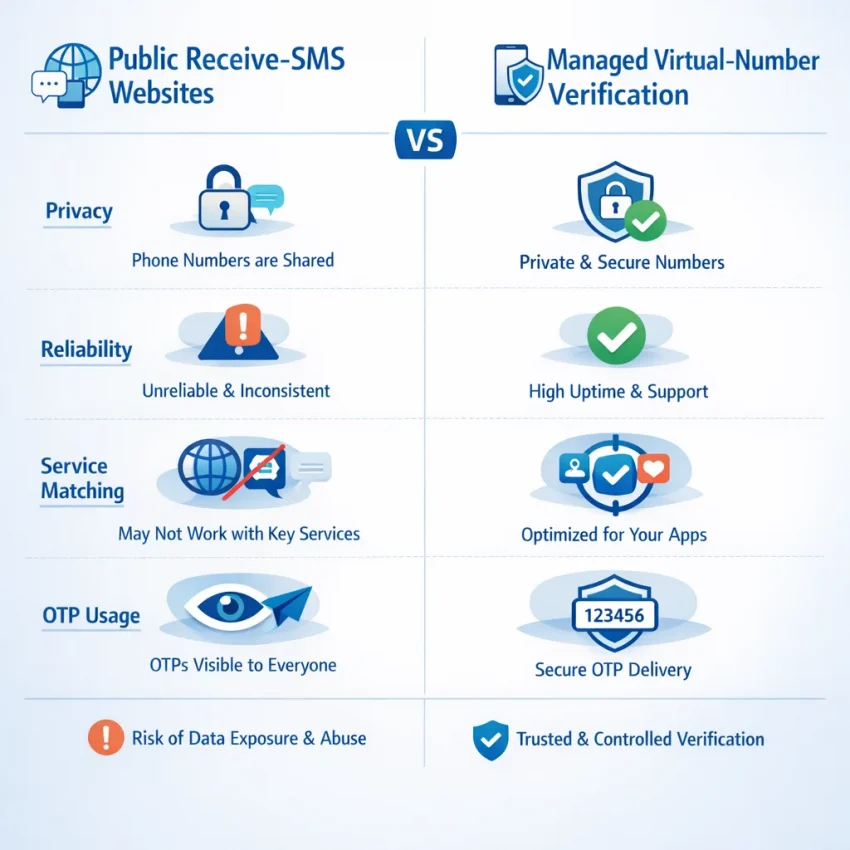
That distinction matters. In 2026, people still confuse two very different models. One is the public inbox model, where numbers are shared and messages may be visible in an open feed. The other is a structured verification workflow built around a virtual phone number for OTP receipt for a specific service.
If your real goal is online sms verification, the second model is usually the better fit. A public inbox may look free, but it often does not match how modern verification systems work. Many platforms expect a cleaner process: choose the target service, use a number intended for that route, wait for the code, and complete verification before the OTP expires.
Why “free” often fails for real verification
When people search receive sms online, they are usually solving an urgent problem. They need a code now. Public inbox sites can look convenient, but they come with tradeoffs. The number may be overused, the inbox may be visible to others, and the SMS may not align with the service you are trying to verify.
That does not mean every public number is useless. It means “free” and “usable” are not the same thing. For real verification, what matters is control. You want to know which service you selected, which country options are available, and where the incoming code should appear.
This is where SmsPva becomes the practical option. Instead of treating online SMS as a generic public inbox, it is built around verification workflows. You start from the service you need, check current options, request a number, and use that number for account confirmation or OTP receipt. If you want a working place to Receive SMS online, that is the right starting point.
What users usually need instead
Most users searching for free SMS online want four things: privacy, convenience, a simple verification path, and fewer failed attempts. A service-specific virtual number workflow supports those needs better than a shared inbox. The goal is not to chase “free” at any cost. The goal is to finish the verification step with less friction.
In practice, that means choosing a number for the exact platform you are verifying, entering it carefully, and waiting for the code inside the same workflow. That structure helps when you want better account separation, do not want to expose your personal number, or need a more organized way to receive verification codes online.
So if you came here looking for free SMS online, the better question is usually this: how do I receive a verification code online in a controlled, privacy-aware way? In most cases, that is not a public inbox problem. It is a virtual-number verification problem, and SmsPva is designed for that use case.
How SmsPva Works for Online SMS Verification
When people search for free SMS online, they usually want a workable way to receive a verification code. SmsPva is built around that exact task. Instead of browsing a public inbox and hoping a code appears, you start with a service-specific workflow. You choose the platform you want to verify, request a virtual number for that flow, and then wait for the OTP inside your dashboard.
The process is straightforward: select the target service, review the available country options shown on the live page, get a number, paste it into the app or website you are verifying, and then check SmsPva for the incoming code. This is much cleaner than a generic public inbox because the number is requested for a defined verification purpose.
Why the workflow is service-specific
Service-specific selection is the key difference. Many verification systems check more than whether a phone number can receive an SMS. They may also look at country format, routing expectations, or whether the number was obtained through the correct activation flow. That is why SmsPva uses service pages instead of one random pool of numbers.
In practice, that means you should match the number request to the exact app or site you are verifying. If you need a code from one platform, choose that platform before you request the number. This helps you avoid a common mistake: entering a number into one service after requesting it for another.
Country selection also matters. Some platforms accept many regions, while others are stricter about number format or local expectations. SmsPva lets you review current options on the live interface instead of relying on fixed assumptions.
What to focus on inside SmsPva
There are three useful product areas to understand. First are the service-specific verification pages. These are the clearest path when you already know the platform you need. They help you move from “I need an SMS OTP online” to a more precise workflow.
Second is the privacy-focused use case. Many users do not want to attach a personal number to every sign-up or activation. SmsPva supports that account-separation workflow by letting you use a virtual number for SMS verification when a one-time code is required.
Third are the support resources. Verification can fail for ordinary reasons: the wrong service was chosen, the OTP expired, or the target app expects a different country format. SmsPva is not just a list of numbers. It also supports a troubleshooting workflow.
Step-by-Step: How to Use SmsPva to Receive SMS Online
If you searched for free SMS online, you probably need something more specific: a working path to receive a verification code for a real sign-up or login flow. With SmsPva, the process is built around service-specific SMS verification instead of a random public inbox.
1) Select the correct service first
This is the most important step. Choose the exact service you want to use. Do not treat all virtual numbers as interchangeable. If you request a number for one service and then enter it on another platform, the verification code may never arrive, or the flow may fail on the target side.
Before you proceed, confirm three basics: the service name matches your target, you are using a suitable country option, and you are ready to receive the code immediately. OTP windows are often short, so timing matters.
2) Review country options and get your number
After selecting the service, review the available countries shown on the live page. Country choice can affect whether a verification form accepts the number, so pick the option that fits your use case. Do not assume every country works the same way.
Once you choose a country, get the number and copy it exactly as shown. Then paste that virtual phone number into the sign-up or verification screen of the app or website you are activating. Double-check the country code before you submit.
3) Trigger the OTP and watch your order view
After you submit the number on the target platform, trigger the OTP. Return to your SmsPva order view and watch for the incoming message. When the code arrives, copy it carefully and enter it into the verification form right away.
If the code does not show up immediately, avoid rushing into a second request. First confirm that you selected the correct service and country, that you entered the number correctly, and that the app actually sent the message.
Service-Specific Example: Using SmsPva for Signal Verification
If your real goal is Signal setup, a service-specific flow is the better path. Signal verification works best when you choose a number intended for that exact service, not a random public inbox. On SmsPva, that means starting from the Signal SMS verification page and following the options shown there.
How to complete a Signal verification flow
First, open the Signal service page on SmsPva. Review the listed country options before doing anything else. Availability can change, so treat the live page as the source of truth. If you see a suitable option, request a number and copy it exactly as shown.
Next, open Signal and begin registration or verification. Paste the number carefully, including the correct country code. Double-check that the country you selected on SmsPva matches the country format you enter in Signal.
Then wait for the verification message to reach your dashboard. When the code appears, enter it into Signal promptly. OTP windows are usually short, so it helps to keep both pages open and complete the process in one session.
If Signal asks you to retry, pause before requesting a new code. Confirm that you selected Signal on SmsPva, not another service. Also confirm that the number format and country entry match what you received.
When country selection matters
Country choice can matter for formatting, availability, and the options shown on the service page. If you specifically need a United Kingdom option for Signal, you can review the live Signal verification in Unt. Kingdom page.
At the time of writing, Signal in the United Kingdom is listed from $0.50 or $0.77 depending on the listed option. For the United States, the listed Signal price is $1.75 at the time of writing. These are API snapshots, not guarantees.
The key point is to use the service and country pages as live checks, not as promises. Listed options can change. The safest habit is simple: confirm the current Signal page, choose the matching country if needed, receive the code through your dashboard, and enter it quickly.
Common Problems When Receiving SMS Online and How to Fix Them
If you try to receive a verification code online and nothing shows up, the problem is usually small and fixable. Most failed attempts come from a mismatch between the number you selected and the verification flow you started.
No code received yet
If no SMS appears after you submit the number, do not rush to order another one. First, make sure the number was entered exactly as provided, including the country code. A single wrong digit can break the process.
Next, check that you used the number inside the same service flow you selected on SmsPva. This is one of the most common mistakes. If you choose a number for one service but enter it into a different app, the verification system may reject the route silently.
Also check whether the app switched to another verification method or whether the page session expired. Some forms time out quietly. If the request still looks active, wait a reasonable moment and watch the order status rather than repeatedly tapping “send code.”
Service mismatch and country mismatch
Service-specific selection matters more than many users expect. If you want SMS verification for a particular platform, choose that exact service on SmsPva instead of treating all virtual numbers as interchangeable.
Country choice can matter too. Some services work better when the selected country matches your intended sign-up context. That does not mean any country is guaranteed to work, but it does mean you should avoid random selection.
Another common issue is using an old page session. You request a number, leave the app, come back later, and submit the same screen again. By then, the original OTP request may have expired.
If you are troubleshooting repeated failures, use the Help page before burning more attempts.
Expired OTP windows and when to retry
OTP codes often expire quickly. If the SMS arrives after the timer runs out, the code may be correct but unusable. In that case, request a new code only after confirming the previous attempt is no longer valid.
A clean retry usually works better than a frantic one. Reopen the sign-up or login flow, confirm the selected service and country, and submit the number once. Watch for prompts such as “code already sent” or “try again later.” These messages often explain whether the issue is delay, expiry, or rate limiting.
Privacy, Use Cases, and Best Practices for Online SMS in 2026
People searching for free SMS online often want one simple outcome: complete account verification without exposing their primary number everywhere. In 2026, a privacy-focused SMS verification workflow is less about finding a random public inbox and more about using a service-specific virtual phone number for OTP receipt.
A virtual phone number can help in a few practical cases. You may want cleaner separation between personal and signup activity. You may need a dedicated number for one service flow. Or you may want to reduce spam and keep your main SIM reserved for trusted contacts and long-term accounts.
Where this workflow fits best
The best use cases are straightforward. Examples include testing a signup flow, creating a secondary contact layer for non-critical registrations, or keeping project-specific accounts separate from your personal identity.
Good privacy practice also means matching the number to the exact service you are verifying. If you pick the wrong service flow, the code may not arrive. That is why service-specific selection matters more than the idea of “free.”
For users managing separate workspaces or browser profiles, account isolation also matters. Keep each account in its own session. Use distinct login states and device environments where appropriate. Some users also pair this with separate networking tools, but the core rule is simple: keep each verification flow organized from start to finish.
Best practices before you request an OTP
Before you request a code, confirm four basics: the target service, the selected country, the number format, and the timing window. Enter the number exactly as shown. Request only one code at first, then wait.
Use online SMS verification responsibly. Follow the terms of the service you are signing up for, avoid misuse, and do not treat any virtual number as a permanent recovery channel unless your workflow clearly supports that use. Availability and pricing can change, so always check the live options on SmsPva before starting a sensitive flow.
FAQ: Free SMS Online and SmsPva
Is free SMS online actually free when you need a verification code?
Usually, not in the way most users expect. Public inboxes may appear free, but they often lack privacy and may not fit real verification flows. If you need a usable OTP workflow, a managed virtual number service like SmsPva is usually the better option.
How do I receive an OTP online with SmsPva?
Select the exact service, review the available country options, request a number, enter it on the target app or site, and wait for the code to appear in your dashboard. Then copy the OTP and complete verification before it expires.
What is the difference between a public SMS inbox and a virtual number for verification?
A public inbox is usually shared and may expose incoming messages in an open feed. A virtual number for verification is requested for a defined service flow, which makes it more practical for account activation and OTP receipt.
Why didn’t my verification code arrive?
Common causes include choosing the wrong service, entering the number incorrectly, using the wrong country format, or letting the OTP window expire. Check those basics before requesting another code.
Can I choose a country when receiving SMS online?
Yes, country selection is part of the workflow when options are available on the live page. You should choose a country that fits the target platform’s expected number format and your verification context.
How do service-specific verification pages help on SmsPva?
They reduce guesswork. Instead of choosing a random number, you start from the exact service you want to verify. That helps you match the number to the route the target platform expects.
Is SmsPva suitable for Signal verification?
Yes, Signal is supported through a dedicated service page. If Signal is your target flow, use the service-specific path rather than a generic inbox approach.
What should I check before requesting another SMS code?
Confirm that you selected the correct service, chose an appropriate country, entered the number exactly as shown, and that the previous OTP request is no longer active. A careful retry is usually better than repeated rapid attempts.
Why SmsPva Is the Best Next Step for People Searching ‘Free SMS Online’
Most people who search free sms online are not looking for a public message board. They want a simple way to receive a verification code and finish sign-up without exposing a personal number. In 2026, that usually means using a service-specific virtual number workflow instead of hoping a shared inbox will work.
That is why SmsPva is the practical next step. It is built around online SMS verification, not casual message viewing. You choose the target service, select an available country option, get a virtual phone number for OTP use, and retrieve the code inside one flow.
Just as important, SmsPva helps reduce common mistakes. You can match the number to the verification target, avoid generic inbox confusion, and follow a cleaner process for account activation or privacy-sensitive sign-ups.
If you are ready to act, use smspva.com to receive SMS verification codes with virtual phone numbers. Choose your service, review the live options, request a number, and complete the verification flow. If something does not work as expected, check the Help area before retrying. For users who searched for “free,” SmsPva is the smarter route because it focuses on usable verification, not just visibility.