

What “free SMS receive” means in 2026
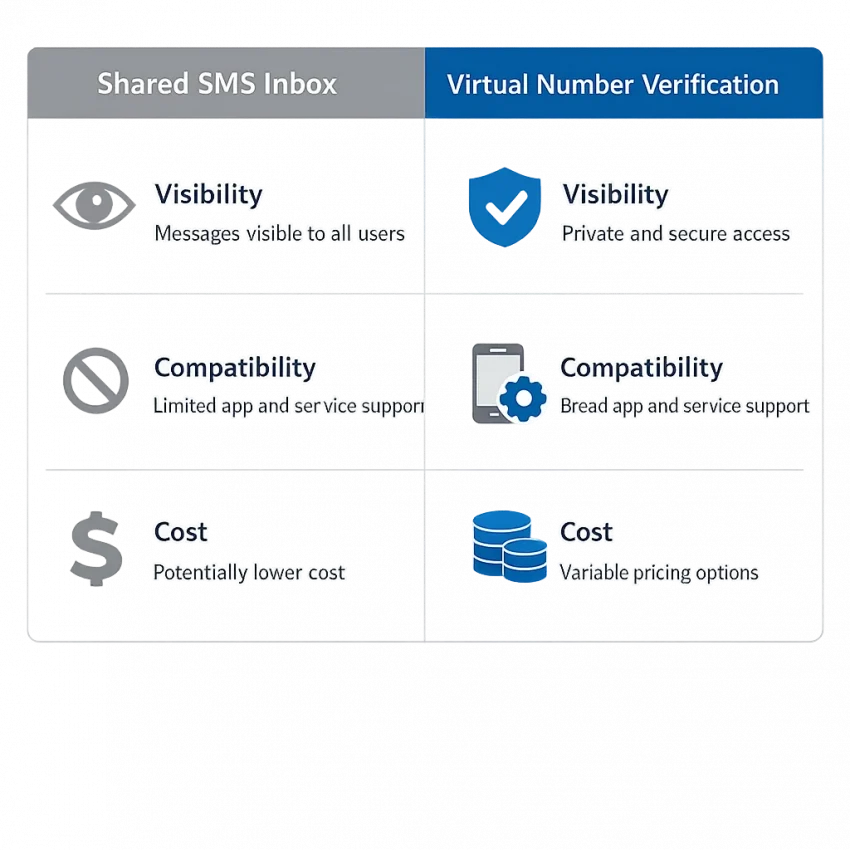
Searching for free SMS receive can lead to two different kinds of service. One is a public inbox that displays messages sent to a shared number. The other is a virtual-number service for an SMS verification flow, which may charge for an attempt. They are not interchangeable, and neither guarantees that a website or app will accept the number or deliver a code.
A public inbox may not charge you to view a message, but its number and incoming texts could be visible to other visitors. A virtual-number service offers a different workflow, but don’t assume it is free. Check the current SmsPva Receive SMS online options and review any displayed price before proceeding.
Public inboxes and virtual numbers work differently
A public SMS inbox typically lists numbers that many people can use. Messages arrive on a shared web page rather than in a private phone inbox. This may suit a low-risk test if the target service permits shared or virtual numbers. But someone else may see the message, and the number may already have been used or may not be accepted.
A virtual-number service is another way to receive an SMS verification code or OTP. An attempt may have a displayed charge, depending on the current service and available options. Check the live listing for your intended service and review its details before choosing.
What to expect from free SMS online
“Receive SMS online” describes a method, not a promise of successful verification. The target platform decides whether to accept a number, and delivery can vary. Some services restrict public inboxes or virtual numbers, while others may not send a code at all. A number that worked for one verification flow may not work for another.
Consider privacy as well as compatibility. Don’t use a public inbox for accounts tied to personal, financial, work, or recovery information. For a virtual-number option, verify the current service, country, and displayed cost first. Proceed only if the platform’s rules allow that method.
Free public inboxes: when they may work—and when they are a bad fit
A public SMS inbox usually displays messages sent to a number that many people can see and use. A website lists one or more numbers, and visitors check a shared page for incoming texts. That can make free SMS receive options useful for limited, low-risk testing—but it also means the inbox is not private.
If a verification message arrives, the code may appear on a page visible to other visitors. Someone else may see it before you do, or a number may be reused later. Don’t treat a public inbox like a personal phone or a secure mailbox.
These services can also be inconsistent. A platform may reject a shared number, limit repeated attempts, or send a message that does not appear in the inbox. Availability can change, and a number that worked previously may not work for another request. Receiving an OTP online through a public number is never guaranteed.
Where a free public inbox may fit
A public SMS inbox may be reasonable for a permitted, low-stakes test when the message contains no sensitive information and shared visibility is acceptable. For example, you might use one to test a flow you control, provided the service’s rules allow it. “Free” does not mean private, reliable, or approved by the platform you are trying to use.
Before entering a number, check the target service’s terms and verification requirements. Some platforms prohibit virtual or shared numbers, or may decline them automatically. If the rules do not allow this method, don’t use a public inbox to get around them. Choose an approved verification option instead.
Also consider what happens after the code arrives. Another person might see a code or message tied to your activity. Avoid public inboxes for accounts that hold personal details, payment information, work content, private conversations, or access to other accounts.
A practical safety checklist
- Keep it low risk: Don’t use a public inbox for financial, work, personal, or recovery accounts.
- Check the rules: Confirm the platform permits shared or virtual numbers before trying one.
- Assume messages are visible: Avoid sending or receiving anything you would not want others to read.
- Don’t rely on it long term: A shared number may be reused, unavailable later, or rejected on a future login.
- Stop if the service declines it: Use an official method the platform accepts instead of repeatedly requesting codes.
Free SMS online can solve a narrow testing need, but it is a poor fit when you need confidentiality, dependable access, or future account recovery. If those conditions matter, consider an approved personal number or another official verification method.
When SmsPva may be a better fit than a free public number
A free public inbox and a virtual-number service work differently. Public inboxes expose a shared number and may show incoming messages to anyone viewing the page. SmsPva offers virtual numbers for SMS verification and OTP receipt; it is not an open shared inbox.
That does not mean SmsPva is free. Options may involve a charge, and availability, acceptance by the target platform, and message delivery can vary. Check the current options and displayed price before deciding. Treat the live listing—not a general expectation about virtual numbers—as the basis for your choice.
Check the service and country first
Check whether the platform you intend to verify appears among the current service options. Then check whether a suitable country is listed. A service page can help you review a relevant flow, but it does not guarantee that the target platform will accept a number or send a code. For example, see the live Signal SMS verification options if Signal is your intended service.
For Signal verification in the United Kingdom, you can also review the Signal verification in United Kingdom options. Listings can change, so confirm the details directly. Don’t assume a country shown for one service is available for another.
Review the cost and fit before choosing
An API snapshot fetched October 5, 2026, listed Signal single-SMS options at $0.50 and $0.77 for the United Kingdom and $2.01 for the United States. These are time-specific listed prices, not permanent rates or a promise of stock or successful delivery. Check the live page for the option you are considering.
A virtual number may suit a permitted, one-time verification if you understand the service’s rules and do not need that number for future recovery. It is a poor substitute for a personal, long-term recovery number on important accounts. If the platform prohibits virtual numbers, or its requirements are unclear, use an allowed verification method instead.
How to use SmsPva to receive a verification SMS
Using a virtual number to receive SMS online takes a few checks before you request a code. SmsPva is not the same as a free public SMS inbox, and you should not assume an option is free. Availability, displayed costs, and whether a target platform accepts a number can vary. Check the live details first, and don’t continue unless the method is allowed for your intended use.
Check the service and number options first
- Identify the platform and purpose. Know which app or website is sending the SMS verification code. Make sure the platform permits verification with a virtual number. Don’t use this method to evade its rules or security checks.
- Look for the relevant service. Check whether your intended service appears among the current SmsPva options. A service-specific page can help you review relevant details, but a listing does not mean every number will be accepted.
- Review the available details. Check any displayed country, number, and price information. Confirm that the country fits your needs and that you understand the charge, if one is shown. Options and page layouts can change, so rely on the current page.
If the service or country you need is not listed, or the terms are unclear, stop and check the current guidance. Don’t choose a different option simply because it appears available; it may not fit the platform or your purpose.
Request the code and check for the message
- Proceed only when the method is permitted. Follow the target platform’s requirements and the current SmsPva instructions. If you are uncomfortable with the displayed cost or privacy implications, don’t proceed.
- Enter the provided number carefully. Use the number shown in the active SmsPva flow and enter it in the intended app or website. Check the digits and country format before submitting.
- Return to the SmsPva flow. Check the relevant page for an incoming message. Delivery can vary, and a code may not arrive. Don’t assume a delay means you should keep submitting requests. Confirm that the target platform accepts virtual numbers and that you selected the matching service.
- Enter the code only in the intended verification screen. If a message arrives, use its code in the app or website that requested it. Never share an OTP with another person or enter it into an unrelated page.
Follow the current on-page instructions rather than relying on a fixed sequence of buttons. Interface details and availability may change. SmsPva or the target platform may not receive or accept a code in every case, so don’t treat successful delivery as guaranteed.
If the workflow does not fit your situation
Pause if the verification purpose conflicts with the platform’s rules, if the number’s country is unsuitable, or if a displayed charge is unexpected. Don’t use a temporary number for an account that depends on it for future recovery. For an important account, choose an official personal number or another recovery method the platform supports.
Troubleshooting when the SMS does not arrive
If an SMS verification code does not appear, avoid requesting codes repeatedly. First check the details of the attempt, then confirm that the target service permits virtual numbers. Message delivery and platform acceptance can vary; no troubleshooting step guarantees that a code will arrive.
Check the number and verification request
- Confirm the number was entered correctly. Compare the number in your SmsPva flow with the number entered on the target platform. Check the country or calling code and remove extra characters if the form does not accept them.
- Check that you selected the matching service. The SmsPva option should correspond to the app or website sending the request. A number option for one service may not suit another.
- Review the target platform’s rules. Some services reject virtual, shared, or temporary numbers. If its requirements say these numbers are not accepted, stop rather than trying to work around the restriction.
- Allow for variable delivery. Messages may not arrive immediately, and timing can differ. Check the current flow for an incoming message, but don’t assume a specific wait time or guaranteed delivery.
Also check whether the target service is still showing the same verification request. If it expired or the platform says to start again, follow its current instructions before making another attempt.
Know when to stop and where to get help
If the number appears correct and the selected service matches, consult the current SmsPva Help guidance. Page layouts, options, and setup instructions can change, so use the live instructions rather than relying on an old screenshot or assumed button name.
Don’t keep generating new verification requests in quick succession. Repeated attempts can trigger limits or additional checks. Stop if the platform blocks another attempt, tells you to wait, or indicates that the selected number type cannot be used. Follow its instructions or choose an official verification method it supports.
If a code arrives, enter it only in the intended verification screen. Never post or send an SMS OTP to another person, even if they claim to be support. For an important account, don’t treat a temporary virtual number as a long-term recovery number.
Privacy, account security, and appropriate use
A temporary phone number for verification can be useful for a permitted, one-time task, but it is not a substitute for a personal number you control over time. If you later need a password reset or account recovery, you may not be able to receive a message sent to a temporary number again.
Avoid temporary numbers for accounts that hold financial, medical, work, identity, or other sensitive information. The same caution applies to your primary email, password manager, and accounts you rely on to recover other accounts. For those, use a personal number or another recovery method the provider officially supports.
Consider who can see messages sent to the number. With a public inbox, messages may be visible to other visitors. Even with a virtual-number workflow, don’t assume you will retain long-term control of the number. Check the service’s current terms and the target platform’s rules before proceeding.
A code confirms a step, not your identity
An SMS verification code, sometimes called an SMS OTP, shows that someone received a message sent to a particular number for a specific verification step. It does not prove a person’s identity, guarantee account security, or ensure you can access the account later.
Enter the code only in the verification screen you intentionally opened. Never send it to another person, post it publicly, or share it in a message claiming to come from support. If a request seems unexpected, stop and check the service through its official app or website.
Be cautious about repeated code requests, too. If you did not initiate a sign-in or verification attempt, don’t enter a code just because it arrived. Someone else may be trying to access an account or use your number in a flow you did not authorize.
Keep verification use permitted and low risk
Check the platform’s terms before using a virtual or temporary number. Some services may restrict these numbers or decline them. Don’t use them to bypass security checks, misrepresent who you are, or create accounts deceptively. If the platform requires a personal number or another approved method, follow that requirement.
For important accounts, prefer durable options the provider supports, such as an authenticator app, passkey, or official recovery codes. Store recovery codes securely and keep your recovery details current. SMS may be convenient, but it should not be your only plan for regaining access to a critical account.
A quick decision guide: free inbox or SmsPva?
The right choice depends on what you are verifying, how sensitive the account is, and whether a shared number is acceptable. “Free SMS receive” usually refers to a public inbox, not a private number or a guaranteed way to get a code. Virtual-number services may charge, and platforms differ in which numbers they accept.
Choose a public inbox only for low-risk tests
A free public SMS inbox may suit a permitted, low-stakes test when you do not mind other people potentially seeing the number or messages. Treat the inbox as public. Don’t use it for accounts containing personal, financial, work, or recovery information, or where the platform disallows shared or virtual numbers.
Consider SmsPva when the current option fits
If a public inbox is unsuitable, SmsPva may be an option for receiving an SMS verification code through a virtual phone number. It is not the same as a free public inbox, so don’t assume an attempt costs nothing. Check whether your intended service and country are currently listed, review the live terms and displayed price, and proceed only if those details fit your needs and the target platform permits the method.
In short: use a public inbox only for low-risk, allowed testing where shared visibility is acceptable; consider SmsPva when a virtual-number workflow suits the task and its current cost works for you; use your official personal number or recovery method for important accounts. Availability, acceptance, and delivery can vary, so check live options before deciding.
Frequently asked questions
Is SmsPva free to use for receiving SMS?
Don’t assume it is free. Check the current service options and any displayed price before proceeding. Costs and availability can change, and a listed option does not guarantee successful delivery.
Can I receive a verification code with a free public SMS inbox?
It may work in some cases, but acceptance and delivery vary. Messages in a public inbox may be visible to other people, so avoid using one for sensitive accounts or private information.
How do I use SmsPva to receive an SMS verification code?
Check that your intended service is listed, review the available options and any displayed cost, and confirm the target platform allows virtual numbers. Enter the selected number in the platform’s verification flow, check for an incoming message, then enter the code only in the intended screen.
Why has my verification SMS not arrived?
Check the number and country format, confirm that the selected option matches the service, and review whether the platform accepts virtual numbers. Delivery can vary. Follow the current SmsPva Help guidance and stop if the platform says the method is unsupported.
Is it safe to use a temporary virtual number for account verification?
It may fit a permitted, low-risk, one-time task if you understand the privacy and access trade-offs. Don’t use it for sensitive accounts or as a long-term recovery number. Protect the code and follow the platform’s rules.
Can I use a virtual number for any app or website?
No. Platform rules and number acceptance vary. Check the target service’s requirements first, and use an official alternative if virtual numbers are not allowed or the requirements are unclear.