

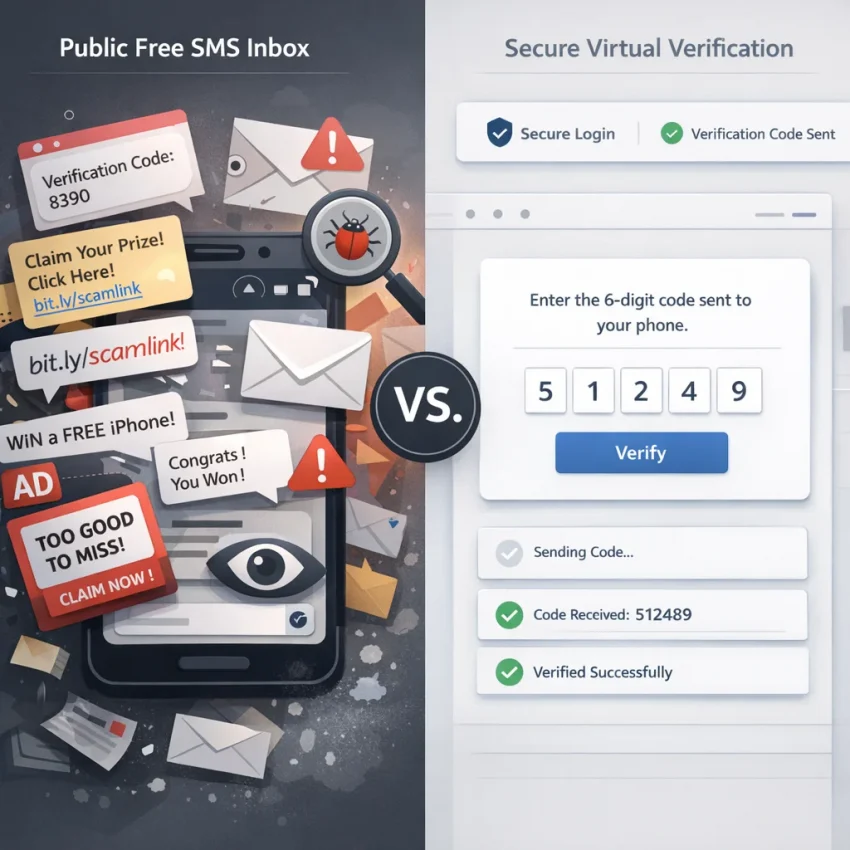
Why “Free SMS Online” Often Fails When You Need a Verification Code
Many users search for free sms online because they need a quick OTP and do not want to use a personal number. A public inbox seems simple: copy a number, wait for a code, and finish signup. In practice, that flow often fails. The real problem is reliability.
Most public inbox sites were not built for consistent free sms online verification. Their numbers are shared, visible to others, and reused heavily across many services. That creates the exact pattern verification systems try to detect and reject. If you need real account activation, a random public number is often the weakest part of the process.
The first issue is number reputation. When many people use the same number, platforms quickly learn that it is public, overused, or suspicious. A site may block it before sending a code. You might see “invalid number,” “number cannot be used,” or no clear error at all. From your side, it looks like the SMS never arrived. From the service side, the number likely failed trust checks.
The second issue is exhaustion. Even if a free number worked before, it may have already been used too many times for the same platform. Many services limit how often one number can verify accounts. Once that threshold is hit, the next user inherits the failure.
Why generic inboxes fail even when the number looks active
Another common problem is service filtering. Modern apps and websites often do not treat all numbers equally. They may route verification only to supported ranges, screen for abuse patterns, or reject categories of numbers tied to public inbox behavior. So a number can technically receive sms online and still fail for the exact service you want.
Country mismatch also creates friction. Some platforms expect a number from a country that fits your account setup or signup flow. If you force a mismatch, the code may be delayed, blocked, or never triggered. Users then keep retrying, which can create rate limits and make the problem worse.
Delivery timing is another hidden failure point. Public inboxes often have inconsistent message arrival. A code that appears after several minutes may already be expired. Worse, a shared inbox can expose the message to other users.
This is why SMS verification troubleshooting should start with the number source, not just the missing code. If you keep failing with public tools, the fix is usually a better workflow rather than more retries.
Instead of hoping any public number will work, use a service-specific virtual number flow. Receive SMS online with SmsPva when you need OTP verification, account activation, or login steps through a workflow built for verification rather than random public inbox browsing.
The 7 Most Common Free SMS Online Problems Users Run Into
If you keep trying free SMS tools and nothing works, the issue usually is not bad luck. It is a mismatch between public inbox numbers and modern verification systems. Many services now screen numbers by history, region, usage patterns, and delivery quality.
1) The SMS code never arrives
This is the most common complaint behind searches like sms code not received and sms verification not receiving code. Sometimes the service sends nothing because the number is already flagged. In other cases, the message is sent but never reaches the inbox you are watching. Public inbox pages often have unstable routing or numbers that major platforms already distrust.
If your screen stays empty after one or two normal attempts, assume the problem is the number path, not just timing. Repeating the same request too many times can make things worse.
2) The number has been used too many times
Free public numbers are shared by many strangers. The service may see a long history of prior signups, failed verifications, or abuse tied to that number. Once the reuse threshold is high enough, the number becomes weak for new registrations.
This often appears as messages like “number already used,” “too many attempts,” or silent failure during signup. Even when the site does not show a clear warning, overused numbers can still be deprioritized.
3) The service says the phone number is invalid
An invalid-number error does not always mean the digits are formatted wrong. Often it means the service does not accept that number range, line type, or source. Some platforms are stricter with an online sms receiver than others.
This problem is common when users pick any free number instead of matching the number to the exact service. If you hit this error, switch from generic inboxes to a service-specific selection flow. If you are unsure how the process works, check the Help page before retrying.
4) The OTP arrives too late to use
Late delivery is different from no delivery. Here, the code eventually appears, but the login or signup page has already expired it. This is common on congested public inboxes where many messages compete for visibility.
A late OTP wastes more time than a failed one because it tempts you to keep retrying. Then multiple codes arrive out of order, and you no longer know which one is current.
5) You chose the wrong country number
Country mismatch is easy to miss. A service may prefer or expect a number from the same region as your account flow or signup context. Even when a foreign number is technically accepted, friction can increase. You may see more validation checks, more delays, or more soft rejections.
6) Anyone can see the inbox
Many free public inbox sites are public by design. Other users can often view incoming messages, including verification texts. That creates a privacy problem and adds confusion because several users may watch the same inbox at once.
7) Low-quality numbers can raise account risk
Even if you receive the code, the number can still affect the account later. Services look at number quality signals over time. If a number has a weak history or heavy recycling, your account may face extra review or friction later.
If you keep hitting problems with free SMS online tools, the likely issue is reliability, not your device. SmsPva is better suited to this workflow because it focuses on verification-ready virtual numbers and service matching rather than generic public inbox browsing.
How to Solve Each Issue With SmsPva: A Step-by-Step Troubleshooting Workflow
If free inbox tools keep failing, the fix is usually not “try more public pages.” The fix is a better workflow. SmsPva is built for users who need a service-specific virtual number for OTP, not a random shared number that may already be flagged or overused.
1. Start with the service, not the number
A generic inbox treats every verification flow as the same. Real platforms do not. Many services filter numbers based on past use, routing patterns, or region. That is why the first troubleshooting step is to choose the exact service you want to verify before you request any number.
If you are trying to receive OTP online for signup, login, or activation, this service-first approach reduces mismatch problems early.
2. Check country fit before you request the code
Country mismatch is one of the most common reasons verification drags on. Some services expect the account’s phone region, signup flow, or network context to make sense together. If you pick the wrong country, the site may reject the number, delay the code, or trigger extra checks.
Start with the most natural region for the account flow rather than chasing the first available number. That decision often solves “number invalid” and “SMS code not received” issues faster than repeated retries.
3. Request a fresh number and use it immediately
Once you have chosen the service and country, request a fresh number in SmsPva and enter it into the verification form right away. Do not let the session sit too long before you trigger the OTP.
Double-check the country code and format. Small formatting mistakes can cause an instant rejection that users often misread as a delivery problem. If the platform accepts the number, submit the verification request once and wait.
4. Wait correctly, then retry safely if needed
If the code does not appear instantly, do not assume the number failed. OTP systems can take time. The better move is to wait through a reasonable window without hammering the resend button.
If no code arrives, troubleshoot in order. Confirm the service accepted the number, make sure you did not request multiple codes, and check whether the platform moved you into a cooldown. Only then should you retry.
When retrying, change only one variable at a time. Keep the same account session but use a fresh number, or keep the same service choice and adjust the country if the original one was a weak fit.
5. Use support when the flow is unclear
Some failures come from uncertainty, not from the number itself. Users may be unsure when to wait, when to cancel, or how to tell a bad number from a delayed OTP. A short pause to confirm the process is often better than cycling through multiple random numbers and making the verification state worse.
The practical takeaway is simple: treat verification as a workflow, not a lottery. Start with the service, match the country carefully, request a fresh number, submit once, wait properly, and retry with purpose.
Service-Specific Verification Matters More Than “Any Free Number”: The Signal Example
If you search for free SMS online, it is easy to assume any visible number should work for any signup. That is usually where verification problems start. Services like Signal do not treat every number the same way. A random public inbox may be overused, filtered, mismatched by region, or tied to too many prior attempts.
That is why service-specific selection matters. With Signal SMS verification on SmsPva, the workflow begins with the service itself. You are not picking a number blindly. You are matching your verification task to a platform-specific route.
Why generic free SMS online verification breaks down
Public inbox pages optimize for visibility, not verification quality. Their numbers are often shared widely, which creates the exact issues users complain about: invalid number errors, missing OTPs, late delivery, and privacy concerns.
A service-specific virtual number for OTP use is more practical because it narrows the variables. You choose Signal first, then review the available country options that fit your account context. This is a better troubleshooting path than retrying random public numbers.
If you are explicitly looking at both Signal and UK options together, the dedicated Signal verification in Unt. Kingdom page gives you a clearer path than a broad free SMS directory. At the time of writing, listed single-SMS Signal pricing included UK_V from $0.50 and UK from $0.77. For the United States, the listed single-SMS price was $2.01. These are API snapshots, not permanent offers or delivery guarantees.
What the Signal workflow looks like in practice
On a free SMS site, you usually start with whatever number is public and only later find out whether Signal accepts it. On SmsPva, you start with the service page, choose the country that makes sense, request the number, and then wait for the code within that workflow.
This helps you troubleshoot faster. If Signal rejects one country option, you can reassess the service-country match instead of repeating the same failing attempt on another random shared inbox.
Choosing the Right Country and Workflow to Reduce Verification Friction
Many free SMS online failures are really country-matching problems. A number can be valid in general but still fail for the specific service, account flow, or region you are trying to use.
The practical fix is to match three things from the start: the service you want to verify, the country that fits that service flow, and the account context you are using. SmsPva is useful here because it is built around service-specific virtual numbers rather than generic public inboxes.
How country choice affects SMS verification
Services may handle number ranges differently across countries. That does not mean one country always works and another never does. It means your result can depend on whether the selected number fits the verification flow you are attempting.
For example, if your account setup or expected phone region points to the UK, a UK Signal number is usually a more logical starting point than forcing a US number. The same logic applies in reverse. If your account context points to the United States, switching to a UK number just because it appears cheaper can create extra friction.
When to retry, switch countries, or stop forcing a mismatch
Use a simple workflow. First, pick the correct service flow. Second, choose the country that best matches your intended account context. Third, request the number and wait normally for the code instead of stacking resend attempts too fast.
If the number is rejected immediately, that is a strong sign to switch options rather than hammer the same path. If the number is accepted but the code does not arrive, retry carefully within the same logic and test a different suitable country only if the first fit is not working.
At the time of writing, listed single-SMS Signal pricing included UK_V from $0.50, UK from $0.77, and US from $2.01. Those are current API snapshots, not promises of permanent availability or results. The main takeaway is not the price alone. It is that service-specific and country-aware selection gives you a cleaner verification workflow.
Best Practices for Reliable, Private SMS Verification Online
If you need to receive SMS online for a real signup or login, treat reliability as the priority. Public inboxes may look convenient, but they often create the same problems users are trying to escape: blocked numbers, reused history, and visible messages.
Improve delivery odds before you request a code
First, match the number to the platform you are verifying. Many failures happen because users pick any available number and hope it works everywhere. A service-specific choice reduces avoidable mismatches.
Second, keep your browser session stable. Start the signup or login flow, request the number, and complete verification in the same session if possible. Do not switch devices, clear cookies mid-process, or jump between networks unless the service forces you to.
Third, choose the country carefully. If your account flow expects one region and your number comes from another, the service may reject the number or delay the code.
Protect privacy and avoid unnecessary lockouts
Do not spam the resend button. Multiple rapid requests can invalidate earlier codes or trigger temporary rate limits. Wait for the first request to finish processing, then retry carefully only when the service allows it.
Keep account context clean. If you manage separate verification workflows, optional isolation tools such as dedicated proxies can help maintain consistent sessions. They are not required for most users, but they can help in more complex setups.
Finally, use support resources when a step is unclear. A clean, service-matched process is usually more effective than continuing with unreliable free SMS online methods.
When to Stop Searching for Free SMS Online and Switch to SmsPva
If you keep trying free sms online tools and still cannot receive a code, the pattern is clear. The problem is usually not the timing of your retry. It is the quality of the verification workflow itself.
That is the point where it makes more sense to stop chasing a “free” fix and move to a service-specific virtual number workflow. SmsPva is the practical option when you need to receive OTPs for signup, activation, or one-time login without relying on a public number that may already be flagged or exhausted.
The key difference is control. Instead of hoping any online SMS receiver will work, you choose a number for the service you need, match the country more carefully, and follow a cleaner verification flow. That reduces invalid number errors, delayed OTPs, region mismatch, privacy concerns, and repeated failures.
If you have already retried several times with free SMS online options, switching sooner usually saves time. Use SmsPva when you want a workflow built for verification rather than a public inbox built for chance.
FAQ
Why am I not receiving a verification code from a free SMS online number?
The number may be blocked, overused, mismatched to the service, or routed poorly. Public inboxes often fail because major services already distrust them.
Are public free SMS inbox numbers blocked by major services?
Many are filtered or rejected, especially when they have heavy reuse or a public history. That is why a visible number can still fail during verification.
What should I do if a website says the phone number is invalid?
Do not keep submitting the same number. Switch to a service-specific flow and choose a fresh number that better matches the platform and country context.
How do I choose the right country for SMS verification?
Pick the country that best fits the account setup, region, and service flow. Avoid forcing a mismatch just because another number looks cheaper or easier to find.
Is a service-specific virtual number better than a generic online SMS receiver?
Usually, yes. A service-specific workflow reduces mismatch problems and gives you a cleaner path than a generic public inbox.
Can I use SmsPva for Signal SMS verification?
Yes. SmsPva has a dedicated Signal verification flow, which is more practical than testing random public numbers for a time-sensitive OTP.
Why do OTP codes sometimes arrive too late to use?
Public inboxes can have inconsistent routing or congestion. By the time the message appears, the code may already be expired.
When should I stop retrying and switch to a different verification workflow?
If you see repeated invalid-number errors, no code after normal wait times, or multiple failed attempts on public inboxes, stop retrying blindly and switch to a service-specific workflow with SmsPva.