

How to Use a Free Phone Number for SMS in 2026—and When to Choose SmsPva
A search for a free phone number for SMS can lead to shared inboxes, limited free offers, and virtual-number services that may charge for use. These options differ in privacy, access, and cost. Before entering a number on a website or app, check what “free” covers and whether the number suits your account.
Public inboxes may be useful for low-stakes tests, but they are not private or dependable for account recovery. If you want a service-focused verification workflow, review SmsPva’s options to receive SMS online. Check the live listing and displayed terms; do not assume a number is free, available, or accepted by your target service.
What a “free phone number for SMS” means in 2026
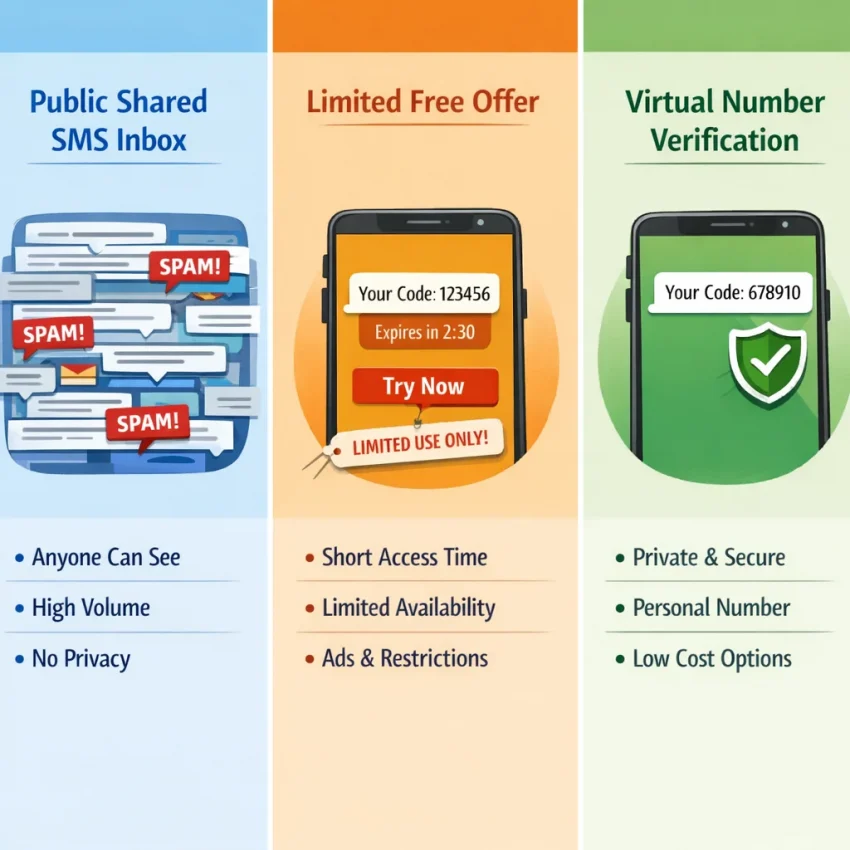
“Free” can describe several different things. Some websites let anyone view messages sent to a shared number. Others offer limited use supported by ads or an introductory offer. Virtual-number services may charge per verification attempt or for other features. Check the terms to understand what is included before you use a number.
Public inboxes and limited free offers
A public inbox lets people view incoming messages sent to a shared number. That can make it possible to receive SMS online free, but another visitor may see the verification code too. The number may have been used before, may be blocked by a platform, or may stop being available. It is not a private line or a reliable way to keep account access.
Some services advertise free access through ads, usage limits, or introductory offers. Read the terms to check for conditions, limits, and charges. “Free to try” does not necessarily mean every number or verification request is free. It also does not mean that a number will work with the service you want to use.
Virtual numbers and what “free” does not promise
A virtual number is provided through an online workflow rather than a physical SIM in your phone. Some services charge for use, and listings, terms, and costs can change. “Free” alone does not tell you whether a number is private, available later, or accepted for verification.
The website or app receiving the code sets its own rules. It may reject public, temporary, or virtual numbers. A number that receives ordinary messages may still fail a particular account check. Consider privacy, future access, and the platform’s rules separately from the price.
How to use SmsPva to receive a verification SMS
SmsPva provides a virtual-number option for SMS verification and OTP receipt. Do not treat it as a promise of a free number or guaranteed delivery. First check that the target service permits virtual numbers and that a temporary number fits your account’s recovery needs. Interface details and listings can change, so follow the current instructions shown on the live pages.
Choose the service and review the listing
Start with the app or website where you need to verify an account. Select the matching service on SmsPva rather than choosing a number at random. Then review the country options and the listing details. A number’s country does not guarantee that a platform will accept it.
For example, you can review the Signal SMS verification flow if you are verifying Signal. Check Signal’s current requirements too; the service page does not mean Signal will accept every virtual number.
Review the displayed cost before proceeding. In an API snapshot from October 20, 2026, a single-SMS option for Signal in the United States was listed at $2.01. This is a dated price snapshot, not a permanent price or confirmation that a number is available. See the current Signal verification options in the United States and recheck the live listing before you act.
Request and enter the code
- Open the target service’s verification screen. Enter the details it requests and choose SMS verification if the service offers it.
- Follow SmsPva’s current instructions. Select the matching service and country, then review the number, terms, and displayed cost.
- Enter the number in the target service. Check the country code and number format requested by its verification screen.
- Check for the incoming message. Use the provider’s current workflow to view it. Enter the code only in the verification screen for the account you are setting up.
An SMS OTP number does not override a platform’s eligibility rules or give you ownership of an account. Use the process only for an account you are authorized to create or verify. Never send an OTP to another person or enter it on an unrelated site.
Consider future access before you start
Some services ask for another code during a later security check or recovery attempt. A temporary number may not remain available to you, so it may not suit an account that depends on long-term access. Consider whether the service offers another recovery method before using a temporary number.
Free public inbox or virtual number: which fits your use case?
A free public inbox and a virtual-number service can both display incoming texts online, but they offer different levels of control. With a public inbox, other people may be able to view messages sent to the same number. A virtual-number service offers a more service-focused verification workflow, but it does not guarantee acceptance or successful delivery.
| Consideration | Free public SMS inbox | Virtual-number workflow |
|---|---|---|
| Message visibility | Other visitors may be able to see incoming messages | Depends on the service’s setup and terms |
| Potential fit | Low-stakes tests where shared visibility is acceptable | A service-specific verification attempt after checking current options |
| Future access | Do not rely on continued access to the inbox or number | Do not assume the number will remain available for recovery |
| Acceptance | The platform may reject a public number | The platform may also reject a virtual number |
A public inbox may suit a low-risk test if you do not mind that the message could be visible to others and do not need lasting access to the number. It is a poor fit for private accounts. A temporary number also may not remain under your control, which can complicate future sign-in or recovery.
Consider SmsPva when you want a service-focused virtual-number workflow. Review the live service and country listings, terms, and displayed costs first. Availability and terms can change, and the target platform may still reject a virtual number.
Privacy, account safety, and troubleshooting
A phone number used for verification can affect both your privacy and your ability to recover an account. Avoid public or temporary numbers for banking, payments, healthcare, your primary email, or other accounts with sensitive information. Someone else may see a public inbox message, and a temporary number may become unavailable later.
Keep every one-time password (OTP) private. Enter it only in the verification screen of the service that requested it. Do not share it with another person or paste it into an unrelated support chat, email, or website. If a page asks you to disclose a code outside the expected sign-in flow, verify the request through the service’s official channels.
If your SMS code does not arrive
Check that you selected the intended service and number. Confirm that you entered the number correctly, including its country code if requested. Then wait for the period specified by the target service or the provider’s current instructions. Delivery timing can vary, and repeated requests may trigger rate limits or temporarily block further attempts.
If the code still does not appear, consult the current instructions and avoid assuming another request will solve the problem. Review SmsPva Help for guidance. If the target service says the number is unsupported or the request is limited, follow its instructions rather than trying to bypass its checks.
Frequently asked questions
Can I receive SMS online for free?
Sometimes. Public inboxes may let you view messages at no cost, and some services offer limited free access. These options may involve shared numbers, usage limits, or other conditions. Check the terms and avoid using a public inbox for sensitive accounts.
Does SmsPva offer a free phone number for SMS?
Do not assume SmsPva numbers are free. Review the live listing and displayed price for the service and country you need before proceeding. Prices and availability can change.
Is it safe to use a public number to receive a verification code?
A public number can expose messages to other visitors, so it is not a safe choice for sensitive accounts. Use it only for a low-stakes purpose where shared visibility is acceptable, and never share the code yourself.
Can I use a temporary number for an account I need to recover later?
That may create problems. You might not have access to the number when the service asks for another code. For an account you need to keep, choose a permitted number you control long term and set up other recovery methods where available.
What should I do if an SMS verification code does not arrive?
Check the selected service, number, and country code. Follow the target service’s timing instructions, avoid repeated requests, and consult the provider’s current help guidance. A retry does not guarantee delivery.
Can every website or app verify an account with a virtual number?
No. Each platform sets its own rules and may reject public, temporary, or virtual numbers. Check the platform’s requirements before trying to verify an account.
Should I use a public SMS inbox for banking or other sensitive accounts?
No. Shared inboxes can expose verification messages, and temporary numbers may not be available for recovery. Use a number and recovery method permitted by the service that you can reliably access.
Choose based on the account’s importance
A free public inbox may be enough for a low-stakes test when shared visibility and limited future access are acceptable. It is a poor choice for a private or recoverable account. If you need a more service-focused virtual-number workflow, review SmsPva’s current listings, terms, and displayed costs before proceeding. Treat any number as an option to evaluate, not a guarantee of acceptance or future account access.