

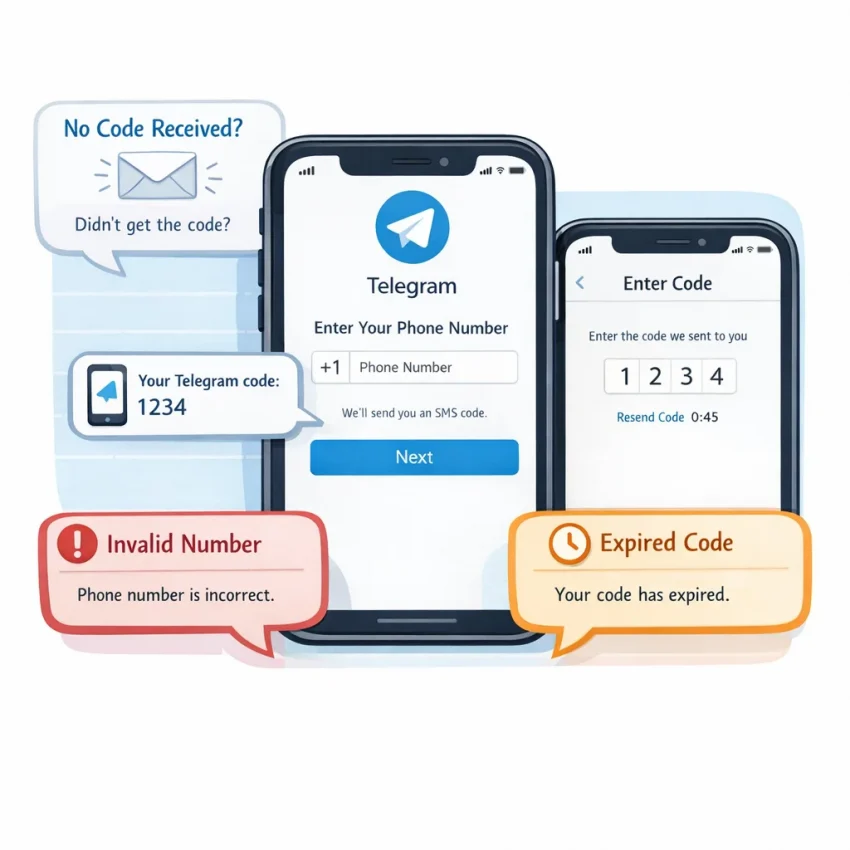
Why People Buy a Telegram Number and Why Verification Often Fails
People usually want to buy a Telegram number for practical reasons. Some want better privacy. Others need a separate account for work, testing, or project communication. Some simply do not want to connect their main number to another app. The goal is simple: complete Telegram verification with less exposure and less friction.
Many users fail at the first step. They choose any random virtual number for Telegram and assume every SMS flow works the same way. It does not. Telegram verification is sensitive to timing, number compatibility, and the setup path you use before requesting the code.
A better starting point is a service built around verification workflows, not a vague list of numbers. SmsPva is designed for users who need OTP receipt and activation support. If you want to Receive SMS online, it gives you a more structured path than trial and error.
Common motivations are valid, but setup still matters
Buying a number for Telegram is often about account separation. A freelancer may want one account for clients and another for personal chats. A privacy-conscious user may not want to expose a long-term number during signup. A tester may need a temporary number for Telegram to complete one clean registration.
These are normal use cases. The problem is that many users focus only on getting a number, not on getting the right verification flow. Telegram may reject a number, delay the OTP, or change verification behavior if the app session, device state, or request timing is off.
This is why users searching for a telegram verification number often feel stuck. They think they need a different country or endless retries. In reality, they usually need a better process: choose the correct Telegram-specific service, prepare the app first, request the code once, and wait long enough before assuming failure.
Why verification fails even when the number looks fine
The most common failure points are predictable. Users select the wrong service category. They trigger multiple OTP attempts in a short time. They mistype the number format. They expect every virtual number for Telegram to behave the same way. Or they start verification on a device with conflicting sessions or cached login attempts.
Expectation mismatch also causes problems. A temporary number for Telegram is usually part of a one-time SMS verification workflow. It is not the same as a permanent identity tool. If users ignore that, they often repeat steps that increase the chance of expiration or rejection.
This guide focuses on those exact issues. Instead of treating Telegram SMS verification like a generic OTP task, the next sections explain what actually goes wrong and how to reduce friction with SmsPva’s Telegram-focused workflow, support resources, and privacy-first setup habits.
How Telegram SMS Verification Works With a Virtual Number
If you want to buy telegram number access for verification, the process is more specific than renting any random phone number. Telegram checks the number format, delivery route, and timing of your OTP request. That is why a service-specific workflow matters.
The cleanest starting point is SmsPva’s Telegram SMS verification page. It helps you choose a number intended for this exact activation flow instead of guessing with a generic marketplace approach.
In practice, telegram sms verification usually follows five steps. First, open the Telegram-specific page on SmsPva. Second, select an available country if that option fits your setup. Third, receive the temporary number shown in your order flow. Fourth, enter that number inside Telegram and request the code. Fifth, wait for the OTP to appear in your SmsPva session, then enter it in Telegram before it expires.
The order matters. Many failures happen because users request a code before confirming they picked Telegram as the service, or they switch numbers mid-process. If you want to receive Telegram SMS online, keep one clean path from selection to code entry.
What to expect during the OTP step
When Telegram accepts the number, it sends a one-time password to complete signup or login. With a virtual number for Telegram, you are not setting up a permanent SIM. You are completing a single verification event.
Patience matters here. Telegram may not always send the code instantly, and repeated requests can create extra friction. If the first request is still active, sending another one too fast can lead to confusion about which code is current.
Your device setup also affects the flow. Before requesting the code, make sure Telegram is updated, your internet connection is stable, and you can stay on the same session long enough to read and enter the OTP.
Why a Telegram-specific flow works better
The main difference between a generic number marketplace and a Telegram-specific flow is context. A dedicated Telegram page helps you match the service before you spend money or trigger the OTP. That reduces common setup errors, especially for users learning how to verify Telegram with virtual number tools for the first time.
It also sets the right expectation. You are buying access to a number for one verification workflow, not a guaranteed long-term phone line. Use the number for the intended Telegram activation step, watch for the incoming code in your order area, and enter it promptly.
The Most Common Problems When You Buy a Telegram Number
Most failures happen before you ever reach the code screen. Users often try a generic temporary number for Telegram, request multiple OTPs too fast, or troubleshoot the wrong part of the flow. If your goal is to buy Telegram number access for SMS verification, diagnose the failure type before retrying.
Telegram errors usually fall into a few repeat categories. The big mistake is treating every failure as an SMS delivery issue. Sometimes the number is rejected before Telegram even sends a message. In other cases, the code is sent but the app shifts to another verification route, the OTP expires, or repeated retries create temporary friction.
No OTP arrives at all
The most common complaint is simple: telegram OTP not received. But that can hide several causes. Telegram may not have accepted the number for SMS delivery, may be delaying the code after repeated requests, or may prefer an in-app step depending on the account state.
If the telegram verification code not coming problem appears immediately, check what happened right before it. Did you switch numbers mid-process? Did you request another code within seconds? Did you close the app, change devices, or refresh the session? Those actions can interrupt a clean verification attempt.
Another common pattern is requesting a code again too quickly because the first SMS feels delayed. That can make the first message useless and put the new request on a longer timer. Users then report that the telegram code not received on virtual number issue keeps repeating, when in reality each retry is resetting the state.
Number rejected or treated as invalid
Sometimes Telegram does not send an OTP because it does not accept the number entry in the first place. The user may see an invalid number message, a formatting error, or a silent refusal to continue.
This is often caused by choosing the wrong country code, entering the number with extra symbols, or assuming all online numbers behave the same way for Telegram verification. Country mismatch is another common source of confusion. Users may expect a region-specific outcome based only on the number they selected, but verification depends more on the number format, service compatibility, and app behavior.
Users also worry about previous use. That concern is understandable, but it should be treated as one troubleshooting factor, not the only explanation. Format, flow, timing, and account state can all be involved.
Codes expire or device setup gets in the way
Some users do receive a code, but it no longer works by the time they enter it. This often happens when they switch screens, request a second OTP, type the older code, or let the timer run down while troubleshooting another issue.
Device and browser issues also create hidden friction. Examples include installing Telegram on one device but entering the number on another, unstable connectivity during the request, or background restrictions that delay app updates. These are easy to miss because they do not look like verification errors at first.
If you run into repeated verification errors and need platform-specific guidance, use SmsPva’s Help resources before burning through more retries. In many cases, identifying the exact failure category is the real fix.
How to Solve Each Telegram Verification Issue With SmsPva
If you want to buy a Telegram number, the biggest mistake is treating Telegram like any other SMS signup. A generic flow often creates avoidable errors. The better path is to start with a Telegram-specific workflow, then move step by step instead of requesting codes repeatedly.
If your Telegram OTP is not received, first confirm you selected Telegram as the service before getting the number. This sounds obvious, but it is one of the most common failure points. A number reserved for the wrong platform can lead to a code that never appears where you expect it.
Next, make sure you entered the number in the correct international format inside Telegram. Then request the code once and wait. Rapid retries can trigger delays, expired codes, or a switch to a different verification method.
If the Telegram verification code is not coming, do not immediately abandon the session. Check whether Telegram is trying to send the code inside another logged-in Telegram app first. On some setups, the platform may prefer an in-app message before SMS. If you have Telegram installed on another device, open it and look for the code there.
Fixes for rejected numbers, expired codes, and repeated OTP failures
If Telegram says the number is invalid or unsupported, stop and restart with a clean selection rather than forcing more attempts. Double-check the country you picked and make sure it matches the number format shown in Telegram. Do not assume any country works equally well for every registration attempt.
If a code arrives but expires before you use it, focus on speed and isolation. Keep the Telegram app open, stay on the verification screen, and watch the incoming message panel on SmsPva without switching between too many tabs or devices. Copy the code as soon as it appears.
If you already requested several OTPs, pause before trying again. Repeated requests can create confusion about which code is current. Wait for the active attempt to settle, then either use the latest code only or replace the workflow with a new number if the session is clearly broken.
What to check on your side before replacing the number
Before blaming the number, check your own environment. Update Telegram if needed. Disable app restrictions that may interfere with code entry or session refresh. Avoid sudden network changes during verification unless you are intentionally using a separate account setup.
In practice, the solution sequence is simple: choose the Telegram-specific flow, enter the number carefully, request one code, wait, check for in-app delivery, and only then decide whether to retry or replace the attempt.
Best Practices Before You Buy a Number for Telegram
If you want to buy number for Telegram use, the best way to avoid failure is to prepare before you request any code. Most problems happen before the OTP is sent. Users pick the wrong service, rush app setup, or trigger too many retries.
Start by defining your use case. Are you creating a privacy-focused account, separating work and personal chats, or testing a clean setup? That decision affects how careful you need to be with device state, network consistency, and account separation.
Next, prepare the app before you buy a virtual number for Telegram. Install the latest Telegram version, confirm your device can receive prompts normally, and keep a stable connection during signup. Avoid switching between multiple devices mid-process.
Choose the right verification path
Do not treat Telegram like a generic SMS destination. A telegram number online should be selected through a Telegram-specific workflow, not by guessing which number might work. On SmsPva, the cleanest approach is to begin with the Telegram service page so your service choice matches the platform from the start.
This matters because service selection errors are common. If you request a number under the wrong category, the OTP may never align with your session. Pick the exact service first, then proceed carefully through the app prompts in one session.
You should also keep expectations realistic. Availability can change by country and by moment. The goal is not to chase perfect conditions. The goal is to use a structured workflow that reduces avoidable mistakes.
Control timing and keep environments clean
Once you start verification, be disciplined with OTP timing. Do not hammer the resend button. Repeated requests can create overlapping code windows or session confusion. Wait for the current step to complete before trying again.
It also helps to keep the device environment simple. Close unnecessary apps, avoid network changes during signup, and do not jump between different connections if you can avoid it. If you manage multiple Telegram identities, separate those workflows carefully.
When to Use Privacy and Account-Isolation Practices Alongside Telegram Verification
If you manage separate Telegram identities, a clean setup matters as much as the virtual number for Telegram itself. Privacy-focused users often run into trouble when they mix old app sessions, shared browser data, or inconsistent network paths during signup.
A practical rule is simple: use isolation when the account has a distinct purpose. Examples include a work-only Telegram profile, a research account, or a privacy-oriented verification workflow that you do not want tied to your daily device state.
What a cleaner verification environment looks like
Start with a fresh app session or a separate device profile. If you are using Telegram Desktop or web tools during setup, avoid reusing a browser full of old cookies and cached logins. A clean session lowers the chance of confusing your own workflow.
It also helps to keep network behavior consistent during the attempt. Do not switch between multiple connection paths while requesting the code. Frequent changes make troubleshooting harder because you cannot tell whether the issue came from the number, the app state, or your connection.
For users who already separate workflows, SmsPva also offers proxy tooling for account-isolation practices. Use it as an operational hygiene tool, not as a shortcut or promise of approval.
When this is worth the extra effort
Use isolation practices when you have had repeated OTP confusion, manage more than one account context, or want tighter separation between personal and project activity. If your first attempts failed because of session clutter, a clean retry with the correct Telegram-specific flow can save time.
This is where SmsPva fits best: pair a service-specific Telegram number purchase with a controlled setup, then troubleshoot methodically if the code does not arrive. Keep each variable stable, request only when ready, and change one thing at a time.
Why SmsPva Is the Smarter Choice for Buying a Telegram Number
If you want to buy telegram number access without wasting retries, SmsPva is the practical path. The key advantage is focus. Instead of picking a random virtual number and hoping Telegram accepts it, you start with a service-specific workflow built for Telegram verification.
That lowers the chance of simple setup mistakes, such as choosing the wrong service, requesting too many OTPs, or using the wrong environment. SmsPva also fits the way real users troubleshoot. You can pair the Telegram workflow with clear support guidance when a code is delayed, a number is rejected, or your setup needs checking.
For buyers comparing options, that workflow matters more than chasing any generic telegram number online. At the time of writing, Telegram in the United Kingdom was listed from $4.71 for single SMS on SmsPva, but pricing and availability can change.
In short, SmsPva is the smarter choice because it helps you buy number for Telegram access with fewer avoidable errors and a clearer verification path. Use smspva.com to receive SMS verification codes with virtual phone numbers.