

What makes a temporary phone number for Discord worth using in 2026
People searching for a temporary phone number for Discord usually want one of three things: a privacy-focused signup, a clean way to complete phone verification, or a practical recovery workflow without using a personal number. In 2026, the best option is not just the cheapest one. It is the one that makes Discord SMS verification simple from the start.
That is why SmsPva is a strong place to begin. Instead of forcing you to guess which numbers might work for Discord, it centers the process around service-specific verification. If your goal is to Receive SMS online for a Discord code, a focused workflow matters more than browsing generic inventory.
Start with service-specific Discord support
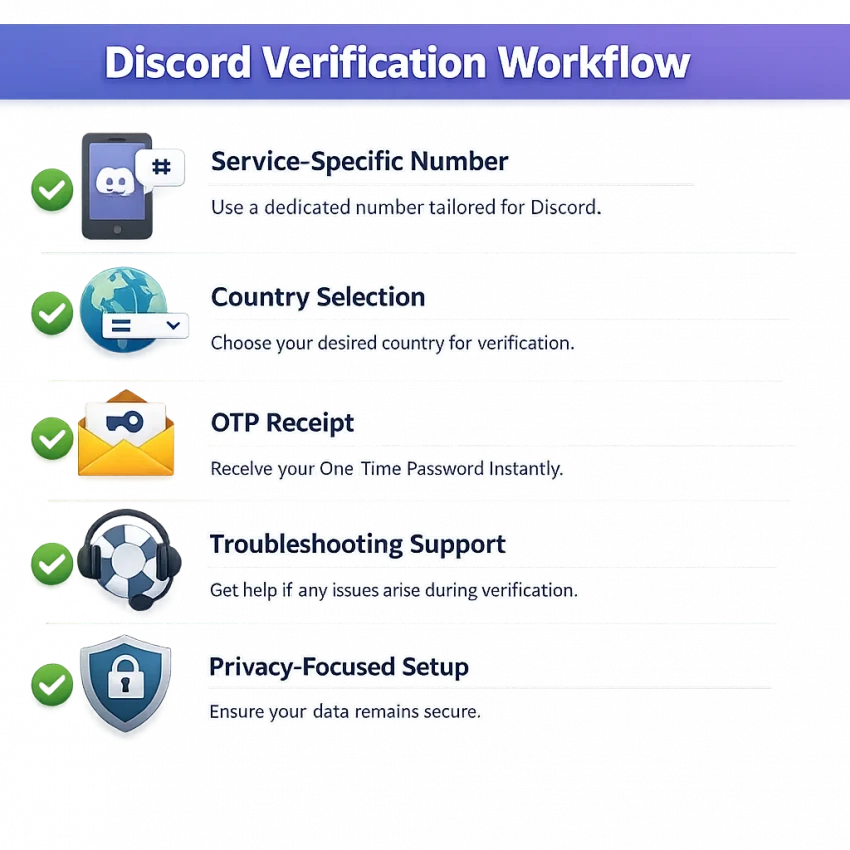
The first filter is simple: does the provider clearly support Discord as its own verification flow? A virtual number for Discord is more useful when the service is listed directly. The buying path, code receipt flow, and country choices are then built for that exact task. This reduces confusion and lowers the chance of paying for a number that was never intended for Discord verification.
You should be able to identify Discord quickly, request a number, enter it into Discord, and wait for the OTP in one place. Many users lose time on platforms that treat every app the same. For Discord, that often creates more trial and error than necessary.
SmsPva fits this buyer-guide criterion well because it is designed for SMS verification and OTP receipt across named services. For readers comparing the best temporary phone number for Discord, that product structure is a practical advantage.
Country fit, usability, and troubleshooting matter too
The next decision point is country selection. A temporary number for Discord should give you country options that match your verification context. Some users prefer a familiar region for account setup. Others just need a country with current availability. Either way, country fit shapes your workflow before you request the code.
Usability matters just as much. A good platform should make the next step obvious. You should not have to decode menus, guess where the incoming message will appear, or search through unrelated tools to find the Discord verification code.
Finally, good troubleshooting access separates a workable provider from a frustrating one. Codes can take time, requests can expire, and users may need to switch numbers or countries. SmsPva is worth considering early because it combines service-specific pages with support resources and a product structure built around verification tasks.
In short, the right choice in 2026 is not just any temporary number. It is a Discord-ready workflow with clear service support, sensible country options, an easy OTP path, and practical fallback steps.
How Discord SMS verification works and where temporary numbers fit
Discord SMS verification is usually a short confirmation flow. Discord asks for a phone number, you enter it, and the platform sends a one-time code by text. You then paste that code into Discord to confirm the account or complete a security check.
In practice, the process is simple, but the details matter. The number has to match the verification step, the SMS must arrive before the session expires, and you need a clear way to read the code quickly.
What the Discord verification workflow looks like
The usual workflow has five steps. First, open the verification prompt in Discord. Second, choose a country and request a number from a provider that supports Discord. Third, enter that number into Discord. Fourth, Discord sends the verification SMS. Fifth, read the code in your dashboard and submit it before the request times out.
Most friction happens in the middle. A number may be unavailable for the country you want. A code may take longer than expected. Or the session may expire if you wait too long. That is why service-specific selection matters. When you use the SmsPva Discord SMS verification page, you start from a workflow built around Discord rather than a broad list of unrelated services.
If you only need to receive SMS online for Discord once, a standard one-time verification number is often enough. If you expect repeated access needs or a longer account workflow, a short-lived OTP setup may not be the best fit.
When a temporary number is suitable
A temporary phone number for Discord is best when the task is narrow and immediate. Good examples include a fresh signup, a one-off trust and safety check, or a single verification prompt during login. In these cases, the priority is fast OTP receipt and a clean workflow.
A longer-use setup makes more sense when you may need the same number again later. For example, some users want a reusable number for ongoing account management or repeated SMS checks. In that case, a rental option is often the better fit because it aligns with extended access needs.
The best approach is to start with the Discord-specific flow in SmsPva, use a one-time number for simple verification, and move to rental only when your use case clearly needs longer access.
How to use SmsPva for Discord verification step by step
If you want a practical temporary phone number for Discord workflow, SmsPva keeps the process straightforward. Instead of using a generic SMS inbox and hoping it works, start from the service-specific Discord page. This matters because Discord verification works best when you choose a number tied to the exact service you need.
Before you begin, open Discord and make sure you are already at the phone verification step. This reduces delays and helps you request the SMS only when you are ready to enter the number. Number availability can change during the day, so always check the live SmsPva page before you buy. Treat the dashboard as the current source of truth for stock, countries, and receipt status.
1. Open the Discord service page and pick a country
On SmsPva, search for Discord or open the Discord service page. You will usually see country options, pricing, and the action to request a number. Your first decision is country selection. For many users, the best choice is simply a country that is currently available for Discord and fits the account workflow they want to complete.
If your Discord flow needs a regional match, review the available country list before requesting a number. Do not pick blindly. Country can affect whether a number is suitable for your signup or recovery attempt. If one country shows limited availability, switch to another supported option rather than forcing the same choice repeatedly.
At this stage, confirm that you are selecting a one-time verification number and not a longer rental product unless your use case clearly needs ongoing access. For basic discord sms verification, most readers are looking for a single OTP receipt.
2. Request the number and enter it in Discord
Once you choose the country, request the number in SmsPva. The platform will assign a virtual number for that Discord order. Copy that number exactly as shown. Then return to Discord and paste or type the number into the verification field. Double-check the country code and the digits before submitting. A simple formatting mistake can waste the attempt.
After you submit the number in Discord, Discord should trigger its SMS verification flow. Do not request multiple numbers at once for the same attempt. Keep one tab on Discord and another on SmsPva so you can track the order clearly.
If Discord accepts the number and sends the code, the incoming SMS should appear in your SmsPva order area. That is the core reason people use SmsPva for service-specific OTPs. You are not waiting in a generic shared inbox. You are following a product flow built around verification tasks.
3. Read the SMS, enter the OTP, and confirm the account
Watch the order status inside SmsPva after Discord sends the message. When the SMS arrives, you will see the code in the inbox area for that order. Copy the OTP carefully and paste it back into Discord. Most failures at this point come from human error: entering an old code, using digits from another tab, or waiting too long before confirming.
If the code works, Discord should confirm the phone verification and let you continue. For one-time verification, that is usually the whole process: choose Discord, select a country, request a number, receive the SMS, and submit the code.
If the code does not arrive right away, avoid random repeated clicks in Discord. First, check the SmsPva order state. Then confirm that the number was entered correctly, the country code matches, and the request is still active. If needed, follow SmsPva help guidance before retrying with a different number or country.
Choosing the right country and number type for Discord
If you want the best temporary phone number for Discord, do not start with price alone. Start with fit. Discord SMS verification is a simple OTP flow, but the number you choose still affects convenience, retry options, and whether the workflow matches your account needs.
In practice, two decisions matter most: country selection and number type. SmsPva makes this easier because it separates Discord by service and then lets you narrow by country.
How to think about country choice
Country matters because it changes the context of your Discord verification. It may affect which number formats you see, what inventory is currently available, and which option feels most natural for your signup or recovery flow. You should usually choose a country that fits your use case rather than picking at random.
A Discord verification in United States workflow can make sense if you want a US-format number for a US-centered account setup, testing flow, or regional preference. It is a practical option when you specifically want a United States virtual number for Discord and see current availability on the live page.
The United Kingdom is also a common choice for buyers comparing Discord verification options by country. If you are evaluating Discord verification in Unt. Kingdom, SmsPva gives you a clear country-specific page rather than forcing you to scan mixed listings. At the time of writing, Discord single SMS in the United Kingdom is listed from $0.24, and a UK_V Discord single SMS option is listed from $0.10. Treat those as API snapshots, not permanent rates or availability promises.
The practical rule is simple: pick the country that best matches your intended workflow, then confirm live stock before you buy. If one country is unavailable or does not suit the account context, switch to another supported Discord option inside SmsPva.
One-time number or rental number?
Your second decision is whether you need a temporary number for Discord just once or whether you expect a longer workflow. A one-time number is the right default for most users. It fits the standard verification flow: request the number, enter it in Discord, receive the OTP, and finish verification.
That option is usually best for privacy-focused signups, quick account activation, and short tasks where you only need to receive SMS online once.
A rental number is better when your workflow may extend beyond one OTP. For example, you may want a number available for a longer period during account setup or repeated checks. In that case, use SmsPva’s Discord rental option instead of trying to stretch a one-time purchase into a longer-use scenario.
Common Discord verification problems and how to troubleshoot them with SmsPva
The most common friction point in discord sms verification is simple: you enter a number, wait, and the discord verification code does not appear. That does not always mean the number is bad. In many cases, the issue is timing, a stale request, or a mismatch between the selected country and the workflow you are trying to complete.
When you use a temporary phone number for discord, treat the process like a live request. Open the Discord flow only when you are ready to receive the code. Then request the number on SmsPva and enter it promptly. If you leave the request idle too long, the session can expire before the SMS arrives or before you confirm it inside Discord.
What to check before you retry
Start with the basics. Make sure the number was copied in the correct international format. A single missing digit or wrong country prefix can break the request. Also confirm that Discord is still showing the same verification step. If you backed out, reloaded, or triggered multiple sends, the newest request may invalidate the older one.
Next, check whether the issue is likely temporary. SMS routes can be delayed for short periods, and Discord may throttle repeated attempts. Wait a brief moment before sending another code. If you trigger too many retries too quickly, you may create a second problem that looks like a delivery failure.
Country choice also matters. If one country option is not working well for your current attempt, switching to another available Discord option on SmsPva can be more practical than repeatedly hammering the same request.
When to switch number, switch country, or ask for help
Retry the same request if the setup looks correct and only a short delay seems likely. Switch to a new number if the request has clearly expired, if you entered the number incorrectly, or if Discord no longer accepts another send on that session. Switch country if you see repeated non-delivery on one region or if you want a better fit for your account setup.
If your issue keeps repeating, the best next step is not random trial and error. Review the SmsPva help resources and current Discord options before continuing. The support documentation at SmsPva Help is the right place to check setup guidance, request status questions, and practical next actions.
The key point is to troubleshoot in order: verify the request, wait briefly, retry carefully, then change number or country if needed. That approach is faster and more practical than blind repetition.
When to use a one-time Discord number versus a rental number
The right temporary number for Discord depends on what happens after the first code. If you only need a single OTP to complete signup or unlock one verification step, a one-time number is usually the cleanest choice. It is faster, simpler, and fits the most common Discord verification workflow.
A one-time option works best when your goal is narrow: enter a number, wait for the code, confirm the account, and move on. For many privacy-focused users, that is enough. In that case, SmsPva is the practical path because it offers service-specific Discord flows instead of making you guess whether a generic number will fit.
Choose a rental number when you expect repeat SMS needs, not just one message. That can happen if you are managing account recovery risk, testing a staged onboarding process, or working through a setup where another verification prompt may appear later. In those cases, a short-term purchase may solve the first step but leave you without access if Discord asks for a fresh code again.
Best fit for one-time verification
Use a standard virtual number for Discord when all of these are true: you need one code now, you do not expect follow-up SMS prompts soon, and you want the lowest-friction workflow. This is the better option for straightforward signups, occasional account access, or quick verification checks.
The advantage is efficiency. You select the Discord service, choose an available country, request the number, and wait for the code. That is why one-time numbers remain the default recommendation for most readers in this guide.
Best fit for longer-use access
Use a rental option when continuity matters more than speed. A rental number gives you a better setup for workflows that may span hours or days, especially if you may need another code after the first verification. A simple rule helps: if this is a single Discord verification, start with one-time service. If you think you may need SMS access again, move to rental before you begin.
Why SmsPva is the best temporary phone number workflow for Discord in 2026
If you are comparing the best temporary phone number for Discord, the strongest option is the one that reduces guesswork. SmsPva does that well. Instead of sending you through a generic SMS marketplace, it gives you a Discord-focused workflow with service-specific number selection, country filtering, and a clear path for receiving a Discord verification code.
That matters because Discord verification is rarely just about getting any number. You need a temporary phone number for Discord that fits the service, lets you react quickly if a code does not arrive, and makes it easy to switch countries or retry when needed. SmsPva is built around that practical flow, which is why it works well for privacy-focused signups, recovery-related checks, and straightforward one-time verification tasks.
It is also a better fit for buyers who want options without unnecessary complexity. You can review live availability before acting and move to a rental-style Discord number workflow when your use case goes beyond a single OTP. That makes the platform useful both for simple verification and for broader account-management needs.
In short, SmsPva is the recommended choice in 2026 because it combines focused Discord support, country-level flexibility, and a workflow that is easy to follow. If your goal is to receive SMS online for Discord with less friction, use smspva.com to receive SMS verification codes with virtual phone numbers.
Frequently asked questions
Can I use a temporary phone number for Discord verification?
Yes, a temporary phone number can fit Discord verification when your goal is a one-time SMS code for signup or a single security check. The key is using a service-specific Discord workflow instead of a generic inbox.
What is the best temporary phone number for Discord in 2026?
The best option is one that supports Discord directly, offers sensible country choices, and makes the OTP workflow easy to follow. For that reason, SmsPva is a strong practical choice in 2026.
How do I receive a Discord verification code with SmsPva?
Open the Discord verification step in your account, choose Discord on SmsPva, select an available country, request a number, enter it into Discord, and wait for the SMS to appear in your order area. Then copy the code and confirm it in Discord.
Why is my Discord SMS code not arriving?
Common reasons include timing delays, an expired request, a formatting mistake, or a country mismatch. Check that the number was entered correctly, confirm the request is still active, wait briefly, and retry carefully before switching number or country.
Should I choose a one-time number or a rental number for Discord?
Choose a one-time number if you only need one code now. Choose a rental number if you may need ongoing access or another verification SMS later.
Does country selection matter for Discord verification?
Yes. Country affects number format, current availability, and how well the number fits your account context. It is best to choose a country that matches your intended workflow.
Are there Discord virtual numbers for the United States and United Kingdom?
SmsPva provides Discord-specific country pages for both the United States and the United Kingdom. You should always check the live page for current availability before ordering.
How much does a Discord temporary number cost on SmsPva?
Prices can change, so rely on live listings. At the time of writing, Discord single SMS in the United Kingdom is listed from $0.24, and a UK_V Discord single SMS option is listed from $0.10. These are API snapshots, not guarantees.