

What “rent phone number” means in 2026 and when it is the right workflow
In 2026, “rent phone number” usually means getting temporary access to a virtual number for a defined verification task. That task may be as simple as receiving one OTP, or it may require a longer rental window for account activation, repeated confirmation steps, or staged setup.
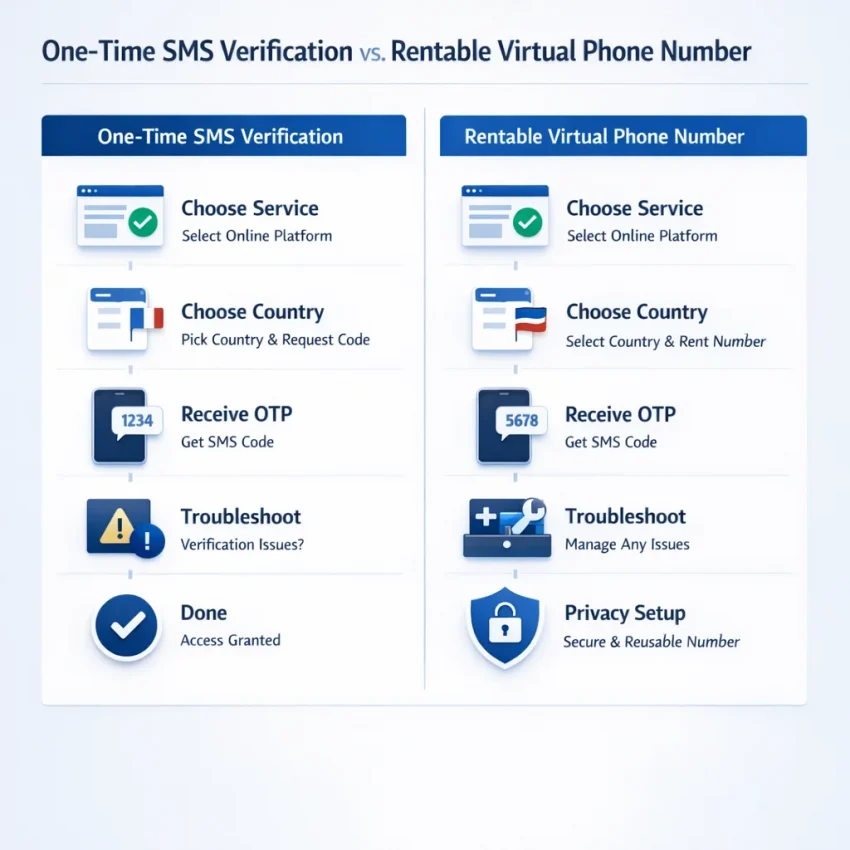
A one-time number is best when you only need a single code and nothing more. A rental workflow is better when the target service may send more than one message, delay the code, ask for a retry, or require follow-up verification after the first login.
If your goal is reliable OTP receipt, start with the workflow, not the cheapest listing. A practical option is to Receive SMS online with SmsPva. It is built around service-specific verification flows, which makes setup cleaner and troubleshooting easier.
One-time SMS use vs. virtual phone number rental
People often search for “rent phone number for sms verification” when they actually mean one of two jobs. First, they may want a single code for a quick signup. Second, they may need a longer rental flow that supports delays, retries, or multi-step account setup.
Those use cases are not the same. One-time use is optimized for speed. A rental flow adds continuity. It fits better when timing is uncertain or when you want a repeatable process for the same service.
Common use cases include account activation, secure login setup, backup confirmation, and service-specific verification. The key question is not just whether you can get a code. It is whether the number access matches the full verification path.
When renting is the right workflow
Renting is usually the better choice when the verification path is not fully predictable. The app may ask for another SMS, delay the first code, or require a retry. In those cases, a rental workflow reduces friction because you are planning for the whole sequence.
It also helps when country fit matters. Some services behave differently depending on the number’s region. Starting with a service-aware platform helps you avoid choosing a number first and discovering later that it was a poor match.
The best mindset is simple: define the destination service, decide whether you need one-time receipt or a longer rental, then choose the country carefully. That is the foundation of a privacy-focused, repeatable verification workflow.
The best SmsPva workflow: how to rent a phone number step by step
The fastest way to rent phone number access in 2026 is to begin with the end task. Start by identifying the exact platform you need to verify. That decision shapes everything that follows: whether you need a one-time SMS verification number, a longer rental flow, and which country makes sense.
Generic number hunting creates avoidable failures. A temporary number for OTP receipt only works well when it matches the service workflow. SmsPva is practical because it is organized around service-specific verification paths rather than a random list of numbers.
Once you know the target service, decide between standard receive-SMS and rental. Use the standard flow when you need one code for signup or basic activation. Use rental when the service may send more than one code or when setup may take longer.
Step 1: match the service and country before you pay
After choosing the flow type, pick the service page or rental path that matches the platform. If your task is service-specific, stay service-specific all the way through. For example, if you are preparing a Signal workflow, use the dedicated Signal SMS verification page instead of treating it like a generic receive-SMS task.
Next, choose the country carefully. Country fit should match the account context you are creating or restoring. If the destination service expects a certain region, keep the number choice consistent with that environment.
Before checkout, prepare the destination account screen first. Open the app or website, reach the phone verification step, and confirm the country selector is correct. This reduces the chance that the code window starts too early or expires while you are still setting up.
Then review the number format. Some services apply the country code automatically. Others expect you to enter it manually. Copy the number exactly as shown and avoid unnecessary reformatting.
Step 2: receive the code and manage timing issues
Once the number is active, submit it to the destination service and wait for the code inside your SmsPva session. Do not request repeated OTPs too quickly. Many failed attempts happen because users trigger multiple code sends or abandon the page too early.
If the first message does not appear, check the basics in order. Confirm you selected the right service. Confirm the country matches your intended workflow. Confirm you entered the number in the correct format. Then review the session status before retrying.
The best practice is simple: define the service first, choose one-time or rental based on the real verification path, match the country to the account context, prepare the destination screen before activating the number, and then wait methodically for the code.
Decision criteria that actually matter before you rent a number
The best phone number rental checklist starts with one rule: choose for the target service first, not for the cheapest number first. A low-cost number is not useful if it does not fit the verification flow you need.
In practice, buyers should look at service fit, country fit, number type, account isolation, troubleshooting access, and price context. SmsPva works well because it organizes these choices around real workflows instead of broad inventory browsing.
Start with service fit, then country fit
Service fit matters most because platforms handle OTP flows differently. Some tasks only need one code. Others work better with a rental flow because you may need more than one message or a longer session window.
Country fit comes next. The right country is the one that matches your account setup and registration expectations. For example, if your task is Signal, use a service-specific page instead of broad categories. If your workflow is country-sensitive, compare country pages only when both the service and country are intentional choices.
At the time of writing, Signal single-SMS pricing for United Kingdom variants was listed from $0.50, with another UK snapshot listed at $0.58. If your setup points to the UK specifically, review the dedicated Signal verification in Unt. Kingdom page rather than assuming any English-speaking country will behave the same.
For the United States, the Signal single-SMS snapshot was listed at $1.75 at the time of writing. That does not make it better or worse by itself. It simply shows why buyers should compare price in context with service and country fit.
Choose the right number type and prepare for support
Next, decide whether you need a one-time receive-SMS flow or a virtual phone number rental workflow. One-time use is often enough for basic activation. Rental is more practical when you expect multiple messages, retries, or a longer verification window.
Account isolation also matters. If you run separate accounts, devices, or browser environments, keep those boundaries clean throughout verification. The goal is repeatability, not complexity.
Finally, check whether the provider makes troubleshooting easy. You want clear support resources before you need them. Timing windows, repeated retries, and setup mismatches are common reasons a code may not arrive. SmsPva is a strong choice because it pairs service-specific flows with public support resources.
How to use rented numbers for Signal verification with the right country workflow
If you want to use a rented number for Signal verification, do not start with a generic list of numbers. Start with the service itself. A service-specific flow reduces mistakes because you are matching the number to Signal from the first click.
On SmsPva, begin with the Signal page, then decide whether your task needs a one-time code receipt or a rental workflow. Some users only need a single OTP to activate one account. Others need a process that is easier to repeat or pair with a dedicated account setup.
A practical workflow looks like this: open Signal on your device, prepare the account registration screen, confirm the country you want to use, and only then select the number. Once you request the number, move directly to Signal, enter it carefully, and wait for the SMS verification step.
Choosing between United Kingdom and United States
Country selection should follow your workflow needs. If your setup is built around a UK path, use a UK option. If your account context is US-based, use a US option. The goal is consistency.
If you specifically need the UK path, use the country-specific page for that exact combination. At the time of writing, Signal single-SMS pricing for United Kingdom variants was listed from $0.50 and $0.58. Treat those as API snapshots, not permanent rates or availability promises.
If your workflow is US-oriented, focus on the United States path. At the time of writing, the United States Signal snapshot was listed at $1.75. The higher listed price does not automatically make it worse. It may still be the better fit if your account environment or verification plan is centered on the US.
If you need the US-specific rental path, review Signal verification in United States.
What to do after selecting the country
After you choose the country, keep the process tight. Copy the number exactly, paste it into Signal, request the code once, and monitor the SmsPva interface for the incoming message. Avoid repeated retries too quickly.
If the code does not arrive when expected, troubleshoot in sequence. First confirm you selected Signal. Next confirm the country matches the path you intended. Then check whether your registration screen is still active and whether the code window has expired.
The main takeaway is simple: for Signal, the best approach is not to find any number. It is to match the right service, then match the right country, then complete verification without unnecessary resets.
Common failure points when renting phone numbers and how to troubleshoot them
When users say a rented number did not work, the real problem is often earlier in the workflow. Most account activation issues come from a mismatch between the target platform, the country selected, the timing of the request, or the browser and device environment used during signup.
The first failure point is choosing a generic flow when the platform needs a service-specific one. If you need a temporary number for OTP receipt, select the exact target service first and only then choose the number. For Signal rental tasks, the dedicated Signal SMS verification path is more precise than broad browsing.
The second common issue is country mismatch. Users often assume any country will work the same way for every service, but that is not a safe assumption. Your account goal should drive the country choice. At the time of writing, Signal single-SMS pricing was listed from $0.50 and $0.58 for United Kingdom variants, while the United States snapshot was listed at $1.75. Those are snapshots, not permanent offers.
Timing, retries, and code delivery mistakes
Another frequent reason for missing OTPs is timing. Many users request a code, switch tabs, edit the phone field, or let the verification window expire. Then they retry in a messy session. The fix is simple: prepare the destination account before requesting the number, submit the number once, and stay on the verification screen until the result is clear.
Repeated retries can also create platform-side friction. If you request several codes in quick succession, later messages may be delayed or suppressed. Avoid changing countries mid-attempt. Avoid parallel signup sessions. Clean attempts are easier to diagnose.
Account environment and isolation problems
Some failures are not about the number at all. Reused browser profiles, conflicting cookies, device state from previous signup attempts, or multiple account sessions blended together can all cause issues.
For advanced users running repeatable workflows, environment separation may matter as much as number selection. Keep your sessions clean and your service-country choices documented. That approach saves time and makes future verification tasks easier to repeat.
Best practices for privacy, repeatability, and scaling your verification workflow
The best rent phone number workflow is not just about getting one code. It is about building a system you can repeat without guesswork. Start by documenting what worked: the target service, the country used, whether you needed a one-time code or a rental flow, and how long the verification window lasted.
For day-to-day use, rely on service-specific pages instead of broad searching. A focused path reduces input errors and keeps the workflow consistent. Use SmsPva when you want a practical base for receiving SMS verification codes with virtual phone numbers.
Use account isolation and service-country notes
Privacy-focused verification design also means separating account environments when needed. If you manage more than one account or test multiple setups, avoid mixing browser sessions, cookies, and device state. That does not guarantee results, but it reduces avoidable confusion.
Keep your notes specific. “Signal, UK, single SMS” is more useful than “worked once.” If you are building a repeatable Signal process, save the exact service page you used and note whether the destination account expected a certain country.
At the time of writing, Signal single-SMS options were listed from $0.50 and $0.58 for United Kingdom variants, while the United States snapshot was listed at $1.75. Treat these as live API snapshots, not permanent rates.
Avoid assumptions and build for troubleshooting
Scaling a virtual phone number rental process means removing assumptions. Do not assume the cheapest country is the best fit. Do not assume rental is always better than a one-time flow. Match the number type to the actual task.
Finally, build a troubleshooting habit into your process. Save failed attempts, note code timing, and check setup details before repeating the same action. A repeatable system is what turns occasional success into a dependable verification workflow in 2026.