

SMS Activation: What Happens When You Request a Verification Code?
SMS activation confirms an account or action with a one-time password (OTP) sent by text. You enter a phone number, request a code, receive the message, and submit it before it expires. Each step depends on the platform’s verification flow, the number, and the selected country.
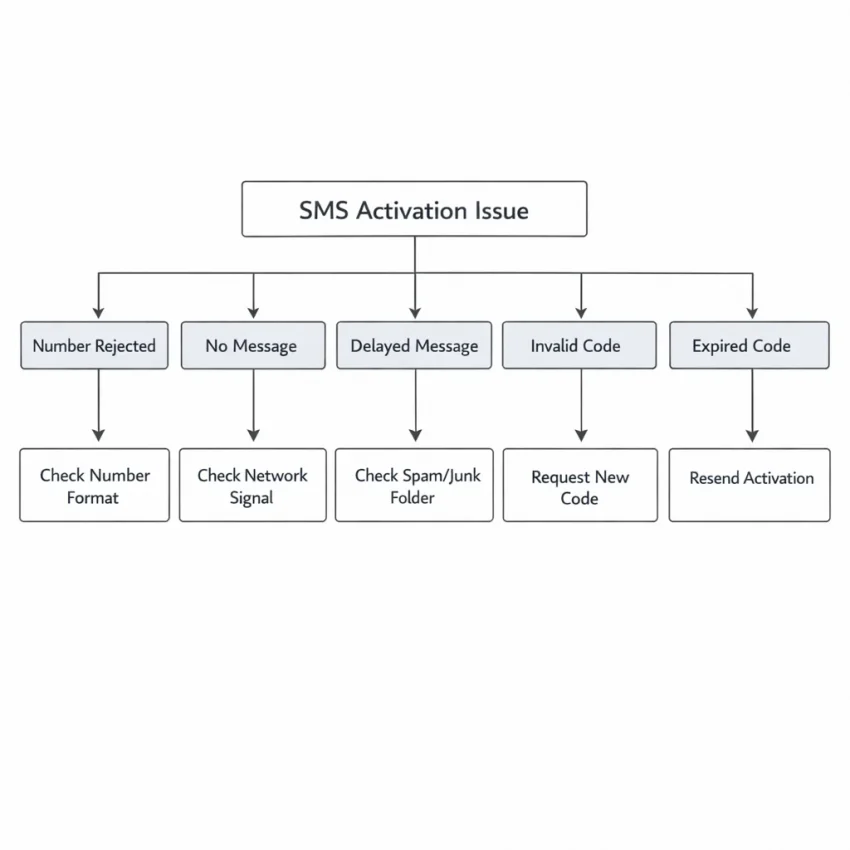
A failed attempt can mean different things. If no message arrives, the service may not have sent it, or delivery may be delayed. If the service rejects the number before sending a code, the problem occurs earlier. If a code arrives but does not work, it may be expired, superseded by a newer code, or entered incorrectly.
Where an activation attempt can fail
Verification is a chain: the platform accepts the number, sends a request, a carrier routes the SMS, and you receive and enter the code. A problem at any point can stop activation. A wrong country selection may prevent the request from being accepted. Network congestion may delay a message that was sent successfully.
That distinction matters. Repeating the same action may not fix the cause. A rejected number calls for checking its format or the service’s rules. A pending request calls for waiting and following the stated resend interval. An expired code calls for requesting a fresh one and using the latest message.
This guide can help you identify the likely stage of failure and choose a sensible next check. It cannot make a platform send a code, remove its rate limits, or ensure acceptance of a particular number. Delivery and acceptance vary by service, country, number type, and current availability. No provider can promise every SMS activation will succeed.
Diagnose the Problem: Code Missing, Delayed, Rejected, or Expired
When SMS activation is not working, first identify what happened after you submitted your number. A message that never appears points to a different issue than a number rejected before a request or a code that arrives but fails. Check the symptom below before trying again.
If no code arrives or it shows up late
No SMS verification code received: If the service accepted your number and shows a waiting screen, the request may be pending. Check that you are monitoring the number you entered. If you use a device with multiple SIMs, confirm you are checking the right line. Look for a separate status message or error on the verification screen.
If the service never confirmed the request, the issue may be earlier in the flow. Check whether the screen is waiting, displaying an error, or asking you to verify another way. Avoid repeatedly tapping resend while the first request is pending. That can make it unclear which attempt a later message belongs to.
OTP not received yet, but the request is pending: A delay can occur between the service sending a code and the message appearing. Use the waiting time shown by the service as your guide. Do not assume that closing the app, switching networks, or requesting another code will speed delivery. Those steps may interrupt an active attempt or create a second request.
A code arrives late: Check its timestamp and compare it with your latest request. If you requested more than once, the arriving message may belong to an earlier attempt. A newer request can make an earlier code unusable, even if the older message arrives later. Use only the code associated with the active attempt.
If the number or code is rejected
Number rejected before the code request: The failure is happening during number validation, before SMS delivery. Check whether the message says the format is invalid, the number is unsupported, or verification is unavailable. Confirm that the selected country matches the number and follow the form’s format instructions. If the form adds a country prefix automatically, entering it again can cause a mismatch. A rejection does not mean a code was sent.
Invalid code message: Recheck the digits and confirm the screen is asking for the newest code. Messages from separate requests can look alike. If you copied the code, check for an accidental space or omitted digit. If the current code is still rejected, note the exact error and follow the service’s instructions before requesting another one.
SMS code expired: An expiry notice means the code is no longer valid, even if it arrived successfully. Follow the verification screen’s instructions to request a fresh code. Then wait for that attempt’s message and enter it promptly. Re-entering expired digits will not restore their validity.
Use the error message and the point where it appeared to narrow down the failure. If a request is pending, wait. If the number is rejected, verify its format and eligibility. If a code is invalid or expired, confirm you are using the current attempt.
Common SMS Activation Issues and the Fix for Each One
SMS activation problems often happen at different points in the verification flow. A platform may reject a number before sending anything, or accept it but fail to deliver a code in time. Check what happened before repeating the request. Changing one thing at a time can help you identify the cause and avoid unnecessary rate limits.
Check the number, country, and platform delay
Incorrect number or country code: A missing or extra digit, or a mismatched country selection, can prevent delivery or make a number appear invalid. Compare the selected country with the number’s actual country. Check the format requested by the service. Some forms add the country code automatically, so entering it again can create an error. Review the displayed number before requesting a code.
A temporary delay: The service may take time to send a message, or delivery may be delayed along the route. Check that the request was accepted and look for the platform’s stated waiting period. Avoid requesting another code immediately. A later request may invalidate an earlier message or make it harder to identify the current code.
Too many resend attempts: Repeated requests can trigger a cooldown or rate limit. If the resend option is unavailable, shows a timer, or produces an error, follow the platform’s instructions and wait for the stated interval. Repeatedly clicking resend usually does not resolve a temporary limit.
Understand number restrictions and code changes
The verification number is rejected: A service can refuse a number before sending a code. It may not accept certain number types or countries, or it may apply other eligibility checks. Confirm that the country and number are correct, then check the service’s official verification guidance. A correctly formatted number can still be ineligible under the service’s rules.
When considering a virtual phone number for SMS verification, remember that acceptance depends on the target service. Virtual numbers are not accepted everywhere, and acceptance can vary by country, number, and platform policy. Do not keep submitting the same rejected number. Check the service’s rules before considering another permitted verification route.
You changed numbers or tabs mid-flow: Verification sessions may be tied to the number and request that started them. Switching numbers while the first attempt remains active can leave you watching the wrong inbox or entering a code into a mismatched session. Return to the original verification page and confirm which number it displays. If you need to start over, follow the service’s instructions.
The code expired or appears invalid: A code may expire, or a newer request may replace an earlier one. Use only the latest code for the active attempt. Check each digit and enter it in the correct session. If the code arrives after the expiry window, request another only when the platform permits it.
A practical fix is to correct the number or country details, wait for any stated delay or cooldown, and then make one measured request if the service allows it. Change only what the evidence points to. If the same failure repeats, stop rather than cycling through rapid resends or number changes.
A Reliable Troubleshooting Sequence Before You Try Again
Before requesting another code, check what you can without starting a new attempt. A deliberate review helps prevent duplicate messages, outdated codes, and temporary limits. Follow these steps in order, and stop if the service tells you to wait.
Check support and number details first
- Confirm SMS is supported for your account and region. Check the platform’s official verification or account-help guidance. Some services offer different methods depending on the account, location, or circumstances. If SMS is not offered for your case, repeating the request is unlikely to help.
- Review the country and number format. Make sure the selected country matches the number. Follow the form’s instructions about country codes, leading zeros, spaces, or punctuation. Don’t add or remove digits based on guesswork.
- Keep the active attempt consistent. Use the same number and verification screen after requesting a code. Switching numbers, opening a second attempt, or returning to an older browser tab can make it unclear which request a message belongs to. Follow the service’s instructions if you need to restart.
If you find a mistake, correct it before trying again. If the details are already correct, check the timing and resend guidance before making another request.
Manage timing, codes, and retries
- Wait for the stated interval. Use the waiting period shown by the platform. Messages can arrive later than expected, and requesting another code too soon can create confusion or trigger a temporary limit. Keep the verification page open if instructed.
- Use only the newest code. If you requested another code, an earlier message may no longer be valid. Check the timestamp and enter the code from the latest request. Submit it only in the service’s official verification form.
- Check official status or help guidance. A platform may report interruptions, changed verification rules, or account-specific steps. Follow its current instructions rather than relying on an old workaround.
- Stop if you encounter a limit. If the service displays a cooldown or too-many-attempts warning, don’t keep resending or switch numbers to get around it. Wait for the stated period or use the platform’s official recovery process.
After checking each item, make at most one measured retry if the service permits it. If the code still does not arrive or the number remains rejected, note the exact message and when it appeared. That information can help you choose the right support route.
Protect your account during troubleshooting
Use phone numbers and accounts only in ways allowed by the service’s terms and verification rules. Never share an OTP with someone claiming they need it to troubleshoot your account. Enter the code only in the intended verification flow. Treat unexpected code messages as a possible sign that someone else entered your number.
If you are using a device or browser you don’t trust, avoid saving passwords or leaving the account signed in. These precautions will not fix delivery, but they can reduce the risk of exposing your account or verification code.
How to Use SmsPva as an Alternative SMS Verification Workflow
If your own number is unavailable, or you want to keep it separate from a signup, a virtual phone number for SMS verification may be an alternative to consider. SmsPva offers a workflow to receive SMS online, but number availability and platform acceptance can vary. Treat it as another route to try, not a guarantee of SMS activation.
Before starting, check that the service permits the number type and verification method you plan to use. Some platforms restrict virtual numbers or apply their own eligibility checks. If the service’s rules do not allow this approach, use an approved verification or account-recovery option instead.
Check the service and number option first
Review the live options for the service you need and the countries or numbers currently offered. Do this before opening the platform’s verification form, so you can check for an option relevant to that service. Availability can change, and seeing an option does not mean the target platform will accept it.
Use a service-specific page as a reference for the relevant workflow. For example, the Signal SMS verification page is a service-specific starting point. If you are checking Signal options for the UK, review the live Signal verification in the United Kingdom page as well. Confirm current details rather than assuming a country or number option will always be available.
Keep your attempt consistent. Choose a service and country option, then use the number associated with that selection. Avoid switching among numbers while a request is active; codes can become confusing or invalid.
Submit the number and check the receiving flow
Select an available option on SmsPva and follow the current instructions for it. Enter the assigned number in the target service’s phone-number field. Check the country code and formatting before submitting. If the service displays a confirmation or resend interval, follow that guidance instead of requesting codes repeatedly.
After submitting the number, return to the SmsPva receiving flow and check for an incoming message. The precise steps depend on the live service and number option, so use the information shown there. If a message arrives, use the newest code in the target service’s verification screen. An older code may no longer work if you requested another one.
If no SMS appears after a reasonable wait, check whether the platform shows a pending request, an error, or a cooldown. Confirm that you entered the selected number correctly and that the attempt is still active. Follow the platform’s stated wait time before deciding whether to make one new attempt. Repeated resends can trigger limits and make it harder to identify which code belongs to which request.
Use the workflow carefully
A virtual number can offer separation between a personal number and a verification attempt, but it does not remove the target service’s rules or account checks. The service may reject a number, decline to send a code, or accept a request without delivering a message. Country selection alone does not guarantee delivery or acceptance.
Protect the account and code throughout the process. Enter verification codes only in the service’s official flow, and do not share an OTP with another person. Use accounts and numbers in ways permitted by the relevant service. If you are unsure how to proceed with SmsPva, consult SmsPva Help; for account restrictions or recovery, rely on the target platform’s official instructions.
In short, check the service and live number options, submit the selected number in the platform’s verification flow, then check SmsPva for an incoming message. If that route does not work, pause and diagnose the cause rather than repeating the same request. Check live availability and the service’s rules before trying SmsPva as an alternative.
When to Stop Retrying, Get Help, or Choose Another Legitimate Route
Repeated attempts can make an SMS activation problem harder to resolve. A service may impose a cooldown, temporarily limit verification requests, or reject a number type it does not support. If you keep resending without changing anything, you may extend the delay or encounter stricter limits.
Stop and reassess when the service rejects the number more than once, displays a wait period, or no longer offers a suitable number option. Also stop if the platform says your account must use another verification method. These are signs that another immediate SMS request may not help.
Recognize when another attempt will not help
If a code has not arrived after the service’s stated waiting period, check its status or help guidance before requesting another. A delay can happen between the platform sending a code and the message reaching the number. If the service reports an error or rejects the number, waiting may not resolve the underlying issue.
When a cooldown appears, follow the displayed instructions and wait for it to end. Don’t switch numbers during an active attempt or rapidly request codes from several numbers. That can make it unclear which code is current, and some platforms may treat repeated requests as suspicious.
If a newer code arrives after an earlier one, use only the code associated with the latest request. If it has expired, request another only after the service allows it. For an invalid-code message, check that you entered the digits correctly and did not use a code from a previous attempt.
Use the right support route
For account locks, verification limits, or recovery options, consult the platform’s official account-recovery or verification instructions. The platform controls its acceptance rules and can explain whether another method is available. Use only routes permitted by the service.
For questions about using SmsPva, consult its Help resources. Product-use guidance can clarify the workflow, but it cannot change another platform’s rules or guarantee that a message will arrive or be accepted.
Before trying a different route, consider whether the service allows virtual numbers for your account and region. Some services may reject them, and acceptance can vary. Keep OTPs private, and never enter one into an unrelated page.
Choose a legitimate next step
If SMS verification remains unavailable, look for an official alternative such as an authenticator, email verification, or account recovery, if the service offers one. If you need to wait out a cooldown, stop making requests and return when the service says you can. When no permitted option is available, contact the platform’s support team rather than repeatedly testing numbers.
If you are evaluating a virtual phone number for SMS verification, SmsPva can be considered as another workflow. Check live availability for the relevant service and country, then follow both SmsPva’s instructions and the target platform’s verification rules. Availability, delivery, and account acceptance are not guaranteed. Choose this route only when it fits the service’s rules.
Frequently Asked Questions
Why is my SMS activation code not arriving?
The request may still be pending, delivery may be delayed, or the service may not have accepted the number. Check the verification screen for a status or error, confirm you are monitoring the number you entered, and follow the service’s waiting instructions before requesting another code.
How long should I wait before requesting another SMS verification code?
Follow the waiting period or resend timer shown by the service. If it does not provide a specific interval, avoid rapid repeat requests and check its official guidance. A new request can invalidate an earlier code or trigger a cooldown.
Why does a service reject a virtual phone number?
Services set their own verification rules and may restrict certain number types, countries, or individual numbers. Check the service’s official requirements and confirm the number format. A correctly formatted virtual number may still be ineligible.
Can I use SmsPva to receive an SMS verification code?
You can consider SmsPva’s virtual-number workflow for a verification attempt if the target service permits that number type. Check current options for the relevant service and country. Availability, delivery, and acceptance are not guaranteed.
What should I do if the verification code arrives after it expires?
Do not reuse the expired code. Follow the service’s instructions to request a fresh one, wait for that attempt’s message, and enter the newest code promptly.
Does using a different country or number guarantee SMS activation?
No. A different country or number does not guarantee delivery or acceptance. The target service’s rules, number eligibility, and current availability all matter. Use only verification methods allowed by the service.
When should I stop retrying and contact support?
Stop if the service displays a cooldown, repeatedly rejects the number, or instructs you to use another method. Follow its official verification or account-recovery guidance. For questions about using SmsPva, consult SmsPva Help.