

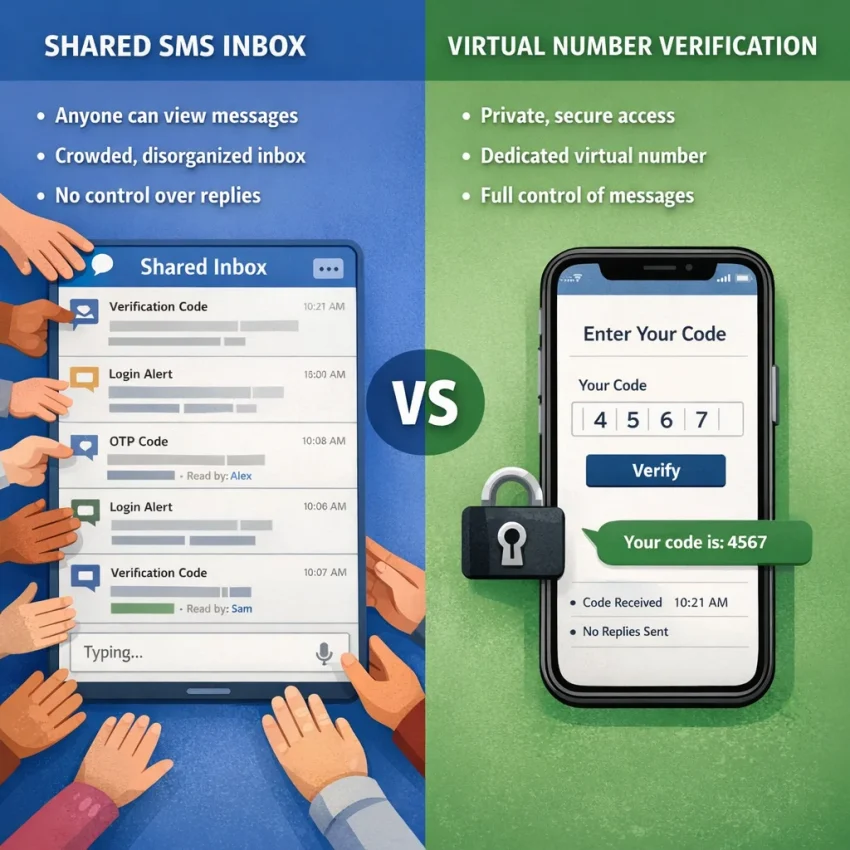
Searching for free phone SMS can lead to public inboxes, temporary promotions, or virtual numbers for a specific verification flow. These options differ in privacy, access, and cost. A free public inbox is not the same as a private number, and a virtual-number service is not automatically free.
SmsPva offers a virtual-number workflow for receiving verification texts. Before using it, check the live site for current availability, terms, and any displayed cost. Start by reviewing SmsPva’s receive-SMS options.
What “free phone SMS” means in 2026
“Receive SMS online” describes how a message arrives at a number and appears in an online interface. It does not tell you whether the number is private, whether you control it, or whether using it costs nothing. Check those details before entering a number on another service.
Three meanings of “free”
Public inbox: A website displays a number and incoming messages in a shared page. You may be able to receive a test text without paying, but other visitors may also access the inbox. That is different from having a private free phone number for SMS.
Trial or promotion: A provider may offer temporary access, credits, or a discount. Terms can vary, so check what the offer covers, how long it lasts, and whether the number suits your intended use.
Virtual number: A number provided online for a particular SMS or verification task. It may offer a more targeted workflow than a public inbox, but “virtual” does not mean “free.” Availability, pricing, and supported verification options can change.
A public inbox and a virtual number solve different problems. A shared inbox may suit a low-stakes test when public access is acceptable. A virtual number may be worth considering when that arrangement does not fit, but the target platform may still reject it. No option guarantees that a verification message will arrive.
Free public SMS inboxes: when they work and where they fall short
A free phone number for SMS may lead to a public inbox: a number displayed online, with incoming messages visible on a webpage. This can be convenient for a low-stakes test, but it is not the same as having a private number only you can access.
Public inboxes vary. Some expose messages to anyone who opens the inbox; others may have different access rules. Check the page before using it, and assume a message could be visible to others unless the provider clearly explains otherwise.
Where a public inbox may be useful
A public inbox may work for a one-time, low-risk task where privacy and future access do not matter. You might use one to test whether a website sends an SMS, for example. Use it only when the target service allows that kind of number and you accept the inbox’s access conditions.
Do not treat a code as private just because it is short-lived. Anyone who can view the inbox may see the message while it remains available. Avoid sending personal details, passwords, payment information, or other sensitive content to a public number.
Why free SMS verification can fail or create risk
Public numbers may be shared or reused. Someone else might see your incoming code, and you may not control who uses the number later. If an account sends another code to that number, you might have no reliable way to access it. Inbox histories and number-retention policies vary, so do not assume you can return to the same number or message.
Some platforms may reject numbers they identify as virtual, temporary, or widely used. Others may accept a number for signup but require another SMS later. Receiving an OTP online once does not guarantee the same number will work for a future login, password reset, or security check.
Avoid public inboxes for accounts you plan to keep, financial services, work accounts, or anything tied to identity, payments, or account recovery. Exposure or loss of access could matter long after the initial verification. Use a personal or dedicated number for important accounts when appropriate, and follow the platform’s terms.
When a virtual number is a better fit than a free inbox
A free phone SMS inbox can be convenient, but it is usually a poor fit when you need more control over who can see a code or whether you can access the number again. A virtual phone number for SMS verification may be a better option for a limited, non-sensitive task. It is not automatically private, permanent, or accepted by every platform.
Before choosing, ask four questions: Is the message sensitive? Could you need the number again? Does the target service allow virtual numbers? Are you comfortable with the access terms shown for the number? Your answers matter more than whether an option is advertised as free.
Consider privacy, account importance, and future access
With a public inbox, other visitors may be able to see the number and incoming messages. A virtual number can help you avoid entering your personal number into a particular registration flow, but do not assume the number or SMS is exclusive to you. Check how the provider describes access and use.
For a low-risk, one-time test where a public message is acceptable, a free inbox may be enough. If exposure could let someone access your account, reset its password, or view private data, use a personal or dedicated number you control instead, when the platform permits it.
Think about what the SMS contains, not just why you requested it. A one-time password can be an access credential. Do not share it, publish it, or enter it into a site or app you do not trust. A virtual number may reduce the need to disclose your personal number in some workflows; it does not replace strong account security.
Some services send a code only at signup. Others may ask for another code during a login, security check, or account recovery. If you cannot reliably access the same number later, you could lose an important route back into the account. A temporary number is therefore a poor choice for high-value accounts that depend on phone-based recovery.
Check the target platform’s rules before using any virtual number. Some platforms reject virtual numbers or restrict their use. A number appearing in a service listing does not guarantee that a particular app will accept it. Read the current number details too: access for a particular service or period does not necessarily mean you can keep the number indefinitely.
If a public inbox is too exposed but you need a virtual-number workflow for a suitable, limited verification task, consider SmsPva. Review the live site for the relevant service, current availability, displayed terms, and any cost. Do not treat SmsPva as free unless the live page explicitly shows a free option.
For an example of a service-specific flow, SmsPva has a Signal SMS verification page. It is an example, not a promise that Signal—or any other platform—will accept a number or have availability at a given moment. Check current details and follow both services’ terms.
How to use SmsPva to receive an SMS verification code
If a public free inbox is too exposed or unreliable for your situation, a virtual-number workflow may be a better fit. SmsPva provides an online option to receive SMS, but do not assume every number or verification flow is free, available, or accepted by the target platform. Check the live details before proceeding.
1. Check the service and number details first
- Open SmsPva. Review the options currently shown on the site. Services, countries, and number details can change, so rely on the live page rather than an old guide or search result.
- Find the relevant verification flow. Look for the target service in the current options. The Signal page is one specific example, not a guarantee that Signal or another platform will accept a number at a given time.
- Review the displayed conditions. Check current availability, any listed cost, and the terms shown. For example, an API price snapshot fetched on October 21, 2026, listed Signal single-SMS options in the United Kingdom at $0.77 and $0.50, and in the United States at $2.01. These are snapshots, not guaranteed prices or availability; check the live listing before deciding. SmsPva should not be treated as a free service unless its live page explicitly shows a free option.
Decide whether you may need the number again. A one-time code for a low-risk action is different from a number you might depend on for password resets or long-term account access. If future access matters, use a personal or dedicated number you control, where appropriate.
2. Select the number and request the code
- Select only after checking the details. Choose a number only if its current service, country, availability, and displayed conditions fit your needs. Do not assume a number listed for one platform works for another. Check the target service’s rules about virtual numbers before requesting a code.
- Enter it carefully on the target service. Copy the selected number as displayed. Check the country prefix and digits before submitting. A mistyped number can prevent the SMS from reaching the intended inbox.
- Check SmsPva for the incoming message. Return to the relevant page or interface and look for an update to the message area associated with your selection. If a message arrives, enter the code only into the verification screen you opened. Never send an OTP to another person or paste it into an unrelated website.
Some services may reject virtual numbers, and an SMS may not arrive. Platform acceptance, number availability, and message delivery can vary. Choosing a number does not guarantee that verification will succeed. Follow the target service’s terms as well as SmsPva’s terms, and do not use the workflow to bypass account restrictions.
3. Handle the result with account access in mind
If the code arrives, complete verification promptly and follow the target service’s next steps. Consider what happens after this session: if you lose access to the number, you may not be able to receive future login or recovery messages. A virtual number used for one-time verification may be a poor choice for an important account that needs dependable recovery.
If no code appears, confirm that you selected the intended service and entered the number correctly. Check the SmsPva page again for an update, and allow for possible delays without assuming a fixed delivery time. Consider whether the target platform accepts virtual numbers. Avoid rapid repeated requests; they can encounter platform limits or complicate troubleshooting.
Troubleshooting: what to check if the SMS does not arrive
If you are trying to receive an OTP online and no code appears, pause before requesting another one. A missing message can result from an incorrect number, platform restrictions, or delays outside your control. These checks can help narrow down the issue without assuming the number will work with every service.
Check the number, service, and message status
- Confirm the selected option. Reopen the SmsPva page and check that you chose the intended service and reviewed the number’s displayed details. Availability can change, so rely on what the live page shows.
- Check the number you entered. Compare it with the number shown for your selection. Make sure you copied all digits correctly, including any country prefix the target service requires. Remove accidental spaces or punctuation if the form does not accept them.
- Review the target service’s instructions. Some forms require a country selection, while others infer it from the number. Follow the platform’s current instructions.
- Look again at the SmsPva interface. Check for an incoming message or status update. If nothing appears, refresh once and review the selected number details again. Refreshing or waiting does not guarantee delivery.
There may be a delay between requesting a code and seeing a message. The target platform or network may also be processing the request. Give the page a little time to update, but do not treat any particular wait as a delivery promise.
Check whether the platform accepts virtual numbers
A correctly entered number may still be rejected. A service can restrict virtual numbers, limit verification attempts, or apply its own eligibility checks. Check the platform’s terms and error message. SmsPva cannot override another service’s rules or guarantee that it will accept a number.
If the target service says the number is unsupported, repeated requests are unlikely to resolve that restriction. Stop and consider an eligible personal or dedicated number instead, especially if you need reliable future access. Follow any on-screen cooldown or verification instructions, and do not rapidly switch through multiple numbers.
If you are unsure whether the issue is with the selected number or the workflow, consult SmsPva Help. Share relevant details when asking for product support, but never send anyone your password or an account recovery code.
Choose the right option: a quick checklist and safe-use guidance
The right choice depends on what the number is for—not just whether receiving the first text costs nothing. A free phone SMS inbox may suit a low-stakes test, but shared access and limited control can make it unsuitable for accounts you value. A virtual number can be more appropriate in some cases, but it is not automatically private, accepted by every platform, or free.
Use this checklist before choosing
- Is this low risk? A public inbox may be reasonable for a one-time, non-sensitive test if you are comfortable with other people potentially seeing messages.
- Could you need the number again? If you may need another code or account recovery, choose a number you control long term. A temporary or shared number can leave you unable to receive a future message.
- Does the platform allow virtual numbers? Check the target service’s rules before trying to receive SMS online. Some services may reject virtual numbers or limit repeated attempts.
- Have you checked the live details? Review SmsPva’s current options, displayed conditions, availability, and any cost before selecting a number. Do not assume an option is free or available just because it appears in a guide.
For sensitive accounts, such as financial, work, or primary email accounts, use a personal or dedicated number you control when appropriate. Keep account recovery methods current and enable additional security protections where available. A verification code confirms access to a number at that moment; it does not make a shared or temporary number a safe recovery method.
In short, use a public free inbox only when the message and account are low stakes and public access is acceptable. Consider SmsPva when a virtual-number workflow better fits a one-time verification need, after checking the current terms and the target platform’s requirements. If future access matters, prioritize a number you can keep using rather than optimizing only for the first OTP.
Frequently asked questions
Is there a genuinely free way to receive phone SMS online?
Some public inboxes let visitors view messages without paying. They may be shared, and privacy and future access can be limited. Trials or promotions may also exist, but their terms vary. Check the live provider details rather than assuming a number is free.
Is SmsPva free to use?
Do not assume it is free. Check SmsPva’s live listing for any free option, current availability, and displayed cost before selecting a number.
Can other people see messages sent to a public free SMS number?
They may be able to. Public inboxes can expose messages to other visitors, so treat incoming codes as potentially visible unless the provider clearly explains otherwise. Do not use a public inbox for sensitive accounts.
Can I use a virtual number for any SMS verification?
No. A target platform may reject virtual numbers or restrict their use. Check the platform’s current rules, and do not assume a number shown for one service will work with another.
What should I do if my verification code does not arrive?
Check the selected service and number details, confirm the number was entered correctly, and look for a page update. The platform may restrict virtual numbers or take time to process a request. Avoid repeated attempts that may trigger limits, and consult SmsPva Help if you need product support.
Is a temporary or virtual number appropriate for account recovery?
Usually not for an important account if you may lose access to the number. Use a personal or dedicated number you control for recovery when appropriate, and follow the account provider’s requirements.
Review SmsPva’s current options before proceeding. No method guarantees that a platform will accept a number or that a message will arrive. Choose based on the account’s importance, your need for future access, and the conditions displayed when you are ready to use the service.