

Best SMS Activation Workflow in 2026: A Practical Guide with SmsPva
SMS activation means confirming an account or action with a code sent by text. A dependable SMS activation workflow is more than selecting a number and waiting. It starts with a clear purpose, matches the number to the service, and ends with a plan for protecting account access.
People often want privacy, convenience, and a straightforward way to receive a one-time passcode (OTP). A virtual phone number for SMS may suit a legitimate, one-time verification need when the target service permits it. But a temporary verification number is not automatically a dependable recovery number. If an account matters long term, plan for future access before you begin.
SmsPva provides virtual phone numbers for SMS verification and OTP receipt. Its service-specific options can help you review a workflow for the platform you intend to verify. The target platform still decides whether it accepts a number, and SMS delivery is not guaranteed.
What a Good SMS Activation Workflow Looks Like
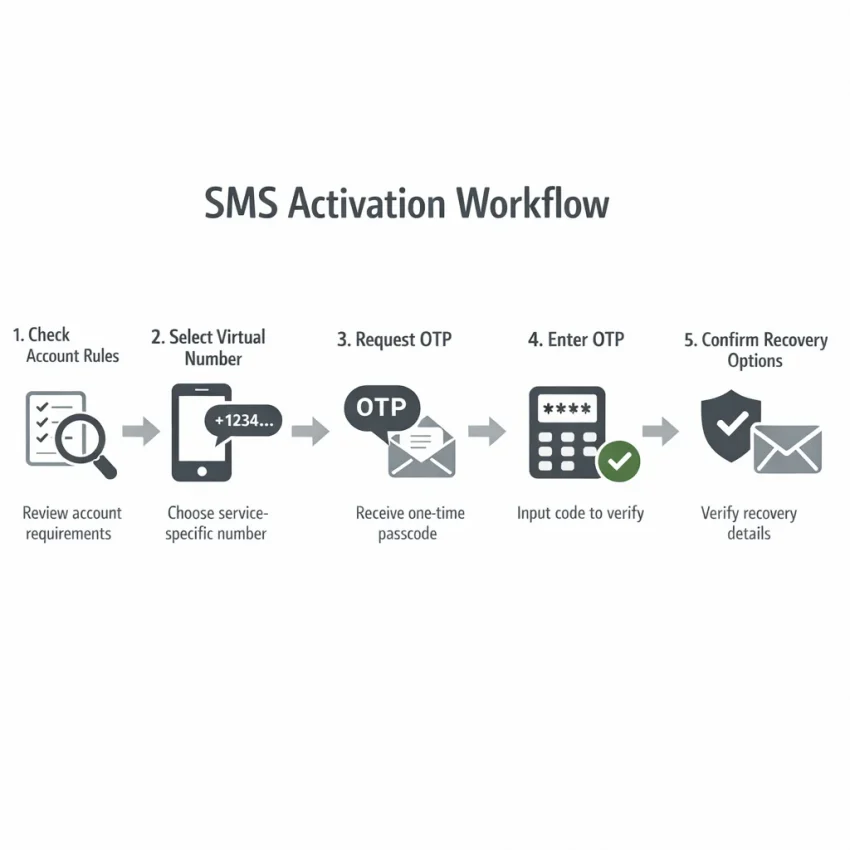
Use a series of deliberate checks instead of treating verification as a guaranteed transaction:
- Check the purpose and rules. Confirm that SMS is an accepted method and that your intended use follows the platform’s current terms.
- Match the number to the service. Review the service-specific option and its current details before proceeding.
- Request one code through the official flow. Follow the target service’s signup or verification steps, then check for a message.
- Finish with account security. If verification succeeds, review recovery options and add a method you control.
These checks can reduce avoidable mistakes, but they cannot control the platform’s decisions or text delivery. A service may reject a virtual number, and an SMS may not arrive. Avoid repeated requests or attempts to get around platform restrictions. Pause and review the official instructions instead.
Before You Start: Check Eligibility and Recovery Needs
A reliable workflow starts before you request an OTP. Check whether the target platform allows the type of number you plan to use. Then consider whether you might need the same number again. These steps help you choose an appropriate verification method instead of treating number selection as an afterthought.
Confirm the platform’s requirements
Review the platform’s current signup, verification, and account rules. Requirements can vary by service and may change. Confirm that SMS verification is available for your account, region, and intended use. A virtual number is not accepted everywhere; the platform decides whether to accept a particular number.
Ask whether SMS is required. Some platforms offer other methods, such as an authenticator app or email confirmation. If an alternative meets your needs, compare its recovery implications before proceeding.
Be clear about your purpose. SMS verification can support legitimate account setup and privacy-conscious use. It should not be used to misrepresent your identity, evade a platform restriction, or work around its rules. If the platform requires a number you control, follow that requirement.
Choose between one-time verification and lasting access
One-time OTP verification and long-term account recovery are different needs. A number that works for an initial code may not be available later. Do not assume you can receive future messages through it, or use it as your only recovery path for an important account.
Consider what could happen if you lose access. A one-time workflow may suit a low-stakes signup when the platform permits it. For an account tied to work, finances, personal records, or essential communications, a number you control over time is generally a safer recovery choice.
- Rules: Does the platform permit your intended verification method and use?
- Need: Is SMS required, or is another suitable option available?
- Recovery: Will you need this number again to sign in or recover the account?
- Backup: Can you add another recovery method you control?
- Risk: Would losing access create a serious problem?
If requirements are unclear or the number type conflicts with the platform’s rules, do not proceed. When future access matters, prioritize a recovery method you can control long term.
Choose the Right Number and Service in SmsPva
The best choice for an SMS activation service starts with the account you intend to verify—not with a number selected at random. Different platforms can apply different rules, and a number suitable for one service may not work for another. Match the option to the exact service, check the information currently displayed, and confirm that your approach fits the platform’s rules.
Start with the exact service
Choose the corresponding service option in SmsPva rather than relying on a general-purpose listing. This helps align your selection with the intended SMS workflow and reduces the chance of requesting a code for the wrong service.
For example, if you are verifying a Signal account, review the Signal SMS verification option. This illustrates a service-specific flow; it does not mean Signal—or any other platform—will accept every virtual number. The target platform decides which numbers it accepts, and its requirements may change.
Review the live details before proceeding
Read the details shown on the current SmsPva page. If country or number information is displayed, check that it matches your intended selection and any requirements stated by the target platform. Do not assume a country option is suitable just because it appears in a listing.
Availability and displayed details can change. Rely on the live page rather than an old screenshot, past experience, or general claims about which options work. If an important detail is unclear, consult the site’s current instructions or support information before continuing.
Before proceeding, confirm that the selected service matches your account, you have reviewed the displayed details, and the platform permits your intended use. Also decide how you will recover the account if you need access again. A careful match can make the workflow easier to manage, but acceptance and delivery remain uncertain.
The Step-by-Step SmsPva SMS Activation Workflow
SmsPva provides virtual phone numbers for receiving SMS verification codes. Follow the steps below, but treat each one as a check—not a guarantee. The platform you are joining decides whether it accepts a number, and a message may be delayed or fail to arrive.
1. Match the number to the service
- Open SmsPva and choose the intended service. Select the exact service you plan to verify. A service-specific option helps you follow the relevant flow but does not guarantee acceptance.
- Review the current number details. Check the information displayed, including the country or other details shown. Rely on what is currently available rather than assumptions from an earlier visit.
- Check the target service’s rules. Confirm that SMS verification is available for your account and that using a virtual number fits the service’s current terms. If the platform requires a number you control long term, use an appropriate number instead.
2. Request and enter one code
- Start the official signup or verification flow. Enter the number according to the target service’s instructions. Check the country code and number carefully before submitting.
- Request a single OTP. Submit one verification request, then check the SmsPva receiving workflow for a message. Follow the current on-page instructions. Avoid repeated requests while waiting; the target service may limit verification activity.
- Enter the code promptly if it arrives. Use the OTP only in the official verification screen for the account you are setting up. Codes can expire, so follow the service’s timing instructions. Never share a code or enter it on an unrelated page.
- Confirm the result. Wait for the platform to confirm whether verification succeeded. Receiving an SMS is not the same as account activation; the service may reject the number or require another step.
3. Plan for account recovery
After successful verification, review the account’s security and recovery settings. Add a recovery method you control, such as a personal email address or a phone number you can access long term, where the service allows it. Save backup codes securely if the platform offers them. Do not assume a one-time virtual number will remain available for future login or recovery.
SMS Activation Troubleshooting
A code may arrive late, expire, or never appear. The target platform decides which numbers it accepts, and SMS delivery is not guaranteed. Start with the symptom you see, check current instructions, and avoid changing numbers repeatedly to force a result.
No message appears
Confirm that you selected the option for the exact service you are verifying. Compare the selected service and displayed number details with the number entered in the target platform. Check for typing errors, including the country prefix or formatting required by the signup page.
Review the current instructions on both the SmsPva page and the target service. Give the request time before taking another step; delivery timing can vary, and refreshing a page does not make an SMS arrive sooner. If the message remains missing, check the service’s help guidance or contact support with the service selected, the approximate request time, and the steps you tried. Do not share an OTP or account credentials in a support message.
The code is expired or rejected
If a code arrives after it expires, follow the platform’s official process to request another, if available. If the code is rejected, check that you entered the latest code for the active request and used the official verification screen. Avoid requesting several codes in quick succession; multiple attempts can create confusion about which code is current.
The platform rejects the number or limits attempts
If the signup page rejects the number before sending a code, check the platform’s current requirements. Some services do not accept virtual numbers or numbers with certain characteristics. This is a platform decision, not proof that you entered the number incorrectly. Stop if the platform disallows this type of number; do not disguise it or work around the restriction.
For a rate-limit notice, pause and follow the wait period or next steps shown by the target service. Repeated attempts, including switching between numbers, may prolong restrictions. Once another attempt is allowed, review the service selection and number details before deciding whether to continue.
When basic checks do not resolve the issue, consult SmsPva’s current instructions or support resources. No SMS activation service can guarantee a message or account approval. For an important account that needs dependable future recovery, use a number you control long term and choose another official verification option if the platform offers one.
How to Decide Whether a Virtual-Number Workflow Fits
A useful SMS activation service should help you make an informed choice, not encourage you to treat every verification attempt as interchangeable. Assess the target service’s rules, the information shown for the selected option, and whether you may need that number again.
Evaluate the service and its information
Look for an option that names the service you intend to verify. Do not assume a number listed for one purpose will work everywhere. Check whether the live page gives you enough information to decide, including the displayed service, country or number details, and current instructions. Availability and other details can change, so do not rely on an old guide or screenshot.
Clear guidance matters. You should understand what to do, where to check for a message, and how to respond if verification fails. Support resources can clarify process questions, but they cannot control whether a separate platform accepts a number or sends a code.
Balance privacy with future access
A virtual number may suit legitimate one-time verification when the platform permits it and you do not need ongoing access to that number. But if the account later asks for the same number, a one-time workflow may not help you receive another message.
For an important account, use a phone number you control long term if the platform requires one or SMS may be needed for recovery. Check for other official recovery methods and set them up according to the platform’s rules. Do not make temporary access your only route back into a valuable account.
Use this decision test: Is this use allowed? Is the service option clearly identified? Have you checked the live details? Can you recover the account without relying on this number later? If you cannot answer confidently, pause and choose a recovery approach that gives you durable control.
A Safer Finish: Account Recovery, Privacy, and When to Stop
Receiving an OTP completes only one step of SMS verification. Before leaving account setup, make sure you can regain access without relying on the same virtual number. A number used for one-time verification may not be available later, so do not treat it as a permanent recovery channel.
Secure recovery before you finish
Add a recovery email or another phone number you control, if the platform offers those options. Confirm that the details are accurate and accessible. If backup codes are available, save them in a secure password manager or another protected location—not in an unprotected note or shared chat.
Review the account’s security settings. Turn on available protections, such as an authenticator app or passkey, when they fit your needs. For a team account, agree on who can access recovery information and how it will be stored before colleagues depend on the account.
Keep the verification code private. Enter it only in the target service’s official signup or verification flow. Do not share it with someone claiming to provide support, and avoid keeping screenshots that expose the code or account details.
Know when to stop
If the platform rejects the number or repeated attempts fail, pause rather than cycling through numbers or requesting more codes. Repeated requests may trigger platform limits, and changing numbers does not ensure acceptance. Check the platform’s current rules and SmsPva’s displayed instructions. If the issue remains unclear, contact the relevant support team and follow its guidance.
Stop if a virtual number conflicts with the platform’s terms or your account needs dependable long-term access. For banking, work, or other important accounts, a number you personally control may be the safer choice. SMS activation does not guarantee account activation; delivery and acceptance depend on the target service.
When a one-time SMS verification workflow is appropriate and permitted, check the current details before you begin. You can use SmsPva to receive SMS verification codes with virtual phone numbers, then complete recovery setup with methods you control. Treat the number as a verification step, not as your account’s safety net.
Frequently Asked Questions
What is SMS activation, and how does an SMS activation workflow work?
SMS activation is verification using a code sent by text. A typical workflow involves checking the platform’s rules, selecting an appropriate number, requesting a code through the official signup process, entering it if received, and setting up account recovery. The platform decides whether it accepts the number, and delivery is not guaranteed.
How do I receive an SMS verification code with SmsPva?
Choose the option for the exact service, review the current details and instructions, then request one code through the target service’s official verification flow. Check the SmsPva receiving workflow for a message and enter the OTP only in the official screen. If it does not arrive, pause and troubleshoot before considering another attempt.
Can every website or app accept a virtual phone number?
No. Acceptance depends on the website or app, its current rules, and its verification process. Some platforms may reject virtual numbers. Check the platform’s terms and instructions before starting, and stop if your intended use is not allowed.
What should I do if an SMS activation code does not arrive?
Check that you selected the correct service and entered the displayed number and country details accurately. Review the current instructions, wait as directed, and avoid repeated requests. If the code remains missing, consult the platform’s guidance or contact appropriate support. Do not share account credentials or OTPs.
Is a virtual number suitable for long-term account recovery?
Do not assume a number used for one-time verification will be available later. For an important account, use a number you control long term or another recovery method the platform officially supports. Add and test recovery options where possible before relying on the account.
What should I check before choosing a service-specific number?
Confirm that the option matches the exact service, review the live information shown, and check the platform’s current rules. Consider whether you will need the number again for recovery. Availability and acceptance can change, so rely on current details rather than old screenshots or assumptions.
Does using a virtual number guarantee account activation?
No. The target platform decides whether it accepts the number and whether verification succeeds. SMS delivery can also fail or be delayed. Use the official process, follow platform rules, and have a recovery plan before you start.