

A free SMS phone number can be a convenient way to try to receive a verification code, but it may not work for every service. A message can be delayed, an inbox may be shared, or the platform may refuse the number. Work through a few basic checks before requesting another code.
If a public inbox is unavailable or unsuitable for a verification attempt the provider permits, a service-specific virtual-number workflow may be another option. SmsPva provides virtual numbers for SMS verification and OTP receipt, but neither delivery nor platform acceptance is guaranteed.
Why a free SMS phone number may not work
“Free number” can mean different things. Some websites display incoming texts in public, shared inboxes. Other services provide a virtual number for a particular verification attempt. Access, availability, and suitability vary between workflows.
Even if a number can receive messages, the platform sending the code decides whether it accepts that number. Its rules may depend on number type, country, or previous use. A missing message does not always mean you entered the number incorrectly.
Shared inboxes and delivery delays
Public inbox numbers may be used by many people. A number might receive messages for multiple attempts, or its inbox may update slowly or show messages only for a limited time. It can be difficult to tell whether a code was delayed, never sent, or delivered to an inbox that is no longer useful.
SMS delivery also depends on systems beyond the inbox site, including the sending service and mobile networks. Delays, routing problems, and temporary outages can interrupt delivery. A free SMS verification number cannot promise that a code will arrive on demand.
Platform acceptance is separate from delivery
A number may receive ordinary texts but still be rejected for verification. Platforms can restrict certain number types, regions, or numbers used too often. If a platform declines a number, it may not send a code at all.
A service-specific virtual-number workflow helps organize a verification attempt around a particular service and the options currently shown. It does not override the platform’s rules or guarantee a successful SMS.
Troubleshoot a missing or delayed verification code
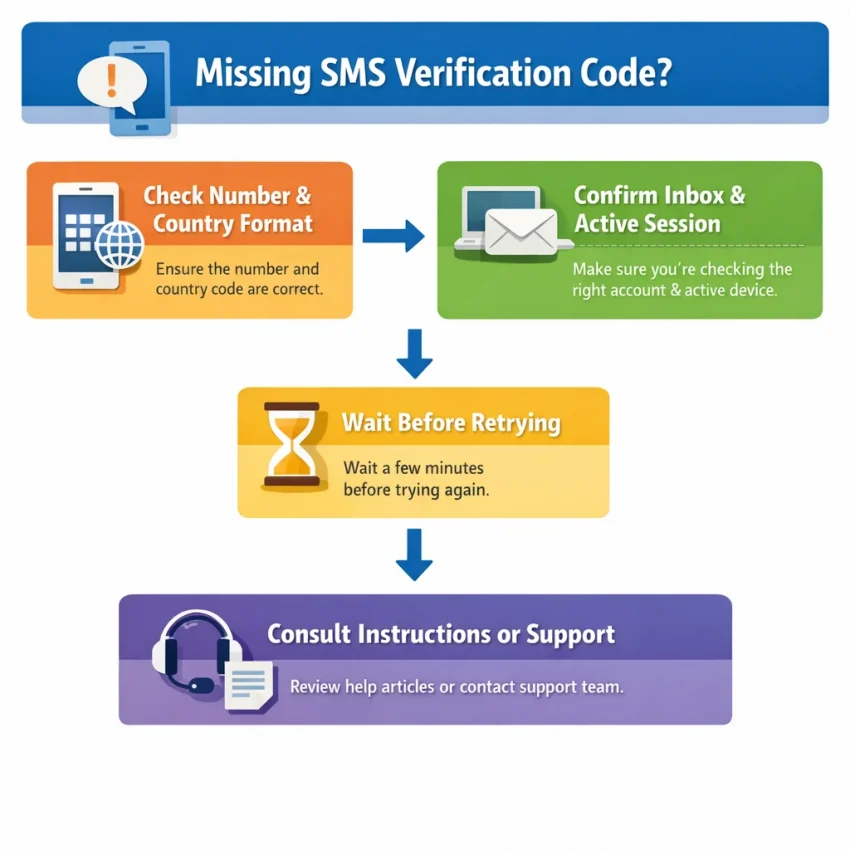
If an SMS verification code is not received, avoid requesting several more codes straight away. Check the number and inbox first, then follow the platform’s waiting instructions. These steps may identify a simple mistake, but cannot guarantee that a platform will send or accept a code.
1. Confirm the number and inbox
Compare the number on the verification screen with the number you entered, digit by digit. Check the country calling code and follow the format shown by the service. Some forms add a country code automatically; entering it again can produce an incorrect number. Do not add or remove a leading zero unless the instructions tell you to.
Open the inbox associated with that exact number. With a free number to receive SMS, the message may appear on a public webpage rather than on your own phone. Make sure you are viewing the correct number’s inbox, refresh it once, and look for a recent message from the relevant service.
If you are using a number with a limited session, confirm that it is still available for the current attempt. An inbox you viewed earlier may not be linked to your active verification session.
2. Wait before requesting another code
Give the platform time to process the request. Follow any countdown or wait instruction shown on the verification screen. Repeatedly selecting “send code” may create overlapping requests, invalidate an earlier code, or trigger a temporary limit.
Before requesting another code, check whether the original one arrived. If you receive multiple codes, use the newest valid code for the active request, following the platform’s instructions. Never share a verification code with someone claiming they need it to troubleshoot your account.
3. Retry carefully, then stop
Before retrying, check the number format, the correct inbox, and whether the platform permits another request. Keep the same active verification session unless the platform instructs you to restart it. If the inbox remains empty or the platform displays a limit or rejection, stop. More attempts may not resolve a restriction and could delay verification.
Read the platform’s troubleshooting instructions and use its approved support or recovery route. For questions about SmsPva setup or a number there, consult SmsPva Help.
Fix number rejection, expired sessions, and repeated-code errors
Different error messages point to different problems. “Number not supported” suggests an eligibility restriction. “Code expired” usually means the code or session timed out. “Too many attempts” signals a temporary limit. Requesting more codes will not fix every issue.
If the platform rejects the number
Check that you selected the correct country and followed the number format requested. If those details are right, the service may not accept public, shared, virtual, or previously used numbers. Rules vary by platform and can change, so a number accepted elsewhere may not work here.
Read the platform’s current eligibility rules. If it permits the number type, you can make one careful attempt with a number intended for that service. Do not switch countries repeatedly or try to disguise a number to get around a restriction. If the platform says the number is unsupported, use a method it allows or contact its support team.
If the code expires or the session ends
Codes are usually tied to a specific request and session. A code from an earlier attempt may stop working after a resend, a closed verification screen, or an expired session. If a code arrives late, confirm that you are still on the same verification step and follow the platform’s instructions for using it.
If the session has ended, start a fresh attempt only when the platform allows it. Check that you are monitoring the inbox linked to the current number and session. Do not use an old code or enter a code into a different account flow.
If you reach an attempt limit
Stop retrying when you see a limit or cooldown message. Wait for the period stated by the platform, if one is given, and follow its instructions before trying again. When another attempt is allowed, recheck the number, country format, and active session. Do not cycle through numbers to bypass a restriction.
Understand privacy and account-recovery trade-offs
Before using a free SMS phone number, consider who can access its messages and whether you will need the number again. Public inboxes and temporary numbers may suit a low-risk, short-term task, but they can create privacy and recovery problems. Check the account provider’s rules before choosing one.
Public inboxes can expose codes
Some online SMS services show incoming messages in a shared inbox. If other people can view that inbox, they may also see a code sent to the number. Treat verification codes as private, even when the number is publicly listed.
Check whether messages are visible to others and whether you control inbox access. If you cannot confirm that access is private, avoid using the number for sensitive accounts. Numbers can also be shared or reused over time, so do not assume that a number or its message history will remain available to you.
Plan for future recovery
Account recovery may depend on accessing the same phone number later. If a temporary number expires or becomes unavailable, you may not receive a password-reset code. For accounts you expect to keep or use for important communication, consider a number you control long term, if the service allows it.
Where available, add other recovery options, such as a recovery email or an authenticator method, and store backup codes securely. A virtual number is not automatically a long-term recovery number. Confirm what access the workflow provides and whether the platform permits that number type.
Avoid public or temporary numbers for banking and other sensitive accounts. For any account where losing access would be costly, prioritize a recovery method you can continue to use.
When to move from a free number to SmsPva
Consider another workflow when a public inbox is unavailable, its messages are visible to others, or a platform rejects that number type. SmsPva provides virtual phone numbers for SMS verification and OTP receipt, with service-specific options to review. Start at Receive SMS online and check the choices shown for your intended use.
First, check the account provider’s current rules. Some services restrict virtual or temporary numbers. Do not use another number type to get around a restriction; if the provider does not permit it, choose an approved verification method instead.
Check the live service and country options
If the workflow is allowed, review the relevant SmsPva service page and the country options currently displayed. Availability can change, so do not assume a particular country or number will be available. Choose only from the live options shown for the service you intend to verify.
For example, if you need Signal and the platform permits a UK number, review Signal SMS verification and the current listing for Signal verification in Unt. Kingdom. Check the live options before proceeding; this example does not mean the same options or conditions apply to other services.
Enter the number as presented, including its country code where shown. Monitor the inbox associated with that selection and keep track of the active verification session. If the platform refuses the number, do not keep cycling through numbers to defeat its checks.
A service-specific workflow may make an allowed attempt more organized, but it cannot control the platform’s acceptance rules or SMS delivery. Treat the displayed choices as options to review, not a promise of successful activation.
A safe, step-by-step verification workflow
- Check the rules. Read the account provider’s current verification guidance. If it does not permit your chosen number type, use another allowed method.
- Select the intended service and country. If considering SmsPva, check the live options before proceeding. Do not assume a particular country or number is available.
- Enter the number exactly as shown. Preserve its country code and follow the provider’s format instructions.
- Request one code and monitor the right inbox. Keep the verification screen open and watch the inbox or session linked to your selected number.
- Wait, then follow the provider’s instructions. If the code does not arrive, check the number and inbox. Avoid rapid repeat requests.
Stop if the platform rejects the number, reports that it has been used, or says the session has expired. Start a fresh session only if the platform allows it. A new number does not guarantee acceptance or delivery.
A free number may be sufficient for a low-stakes task if the service permits it and you accept the shared-inbox limitations. Consider a service-specific virtual-number workflow when a public inbox is exposed, unavailable, or unsuitable for an allowed attempt. For important accounts or future recovery, use a number you can keep accessing if the provider requires it.
Frequently asked questions
Why does a free SMS phone number sometimes not receive a verification code?
The number may be shared or unavailable, the inbox may update slowly, or the platform may not accept that number type. Network or service issues can also delay a message. Check the number, country format, and correct inbox before trying again.
What should I check before requesting another SMS code?
Confirm the number and country code, open the inbox linked to the active attempt, and follow any waiting instructions. Check whether the original code arrived before requesting another. Repeated requests can trigger limits or invalidate earlier codes.
Why would a service reject a free or virtual phone number?
The service may restrict public, shared, virtual, or previously used numbers. It may also limit certain countries or number categories. Follow the provider’s eligibility rules rather than trying to bypass a rejection.
Are public SMS inboxes private?
Not necessarily. Some public inboxes let other visitors view incoming messages, including verification codes. If you cannot confirm that access is private, avoid using one for sensitive accounts.
Can I use a virtual number for account recovery?
Only if the account provider permits it and you can maintain access when recovery is needed. Temporary numbers may become unavailable, so they can be a poor fit for accounts you need to keep. Check recovery options before registering.
How do I choose a service-specific number on SmsPva?
Check the live options for the intended service and country, and confirm the account provider permits that number type. Enter the number as shown and monitor its associated inbox. Availability and acceptance can vary.
Does SmsPva guarantee that every verification SMS will arrive?
No. SMS delivery and platform acceptance are not guaranteed. The platform’s rules, the verification session, and delivery systems can all affect whether a code arrives and works.