

Rent SMS in 2026: What It Means and When a Rental Makes Sense
To rent SMS means using a virtual phone number under a provider’s stated rental terms to receive SMS messages. You do not own the number. Instead, you select an available option for a defined rental period or arrangement, then follow the provider’s instructions to check for incoming messages. The access period and conditions depend on the live listing, so review those details before starting.
People may consider SMS number rental when they need a verification message for an account they are authorized to create, or when they are testing a product flow that depends on SMS. It can also help separate a test workflow from a personal phone number. Whether it fits depends on the target service’s rules, its acceptance of virtual numbers, and the rental terms shown at the time.
Rental versus a one-time SMS number
A one-time SMS number is generally intended for a single verification transaction: choose an available number, request a code from the service, and check the provider’s page for the incoming SMS. It may suit a task where you expect to verify once and do not need a rental arrangement. Do not assume the number or message will remain accessible after that transaction; check the provider’s displayed terms.
A rented number is offered through a rental workflow with its own stated duration and conditions. That may be more appropriate when your authorized task requires a rental period rather than a one-off activation. A rental does not automatically mean you can receive unlimited messages, keep the number indefinitely, or use it for account recovery. The listing and service rules determine what is permitted.
For example, if you are testing an SMS-dependent feature in an application you manage, a rental may fit if the displayed terms cover your test window. If you only need to complete one legitimate sign-up verification, a one-time option may be enough. Compare the actual terms rather than assuming one format includes longer access or repeat messages.
When to consider a rental
Before choosing, confirm that the account or test is yours to manage and that the service permits the verification method. Then check the rental duration, listed conditions, current availability, and price on the live page. Availability and service requirements can change, and a virtual number may not be accepted by every platform.
Do not use a rented number to evade a service’s rules or access an account you do not own. For sensitive accounts, consider whether a temporary number suits your security and recovery needs; it should not replace a dependable recovery method. Rely on the current SmsPva page and rental terms—not assumptions—when deciding whether to proceed.
Before You Rent: Check Eligibility, Service Support, Country, and Rental Terms
A quick preflight check can help you avoid choosing a rental that does not fit your account setup. Before paying or starting a rental, confirm that the target service permits verification with a virtual number and that the option shown matches your intended use. SmsPva provides virtual numbers for SMS verification; start by reviewing its Receive SMS online information and current options.
Use a rented number only for an account you are authorized to create or for a legitimate test. The target service’s rules still apply, and some services may restrict virtual numbers or apply additional checks. If the service requires a personal number, or its terms prohibit the method, choose another permitted verification route.
Match the service and country to your account setup
Start with the exact service you need to verify. A listing for one service should not be assumed to work for another, even if both send standard SMS codes. Then consider the country relevant to your account and verification flow. Follow the target service’s country requirements; do not select a country simply because a listing appears available.
Check the service and country together on the live page. Number availability can vary, and a country listed for one service may not be listed for another. If your intended combination is missing, do not treat a different combination as an equivalent substitute. Review the available choices again later or use a verification method accepted by the target service.
For example, if you are setting up an account that legitimately uses Signal, check the current Signal rental options and make sure the country choice fits your circumstances. Neither a service listing nor a country label guarantees that the target platform will accept a number. Treat the listing as a current option to evaluate, not a promise of successful verification.
Review the rental terms and live listing details
Before starting, read the conditions shown for the specific rental. In particular, check:
- Rental duration: Note how long the rental is available and when that period begins, as described on the page.
- Included use: Review what the listing says about receiving messages or using the number. Do not assume a rental includes more access or time than its displayed terms specify.
- Price and availability: Confirm the current amount and whether the option is available before proceeding. Prices and stock can change; an old screenshot or search result may no longer reflect the live page.
- Conditions or limits: Read any service-specific instructions, restrictions, or other conditions presented with the option.
Compare the displayed rental details with your actual need. If you only need a single verification message, make sure you understand what the rental offers before choosing it. If you need access over a particular period, confirm that the listed duration and terms suit that purpose. Do not infer a rental price from a separate single-SMS listing.
Proceed only if the method is permitted and the live service, country, duration, and price make sense for your use. Availability and acceptance can change, so rely on the current SmsPva page and the target service’s latest rules.
How to Rent an SMS Number on SmsPva: The Core Workflow
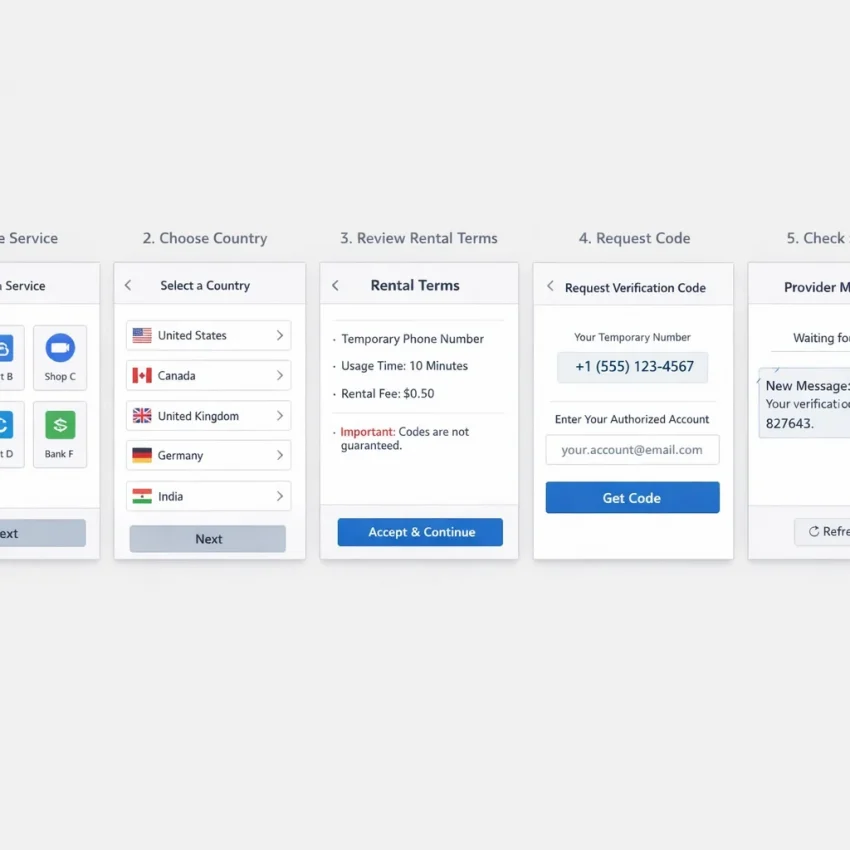
SmsPva’s rental process lets you select a service and country, review the live rental details, and use the number for an authorized verification flow. The exact labels, options, and availability can change, so treat the current page as the source of instructions rather than relying on a fixed menu path.
1. Open the rental option and choose what you need
- Open SmsPva’s rental page. Start from the site and locate its current SMS number rental option. If Signal is your target service, use the Signal SMS verification information as a service-specific starting point, then check the current rental options.
- Select the service. Choose the service where you are authorized to create or verify an account. Check the selection carefully: a number listed for one service may not be intended for another verification flow.
- Select a country. Pick a country that suits your legitimate account needs and the target service’s requirements. Confirm the live listing before proceeding; do not assume a country or number will always be available or accepted.
These choices matter because the target platform controls whether it accepts a virtual number. If the account flow requires a particular region or verification method, check its rules before starting. A rental cannot override those requirements.
2. Review the live details before proceeding
Before you commit, read the details displayed for the selected rental. Check the stated duration, applicable conditions, and any other information the page provides. Make sure the option matches how you plan to use the number. Do not infer how long access lasts or whether further messages are included unless the current terms say so.
Also review the price shown for that specific rental. Prices and available options can vary, and a single-SMS listing is not automatically the same as a rental offer. Use the amount and terms shown on the live rental page; do not rely on old screenshots or a price quoted for a different service or country.
If the details are unclear, pause and consult the current page guidance before proceeding. Check the actual instructions instead of selecting an option based on a guessed label or assumed duration.
3. Request the code and monitor the rental flow
- Proceed using the page’s instructions. Follow the current on-page steps to start the rental. Interface wording may change, so use the controls and explanations actually presented.
- Open the target service. Start its verification process when you are ready to receive the message. Enter the rented number in the format the service requests, then request the code once.
- Check SmsPva for the incoming message. Keep the rental page available and follow its status or message display. When a code arrives, enter it into the authorized account flow according to the target service’s instructions.
If no message appears, confirm that the target service sent a code and that you selected the intended service and country. Check the rental status and stated duration, then allow a reasonable amount of time within those terms. Avoid repeatedly requesting codes in quick succession; the target service may apply limits, and repeated attempts may complicate the process.
Use a rental only for an account you are allowed to create or verify. Follow both the target service’s rules and SmsPva’s current terms. A rented number is not a substitute for a recovery method you control, and it may not suit an account that depends on long-term access. If the page’s instructions or status are unclear, check the available support guidance rather than assuming the code will arrive or that the rental includes further access.
Choosing a Service and Country: A Signal Example
When you rent an SMS number, choose the service first, then check which country options are currently listed for that service. The right choice depends on your legitimate account needs and the target service’s verification rules. A number being listed does not guarantee that the service will accept it or deliver a code.
Start with the service you need
For Signal SMS verification, review the current service information and any rental-specific listing before proceeding. Confirm that you are setting up an account you are authorized to create and that using a virtual number fits Signal’s current requirements. If the service’s instructions call for a particular verification route, follow those rather than choosing a number based on convenience alone.
Keep the service selection consistent throughout the process. A country listing for one service should not be treated as evidence that the same number will work with another service. Availability and acceptance can change, so check the live page close to the time you plan to request the code.
Match the country to your needs
Choose a country based on your account setup requirements, not on an assumption that one country is more reliable. For example, if the United Kingdom is appropriate for your account flow, check the current Signal rental listing for the United Kingdom. Review the displayed terms, price, and availability before proceeding. These details may vary, and the listing does not guarantee that Signal will accept a particular number.
Before you rent SMS by country, use this quick check:
- Confirm that the selected service and country match your intended account setup.
- Read the current rental duration and any conditions shown on the listing.
- Check the live price and availability for the rental itself.
- Make sure you can access the SmsPva rental flow while requesting the verification message.
Do not assume that a price shown for a single-SMS option applies to a rental. API price snapshots for Signal single-SMS options are not rental quotes. Use the current rental listing to assess cost, and do not rely on an old price or availability detail. Once you have confirmed the service, country, and rental terms, proceed only if they suit your needs and the target service’s rules.
Managing the Rental: Receiving Codes, Timing, and Account Security
Once you start a rental, keep the SmsPva rental page available so you can check its current status and look for incoming messages. Follow the instructions shown there; page labels and workflows can change. Before requesting a verification code, make sure you are ready to receive and enter it. This helps avoid requesting a message before you can use it.
On the service you are authorized to use, enter the rented number in the format requested. Check the country code and digits before submitting. Then request the SMS once and return to the SmsPva rental flow to monitor for the message. When a code arrives, enter it promptly in the target service, following that service’s instructions. Do not share the code or enter it on a page you did not intend to use.
Use the rental within its displayed terms
Check the rental duration and any other conditions shown before you begin, and keep them in mind while waiting. A rental’s terms determine the period and access conditions; do not assume a number will remain accessible beyond what the page states. If you need to receive another message, first check whether the displayed terms and current status support that use. Do not assume every rental accepts multiple messages or remains available for a particular period.
Allow a reasonable amount of time within the stated terms for the service and SmsPva flow to update. Avoid rapidly requesting codes again and again. Repeated requests can create confusion or trigger verification limits set by the target service. If you are unsure whether a request went through, check the service’s confirmation and the rental page status before trying again. These checks help you manage the workflow without assuming delivery is guaranteed.
Keep account security in view
A rented SMS number can be useful for a legitimate verification step, but it is not a substitute for a reliable account recovery method. Consider what would happen if you later needed to prove ownership, reset a password, or receive a security alert. Add recovery options that you control, such as an approved email address or another method offered by the service. Keep recovery details current and store backup codes securely if the service provides them.
For sensitive accounts—especially those holding financial, private, or work information—a temporary or shared-number workflow may not be appropriate. Review the target service’s rules and the rental terms before proceeding. Some services may restrict virtual numbers, and using one does not override their policies. Use a rented SMS number only for accounts you are authorized to create or verify. Never use it to evade platform rules, impersonate someone, or gain access to an account you do not own.
Keep the rental page accessible, request a code only when ready, and check the displayed terms rather than relying on assumptions. Treat the number as one part of a carefully managed verification step, not as a permanent contact channel. Choosing recovery methods you control helps protect the account after verification.
Troubleshooting: What to Do If the SMS Does Not Arrive
If an SMS verification code does not appear, pause before requesting another one. First check that the service, country, and rental details match the account flow you are completing. Then confirm the target service actually sent a code. These checks can help identify a selection or request issue, but they cannot guarantee delivery: services may delay or reject virtual numbers, and availability can change.
Check the request and rental status
- Verify your selection. Review the service and country shown for the rental. Make sure they match the verification flow you started. If you selected the wrong option, follow the current SmsPva page instructions rather than assuming it can be changed.
- Confirm the code request. Return to the target service and check whether it accepted your phone number and submitted a verification request. A screen that still asks you to enter a number may indicate that the request did not go through.
- Review the SmsPva rental page. Check the current rental status and any message or instructions displayed there. Keep the relevant page available while you wait, and follow the rental duration and conditions shown for your selection.
- Allow time within the stated terms. If the request was accepted, give the process a reasonable interval within the displayed rental period. Do not assume that a code will arrive within a fixed time.
Enter a received code only in the account flow you initiated and are authorized to use. If it has expired, follow the target service’s instructions before making another request.
Avoid repeated attempts and escalate unclear cases
Rapidly requesting new codes can create confusion, trigger limits, or make it harder to tell which request a message belongs to. Avoid repeated attempts while an earlier request is pending. If you try again, follow the target service’s guidance and the current rental terms.
Some services apply their own verification limits or may reject a virtual number. If the service reports that the number is unsupported, repeated requests may not resolve the issue. Review the service’s permitted verification methods and choose an option that complies with its rules.
If SmsPva’s rental status or on-page instructions are unclear, consult SmsPva Help. Include the relevant service, country, and status details when seeking guidance, but avoid sharing passwords or account recovery information. Support can help clarify the page or terms; it does not ensure that a particular SMS will arrive or that a service will accept the number.
Is SMS Rental Right for You? A Short Decision Guide
The right option depends on what you need the number to do, not just on receiving one code. Before renting SMS access, consider how long you may need the number, the target service’s rules, and the importance of keeping the account secure. Check the current SmsPva rental terms and listing details before deciding; availability and conditions can change.
Match the option to your use
| Option | May suit you when | Check first |
|---|---|---|
| Personal number | You are setting up an important account you expect to keep and need a dependable recovery route tied to you. | Use a number you control, and set up the service’s recommended recovery options. |
| One-time SMS number | You need a single verification message for an authorized task and do not expect to reuse the number. | Confirm the service accepts virtual numbers and review the listing terms. |
| SMS number rental | Your legitimate task may require access beyond one message, and the displayed rental conditions fit that need. | Check the stated rental period, included access, current availability, and service compatibility. Do not assume a rental can receive multiple messages unless its terms say so. |
A rental is not automatically better than a one-time option. If one authorized verification is all you need, a single-use workflow may be more appropriate. If you need a number for an account you rely on over time, a personal number you control is generally the clearer choice.
Use caution with sensitive accounts
A virtual phone number for verification may be unsuitable for banking, work, healthcare, or other sensitive accounts. A rented number is not a substitute for a recovery number you control. A service can also reject virtual numbers or restrict verification under its own rules. Do not use a rental to bypass those rules, create accounts you are not authorized to access, or verify someone else’s account.
If SMS rental fits your authorized use, compare the live service and country options with the stated terms before proceeding. SmsPva provides virtual numbers for SMS verification; review its current options as a starting point. Treat displayed details as current listings, not promises of availability, acceptance, or delivery.
Quick decision: choose a personal number for long-term account ownership, a one-time number for a single authorized code, or a rental only when its stated terms match your actual need. If you cannot confirm compatibility or understand the rental conditions, pause and check the target service’s guidance before continuing.
Frequently Asked Questions
What does it mean to rent an SMS number?
It means using a virtual number under the provider’s stated rental terms to receive SMS messages. The duration and conditions depend on the current listing.
How do I rent an SMS number with SmsPva?
Choose the supported service and country, review the live rental terms and price, then follow the current page instructions. Request a code through the authorized service and check the SmsPva rental flow for the incoming message.
What is the difference between a one-time SMS number and a rental?
A one-time option is generally intended for a single verification transaction. A rental has its own stated duration and conditions. Check the listing rather than assuming either option includes continued access.
Can a rented number receive more than one SMS?
That depends on the specific rental terms and current status. Do not assume repeat messages are included unless the listing says so.
Why might a verification SMS not arrive?
The request may not have gone through, the service and country may not match, the rental may not be active, or the target service may delay or reject virtual numbers. Check the request and current rental status, and avoid rapid repeated attempts.
Can a service reject a virtual number?
Yes. A target service may restrict virtual numbers or apply its own verification limits. Follow its current rules and use another permitted method if needed.
How should I choose a country for SMS verification?
Choose a country that fits your legitimate account setup and the target service’s requirements. Confirm the service-country combination and its live rental terms before proceeding.
Are SmsPva prices and availability fixed?
No. Prices and availability can change. Check the current listing for the specific service and country, and do not treat a single-SMS price as a rental quote.