

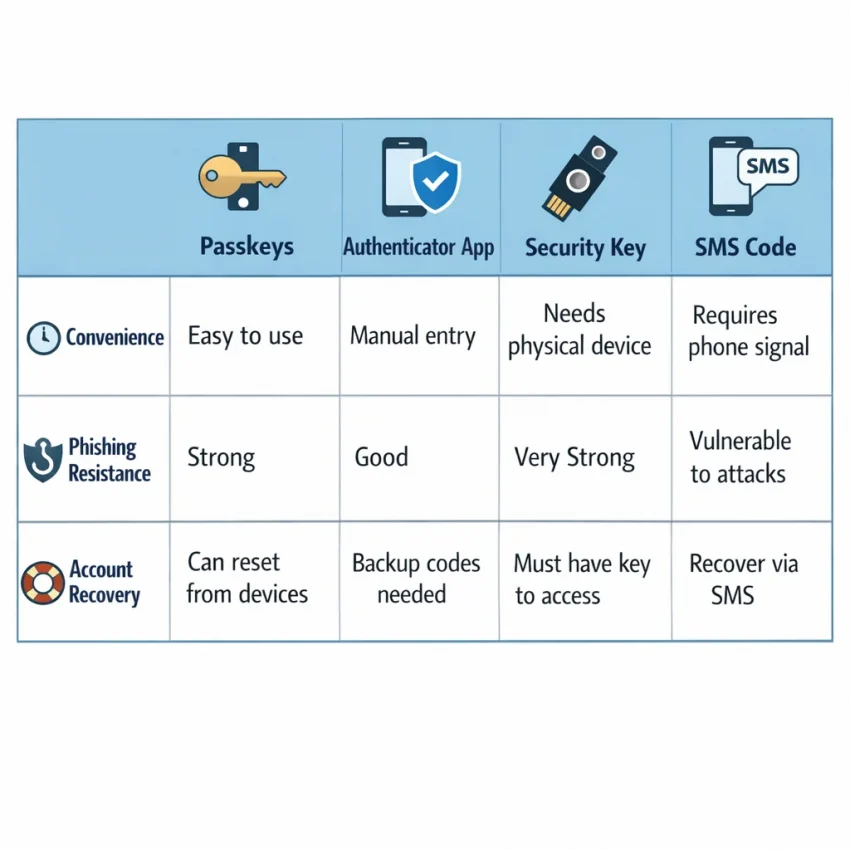
Choosing the right 2FA online setup means balancing account security, convenience, and recovery. Passkeys, authenticator apps, and security keys can offer durable protection. SMS may suit a permitted one-time phone check, but it is not always a dependable long-term factor.
This guide compares the options and gives you a practical setup workflow. It also explains how SmsPva may fit a specific SMS verification need—without replacing a lasting sign-in method or recovery plan.
What “2FA online” means—and what it protects against
Two-factor authentication (2FA) asks for a second kind of proof when you sign in. Instead of relying only on a password, an account may also require something you possess, such as a registered security key or phone. The goal is to make a stolen password alone less useful to an attacker.
Factors are often grouped as something you know, have, or are. A password is something you know. An authenticator code or security key can demonstrate possession. A fingerprint or face scan may unlock a device or credential, but biometric checks are usually tied to that device.
Not every SMS code is 2FA. A service may ask for a code once to confirm a phone number during sign-up. That is a phone verification check, not necessarily an ongoing sign-in factor. SMS-based 2FA asks for a code during later sign-ins, often alongside a password. Check the account’s security settings to see what protection is enabled.
What 2FA can—and cannot—do
A second factor can block many attempts that rely on a password alone, including some attacks using passwords exposed elsewhere. But 2FA does not make an account invulnerable. Attackers may target recovery channels, trick people into sharing codes, steal an active session, or compromise a device.
Services may offer passkeys, authenticator apps, physical security keys, or SMS codes. A passkey can replace a password rather than simply add a second step. An authenticator code or security key may be requested after a password. The label alone does not tell the whole story: enrollment, everyday use, and recovery all matter.
There is no single best choice for every account. A primary email or financial account deserves durable protection and a recovery plan you control. The practical goal is to use the strongest supported method you can maintain—and know how you will regain access if a device is lost.
Choose the right 2FA method for each account
Match the method to the account’s importance, the service’s supported options, and your ability to recover access. Ask three questions: Can someone trick you into giving away the factor? What happens if you lose your device or key? Can you add a backup method?
Compare security and everyday usability
| Method | Useful strengths | Trade-offs to consider |
|---|---|---|
| Passkeys | Designed to resist phishing and often easy to use. | Check how the service handles syncing, device changes, and recovery. A passkey may replace a password rather than act as a separate second factor. |
| Authenticator apps | Generate codes on your device and work without mobile reception. | Codes can still be phished. Plan how to transfer or recover the app if you replace or lose your phone. |
| Hardware security keys | Physical keys can provide strong phishing resistance. | You must carry and protect the key. Check whether the service supports a backup key or another recovery method. |
| SMS codes | Familiar and straightforward when a service requires a phone check. | More exposed to risks such as SIM swaps, number reassignment, and message interception. A temporary number may not remain available. |
Passkeys are often a strong, convenient choice when a service supports them. Authenticator apps are a practical option and generally preferable to SMS when both are available. A hardware key can suit accounts where phishing resistance is especially important. SMS may still be useful when a service requires it or offers no practical alternative.
Match the method to the account
Protect your primary email account with the strongest method it supports. Email often controls password resets for other services, so losing access can have wider consequences. For banking, work, or accounts containing sensitive data, review the service’s security settings and favor phishing-resistant sign-in options where available.
An authenticator app may balance protection and ease of use for lower-risk accounts. SMS can work as a fallback or required check, but a phone number is not automatically a durable recovery option. Before choosing, check the service’s rules and learn what happens if you lose your device.
The useful question is not only “Which factor is strongest?” It is also “Which strong factor can I keep available, and what safe alternative will work if I lose it?” Avoid making one device or number your only route back into an important account.
A safer 2FA online workflow, from setup to recovery
Good online two-factor authentication involves more than switching on a code prompt. Start with the accounts that control your other logins, test each change, and confirm you can regain access if a device is lost.
Secure the account that unlocks the rest
- Protect your primary email first. Use a unique, strong password and enable the strongest sign-in method your provider supports. Review recovery contacts and remove options you no longer control.
- Check the account’s security settings. Review its current options for passkeys, security keys, authenticator apps, and SMS OTP. Read the recovery instructions before choosing.
- Choose a factor you can maintain. Consider device loss, travel, and how you will sign in on a replacement phone. For especially important accounts, use a durable method and add a supported backup where practical.
Enroll the factor through the service’s official app or website. Scan an authenticator setup code only in your authenticator app. Never share a login code or setup secret with someone who contacts you unexpectedly.
Enroll, test, and store a backup
- Test the new method before ending your session. Where possible, use another trusted device or a private browser window to confirm it works. Keep your existing session open until the test succeeds. If sign-in fails, follow the provider’s official recovery instructions.
- Save backup codes separately. If the service provides one-time recovery codes, store them somewhere secure and accessible without your phone. A password manager or locked physical location may suit your situation. Treat each code like a password, and replace the set if it is exposed.
- Configure recovery methods you control. Keep recovery email addresses and phone numbers current. A temporary number should not be your only route back into an account.
Backup codes are a fallback, not a replacement for your normal factor. Check whether generating a new set invalidates older codes, and update your stored copy when needed.
Review access after device changes
- Review devices and active sessions. Remove devices you no longer use and sign out of sessions you do not recognize.
- Plan for a phone change. Before wiping or trading in an old phone, transfer your authenticator or passkeys using the provider’s supported process. Confirm that the new device can sign in and keep backup codes available during the change.
- Revisit settings after a security alert. If a device is lost or you notice suspicious activity, use the provider’s recovery process. Review active sessions once you regain access.
Keep a short checklist for important accounts: selected factor, backup-code location, recovery contact, and the last time you tested access. Review it after a device change and periodically for critical accounts.
When online SMS verification makes sense—and when it does not
SMS verification online can be useful when a service requires a phone check or you need a code for a permitted, one-time sign-up or activation. It is familiar and does not require an authenticator app. But receiving a code once does not mean you have enabled ongoing 2FA.
Before using SMS OTP, check what the service is verifying and whether it will use the number for later sign-ins or recovery. If the number becomes an ongoing account factor, you need reliable access to it. Choose a passkey, authenticator app, or security key for lasting protection when the service supports one.
Good fits for a one-time SMS code
A virtual phone number for SMS verification may suit a short-term, permitted workflow where you want to keep your personal number separate. If a service’s rules allow virtual numbers, an online service such as SmsPva may be an option for receiving the code. Acceptance and availability depend on the target service and the live offering.
Keep the purpose narrow: use the number only for a verification you are authorized to complete. Do not assume that receiving one code gives you lasting access to the number or account. If a service requests another code later, a temporary or shared-number arrangement may not let you receive it.
Know the security and recovery limits
SMS is generally less resistant to account takeover than phishing-resistant passkeys or security keys. Criminals may target a phone number through SIM swapping, and messages can be exposed through weaknesses in devices or telecom networks. These risks matter especially when an account protects money, identity, or private information.
Do not rely on a temporary number as the only 2FA or recovery method for a bank account, primary email, or another critical account. Losing access could prevent you from signing in, resetting a password, or completing a security review. Use durable factors and keep backup codes somewhere secure.
Some services reject virtual numbers, restrict number types, or require a number you can access later. Review the service’s current terms and security settings. If the platform does not permit a virtual number, use an accepted method instead of trying to work around the restriction.
How to use SmsPva in a permitted SMS verification flow
SmsPva can be an option when you need to receive an SMS verification code online and the platform allows virtual numbers. Treat it as a way to handle a specific SMS check—not as a substitute for a passkey, authenticator app, or reliable recovery method.
Start at SmsPva’s online SMS verification service and check the live page for relevant service options and availability. Availability can change, and the target service decides whether it accepts a number.
Follow the platform’s rules and complete the check
- Confirm the use is allowed. Review the target service’s phone-verification and account rules. Do not use a virtual number to evade restrictions or misrepresent your identity.
- Choose the relevant flow. Review SmsPva’s current options and follow the instructions shown for the service you need. Do not assume another flow will work if the suitable option is not listed.
- Submit the number for the permitted check. Enter it on the target service’s verification screen. The target service decides whether it accepts the number.
- Check for the code. Follow the live SmsPva instructions to receive the SMS OTP. Enter the code on the target service only if it arrives and remains valid. Acceptance and delivery are not guaranteed.
- Finish the account’s security setup. Enable a durable factor the platform supports, save backup codes securely, and confirm your recovery details are ones you can access.
For example, if Signal permits the number type and the relevant flow is available, review Signal SMS verification before starting. Follow Signal’s own rules and prompts; a service page cannot promise that a number will be accepted.
A temporary or shared-access number may not remain available later. Do not use it as the only recovery route for a critical account. If a code does not arrive or the platform rejects the number, follow the services’ instructions and use the platform’s official alternatives rather than trying to bypass its checks.
Troubleshooting, privacy checks, and a final decision checklist
A failed code does not necessarily mean the account or number is unusable. Check the target platform’s current instructions, then confirm that you selected the intended service and country on the live SmsPva page. Availability and acceptance can vary.
If a verification code does not arrive
- Confirm the details. Check that the service, country, and number match the platform’s instructions. Review any formatting or timing requirements.
- Wait before trying again. Avoid rapid repeated requests. Multiple attempts can trigger limits or make troubleshooting harder. Follow any wait period shown by the target service.
- Check the platform’s rules. Some services may reject virtual numbers or limit which numbers they accept. If the platform says the number is unsupported, use a permitted method instead.
- Use official support channels. Consult SmsPva’s live instructions for workflow guidance and the target platform’s help information for account-specific issues.
Protect the code like a password. Enter it only on the service where you started verification, and never share it with someone who contacts you unexpectedly. Consider who may have access to the number or message before using an online SMS workflow.
Final checklist before choosing an SMS workflow
- Account importance: Is this a short-term, lower-risk check or an account where losing access could affect money, work, or identity?
- Platform rules: Does the service permit the number type and verification method? Check its current terms and instructions.
- Factor durability: Can you set up a passkey, authenticator app, or security key for ongoing protection?
- Recovery access: Can you still sign in if you lose access to the number or device? Store backup codes securely and separately.
- Current availability: Have you checked the live SmsPva page for the relevant service and country?
- Privacy: Are you comfortable using this workflow for this account, and can you avoid exposing sensitive information through SMS?
For critical accounts, prioritize a durable sign-in factor and a recovery plan you control. Use online SMS verification only when it fits the platform’s rules and your needs. SmsPva may help with a permitted SMS check, but it cannot guarantee that a service will accept a number or deliver a code.
Frequently asked questions
What is the safest way to use 2FA online in 2026?
Use the strongest method your service supports and that you can maintain. Passkeys and hardware security keys are designed to resist phishing. An authenticator app can also be a practical option. Secure recovery methods and backup codes matter whichever factor you choose.
Is an authenticator app safer than SMS verification?
In many situations, an authenticator app is preferable because it does not depend on a phone number and works without mobile reception. However, its codes can still be phished, and you need a plan for device loss. The best choice depends on the service and your recovery options.
Can a virtual phone number receive an online SMS verification code?
It may receive a code when the target service allows that number type and the relevant number is available. A service can reject virtual numbers, and code delivery is not guaranteed. Check the platform’s rules and the live SmsPva page before proceeding.
Can I use a temporary number as my only 2FA or account-recovery method?
No. Access to a temporary or shared number may not remain available. Do not make it the only sign-in or recovery method for important accounts. Choose a durable factor and keep recovery options you control.
What should I do if an SMS verification code does not arrive?
Check the target service’s instructions and confirm the selected service, country, and number. Wait before retrying, since repeated requests can trigger limits. If the number is not accepted, use an official method permitted by the platform.
Does SmsPva guarantee that a service will accept a number or deliver a code?
No. The target service decides whether it accepts a number, and SMS delivery is not guaranteed. Check the live page for current options and follow both services’ instructions.
What should I save before changing or losing my phone?
Use the provider’s supported process to transfer passkeys or authenticator access before wiping an old device. Keep backup codes somewhere secure and separate, confirm your recovery contacts, and test sign-in on the new device before removing the old one.