

Why ‘phone number free’ searches often lead to verification problems
The search for a phone number free option usually starts with a simple goal: get a code fast, finish signup, and move on. Many sites promise you can receive SMS online with no setup and no cost. The problem is that modern verification systems are built to detect abuse, reused numbers, and public inboxes. What feels convenient to a user often looks suspicious to the platform sending the OTP.
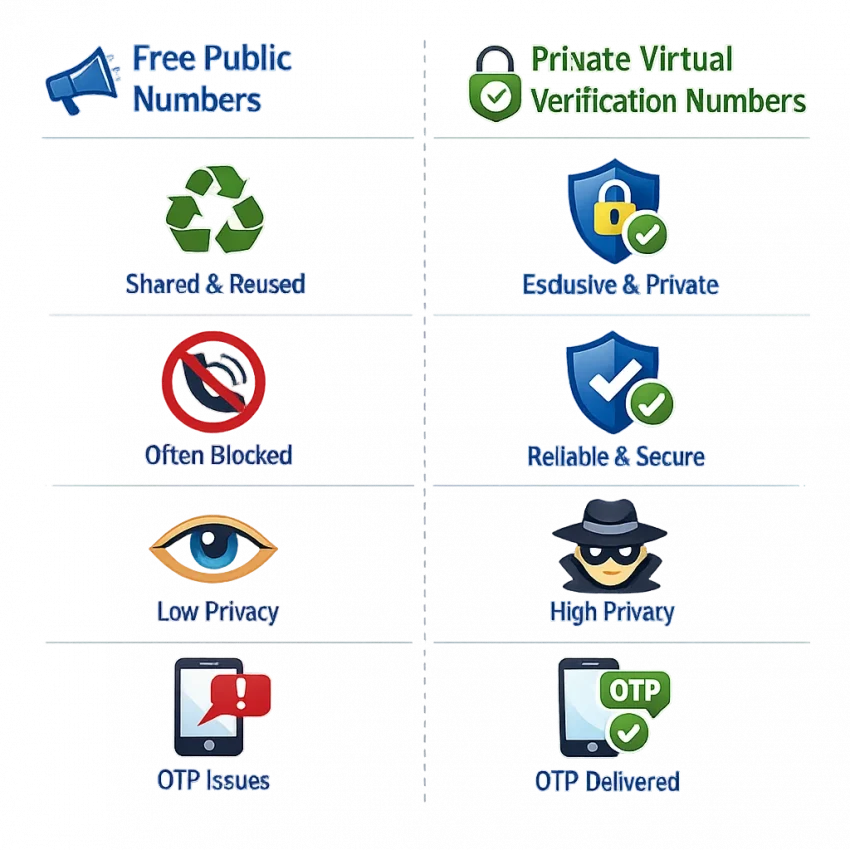
That gap is the core issue. Users expect a free phone number for verification to work like a normal personal number. Most platforms do not treat it that way. Public numbers are often shared by many people, indexed by bots, and reused across countless signups. As a result, the code may never arrive, the number may be rejected instantly, or the account may fail later during review.
This is why so many free-number attempts end in frustration. You are not always doing anything wrong. In many cases, the number itself is the problem.
Why public free numbers fail so often
Most free online numbers are public by design. That means anyone can see incoming messages on the page. If dozens of users have tried to verify accounts with the same number, that number develops a bad reputation. Platforms may block it completely, limit code delivery, or flag it as already used.
There are also basic reliability issues. Some directories list numbers that are old, overloaded, or no longer supported for the service you want. Others do not separate traffic by platform or country, which matters more than many users realize. A number that can receive one kind of message may still fail for a specific OTP flow.
Privacy is another weak point. With public inboxes, you expose verification messages in a space other people can monitor. That defeats the purpose of protecting account access. It also creates confusion when multiple users wait for codes on the same line.
These are classic temporary phone number problems. They directly affect whether a signup or activation can be completed at all.
A better workflow when verification actually matters
If the goal is successful verification rather than endless retries, a controlled workflow is usually better than chasing random free-number lists. SmsPva is built around that practical need. Instead of treating every service the same, it focuses on virtual phone numbers for OTP receipt, account activation, and service-specific verification flows.
That difference matters because verification is rarely generic now. Platforms often check number history, traffic patterns, and regional fit. A more deliberate process gives you a better chance of avoiding the common problems that come with public numbers. It also gives you a cleaner privacy setup than posting your verification attempts into an open inbox.
So the real takeaway is simple: searching phone number free makes sense, but free public numbers are often the reason verification fails. When the code actually matters, the smarter path is to Receive SMS online through a more structured workflow with SmsPva rather than relying on exposed, recycled numbers.
The 7 most common reasons SMS codes never arrive
If your sms verification is not receiving code, the problem is usually not random. Most failed attempts follow the same patterns, especially when people start with a phone number free search and land on public number lists. Those numbers look convenient, but they are often shared, overused, or unsupported by the platform you are trying to verify.
A better approach is to diagnose the exact failure mode first. Instead of grabbing any online phone number for SMS, use a service-specific setup and only request a number when you are ready to receive the code.
1) The number is public or heavily recycled
This is the most common issue. Free online numbers are often visible to many users at once. A platform may see repeated signups from the same number and block it. Even if it is not blocked, someone else may have already requested a code, filling the inbox with unrelated messages.
That creates two problems: you may never get your OTP, or you may not know which message is yours. Recycled numbers are a major cause of virtual number verification issues. A private, purpose-selected number reduces that noise.
2) The service blocks virtual or known public ranges
Some platforms actively filter number ranges tied to abuse, mass signups, or public inbox services. In that case, the code is never sent, even though the signup form accepts the number format. This often looks like otp not delivered, but the real problem is policy filtering on the platform side.
Service-specific pages help because they guide you toward numbers intended for that exact workflow. For example, if you are verifying Signal, start from the dedicated Signal SMS verification page instead of using a generic number first and hoping it works.
3) The country does not match the platform’s expectations
Country selection matters more than many users expect. Some services prefer local or region-matched numbers. Others trigger extra review when your IP, device language, and number country do not line up. A mismatch does not always cause a hard error. Sometimes it simply leads to silent non-delivery.
This is why a random free number from the wrong region often fails. If you are signing up for a service in one market, choose a number that fits that market when possible. The country is not just a formatting detail. It can affect routing, fraud checks, and whether the SMS is sent at all.
4) The number was already used for that service
Many platforms limit how often one number can be used. If the number was previously tied to an account, the service may reject it or suppress a new code. Public free numbers run into this problem constantly because the same number gets reused for the same popular apps over and over.
The result can look confusing. You may see messages such as “number already used,” “try another number,” or no message at all. In practice, this is one of the biggest reasons free phone numbers fail for account activation.
5) The code expired, the session changed, or you requested too many codes
Not every failure comes from the number itself. Timing errors are common. If you refresh the signup page, change devices, request a second code too quickly, or let the first session expire, the platform may invalidate the previous request. Then the next code either arrives late or never matches what the site expects.
Good workflow discipline helps. Open the target service first, confirm the country and number format, request one code, and wait through the normal window before retrying. Avoid jumping between tabs and numbers. Many users create their own delivery problem by restarting the process too early.
6) Anti-abuse systems flag the overall signup attempt
Platforms review more than the phone number. They may score your browser, IP quality, device fingerprint, account behavior, and signup speed. If several signals look risky, the SMS step may be throttled or skipped. That means the issue is not always the number. Sometimes the whole verification attempt is being treated as suspicious.
Typical triggers include repeated retries, multiple accounts from the same environment, or inconsistent location signals. This is another reason random free-number sites perform poorly. They solve only one small part of the process and ignore the rest of the verification context.
7) The setup was too generic from the start
Users often search for the cheapest or fastest free option, then paste that number into any platform. That generic approach causes most virtual number verification issues. A better setup starts with the service you need, the country you need, and the exact step where the code will be requested.
If an attempt fails, do not keep cycling through random numbers. Check the service page, review the steps, and use support documentation when needed. SmsPva keeps that workflow more organized than public number boards, and its Help page is the right place to review setup guidance before burning more attempts.
How to troubleshoot a failed verification attempt before trying again
When an otp not delivered error appears, the worst move is rushing into repeated retries. That often burns attempts, triggers anti-abuse checks, or ties your signup to a bad number history. A better approach is to stop, review the setup, and retry with a cleaner workflow.
This matters most if you started with a free phone number for verification from a public directory, because those numbers are often overused or blocked before your code is even sent.
Run this checklist before requesting a new code
1. Check service compatibility first. Not every platform treats every virtual number the same way. If a public number failed, do not assume all numbers will fail. The issue may be that the number was not suited to that service. Choose the correct service page and review any notes before retrying.
2. Match the country to the account flow. Country mismatch is a common reason users cannot receive SMS online for activation. If the app expects a local pattern, language region, or market-specific signup flow, picking the wrong country can lower your chances. Use the country that best matches the account you are creating.
3. Keep the same active number during the waiting window. Requesting a code and then refreshing the page, changing numbers, or opening several tabs can break the process. The platform may send the SMS to the first number you used while you are already watching a different one.
4. Watch the timing. Some users retry too quickly. Others wait so long that the code expires. If the platform says a new code can be requested after a short delay, follow that timing instead of clicking repeatedly.
If the first retry fails, change the workflow—not just the number
5. Check whether the number may already be tied to prior use. One reason free public numbers fail is reuse. If a service has seen that number on many accounts, it may reject it even before the message stage. In that case, trying another public number often repeats the same problem.
6. Avoid mixing browser states and app states. If you start verification on desktop and then switch to mobile, or log in and out repeatedly, you can create conflicting sessions. Finish the attempt in one clean session where possible.
7. Use the platform-specific help resources. If you are unsure whether you chose the right setup, check SmsPva Help before spending more attempts. A short review of setup guidance is often enough to catch the real issue.
8. Retry with discipline. If the first attempt fails, make one meaningful change at a time: correct service, correct country, fresh order, clean session. Do not change everything at once, or you will not know what fixed the issue.
Most importantly, stop treating verification like a lottery. Public phone number free options are built for convenience, not reliability. If the code matters, use a controlled path with a service-aware workflow on SmsPva.
How to solve these issues with SmsPva instead of random free number sites
If your goal is to receive SMS online for a real signup or account activation, the biggest improvement is moving away from public number lists. Random free number pages usually give you little control. You do not know whether a number was heavily reused, blocked by the platform, or already tied to another account.
SmsPva takes a more structured approach. Instead of hunting through generic inboxes, you start with a service-focused flow built for SMS verification and OTP receipt.
Use the service-specific flow instead of a generic inbox
One of the main advantages of SmsPva is that it is organized around verification use cases, not just raw numbers. If you know the platform you want to verify, start on that service page rather than on a random public number site. This reduces guesswork and helps you avoid using a number type that is a poor fit for that platform’s checks.
Users searching for a free phone number for verification tend to treat every number as interchangeable, but services do not treat them that way. A platform may apply different filters based on country, number history, or abuse patterns. A service-specific page gives you a cleaner starting point.
Reduce retries, protect privacy, and get help faster
SmsPva also helps by making the workflow easier to troubleshoot. When a code does not arrive, users on free sites often just refresh, switch tabs, or grab another public number without learning what failed. That can make the next attempt worse. On SmsPva, you can check the setup more deliberately, confirm you selected the correct service, review the country, and avoid reusing the wrong flow.
This controlled approach is also better for privacy. A public inbox exposes messages to anyone viewing that number. That is a poor fit for account activation, password-related codes, or any private number for account verification. SmsPva is not just about receiving a text. It is about reducing unnecessary exposure while keeping the verification process organized.
In practice, the best workflow is simple. Pick the exact service first. Match the country when it is relevant. Complete the verification without bouncing between multiple public numbers. If the first attempt fails, troubleshoot the setup instead of repeating the same mistake on another free site. That is why SmsPva works better as an SMS activation alternative: it gives you a more deliberate path, not just another number to try.
Service and country fit: why matching the right number matters more than finding a free one
Many virtual number verification issues come from a simple mismatch: the number is real, but it is wrong for the service or wrong for the region. Users searching for a phone number free option often focus only on cost. Verification systems usually care more about fit.
If a platform expects a certain country pattern, filters known public numbers, or checks whether a number has already been overused, a random online phone number for SMS may fail before the code is even sent.
Why service-specific selection helps
Platforms do not all treat virtual numbers the same way. One service may accept a broad range of numbers, while another may be stricter about prior use, carrier type, or country consistency. When you pick a number without matching the service first, you increase the chance of getting no code, a rejected number, or a prompt to try another method.
A better approach is to begin with the exact verification flow you need. If the first attempt fails, check the setup details before retrying rather than switching blindly.
Why country alignment can change the outcome
Country choice matters more than many users expect. A number tied to the wrong region can trigger extra checks, format errors, or silent non-delivery. This is especially common when people try to receive SMS online with whatever free number is available first, even if it does not match the account region or the service’s expected routing.
Signal is a good example. If you specifically need a UK route, use a country-matched page such as Signal verification in Unt. Kingdom instead of choosing blindly. At the time of writing, Signal UK single-SMS options were listed from $0.50 or $0.77, depending on the available route. For the United States, the Signal single-SMS snapshot was listed from $2.01. These are API snapshots, not permanent offers, but they show an important point: a better-fit route can be worth more than wasting time on free numbers that never receive the OTP.
In practice, the best workflow is simple: choose the service first, match the country second, then complete the verification without switching numbers mid-process. That controlled path usually beats random public numbers when account activation actually matters.
Privacy, account safety, and when to use a longer-term number workflow
A phone number free search usually starts as a quick fix, but privacy and account safety depend on the type of verification you need. For a basic signup or one-time code, a virtual phone number for OTP can be enough. The goal is simple: receive the code, finish activation, and avoid exposing your personal number.
That said, many temporary phone number problems appear after the first login. Some platforms ask for another code during password resets, suspicious login checks, or device changes. If you used a random public number, you may not control that second step. That is where a more structured workflow on SmsPva makes more sense than chasing unreliable free-number lists.
When a one-time number is enough
Choose a one-time number when you only need a single verification event and do not expect ongoing SMS prompts. This works best for low-risk account creation, short-lived testing, or isolated signups where recovery is not critical. In those cases, a private number for account verification is still better than a public inbox because it reduces reuse and exposure.
If your workflow involves Signal and you expect repeated checks, a rented option may fit better than single-use activation. See the Signal SMS verification rental path when continuity matters more than one-time access.
When to move to a longer-term workflow
Use a longer-term number workflow when the account matters, recovery matters, or the service often asks for follow-up OTPs. This is common for business logins, backup accounts, region-sensitive apps, or any setup where losing access would cost time.
You may also want more separation between identities. In that case, keep number use isolated and use a controlled verification flow instead of reusing the same details everywhere. SmsPva is the practical option here because it is built around organized verification workflows, not public number recycling.
Best practices to improve SMS verification success going forward
If your goal is more than experimenting with a phone number free search result, treat SMS verification like a setup task, not a gamble. Public numbers are often reused, blocked, or already flagged. That is why users who want account access, privacy, or fewer failed retries usually get better results from a controlled workflow with SmsPva.
Keep your process simple. Start with the exact service flow you need. Choose the correct country. Use a fresh number only for that attempt. Do not refresh the page, switch numbers mid-process, or trigger multiple code requests too fast. Those habits often cause the classic SMS verification not receiving code problem.
It also helps to stop retrying blindly after a failure. If a code does not arrive, review the likely cause first: blocked number type, country mismatch, timing window, or a number that was already used. Then make one clean new attempt with the right setup instead of repeating the same failing pattern.
For most users, the best rule is simple: use free public numbers only for low-stakes testing, and go straight to SmsPva when verification actually matters. That saves retries, reduces confusion, and gives you a more practical path for OTP receipt and account activation.
Frequently asked questions
Why do free phone numbers fail for SMS verification so often?
Most free numbers are public, heavily reused, and easy for platforms to identify. That leads to blocks, prior-use conflicts, and missing OTPs.
Can I receive OTP codes with a public online phone number?
Sometimes, but reliability is low. Public inboxes are better for low-stakes testing than for important account verification.
What should I do if the verification code never arrives?
Check the service flow, country match, session timing, and whether the number may already be overused. Then retry with one meaningful change instead of cycling through random free numbers.
How do I know if a service supports virtual numbers?
Start with a service-specific workflow when available. On SmsPva, service pages help you avoid generic number selection and reduce guesswork.
Does country selection affect whether an SMS code is delivered?
Yes. Country mismatch can trigger extra checks or silent non-delivery, especially when the account region, device signals, and number country do not line up.
When should I use a one-time number versus a rented number?
Use a one-time number for a single OTP event. Use a rented number when you may need repeat verifications, recovery codes, or longer-term access.
Is SmsPva better than using random free phone number websites?
For practical verification workflows, yes. SmsPva offers more control, better privacy, service-specific paths, and clearer troubleshooting than public number directories.
Where can I get help if my verification attempt fails on SmsPva?
Use the SmsPva Help page for setup guidance and troubleshooting steps before making more attempts.