

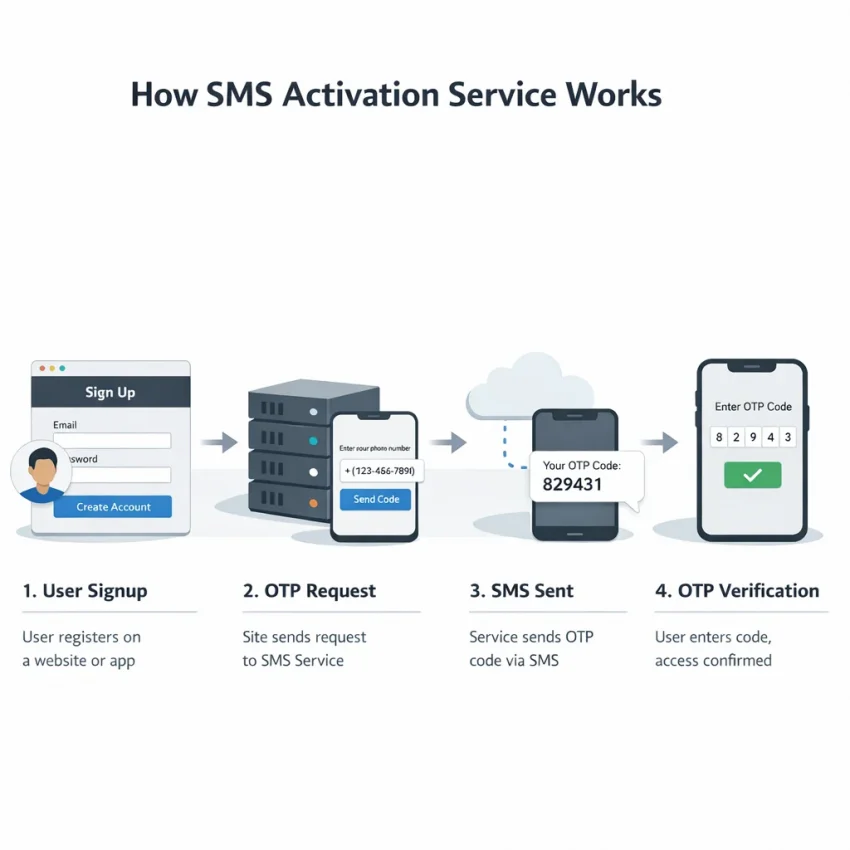
An sms activation service gives you a virtual phone number for receiving one-time verification codes during signups, account checks, and recovery flows. In 2026, this is a practical tool for users who need cleaner OTP handling, privacy-focused registrations, and repeatable service-specific workflows.
Instead of using your personal number for every app, you can use SmsPva to Receive SMS online with a number that matches the verification task. This works well for account activation, OTP receipt, and service-specific signup flows where country and timing matter.
The key is to treat SMS verification as a workflow, not a random number purchase. Choose the right service first, pick the right country second, request the number only when you are ready, then enter the code quickly and accurately.
What an SMS activation service does in 2026 and who actually needs one
An SMS activation service lets you get a temporary or task-specific phone number so you can receive a verification text from a website or app. You select a supported service, choose an available country, request the number, wait for the code, and enter it into the target platform.
This is different from replacing your main SIM. The goal is focused verification. You use a virtual number for SMS verification when a platform asks for an OTP and you want a cleaner, more controlled process.
Common use cases in 2026
The most common use case is account activation. You sign up for an app, it sends a code, and you need a number that can receive it. Another major use case is privacy separation. Freelancers, testers, operators, and researchers often prefer not to attach every registration to a personal line.
There is also a strong service-specific use case. Many platforms handle verification differently by region and service flow. That is why SmsPva works best when you start from the exact service you need instead of browsing a generic number list.
Some users also need repeatable workflows. Support teams, QA testers, and privacy-focused users may need several clean verification attempts over time. In those situations, a dedicated sms verification service is easier to manage than ad hoc personal numbers.
Who should use one, and who should not
You likely need an SMS activation service if you want to receive a one-time code for signup, onboarding, or service-specific verification without exposing your main mobile number. It also helps if you need a structured process for OTP handling across multiple registrations.
You should not treat it as a universal workaround for every app or region. Verification rules vary. Country matching matters. Availability changes. A good result starts with the right service page and realistic expectations.
How SmsPva works: the core workflow from number selection to code receipt
If you want a practical sms activation workflow, start with the exact service you need to verify. SmsPva is designed for that order. First choose the target platform, then review the country options for that service, request a number, and wait for the SMS code.
Start with the exact service
The first step in learning how to use sms activation service tools correctly is choosing the exact service. Many apps validate numbers, timing, and routing differently. A number flow that fits one service may not fit another.
Next, check the country options shown for that service. Country choice can affect compatibility, number format, and how natural the registration looks inside the target app. If the app expects a specific region, match it before you request the number.
Once you have the right service and country, request the number and copy it carefully into the app or website. Submit it once, then stay on the active order screen so you can monitor incoming messages.
Wait for the OTP and avoid unnecessary retries
After you submit the number, wait for the incoming message and watch for the OTP. Enter it quickly. Most verification windows are short, so speed matters.
If the code does not appear immediately, avoid random changes. Do not switch countries mid-process or trigger repeated resends within seconds unless the target app clearly allows it. A steady workflow works best: one service, one country, one number, one active attempt.
How to choose the right service page, country, and number type before you buy
The fastest way to waste a verification attempt is to start with the wrong setup. In an sms activation service 2026 workflow, the order matters. Choose the platform first, review country options second, then decide whether you need a one-time code flow or something longer-running.
Service-specific pages matter because many platforms apply different formatting and acceptance rules to SMS codes. A generic list may look convenient, but it adds guesswork. SmsPva works better when you start from the service you actually need.
Why service and country should be selected together
Country choice affects more than price. It can influence number format, app acceptance, and the consistency of your registration flow. If your profile, app settings, and phone country do not line up, you may create friction before the OTP is even sent.
Signal is a clear example. If your goal is Signal signup, start from the Signal SMS verification page rather than treating it like a generic SMS receipt task.
Pricing can vary by country. At the time of writing, Signal in the United Kingdom was listed from $0.50 or $0.77 depending on the listing, while Signal in the United States was listed at $2.01. These are live API snapshots, not fixed rates or guarantees. If you need a UK route specifically, check Signal verification in Unt. Kingdom before you proceed.
How to think about number type before checkout
Most users should decide between two simple needs: one-time activation or longer-running use. A standard activation flow is best when you need a single code for signup, login confirmation, or a quick privacy-focused registration.
A longer-running workflow may fit better if you expect follow-up checks, staged onboarding, or repeated verification on the same service. The key is not to overbuy. If you only need one code, keep the process simple.
Before checkout, prepare the target app first. Open the signup screen, confirm the country selector, and make sure you are ready to enter the number immediately. Verification windows are often short.
Example workflow: using SmsPva for Signal SMS verification
If you want a concrete example of an sms activation service in action, Signal is a useful one. The right process is simple: prepare the app first, choose the exact service page, match the country when needed, then request the number only when you are ready.
What to prepare before you request the number
Open Signal and get to the phone number entry screen before buying anything. This prevents a common mistake: users request a number, then spend too long updating the app or adjusting settings.
Use a stable connection and confirm Signal is ready to send a code. Decide the country before checkout. If you need a UK route, confirm the live listing on the UK Signal page first. Also avoid repeated retries if you already had failed attempts with another number or setup.
The step-by-step Signal verification flow
Once Signal is ready, select the country and number on SmsPva, then copy the issued number exactly as shown. Paste it into Signal carefully and check the country code twice.
Submit the number in Signal and stay on the active SmsPva order page. Watch for the incoming SMS. When the code arrives, copy it and enter it into Signal immediately.
If the code is accepted, finish the normal Signal setup steps. At that point, the core task is complete: you used a virtual number, received the OTP, and completed verification.
How to reduce failed attempts and wasted numbers
To receive OTP with virtual number access cleanly, minimize avoidable errors. Match the app and service page exactly. Enter the number once, carefully. Do not request multiple numbers in parallel for the same attempt unless you are intentionally restarting.
Keep the session simple. Use one device, one app instance, and one active verification flow at a time. If the SMS does not appear quickly, wait a reasonable moment, then verify that the service and country were selected correctly before you restart.
Common SMS activation problems and how to troubleshoot them with SmsPva
Most SMS activation problems come from timing, service mismatch, or restarting too quickly. If you use the workflow correctly, you can avoid many failed attempts before they happen.
No code received
The most common issue is that the OTP was never sent to the number you activated. This can happen if you chose the wrong service, selected a poor country match, or requested a number before the app was ready.
Start with the basics. Confirm that the app still shows the same phone entry screen. Make sure you entered the number exactly as provided, including the country code. Then check that you selected the matching service page in SmsPva.
If the code does not appear right away, avoid hammering the resend button. Wait through the app’s timer first. If that timer ends and nothing arrives, restart cleanly instead of stacking retries.
Wrong service, wrong country, or expired session
If a code arrives but does not work, the session may have expired, the app may have issued a newer code, or you may be entering a code tied to a different request. This often happens when users switch screens or trigger multiple sends.
Country mismatch is another frequent cause. A number may be technically valid but still a poor fit for a specific registration path. If the app rejects the number before sending any OTP, stop and restart with a better-matched option.
Use this simple logic: keep waiting if the app still shows an active countdown and you made only one send request. Restart if you requested multiple codes, changed screens, or suspect the session expired. Replace the number if the format or country is clearly a poor match.
For platform-specific troubleshooting, use the Help page on SmsPva. It is the right place to review support guidance and decide whether to retry or start fresh. No provider should promise guaranteed delivery for every service, country, or moment, so focus on keeping the workflow clean.
When to use standard activation versus a longer-running number workflow
Most users should start with standard activation. It fits the common workflow: open the target app, request a code, buy a number for that service, receive the OTP, and finish verification. This is the right choice when you need a temporary number for verification and expect only one SMS.
That approach works well for account creation, one-time OTP checks, and privacy separation. If your goal is privacy-focused verification, standard activation keeps the process simple.
A longer-running number workflow matters when verification may continue after the first code. Some services may ask for another SMS during setup, recovery, or a later security check. If you expect repeated checks on the same service, think beyond the first OTP before you buy.
The practical rule is simple: use standard activation for fast, single-use confirmation. Consider a longer-running option only when the same service may require follow-up SMS checks later.
Best practices for safer, cleaner verification workflows in 2026
The safest workflow starts before you request a number. Open the target app first, confirm which service you need, and make sure the verification screen is ready. That reduces timing mistakes and wasted activations.
Next, match the exact service page instead of treating every number as interchangeable. Choose a sensible country for that signup. If the app expects a local-looking registration path, check country choices carefully before you buy.
Keep retries under control. If a code does not arrive, do not spam resend or switch countries mid-flow without a reason. Stop, review the selected service and country, and restart cleanly if needed.
Finally, separate workflows when privacy or account hygiene matters. Use different sessions for different registrations, and only add extra tooling if your broader setup requires account isolation. For most users, the best path is simple: use SmsPva consistently, keep each verification clean, and complete one OTP flow at a time.