

What “phone number free” really means in 2026
The search for phone number free rarely starts with cost alone. Most people want to protect their personal number, finish a signup quickly, or receive a one-time code without using a second SIM. In 2026, that search can lead to very different tools, and they do not solve the same problem.
A “free phone number” may mean a public web number with an open inbox, a limited free trial from a calling app, a disposable number for short-term use, or a paid virtual number designed for OTP delivery. Most users discover the difference only after a code never arrives or the platform rejects the number.
That is why the real goal is not finding something free at any cost. It is finding a verification workflow that is private, usable, and realistic.
Public free numbers, app trials, and verification numbers
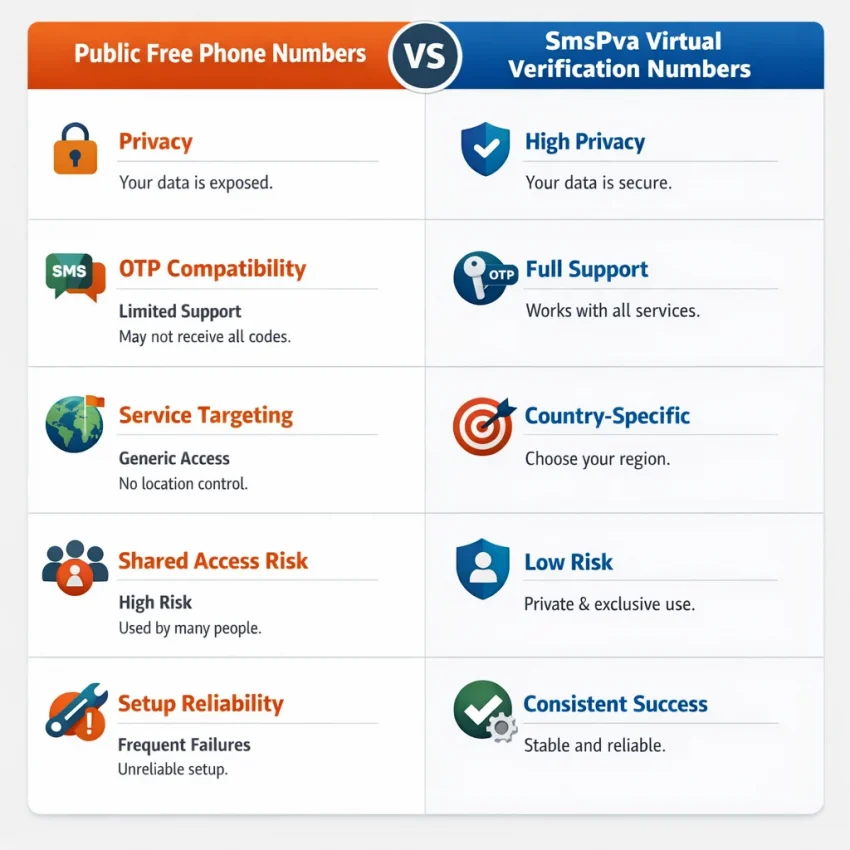
The first category is the public free number site. These numbers are shared, heavily reused, and visible to anyone visiting the page. They may look useful for people searching receive SMS online, but they are poor fits for sensitive signups. If a code lands there, other people may see it too.
The second category is the app-based secondary number or free trial. These can work for casual calling or texting, but verification support is often limited. Some services block those ranges. Others allow signup and fail later.
The third category is the temporary phone number for verification. This is closer to what most users actually need. The number exists to receive a code for a specific task rather than replace your main line long term.
Even then, a generic disposable number may not match the exact platform you want. Many apps now check number history, traffic patterns, and whether a range is commonly used for mass signups. A number may be active and still fail at the last step.
That is why service-specific virtual numbers are more practical in 2026. Instead of browsing random public pages, you choose a workflow built around SMS verification. With Receive SMS online through SmsPva, the goal is simple: receive an OTP without exposing your personal number.
What users are actually trying to solve
Most people searching phone number free are trying to reduce friction. They want a number for one signup, a privacy layer, or a safer way to test a service. That is a workflow problem more than a free-number problem.
So the useful version of this search in 2026 is: “How can I complete SMS verification without using my private number?” Public free numbers answer that badly. A dedicated verification workflow answers it better, and SmsPva is built for that use case.
Why most free phone number options fail for OTP and account verification
People searching phone number free usually want one result: sign up without using their personal number. The problem is that a public free phone number for SMS verification rarely works the way users expect.
The first issue is exposure. A public inbox means other users can often see incoming messages. If your verification code lands there, your privacy is already gone.
The second issue is reuse. Free public numbers are recycled constantly. A platform may detect too many signups, too many failed attempts, or suspicious traffic from the same number. When that happens, the service may reject the number before you even request the code.
There is also a service-matching problem. Generic sites that promise you can receive SMS online often do not separate numbers by target platform. But many apps now treat verification by service, country, and number history. A random public line may be active and still fail as an SMS verification number for your signup.
Why delivery and acceptance break so often
OTP systems are stricter in 2026. They filter shared ranges, flag abused prefixes, and reject numbers linked to public receive-SMS pages. That means a free online number can fail in two ways: the site rejects it, or it accepts it and no usable code arrives.
Timing is another weak point. Public free numbers attract many users at once. Messages can arrive late, disappear in a crowded inbox, or mix with other users’ requests. If the code expires quickly, even a short delay can ruin the attempt.
Privacy risks go beyond the code. Public inboxes can expose account names, partial phone records, or clues about which service you are joining. For users trying to keep their personal number private, that defeats the point.
That is why many users move from random public numbers to a structured virtual-number workflow. Instead of hoping a generic inbox works, they choose a number for a specific verification task. SmsPva gives you a more realistic path: select the service, request a number, enter it during signup, and check the code inside the platform. It does not guarantee delivery, but it is far more practical than relying on public free-number pages that are already overused.
How to use SmsPva for a phone-number-free signup workflow
If you searched for phone number free, your real goal is usually simple: finish signup without exposing your personal number. In 2026, the better path is not a public inbox. It is a private, service-led workflow with a virtual number for OTP receipt.
Step 1: Choose the service before the number
Many verification attempts fail because users pick a number first and only later try to match it to a platform. Reverse that process. Open SmsPva, search for the platform you want, and start from the service page or service selector.
This matters because an SMS verification number is not always interchangeable across platforms. Services often filter number ranges, country patterns, and reuse behavior. A targeted selection gives you a better workflow than a generic free-number search.
Step 2: Pick a country only when it helps
Some services accept numbers from several regions. Others work better when the number country matches the region you are signing up from. If country selection appears, use it intentionally instead of choosing at random.
If you do not need a specific region, keep your first attempt simple. Select the service, review available countries, and choose one that matches your signup context. If the app asks for a country code manually, make sure it matches the number you received.
Step 3: Get the virtual number and enter it exactly as shown
Once you select the service and any relevant country, SmsPva provides a temporary number for verification. Copy that number carefully and enter it into the signup form exactly as the target app expects.
Before requesting the code, check the country code, remove extra spaces if needed, avoid adding a leading zero unless required, and confirm you selected SMS verification instead of voice call verification.
Step 4: Wait for the code inside SmsPva
After the target service sends the OTP, return to your SmsPva session and watch for the incoming message. This is the core answer to how to receive a verification code online: the code is delivered to the virtual number session tied to your selected service.
When the SMS arrives, copy the code and enter it right away. Most verification windows are short. If the service asks for one more confirmation step, complete it before closing the signup page.
Step 5: Use the workflow, not the “free number” mindset
The biggest shift is mental. Users often search receive SMS online or phone number free as if the goal is to find any visible number. For real account creation, the goal is a workflow that protects your personal number and still lets you finish verification with less friction.
In practice, the workflow looks like this:
- Open SmsPva.
- Choose the target service.
- Select a country if needed.
- Get a virtual number for OTP use.
- Enter that number during signup.
- Request the SMS code.
- Read the OTP inside SmsPva.
- Paste the code and finish verification.
Service-specific example: using SmsPva for Signal verification
If your real goal behind a phone number free search is Signal, a service-specific workflow is usually the cleaner path. Instead of hunting for a random public inbox and hoping Signal accepts it, start from SmsPva’s dedicated Signal SMS verification page.
This matters because Signal is not the same as a generic receive-SMS task. The number has to fit a real OTP flow, and support can vary by service and country.
How the Signal workflow looks
Open the Signal service page on SmsPva, review the available options, and pick a country if one fits your signup needs. Then request a virtual number, copy it into Signal’s registration screen, and wait for the platform to send the code. When the SMS arrives, read it inside your SmsPva session and complete setup.
This service-first approach is useful because Signal can treat number ranges differently from one country to another. A generic online number may look convenient, but service-specific routing gives you a better starting point.
If you need a UK route specifically, you can review Signal verification in Unt. Kingdom. At the time of writing, Signal in the United Kingdom was listed from $0.50 on one available route snapshot, while another UK route snapshot showed $0.77. For the United States, the Signal route was listed at $2.01 at the time of writing. These are API snapshots, not permanent offers, so confirm the live page before proceeding.
Why this works better than a generic free-number search
People searching phone number free often want privacy, not unlimited public access. Signal is a good example. You may want to keep your personal number separate during sign-up, test a workflow, or avoid exposing your main line. In those cases, a dedicated temporary number is more practical than a public inbox that anyone can monitor.
The main takeaway is simple: for Signal, start with the service page, then select the country and number that match your verification goal.
Choosing the right number type, country, and session length
When people search phone number free, they usually want a fast way to verify an account without using their personal line. The best setup depends on the task.
In most cases, a temporary phone number for verification is enough. You enter the number during signup, wait for the OTP, receive the code inside the dashboard, and finish activation. That one-time flow is often the best starting point because it is simpler and easier to evaluate.
One-time OTP or longer access?
A virtual number for OTP is usually the right choice when the platform sends one verification message and the job ends there. That is the most efficient route for privacy-minded signups.
Choose a short-term verification number when you want to create an account once, receive one activation code, test whether a service accepts a route, or keep your personal number separate from low-priority signups.
A longer rental makes sense only when you expect more than a single code. Examples include delayed confirmations, repeated login checks, or a verification flow spread across more than one session. If that fits your use case, a rented option such as Signal SMS verification may be relevant.
How country choice affects verification
Country selection matters more in 2026 than many users expect. Some platforms are stricter about number ranges, local patterns, or previous abuse on shared public numbers. That does not mean one country always works better. It means you should choose deliberately.
Start with the country that best matches your signup context. If the service expects local formatting or regional onboarding, a matching country can be the cleanest option. If your first pick does not fit, check another available country on the same service page rather than switching to a random public inbox site.
Stock and pricing can change. The safest approach is to confirm what is shown on-page right before you proceed, then choose the shortest session that covers your actual verification need.
Troubleshooting when the code does not arrive or the number is rejected
If you are trying to receive SMS online and nothing shows up, do not assume the whole process failed. In most cases, the issue comes from one of four places: the wrong service was selected, the number was entered in the wrong format, the app blocked that number range, or the code has not arrived yet.
Start with the basics. Make sure your verification number matches the exact platform you are verifying. Also check the country code and number format before requesting another OTP.
Next, wait through the normal reception window shown in your session. Many users retry too quickly, which can trigger extra checks or invalidate the first code. If the first attempt expires, request a fresh code inside the app and watch the same SmsPva session before switching numbers.
When to retry with a different number or country
If the app says the number is unsupported, blocked, or already used, move on quickly. That problem usually will not fix itself with repeated resends. Try a different number first. If the service is sensitive to region, try a different country only when it still fits your signup goal.
Public free numbers are often overused, visible to everyone, or already flagged by major apps. A fresh virtual-number workflow is usually the cleaner path when you want to verify without exposing your personal line.
If you still hit issues, check the Help page for support steps and platform guidance.
Best practices for privacy, account setup, and sustainable use in 2026
The biggest shift in 2026 is mindset. A search for phone number free usually starts as a cost question, but it quickly becomes a privacy and reliability question. If you need a privacy phone number for sign-up, avoid building your workflow around random public inboxes.
A better approach is to use a service-specific virtual number only when you need it, then keep the rest of your signup process consistent. Match the country to your use case when relevant, save the account email and password right away, and note which number flow you used for each registration.
If you only need to verify once, choose a one-time workflow. If you expect repeat access or later recovery checks, review the number type before you start. Do not assume every virtual number workflow fits every app the same way.
FAQ
Can I really get a free phone number for SMS verification in 2026?
You can find public free numbers online, but they often fail for OTP verification. In practice, most users searching for phone number free need a private verification workflow, not a public inbox.
Why do public free phone numbers fail for OTP codes?
They are usually shared, overused, and visible to other users. Many services block those number ranges or treat them as high risk.
How does SmsPva help if I do not want to use my personal number?
SmsPva lets you use a virtual number for verification, then receive the code inside your session without exposing your private number during signup.
What is the difference between a temporary number and a rented virtual number?
A temporary number is usually for a one-time OTP flow. A rented number is better when you expect repeated SMS checks or need longer access.
Can I choose a country for verification on SmsPva?
For supported services and routes, country selection may be available. Choose a country that matches your signup context instead of selecting at random.
How do I receive the verification code after choosing a number?
Enter the selected number into the target signup form, request the SMS code, and then monitor your SmsPva session for the incoming message.
What should I do if the code does not arrive?
Check the service selection, confirm number formatting, wait through the normal reception window, and then retry with a different number or country if needed.
Is SmsPva better than searching for random free receive-SMS websites?
For practical OTP use, yes. A service-specific workflow is usually more private and more realistic than relying on public free-number pages.
Most importantly, stop treating “free” as the main filter. Treat privacy, fit, and repeatability as the main filters. Use smspva.com to receive SMS verification codes with virtual phone numbers.