

What people mean by a Pakistan phone number in 2026
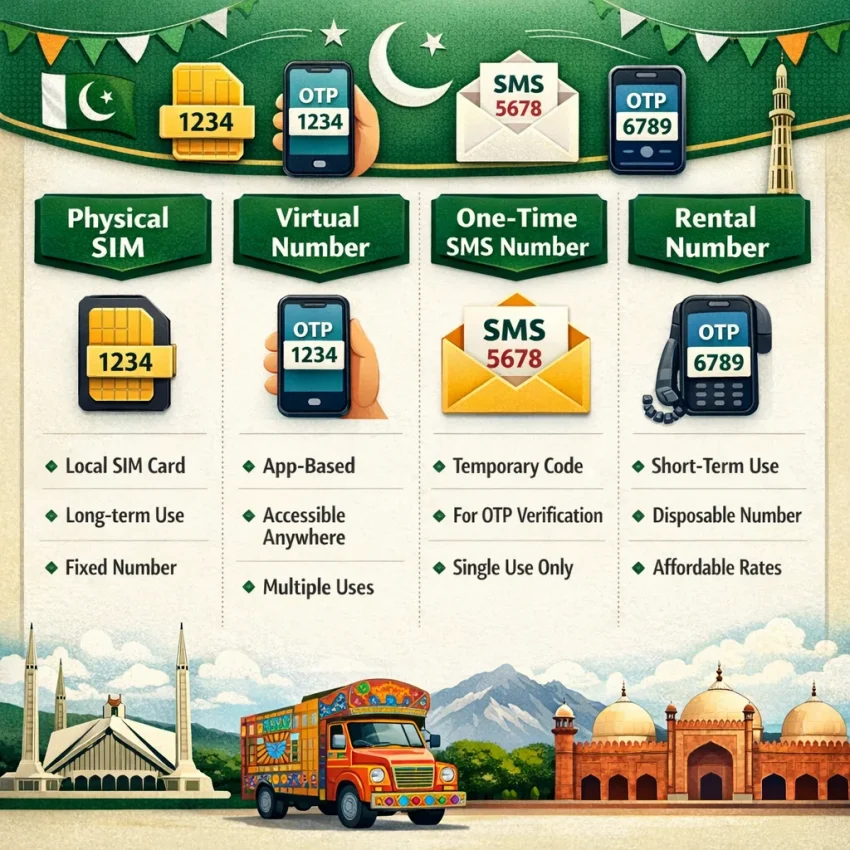
When people search for a Pakistan phone number, they usually do not mean one product. They may need a local-looking number for signup, a privacy layer for OTP receipt, or a temporary line for one verification step. In 2026, that usually points to four options: a physical SIM, a Pakistan virtual phone number, a one-time SMS verification number, or a rented number for longer access.
A physical SIM is the traditional option. It makes sense when you need full mobile service and long-term control. But it is often too heavy for simple verification. Many users who want to receive SMS online Pakistan are really looking for a faster OTP workflow, not a carrier plan.
In practice, a virtual number Pakistan means a number you access through an online platform instead of managing a SIM yourself. These numbers are commonly used for OTP receipt, account activation, and privacy-focused signups. The real question is not whether the number is virtual. It is whether the number type fits your app, country, and account goal.
One-time verification numbers vs. rented numbers
The most useful distinction is between one-time verification numbers and rented numbers. A one-time number is built for a single SMS flow. You request the number, enter it in the target service, and wait for the code. This is often the cleanest option when you need one OTP and do not expect to use the number again.
A rented number is meant for longer access. Choose it when your workflow may need repeated codes, later logins, or recovery messages. It is not better by default. It just fits a different use case. If your task is one verification event, renting may add cost and complexity. If the account may need future codes, rental can make more sense.
This is why a workflow-first platform matters. Think in verification terms: what service are you using, does country matching matter, and will you need the number once or again later? SmsPva is a practical place to start because it is built around SMS verification rather than calling plans. You can Receive SMS online with virtual phone numbers, then narrow your choice by country and service.
Why users want a Pakistan number specifically
Users often want a Pakistan number because the target platform checks regional consistency. A Pakistan-based signup can look more natural when the number, account settings, and intended audience all align. In other cases, the goal is simpler: the user wants a pakistan phone number for verification because the service flow, language, or regional context is tied to Pakistan.
That does not mean a Pakistan number is always the right pick. Some apps also consider account region, device signals, or later recovery behavior. Still, if Pakistan is the intended context, starting with Pakistan-specific options is usually the practical move. SmsPva supports that with a dedicated virtual numbers page for Pakistan.
So when someone says they need a Pakistan phone number in 2026, they usually mean they want the right number type for a verification workflow, not just any number with a Pakistan prefix.
The best SmsPva workflow for choosing a Pakistan number
If you want a Pakistan phone number for verification, the best results usually come from one rule: decide the use case before requesting the number. Many failed attempts happen because users pick a random number first and open the target app later. A better workflow is to start with the app, country fit, and session type.
Step 1: Match the number to the target app and country logic
First, define the exact platform and action. Are you creating a new account, confirming a login, or recovering access? Those are different situations. Some services accept many countries for new signups. Others expect the phone region to align with the account context, language, or local onboarding path.
If your account flow is Pakistan-specific, a pakistan number for sms verification is often the logical choice. That may apply when the signup form is set to Pakistan, when you want a local-looking registration path, or when the service uses regional trust signals. If the target service is tied to another country, forcing a Pakistan number can create friction.
Before you request anything, review Pakistan availability and make sure Pakistan is the country you actually want. Then prepare the verification session first. Open the target app or website, reach the phone-entry screen, and select Pakistan if the service asks for a country code. This reduces timing mistakes.
Step 2: Choose one-time verification or a rental before checkout
After you confirm app and country fit, decide whether you need a temporary Pakistan number for one code or a rental for repeated use. This matters more than most users expect.
Choose a one-time number when you only need a single OTP to complete signup or verify a session once. It is usually the cleanest option for short flows. Choose a rental only when the service may send more than one code over time or when you expect to revisit the same account and may need repeated verification.
Before requesting the number, use a short checklist: the target app is open, your session is stable, the correct country is selected, and you know whether you need one OTP or an ongoing number. Then request the number on SmsPva and enter it immediately into the service.
In short, the best workflow is simple: identify the service, confirm Pakistan is the right country, choose one-time versus rental based on future code needs, and only then request the number.
How to use SmsPva for a Pakistan SMS verification flow step by step
If your goal is SMS verification Pakistan workflows, prepare the signup session before you request any number. Open the target app or website, sign out of old accounts if needed, and reach the screen where it asks for a phone number. Keep the session active. Many OTP flows expire quickly if you pause too long.
Next, confirm the service you want to verify. Then choose Pakistan as the country only if that fits the platform and your account context. This helps you avoid picking a country that does not match the account setup you want to complete.
Once you have the correct service and country in mind, request a Pakistan phone number for verification. Copy the full number exactly as shown. Enter it carefully into the target service, including the correct country code and formatting expected by that app. A small input mistake is one of the most common reasons a pakistan otp number flow fails.
After you submit the number on the target platform, return to SmsPva and watch for the incoming code. Do not refresh the target signup page unless the service tells you to. Restarting the session can break the link between the requested number and the pending verification. When the SMS arrives, copy the code exactly and paste it into the target service right away.
Keep the verification session clean
A smooth verification flow depends on consistency. Use the same device, browser session, and network state from the moment you open the signup form until you enter the OTP. If you switch devices or restart the browser, some services may treat the request as a different session.
It also helps to avoid requesting multiple numbers for the same signup attempt at once. Pick one active flow, wait for the result, and only then decide whether to retry. If you need a Pakistan phone number for privacy-focused signups, this simple discipline usually saves more time than rapid retries.
If the target service offers both SMS and voice verification, stick with the method you selected. Do not switch mid-flow unless you intend to restart the attempt.
What to do if the code does not appear
First, verify that you selected the correct service on SmsPva and entered the same Pakistan number into the target app without mistakes. Then check whether the target platform is still showing the verification screen. If it timed out, restart the flow cleanly instead of guessing which step failed.
Second, wait a reasonable amount of time before clicking resend. Some platforms delay the first code, and repeated resend requests can invalidate earlier messages. Third, if you are unsure whether the issue is setup-related, review the guidance on the help page. For most users, the best workflow is simple: prepare the app first, request the number only when ready, wait for the OTP in one continuous session, and enter it immediately.
When a Pakistan number is the right choice and when it is not
A Pakistan phone number for verification is not automatically the best option just because you want a convenient OTP flow. The better question is whether the target platform expects a Pakistan-based account context. In practice, sms verification Pakistan works best when the service, region, and account setup all match.
Use a Pakistan number when you are creating or restoring an account meant to look Pakistan-based from the start. That often includes local language settings, Pakistan as the selected country, and a user journey that naturally fits the region. If your signup details point to Pakistan, a virtual number Pakistan can be the logical choice.
A Pakistan number is also sensible when the app uses country-level trust signals. Many services do not look only at the code delivery step. They may also compare the phone country code with IP region, language, device history, or onboarding choices. If those signals line up, verification feels more natural.
Good fit scenarios for Pakistan verification
The best fit is a locally aligned workflow. If you choose Pakistan during signup, use Pakistan-oriented profile details, and need a Pakistan OTP number for a service that supports regional onboarding, the country match makes sense. This is especially true when the app asks for a local number format or presents Pakistan-specific flows during registration.
One-time verification is often enough when you only need the first SMS code and do not expect repeated checks. In that case, a temporary Pakistan number can be efficient. If you expect more codes later, such as login confirmations or device-change prompts, a short-term verification number may not be enough.
Another good use case is privacy-focused signup where you want separation from your personal line but still need a Pakistan number for SMS verification. The key is that privacy should not break consistency.
When a Pakistan number is the wrong choice
A Pakistan number is a weak fit when the account is clearly tied to another country. If the service profile, payment region, language, or prior account history points elsewhere, forcing a Pakistan number can create mismatch risk. Many platforms score whether the number country makes sense for the user journey.
It can also be the wrong choice for long-term account use if you only need a one-time code today but may need access again later. A pakistan phone number for verification solves the first step, not every future recovery scenario.
Do not pick Pakistan just because the app accepts international numbers. Pick it because your account context supports it. That simple rule prevents many failed attempts and wasted balance.
Signal verification in Pakistan: a concrete workflow example on SmsPva
If you want a Pakistan phone number for Signal, treat it as a service-specific workflow, not a generic number search. Signal can be simple when your country choice, account context, and number type all match. That is why SmsPva is a practical starting point: it lets you evaluate the exact service and country combination before you begin the OTP session.
Start with the Signal verification in Pakistan page. This narrows your decision to the real question: do you need a Pakistan number just to receive the first code, or do you need a number that stays associated with the account for longer? For many users, Signal setup is a one-session task. In that case, a single-use verification flow is often the cleanest option.
If your device, app setup, and expected account region all point to Pakistan, a Pakistan number is usually the most coherent choice. If your account context points elsewhere, forcing a Pakistan number may create problems later.
When to use one-time verification vs. a rented number
For a basic Signal signup, one-time verification is usually the first option to test. You request the number, enter it into Signal, wait for the SMS, and complete activation in the same session. At the time of writing, Signal in Pakistan was listed from $0.60 for a single SMS on SmsPva. Treat that as a live API snapshot, not a permanent price or availability promise.
A rented number makes more sense when continuity matters more than the lowest entry cost. That can apply if you expect follow-up checks, account changes, or a longer-lived workflow that benefits from keeping the same number active for a period. In that case, review the Signal SMS verification rental option only if a rental model fits your use case.
This distinction helps avoid a common mistake: choosing the cheapest path when you really need persistence, or renting a number when you only need one OTP. Decide that before opening Signal.
How to evaluate the Signal flow before you request the number
Before requesting any Signal number, prepare the whole session. Install or open Signal, confirm your device is ready, and make sure you can enter the number immediately after obtaining it. Then review the Signal SMS verification page on SmsPva so you are working from the right product flow instead of a generic receive-SMS assumption.
In practice, the cleanest sequence is simple: choose Signal, choose Pakistan, decide one-time or rental, request the number only when the app is ready, then enter the code as soon as it arrives. That gives you a more controlled workflow than jumping between unrelated tools while trying to complete activation.
Common problems with Pakistan verification numbers and how to troubleshoot them
Most failed sms verification Pakistan attempts are not random. They usually come from five issues: the code arrives late, the app session changes, the number is entered in the wrong format, the request window expires, or the selected number type does not match the account goal. If you want a smoother result, slow down and check each step before requesting another pakistan otp number.
Start with the basics. Open the target app first, reach the phone verification screen, and confirm that Pakistan is the selected country. Then request the number and paste it exactly as shown. Avoid refreshing the app, switching devices, or restarting the sign-up flow unless the session clearly failed.
No code received, delayed code, or expired session
If no code appears, do not assume the number is bad right away. First check whether the app is still waiting on the same verification attempt. Some platforms invalidate the earlier request if you tap resend too fast or go back to edit the number. In that case, the SMS may arrive for a session the app no longer accepts.
A good workflow is simple: request the number, submit it once, and wait within the same screen. If the timer expires, start a fresh attempt instead of mixing old and new sessions. This is especially important with a temporary Pakistan number, where timing matters more than with a longer rental setup.
If the app says the code is wrong, verify that you did not receive multiple messages and enter an older OTP by mistake. Also make sure the app is not auto-filling a stale code from a previous attempt.
Wrong format, app rejects number, or wrong number type
Formatting errors are common. Make sure you choose Pakistan in the target app and then enter the rest of the number exactly as provided. Do not manually add extra zeros, duplicate the country code, or copy spaces and symbols if the app expects digits only.
Sometimes the app rejects the number before sending any OTP. That usually points to service-country fit, not just formatting. Some apps prefer a local-country profile that matches the account context, IP region, or signup pattern. If your use case needs repeated logins, recovery steps, or longer continuity, a one-time verification number may be the wrong tool.
If problems continue after a clean retry, stop changing variables one by one and use the support guidance instead of burning through repeated attempts.
FAQ: Pakistan phone number workflows on SmsPva
What is the difference between a Pakistan virtual phone number and a rented number?
A Pakistan virtual phone number is the broad category. It can include one-time verification numbers and longer-use rental options. A rented number is a specific option for workflows that may need repeated codes or ongoing access.
Can I receive OTP codes online with a Pakistan phone number?
Yes, that is the core use case for many users searching for a Pakistan phone number. The better approach is to match the number to the target app, keep the session active, and request the number only when you are ready to receive the OTP.
How do I choose between a one-time verification number and a rental number on SmsPva?
Choose one-time verification when you only need a single code for signup or one session. Choose a rental when the account may need repeated verification, later logins, or recovery messages.
Why would I need a Pakistan number instead of another country number?
You would usually choose Pakistan when the target app, account region, language, or onboarding flow is Pakistan-specific. Country consistency often reduces friction.
Does SmsPva have a service-specific page for Signal verification in Pakistan?
Yes. SmsPva has a dedicated page for Pakistan-specific Signal verification workflows, which helps you evaluate the service and country combination before starting.
How much does a Pakistan Signal verification number cost on SmsPva?
At the time of writing, Signal in Pakistan was listed from $0.60 for a single SMS on SmsPva. Treat that as a current snapshot, not a guarantee.
What should I do if my verification code does not arrive?
Check that you selected the correct service, entered the number correctly, and kept the target app on the same verification screen. If the session expired, restart cleanly. Avoid rapid resend requests that may invalidate earlier codes.
Is a Pakistan number a good fit for long-term account use or only for verification?
It depends on the account lifecycle. A one-time number is usually best for simple verification. If you expect future codes, account recovery, or repeated logins, a rental can be a better fit than a single-use number.