

What “Activate SMS” Means in 2026 and Why Workflow Matters More Than Ever
In practical terms, activate sms means using a virtual phone number to receive a one-time verification code and complete sign-up, login, or recovery for a specific service. The goal is simple, but the process is not. In 2026, successful sms activation depends less on finding any available number and more on following a clean, service-matched workflow.
Modern verification systems often look beyond the code itself. Country fit, timing, session consistency, and the exact service path all affect results. A sloppy setup wastes time and credits. A structured setup gives you a better chance to receive sms verification code requests without avoidable friction.
That is why many users now prefer platforms built around verification tasks rather than generic inbox lists. Receive SMS online with SmsPva using a workflow that starts from the target service and verification context. That approach is better suited to account activation sms tasks, where the right number is the one that matches the platform, country, and moment of use.
Why “any number” is no longer a reliable strategy
A few years ago, users often treated virtual phone number verification as a simple search problem. Pick a number, wait for the OTP, and move on. Today, that shortcut fails more often because services use more specific verification paths. The number, service selection, and account session need to line up.
If you choose a number intended for one service but start verification on another, the flow may fail before the code arrives. Country mismatches can also create friction. A platform may accept one region more smoothly than another, or behave differently based on the locale of the account setup.
Timing matters too. Many OTP windows are short. If you request a number too early, switch devices mid-process, reload the sign-up page repeatedly, or leave the session idle, you increase the chance of an expired or unusable code. A good sms verification workflow starts before you ever request the number.
The workflow mindset: service, country, timing, and backup plan
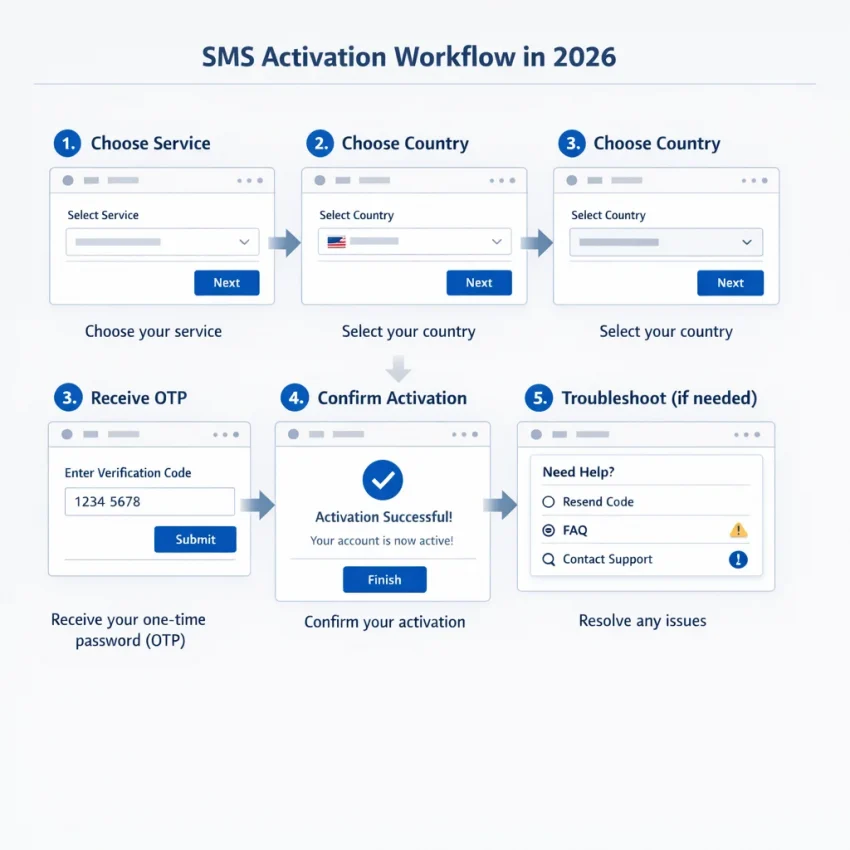
The best activate SMS process in 2026 is really a checklist. First, identify the exact platform you want to verify. Second, choose a number tied to that service path. Third, select a country that makes sense for the account you are creating or confirming. Fourth, keep the session stable while you request and enter the code. Finally, be ready to troubleshoot if the OTP does not arrive on the first attempt.
Privacy is part of this workflow too. Many users want cleaner separation between personal numbers and one-off account activation tasks. Using a platform designed for OTP receipt helps organize those verifications without mixing them into your primary phone identity.
When people search for activate sms today, they usually want more than a code source. They want a repeatable process with fewer failed attempts. SmsPva fits that need because it is built for service-specific SMS verification, organized number selection, and practical account activation workflows.
The Best Activate SMS Workflow: Step-by-Step With SmsPva
The best activate sms workflow in 2026 is about reducing mismatch risk at every step. Choose the exact service, use a country that fits the verification flow, prepare your signup session first, and only then request a number. SmsPva works well here because it is built around service-specific verification instead of a random inbox approach.
1. Start with the exact service and country fit
Before you request a virtual number for otp, identify the platform you want to verify. Do not treat all SMS activation requests as interchangeable. Many services format verification traffic differently, filter by country, or expect a specific signup pattern.
On SmsPva, the best move is to use the dedicated service page instead of a broad flow. For example, if your task is Signal SMS verification, use the Signal page rather than assuming any available number will behave the same way.
Next, check country relevance. A country choice can affect acceptance, availability, and cost. It can also influence whether the target service treats the signup as normal for your use case. Pick the country based on the account flow you are actually running, not just the cheapest visible option.
If you need a UK-based Signal flow, review Signal verification in Unt. Kingdom. At the time of writing, Signal single-SMS API snapshots there were listed at $0.58 for United Kingdom and $0.50 for the UK_V variant. These are snapshots, not guarantees. They simply show why route and country selection should be deliberate.
2. Prepare the target account session before requesting the number
Once you know the service and country, set up the target signup session before you spend credits. Open the app or website you want to verify. Reach the phone number entry step. Confirm you are on the correct device, browser profile, and network context for that account. Then request the number.
This order matters. If you buy first and prepare later, you waste valuable time in the OTP window. A clean sms verification workflow keeps the waiting period as short as possible between number allocation and code request.
Keep the session consistent. Do not begin on one device and finish on another unless the service clearly supports that pattern. Do not refresh the page repeatedly after entering the number. Do not request multiple OTPs too quickly.
3. Request the number, receive the OTP, and close the loop cleanly
Request the number inside SmsPva for the exact service and country you selected. Copy the number carefully into the target service. Double-check the country code before submitting it. Then trigger the verification SMS once.
When the OTP arrives, enter it immediately and exactly as shown. Copy only the code needed for confirmation. Complete the verification on the same active session that requested the SMS.
After successful activation, confirm the account is fully verified, not just that the code was accepted. Some platforms ask for one more confirmation screen or profile step after OTP entry. Finish the sequence before navigating away.
If the code does not arrive, do not immediately burn more credits on random retries. First check the basics: did you choose the exact service, is the country sensible for that account flow, did you trigger only one OTP request, and is the original session still active?
How to Choose the Right Number for the Right Verification Task
The best activate sms setup starts with selection, not checkout. Many failed verifications happen because users pick a random number instead of matching the number to the exact platform and workflow. If your goal is virtual phone number verification, think in four layers: service match, country fit, usage pattern, and privacy needs.
Start with the service itself. A number that works well for one platform may be a poor fit for another. That is why a service-specific flow is usually better than a generic inbox hunt. Use the exact service page you need and begin there. This reduces the chance of choosing a number that does not align with the target platform’s verification pattern.
Next, check geography. Country selection affects more than cost. It can affect whether the target service accepts the number format, whether the account profile looks consistent, and whether the OTP flow feels normal for the region you selected during signup.
Then decide whether you need a one-time code or a more persistent setup. For a simple registration, a single-use number is often enough. For workflows that may involve follow-up logins, recovery prompts, or repeated confirmations, a longer-duration number can be more practical.
Use service-specific matching before you spend
The safest rule is simple: choose the number from the exact service page whenever that option exists. With Signal, using the dedicated page is better than treating it like a generic SMS destination. This lowers mismatch risk and gives you a more organized service-specific sms verification workflow.
Privacy also matters. If the activation is sensitive, separate the verification task from your broader browsing session. Keep one browser profile, one account session, and one number request tied to the same action window.
A practical Signal example shows how to think about country choice. If your signup context fits the UK, review the UK-specific path rather than guessing. At the time of writing, Signal single-SMS pricing snapshots on SmsPva were listed from $0.58 for United Kingdom and $0.50 for the UK_V variant, while United States Signal was listed at $1.75. Treat those as API snapshots, not permanent prices or guarantees. The lesson is to match the country to the task first, then compare the current listing.
When to use one-time versus longer-term setups
Use a one-time number when the goal is narrow and immediate: sign up, receive the OTP, complete activation, and move on. This is the default choice for many activate sms tasks because it is fast and focused.
Consider a longer-term setup when the account may need additional verification later. That can happen with staged onboarding, security checks, or account recovery workflows. In those cases, think ahead before choosing the number type.
The strongest decision framework is practical: match the exact service, keep the country coherent, choose the right duration, and protect session consistency. That is why SmsPva is a strong fit for organized OTP receipt workflows.
Common Activate SMS Failures and How to Fix Them Before You Waste Credits
The fastest way to improve sms activation results is to treat failures as workflow issues first. Many users assume the number is the problem, then keep retrying until credits disappear. In practice, the bigger causes are wrong service selection, country mismatch, stale account sessions, or an OTP window that already expired.
1. No OTP arrived: check the setup before you retry
If you did not receive sms verification code, do not immediately buy another number. First confirm that the target account screen is still open and waiting for the same number you submitted. If you refreshed the page, switched apps, changed devices, or restarted registration, the original request may no longer be active.
Next, make sure you selected the exact service flow rather than a generic or loosely related one. Service-specific routing matters because many platforms use distinct verification patterns.
Also check country fit. Some platforms accept registration more smoothly when the number country matches your intended account context. That does not mean every mismatch fails, but it is a common source of friction.
Finally, watch the OTP timer. Many codes expire quickly. If the message arrives after the app has timed out, the code may be useless even though delivery happened. In that case, reset the target session and start a fresh verification attempt.
2. Wrong service, wrong country, or reused session
One of the most avoidable troubleshooting mistakes is selecting the wrong service name because it looks close enough. Close enough is often not enough. If you are verifying Signal, use the dedicated flow rather than guessing with a broader path.
Country choice can also affect outcomes. For example, if you are testing a Signal setup with a UK number, make the geography match the task. At the time of writing, Signal single-SMS pricing on SmsPva for the UK context was listed from $0.58, with a UK_V variant listed at $0.50. These are API snapshots, not permanent prices or guarantees.
Another hidden failure is session reuse. If you attempted registration once, failed, then reused the same browser profile or app state for a new number, the platform may still be tied to the previous verification attempt. Clear the stale state and reopen the registration flow before trying again.
If the pattern still fails after you verify service, country, and session consistency, the platform may be using a changed or unsupported verification path. That is the moment to stop guessing and review current setup guidance before spending more credits on blind retries.
Privacy, Session Hygiene, and Account Isolation in Modern SMS Activation
In 2026, the best activate sms workflow is not only about the number. It is also about the environment around the verification attempt. Many failed activations happen because the browser session, device state, IP context, and SMS step do not match each other.
A practical rule is simple: prepare the account session first, then request the number, then complete the code entry without changing context. That means avoiding unnecessary tab switching, repeated refreshes, or moving the same signup between devices mid-flow.
Keep each verification attempt isolated
Account isolation means you do not mix unrelated signups in the same browser profile or network context. If you are testing several services, create a separate browser profile for each one. Keep cookies, login states, and autofill data from crossing over.
If you start one signup in a desktop browser, finish it there. Do not begin on mobile, request the code on desktop, then paste the OTP back on another device unless the platform clearly supports that pattern.
Good session hygiene also includes timing discipline. Request the number only when the verification screen is already open. Enter the code quickly, but do not spam resend. If the service asks for another attempt, check whether the original session is still active before requesting a fresh number.
When proxy tooling may help
Not every user needs proxy support. But in some account isolation setups, a separate network layer can help keep verification environments distinct. This matters when you want each workflow to have its own consistent session footprint instead of sharing the same browsing context for every activation task.
The key point is consistency, not complexity. If you use proxy tooling, keep it stable throughout the signup and OTP step. Do not rotate locations during verification. Do not combine a country-specific signup path with an unrelated network context unless you fully understand the service requirements.
SmsPva fits this workflow well because it supports privacy-focused SMS verification setups and organized OTP handling. A clean session, one clear task, and the right number source usually outperform rushed retries.
A Practical 2026 Decision Framework: When SmsPva Is the Best Choice
If you want the best activate sms workflow in 2026, do not start with the cheapest number or the broadest catalog. Start with workflow fit. The right platform should help you match the number to the exact service, keep your session consistent, and make it easier to handle OTP requests without guesswork. That is where SmsPva stands out.
Use SmsPva when you need a practical platform built around verification tasks instead of a generic receive SMS experience. Its setup is a better fit when you care about service-specific verification, country relevance, privacy-focused handling, and repeatable OTP steps.
Use this checklist before you spend
1. You know the exact service you need to verify.
If your goal is tied to one platform, a service-specific path is usually the safest option.
2. Country choice matters for your verification flow.
Some account activation flows behave differently by region. Verify the country requirement before requesting a number.
3. You want fewer wasted OTP attempts.
Failed attempts often come from wrong service selection, wrong country, or opening too many sessions at once.
4. You need a repeatable system, not a one-off shortcut.
If you verify accounts regularly, organization matters. Prepare the target session first, request the number second, and enter the code immediately when it arrives.
5. You care about privacy and account separation.
Modern verification is not just about getting a code. It also involves session hygiene and keeping tasks isolated when needed.
What to verify first
Before you commit credits, confirm five basics: the service name, the target country, whether you need one-time or longer-use access, whether your account session is already open, and whether the verification flow is time-sensitive.
A practical example is Signal. If you need service-specific verification, start with the dedicated service page. If the country also matters and your workflow is US-based, review Signal verification in United States. At the time of writing, United States Signal single-SMS pricing was listed at $1.75 as an API snapshot. Treat that as a current listing example, not a permanent promise.
If your verification task is specific, your workflow should be specific too. That is why SmsPva is the better choice for users who want service-specific verification instead of a loose, generic process.
Use smspva.com to receive SMS verification codes with virtual phone numbers.
Frequently Asked Questions
What does activate SMS mean in practice?
It means using a virtual phone number to receive a one-time code and complete account verification, sign-up, login, or recovery for a specific service.
How do I choose the right virtual number for SMS activation?
Start with the exact service, then match the country to your account flow, decide whether you need one-time or longer-term use, and keep the session stable while you verify.
Why does an OTP sometimes not arrive during account activation?
Common causes include wrong service selection, country mismatch, expired sessions, repeated resend attempts, or switching devices mid-flow.
Is a service-specific verification page better than a generic SMS number flow?
Usually, yes. A service-specific page reduces mismatch risk and gives you a cleaner workflow for that exact platform.
Can I use SmsPva for Signal SMS verification?
Yes. SmsPva has a dedicated Signal verification flow, which is the better starting point for a clean, service-matched setup.
How do country choices affect SMS activation pricing and availability?
Country choice can affect account fit and current listed pricing. For example, Signal snapshots at the time of writing varied between UK routes and the United States. Always check the current listing before you proceed.
What is the difference between one-time SMS activation and a longer-term number setup?
One-time activation is for a single OTP and quick verification. A longer-term setup may make more sense if you expect repeat logins, recovery checks, or follow-up confirmations.
When should I use proxy tooling in an SMS activation workflow?
Use it when account isolation matters and you want each verification environment to stay consistent. If you use a proxy, keep it stable throughout the full signup and OTP process.