

What a rent phone number means in 2026 and when it makes sense
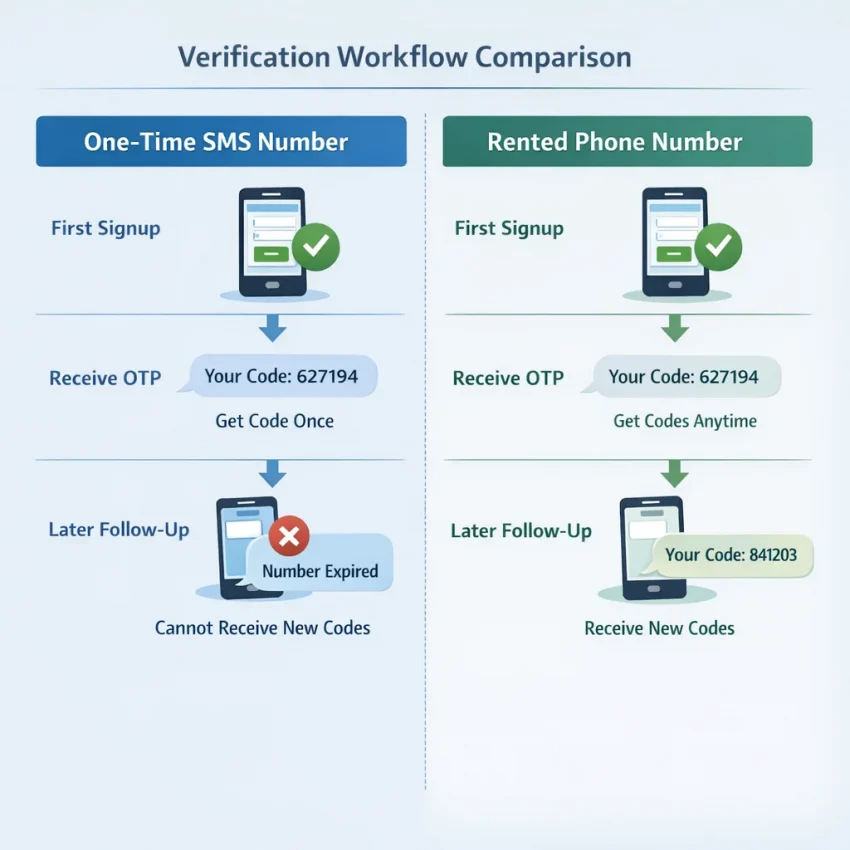
In 2026, a rent phone number usually means a virtual number you keep available for a longer verification window than a single activation. Instead of using a number for one code only, you use it when a signup may involve follow-up SMS checks, delayed onboarding, or another confirmation later.
That is the main difference between a rented number and a one-time SMS activation number. A one-time number is best for a fast, single OTP. A rented number is better when timing is less predictable. If you want a practical way to Receive SMS online for these workflows, SmsPva is built around that exact use case.
When a rented number is the better fit
A rented number makes sense when the service may not finish verification in one step. Some platforms send an OTP during signup, then ask for another code during setup, login review, or security checks. In that situation, a basic temporary phone number for OTP may be too limited.
It also helps with privacy-focused signups. Many users want to keep account verification separate from their personal number. A rent phone number online workflow gives that separation while still supporting service-specific SMS verification.
Another common case is delay. You may start registration on one device and finish later on another. Or the platform may pause the flow and ask for another code after a short wait. A longer-duration SMS number rental is more practical for that kind of gap.
How to decide between rental and one-time
Start with the service. Ask whether the signup is likely to need one code only or another SMS later. If repeat verification is possible, rental is usually the safer choice. Then check whether country matters for your account setup. Some services work better when the number matches the market you want to use.
If you can finish the whole signup in minutes, a one-time number may be enough. If the process may stretch across several steps, a rented number is usually the better fit.
How SmsPva fits the rented-number workflow
If you want to rent a number for verification in 2026, the main challenge is not finding any number. You need a workflow that matches the service, supports SMS receipt clearly, and lets you track the OTP without extra friction. SmsPva fits that need because it is organized around virtual phone numbers for verification rather than a generic inbox model.
In practice, you start with the service you need, review available options, choose a country if relevant, get the number, and then monitor incoming SMS in one place. That structure is useful for account activation, privacy-focused signups, and repeat OTP checks.
SmsPva also uses service-specific flows. Instead of guessing whether a number fits a platform, you can often begin from a dedicated service page. That saves time and reduces mistakes during signup.
Why this workflow is practical
A rented number workflow works best when you expect more than one verification step or need a longer access window than a single activation gives you. SmsPva supports that decision by keeping the process focused on the verification task itself: choose the service, choose the route, use the number, and wait for the code.
It also fits privacy-focused use cases well. You can separate verification activity from your personal number, which is often the main reason people look for virtual phone number rental in the first place.
Step-by-step: how to use a rent phone number on smspva.com
The best approach is to start with the target platform, not the number. First decide what service you are verifying, how many SMS steps you expect, and whether you may need the same number again within a longer window. That tells you whether a one-time activation is enough or whether rental makes more sense.
Use a one-time number when you only need a single OTP and the signup ends there. Choose a rented number when the platform may send a second code, ask for a retry, or require another confirmation shortly after account creation.
1. Choose the service and the right number type
Begin by finding the service you want to verify. Service-specific flows matter because platforms often treat number ranges differently. Picking the exact service gives you a cleaner path than using a generic temporary number.
Then decide on geography. Some users need a local-looking number for country matching or account setup preferences. Others only need any supported number that can receive the verification SMS. If country matters, select it before you continue.
Before paying, confirm three basics: the number matches the correct service, the country fits your signup plan, and rental makes sense for the verification length you expect.
2. Complete the order and use the number during signup
After choosing the service and country, complete the account and payment steps shown on SmsPva. Then copy the issued number exactly as displayed. Do not add digits, remove the country code, or reformat it unless the target platform clearly asks for a different format.
Open the target app or site and begin signup. Paste the number into the phone field, submit it, and move back to your SmsPva order view to monitor incoming messages. When the OTP arrives, enter it promptly.
If the service sends another message, asks you to resend the code, or triggers an extra check during setup, the rented-number workflow becomes useful. You can stay with the same number instead of restarting with another activation.
3. Monitor follow-up SMS and finish cleanly
After the first OTP works, do not assume the process is done. Some services send a second confirmation after profile setup, device linking, or security review. Keep the session accessible until the account is fully usable.
If you are verifying Signal specifically, SmsPva has a dedicated path for Signal SMS verification. That makes the next step easier if you want a concrete example.
Example workflow: renting a number for Signal verification
A concrete example makes the process easier to understand. If you need a phone number for Signal verification, start with a service-specific route instead of browsing numbers randomly. If you expect a longer verification flow, the dedicated rental path for Signal SMS verification is the most relevant place to start.
Next, choose the country based on the account context you want. If you specifically need a UK-based Signal rental flow, use the dedicated Signal verification in Unt. Kingdom page instead of guessing from a broad list.
How to complete the Signal flow
Review the available number option, complete the required steps on SmsPva, and copy the issued number exactly as shown. Then open Signal and begin registration. Enter the number with the correct country code. Small formatting mistakes cause many failed attempts, so check the prefix before moving on.
Once Signal sends the code, return to your SmsPva order page and watch for incoming messages. When the OTP appears, paste it into Signal promptly. The cleanest workflow is simple: request the number, enter it once, wait for the message, and complete verification with the first valid code you receive.
If you are comparing countries by cost, treat prices as snapshots, not promises. At the time of writing, Signal single SMS pricing in the United Kingdom was listed from $0.50 or $0.58, while the United States was listed at $1.75. These are current API snapshots, not guarantees of future availability or pricing.
When this Signal rental path is the better choice
This route is most useful when you do not want to use your personal number, when you want a privacy-focused signup, or when the process may not end with one immediate code. In those cases, a rented number is often more practical than a one-time activation.
How to choose the right rented number: service, country, timing, and cost
The best SMS verification number rental is not always the cheapest one. It is the number that fits your exact signup flow. Before you choose, define four things: the service, the country, how long you may need access, and what price range still makes sense for the account.
Start with the service first. If you already know the target app, use a service-specific path on SmsPva instead of choosing a random number and hoping it works.
Next, decide whether you need rental or just a one-time activation. A one-time number is usually enough when you expect one OTP and nothing else. A rented number makes more sense when the signup may trigger another code later or when setup can take longer than expected.
Match the country to the workflow
Country choice matters because many services check regional consistency. If your account, language, and app setup are tied to one market, choose a number from that market when possible. This can reduce simple friction such as country-code mistakes or unexpected region prompts.
Do not choose a country only because it is cheaper. Lower cost helps, but fit comes first. Also check the number format before submitting it. Many failed verifications come from user error, not from the number itself.
Use timing and price as final filters
Think about timing before you pay. If the OTP usually arrives quickly and the account setup is simple, a one-time activation can be enough. If you expect delays, manual review, or a second code during onboarding, rental is often the safer choice.
Price should be the final filter. Use listed pricing as a planning tool, not a promise. The best low-cost option is the one that still matches the service, country, and timing you need.
Common problems when using a rented phone number and how to troubleshoot them
Most issues with a rent phone number come from setup details, not from the concept itself. If your OTP does not arrive right away, pause before buying another number. A simple checklist often solves the issue.
First confirm that you selected the correct service, country, and number type. A one-time flow and a rental flow are not always interchangeable.
Next, check the number format you entered. Many failures happen because users omit the country code, add spaces, or paste the number into the wrong field. Enter the number exactly as the target service expects.
If the OTP is delayed, avoid rapid retries. Too many resend attempts can invalidate earlier codes or trigger rate limits. Wait for the current request cycle to finish, then review your SmsPva order page.
When the service-country match is the issue
Some platforms are more sensitive to country selection than users expect. A number may be valid for SMS receipt but still be a poor fit for a specific signup flow. If a service rejects the number before sending a code, compatibility is often the real problem.
You should also watch for expired verification windows. Some services give only a short period to enter the code. If you leave the page and return later, the code may no longer work even if it arrived correctly.
When to use help instead of guessing
If you have checked the service, country, format, and timing, the next step is the Help page. Use it when the flow looks different from what you expected or when you need setup guidance.
A practical troubleshooting rule is simple: do not stack errors. Make one change at a time, then test again. That makes it much easier to see what fixed the problem.
Best practices for privacy, account stability, and multi-step verification workflows
If you use a rented number for account verification, think beyond the first OTP. Many services trigger follow-up checks after login, device changes, or security reviews. That is why rented access can be more practical than a one-time number when you expect repeat verification.
For privacy-focused workflows, separate your verification task from your personal number and unrelated accounts. Use one rented number for one clear purpose. Keep the same name, region, and device pattern during setup. Sudden changes can increase verification friction.
Save the basic details of your session, including the service, country, and timing. That helps if another SMS check appears later. If your workflow needs extra isolation, related network tools may help, but the main priority is simple: choose the right verification path and use the number consistently.
In practice, the safest approach is straightforward. Use SmsPva for the exact verification task you need, avoid mixing multiple signup attempts on one number, and complete each step within the service’s verification window. That gives you a cleaner and more practical workflow for SMS verification in 2026.